• Categories
    Category
    {{ postCtrl.tags }}
    • {{ category.tag_type }}

      • {{tag.tag_name}}
      • View more
  • Categories
    Category
    {{ postCtrl.tags }}
    • {{ category.tag_type }}

      • {{tag.tag_name}}
      • View more
  • News
  • Tutorials
  • Forums
  • Tags
  • Users
Tutorial News Comments FAQ Related Articles

How to install GSmartControl on Ubuntu 16.04

{{postValue.id}}

To install GSmartControl on Ubuntu 16.04

GSmartControl is a GUI alternative for smartctl, a tool for controlling SMART data on hard disk drives and solid state drives. With this software, you can check the SMART data in order to determine its health. It also allows you to run different tests.

SMART is an acronym for Self Monitoring Analysis and Reporting Technology, a technology that makes it possible to detect HDD and SDD failures. The early detection of potential problems allows the user to get informed about the situation and make a backup and/or replace the drive before reaching the point of loosing important information.

Some of GSmartControl features are covered below.

  • Automatic anomalies reporting
  • Enable / Disable SMART
  • Perform SMART tests
  • Display device information
  • Enable / Disable Automatic Offline Data Collection
  • Ease of use
  • Nice documentation

Installing GSmartControl

Before you begin with the process of installation, you need to update your system by running the following command.

root@localhost:~# apt-get update
Hit:1 http://in.archive.ubuntu.com/ubuntu xenial InRelease
Get:2 http://security.ubuntu.com/ubuntu xenial-security InRelease [102 kB]
.
.
Fetched 2,793 kB in 5s (497 kB/s) 
Reading package lists... Done


And then, you shall install the GSmartControl package by running the following command.

root@localhost:~# apt-get install gsmartcontrol
Reading package lists... Done
.
.
Processing triggers for systemd (229-4ubuntu4) ...
Processing triggers for menu (2.1.47ubuntu1) ...

GSmartControl has been installed, you shall run the following command to open the application.

root@localhost:~# gsmartcontrol

The application now appears on your screen.
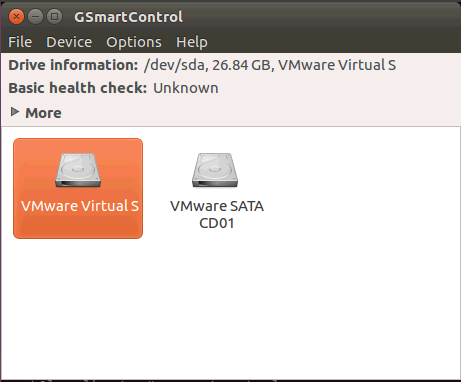
gsmart

To view information & Configuration for Disk
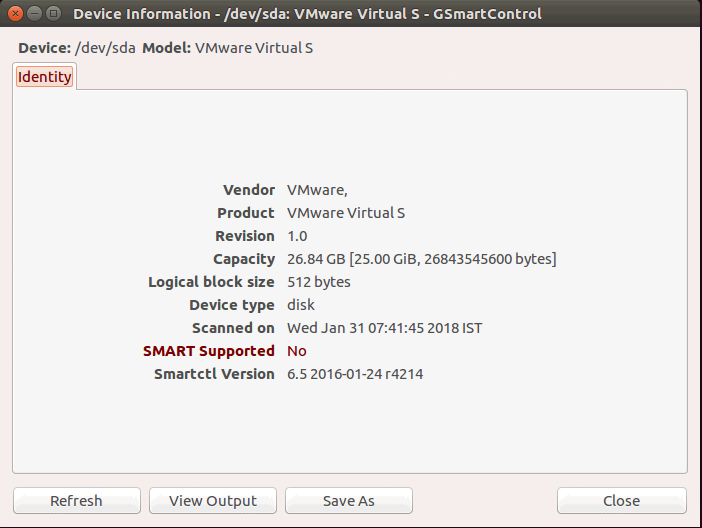
Device information

With this the installation of GSmartControl on Ubuntu 16.04 comes to an end.

Tags:
liam
Author: 

Comments ( 0 )

No comments available

Add a comment
{{postCtrl.cmtErrMsg}}

Frequently asked questions ( 5 )

Q

What are its useful features?

A

Automatic anomalies reporting Enable / Disable SMART Perform SMART tests Display device information Enable / Disable Automatic Offline Data Collection

Q

What for it is used?

A

GSmartControl is a GUI alternative for smartctl, a tool for controlling SMART data on hard disk drives and solid state drives. With this software, you can check the SMART data in order to d

Q

Is there any alternative of Gsmartcontrol?

A

CrystalDiskInfo, HD Tune, smartmontools, HDD Guardian and much more.

Q

If i still think it's a GSmartControl issue, that time what is the collect information about my system?

A

Which operating system you use (for example, openSUSE Leap 42.3).
Which version of GTK and Gtkmm you have installed. Finding this out is very distribution-specific. For example, on openSUSE it would be rpm -q gtk3 gtkmm3. Some distributions have gtkmm30 instead. You may also search them in your distribution's graphical package manager, if there is one.

Q

what is the license of gsmartcontrol?

A

This product is multi-licensed under GNU GPL versions 2 and 3. You are free to choose which one you use.

This program is free software: you can redistribute it and/or modify it under the terms of either version 2 or (at your option) version 3 of the GNU General Public License as published by the Free Software Foundation.

Back To Top!
Rank
User
Points

Top Contributers

userNamenaveelansari
135850

Top Contributers

userNameayanbhatti
92510

Top Contributers

userNamehamzaahmed
32150

Top Contributers

1
userNamelinuxhelp
31040

Top Contributers

userNamemuhammadali
24500
Can you help Ryan ?
how to use visual traceroute tool

Am using traceroute command to check for the route. i got this tool while surfing. So pls help me out installation and usage of Visual traceroute tool.

Networking
  • Routing
  • trunk
  • Netmask
  • Packet Capture
  • domain
  • HTTP Proxy
Server Setup
  • NFS
  • KVM
  • Memory
  • Sendmail
  • WebDAV
  • LXC
Shell Commands
  • Cloud commander
  • Command line archive tools
  • last command
  • Shell
  • terminal
  • Throttle
Desktop Application
  • Linux app
  • Pithos
  • Retrospect
  • Scribe
  • TortoiseHg
  • 4Images
Monitoring Tool
  • Monit
  • Apache Server Monitoring
  • EtherApe 
  • Arpwatch Tool
  • Auditd
  • Barman
Web Application
  • Nutch
  • Amazon VPC
  • FarmWarDeployer
  • Rukovoditel
  • Mirror site
  • Chef
Contact Us | Terms of Use| Privacy Policy| Disclaimer
© 2025 LinuxHelp.com All rights reserved. Linux™ is the registered trademark of Linus Torvalds. This site is not affiliated with linus torvalds in any way.