• Categories
    Category
    {{ postCtrl.tags }}
    • {{ category.tag_type }}

      • {{tag.tag_name}}
      • View more
  • Categories
    Category
    {{ postCtrl.tags }}
    • {{ category.tag_type }}

      • {{tag.tag_name}}
      • View more
  • News
  • Tutorials
  • Forums
  • Tags
  • Users
Tutorial News Comments FAQ Related Articles

How to install gThumb on Debian 8.3

{{postValue.id}}

How to install gThumb on Debian 8.3

The gThumb is free and open source image viewer and organizer with a couple of options to edit images. It is based on GQView and intergrates well with GNOME desktop environment. They also support file system to be browsed for images and organized into catalogs or even viewed as slideshow. This tutorial will explain on how to install gThumb on Debian 8.3.

Installation procedure

Before beginning the installation process, use the nano command to open the sources.list configuration file.

root@linuxhelp:~# nano /etc/apt/sources.list

The sources.list file is opened. Now add these lines at end of the file. Save and exit from the file.

deb http://ftp.debian.org/debian/ stable main contrib non-free
deb http://ftp.de.debian.org/debian jessie main

Next execute the apt-get update command to update the apt sources-list in the target system.

root@linuxhelp:~# apt-get update
Get:1 http://ftp.debian.org jessie-updates InRelease [145 kB]                                  
Ign http://ftp.de.debian.org jessie InRelease                                                 
Get:2 http://ftp.de.debian.org jessie Release.gpg [2,373 B]
Get:3 http://ftp.de.debian.org jessie Release [148 kB]                 
Ign http://ftp.debian.org stable InRelease                                                    
Get:4 http://ftp.debian.org jessie-updates/main Sources [15.5 kB]                             
Get:5 http://ftp.debian.org jessie-updates/contrib Sources [32 B]                              
Get:6 http://ftp.debian.org jessie-updates/main amd64 Packages/DiffIndex [7,900 B]            
Get:7 http://ftp.debian.org jessie-updates/contrib amd64 Packages [32 B]                      
Get:8 http://ftp.debian.org jessie-updates/contrib Translation-en [14 B]                      
Get:9 http://ftp.debian.org jessie-updates/main Translation-en/DiffIndex [2,704 B]            
Get:10 http://ftp.debian.org stable Release.gpg [2,373 B]                                     
Get:11 http://ftp.debian.org jessie-updates/main amd64 2017-03-14-2025.02.pdiff [526 B]       
Get:12 http://ftp.debian.org jessie-updates/main amd64 2017-04-15-2027.16.pdiff [528 B]
.
.
Fetched 23.5 MB in 5min 39s (69.2 kB/s)                                                       
Reading package lists... Done

The target system is updated with the required repositories. Install the gThumb package by executing the following command.

root@linuxhelp:~# apt-get install gthumb
Reading package lists... Done
Building dependency tree      
Reading state information... Done
The following extra packages will be installed:
  binutils bison flex gcc gcc-4.9 gstreamer0.10-gnomevfs gthumb-data libasan1
  libatomic1 libbison-dev libc-dev-bin libc6 libc6-dev libcilkrts5 libfl-dev
  libgcc-4.9-dev libitm1 liblsan0 libtsan0 libubsan0 libwebkit2gtk-3.0-25
  linux-libc-dev manpages-dev
Suggested packages:
  binutils-doc bison-doc build-essential gcc-multilib make autoconf automake libtool
  gdb gcc-doc gcc-4.9-multilib gcc-4.9-doc gcc-4.9-locales libgcc1-dbg libgomp1-dbg
.
.
Setting up manpages-dev (3.74-1) ...
Processing triggers for libc-bin (2.19-18+deb8u2) ...

Once the package is installed click on the Activities window and type the gThumb package name in the search bar. Click on the icon to run the application. gThumb
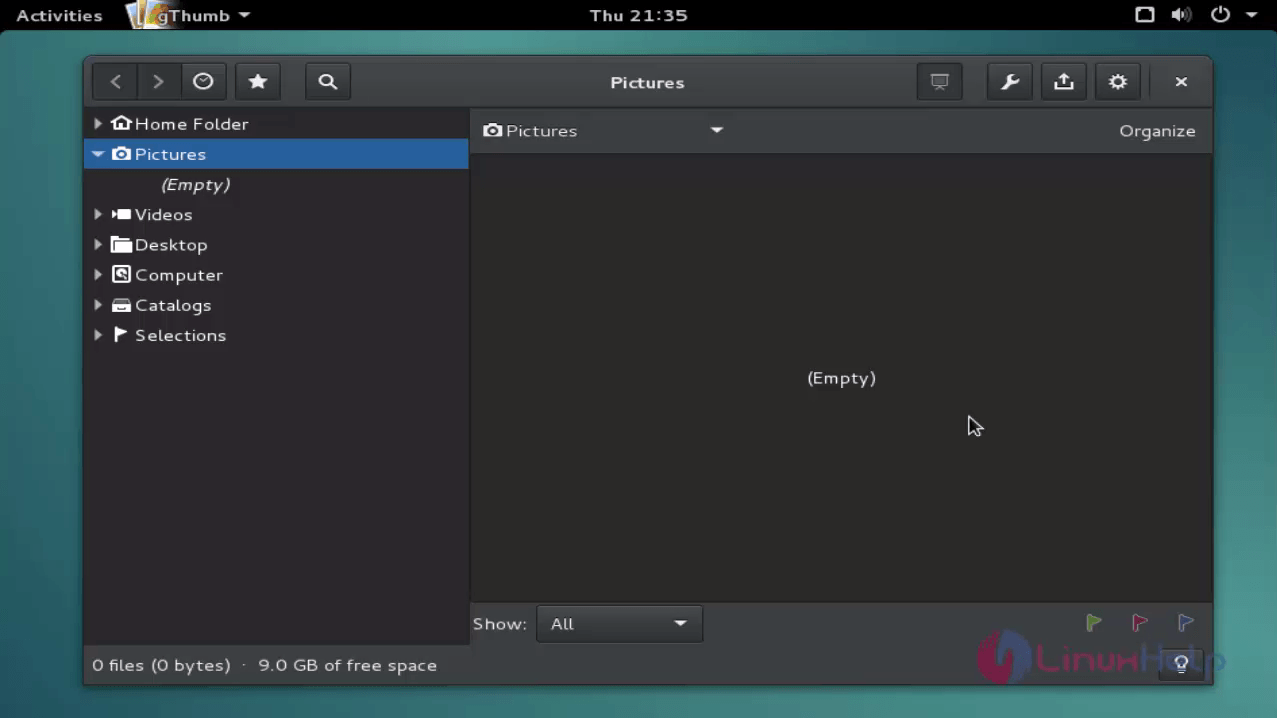
Wasn' t that an easy installation procedure? gThumb contains folders and catalogs that can be bookmarked and comments can also be added to the images.

Tags:
isaac
Author: 

Comments ( 0 )

No comments available

Add a comment
{{postCtrl.cmtErrMsg}}

Frequently asked questions ( 5 )

Q

what was its features of gThumb?

A

The gThumb is free and open source image viewer and organizer with a couple of options to edit images. It is based on GQView and intergrates well with GNOME desktop environment.

Q

What is the installation procedurae for installing gThump in ubuntu 17.04?

A

using the below command to install the gthump https://www.linuxhelp.com/how-to-install-gthumb-on-ubuntu-17-04/"

Q

How to add repo for gthump in debian?

A

use the nano command to open the sources.list configuration file

deb http://ftp.debian.org/debian/ stable main contrib non-free
deb http://ftp.de.debian.org/debian jessie main

add these lines at end of the file. Save and exit from the file

Q

How to install gThump in terminal?

A

Install the gThumb package by executing the following command

# apt-get install gthumb

Q

what is the use of installing the Gthumb in debian?

A

The gThumb is free and open source image viewer and organizer with a couple of options to edit images. It is based on GQView and intergrates well with GNOME desktop environment. They also support file system to be browsed for images and organized into catalogs or even viewed as slideshow

Back To Top!
Rank
User
Points

Top Contributers

userNamenaveelansari
135850

Top Contributers

userNameayanbhatti
92510

Top Contributers

userNamehamzaahmed
32150

Top Contributers

1
userNamelinuxhelp
31040

Top Contributers

userNamemuhammadali
24500
Can you help David Lopez Guillen ?
Ayuda urgente instale SSL para servidor Opensuse y ahora no funciona tengo servicio web

hola segui este tutorial para tener un certificado ssl y ahora no se ve mi app en la red, espero alguien pueda ayudarme, tengo M9oodle en3.5 en un servidor open suse y ahora no funciona por favor ayuda.

https://www.linuxhelp.com/how-to-create-ssl-certificate-in-opensuse

Networking
  • Routing
  • trunk
  • Netmask
  • Packet Capture
  • domain
  • HTTP Proxy
Server Setup
  • NFS
  • KVM
  • Memory
  • Sendmail
  • WebDAV
  • LXC
Shell Commands
  • Cloud commander
  • Command line archive tools
  • last command
  • Shell
  • terminal
  • Throttle
Desktop Application
  • Linux app
  • Pithos
  • Retrospect
  • Scribe
  • TortoiseHg
  • 4Images
Monitoring Tool
  • Monit
  • Apache Server Monitoring
  • EtherApe 
  • Arpwatch Tool
  • Auditd
  • Barman
Web Application
  • Nutch
  • Amazon VPC
  • FarmWarDeployer
  • Rukovoditel
  • Mirror site
  • Chef
Contact Us | Terms of Use| Privacy Policy| Disclaimer
© 2025 LinuxHelp.com All rights reserved. Linux™ is the registered trademark of Linus Torvalds. This site is not affiliated with linus torvalds in any way.