How to install Handbrake 1.0.3 on Ubuntu 16.04
How to install Handbrake 1.0.3 on Ubuntu 16.04
Handbrake is an open source multiplatform multithreaded video transcoder written in Objective-C, C, C#. Handbrake is a tool used for converting DVDs and Blu-ray discs into formats like mp4, mkv, mpeg. It supports all operating systems. HandBrake supports the MP4 (M4V) and MKV file formats, H.264(x264), MPEG-4(ffmpeg), MPEG-2(ffmpeg), or Theora(libtheora) video formats, and AAC, CoreAudio AAC/HE-AAC (OS X Only), MP3, Flac, or Vorbis. AC-3, DTS, DTS-HD, AAC and MP3 pass-thru audio formats.
In this article the installation of Handbrake 1.0.3 Video Editor Tool in Ubuntu 16.04 is described.
Features
- Title/ Chapter Selection
- Two-pass conversions
- Bitrate calculator
- Picture deinterlacing
- Queue up Multiple Encodes
- Chapter Markers
- Subtitles (VobSub, Closed Captions CEA-608, SSA, SRT)
- Constant Quality or Average BitRate Video Encoding
- Support for VFR, CFR and VFR
- Video Filters&mdash Deinterlacing, Decomb, Detelecine, Deblock, Grayscale, Cropping and Scaling
- Live Video Preview
Initially add the Handbrake package into repository via ppa.
root@linuxhelp1:~# add-apt-repository ppa:stebbins/handbrake-releases
 These are the official HandBrake releases for Ubuntu. Official web site http://handbrake.fr/
Press [ENTER] to continue or ctrl-c to cancel adding it
.
.
.
gpg: key 816950D8: public key " Launchpad HandBrake Snapshots"  imported
gpg: Total number processed: 1
gpg:               imported: 1  (RSA: 1)
OK
Before installation process, update your machine.
root@linuxhelp1:~# apt-get update
Get:1 http://security.ubuntu.com/ubuntu xenial-security InRelease [102 kB]
Hit:2 http://in.archive.ubuntu.com/ubuntu xenial InRelease
Get:3 http://ppa.launchpad.net/stebbins/handbrake-releases/ubuntu xenial InRelease [17.6 kB]
.
.
.
Get:8 http://in.archive.ubuntu.com/ubuntu xenial-backports InRelease [102 kB]
Fetched 326 kB in 1s (200 kB/s)
Reading package lists... Done
Install the Handbrake package, once the machine gets updated.
root@linuxhelp1:~# apt-get install handbrake-gtk
Reading package lists... Done
Building dependency tree
Reading state information... Done
The following additional packages will be installed:
  freepats gstreamer1.0-libav gstreamer1.0-plugins-bad gstreamer1.0-plugins-bad-faad
  gstreamer1.0-plugins-bad-videoparsers gstreamer1.0-plugins-ugly gstreamer1.0-plugins-ugly-amr
.
.
.
Setting up vdpau-va-driver:amd64 (0.7.4-5) ...
Setting up va-driver-all:amd64 (1.7.0-1) ...
Setting up vdpau-driver-all:amd64 (1.1.1-3ubuntu1) ...
Processing triggers for libc-bin (2.23-0ubuntu3) ...
Now open the Handbrake package via dashboard and convert your discs in different formats.

Here you can converts the videos through an advanced features.
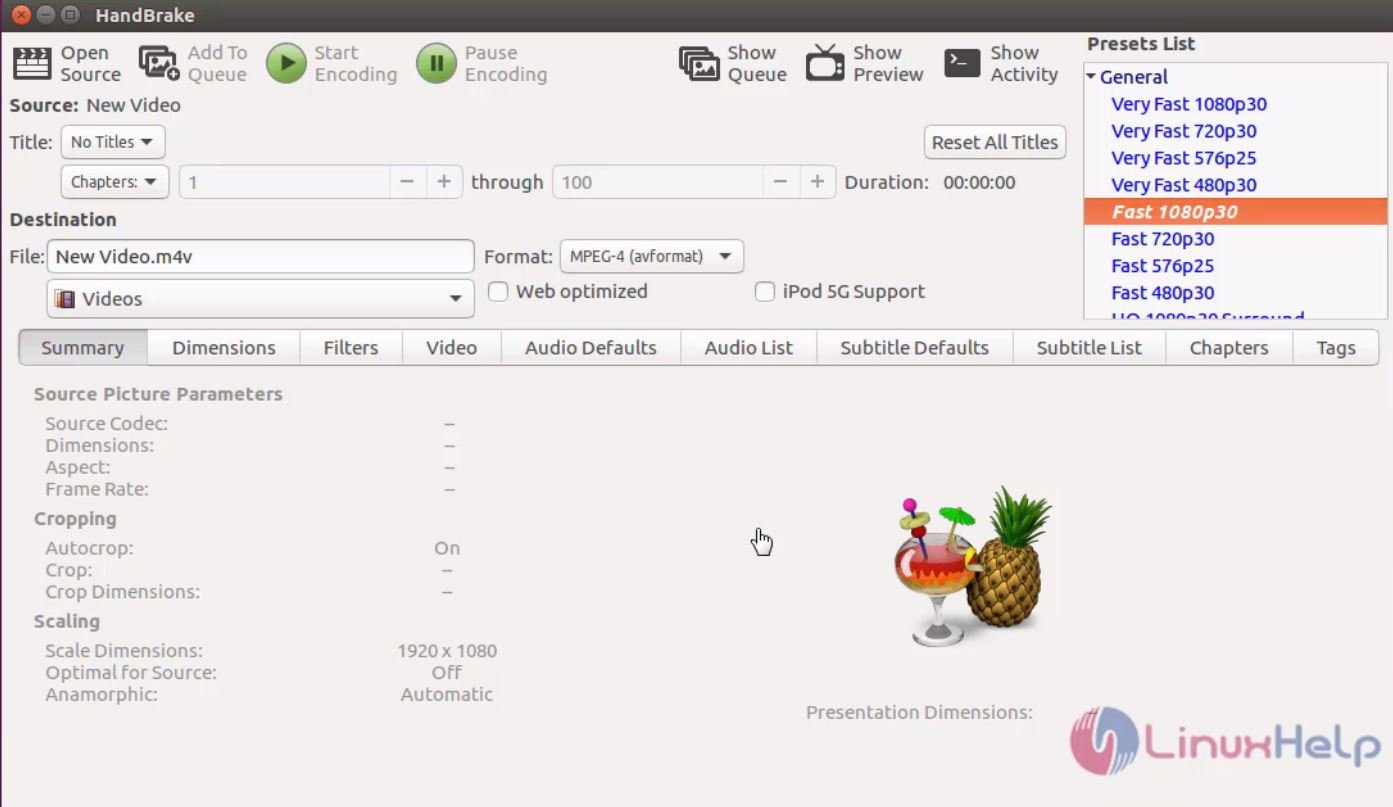
Don' t you agree it was a simple installation procedure? Using Handbrake is as simple as its installation process. Convert your DVDs and Blu-ray discs into several formats by using this Handbrake tool.
Comments ( 0 )
No comments available