• Categories
    Category
    {{ postCtrl.tags }}
    • {{ category.tag_type }}

      • {{tag.tag_name}}
      • View more
  • Categories
    Category
    {{ postCtrl.tags }}
    • {{ category.tag_type }}

      • {{tag.tag_name}}
      • View more
  • News
  • Tutorials
  • Forums
  • Tags
  • Users
Tutorial News Comments FAQ Related Articles

How to install Handbrake Video Editor in Ubuntu

{{postValue.id}}

To Install Handbrake Video Editor Tool in Ubuntu 16.04

HandBrake is an open-source tool to making a fabulous film from a DVD to a data storage device. It supports all operating systems. Installation of Handbrake Video Editor Tool in Ubuntu 16.04 is explained.

Features

  • Customization of output without any quality loss.
  • It supports automatic and manual editing features for deinterlacing detelecine, decombing, scaling, and cropping.
  • Supports all format of videos.
  • Both GUI and CLI encoding is possible.

To install Handbrake

Utilise the following command to add the handbrake package into repository.

root@linuxhelp:/home/user1# add-apt-repository ppa:stebbins/handbrake-releases
 These are the official HandBrake releases for Ubuntu. Official web site http://handbrake.fr/
HandBrake is an open-source, GPL-licensed, multiplatform, multithreaded video transcoder, available for MacOS X, Linux and Windows.
.
.
.
gpg: Total number processed: 1
gpg:               imported: 1  (RSA: 1)
OK

Update the machine to apply the changes.

root@linuxhelp:/home/user1# apt-get update
Hit:1 http://in.archive.ubuntu.com/ubuntu xenial InRelease                                            
Hit:2 http://repository.spotify.com stable InRelease
.
.
.
Fetched 187 kB in 11s (15.8 kB/s)                                                                     
Reading package lists... Donens/handbrake-releases

After adding the repos, install the Handbrake package as shown below.

root@linuxhelp:/home/user1# apt-get install handbrake
Reading package lists... Done
Building dependency tree       
Reading state information... Done
.
.
.
Processing triggers for man-db (2.7.5-1) ...
Setting up handbrake (0.10.2+ds1-2build1) ...

Then install the handbrake gui package.

root@linuxhelp:/home/user1# apt-get install handbrake-gtk
Reading package lists... Done
Building dependency tree       
Reading state information... Done
.
.
.
Setting up gstreamer1.0-plugins-bad:amd64 (1.8.2-1ubuntu0.1) ...
Setting up handbrake-gtk (0.10.5-zhb-1ppa1~xenial1) ...
Processing triggers for libc-bin (2.23-0ubuntu3) ...

Run the following command to install the handbrake cli package.

root@linuxhelp:/home/user1# apt-get install handbrake-cli
Reading package lists... Done
Building dependency tree       
Reading state information... Done
.
.
.
Preparing to unpack .../handbrake-cli_0.10.5-zhb-1ppa1~xenial1_amd64.deb ...
Unpacking handbrake-cli (0.10.5-zhb-1ppa1~xenial1) ...
Setting up handbrake-cli (0.10.5-zhb-1ppa1~xenial1) ...

Open the handbrake package in Ubuntu Dashboard.
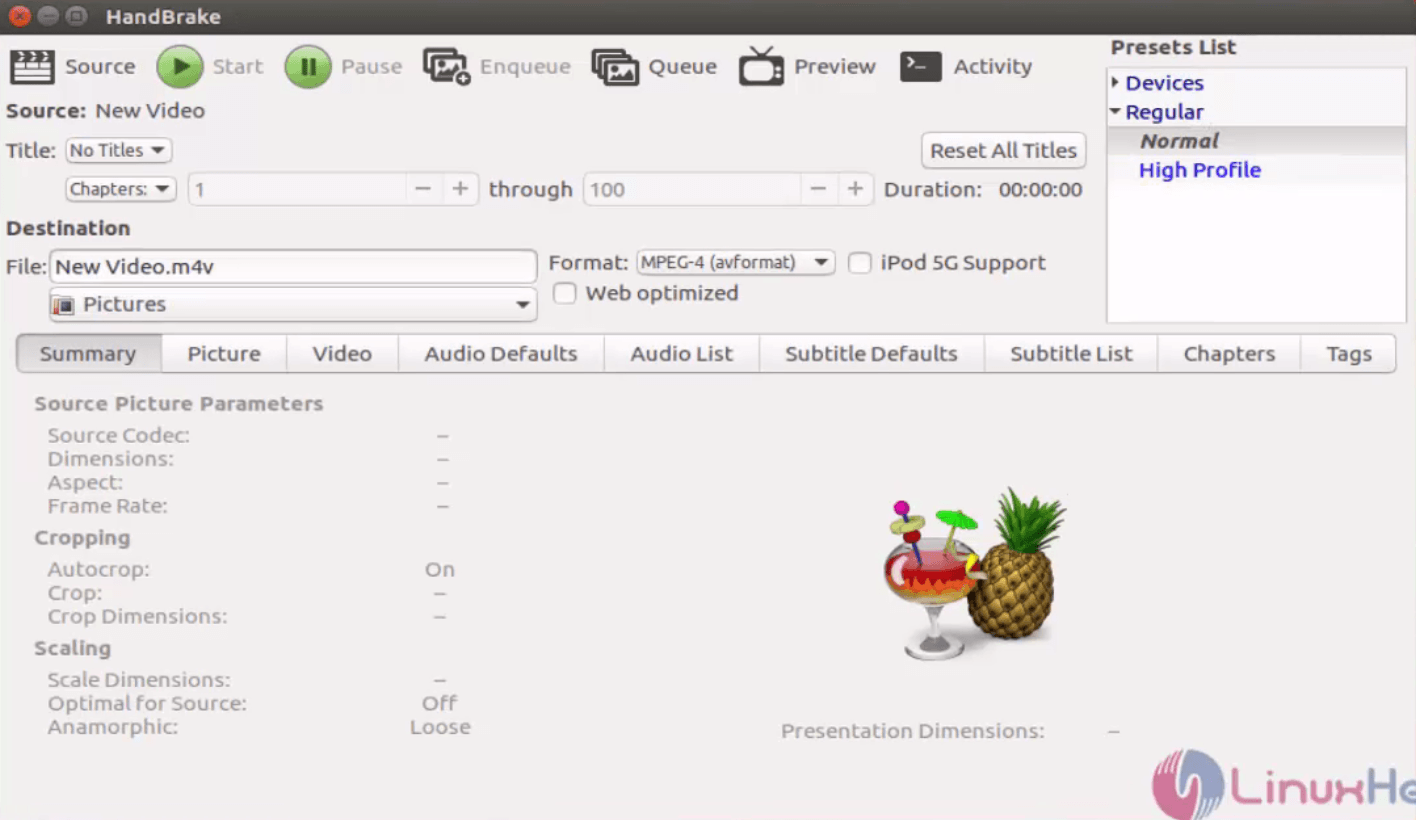
Install-Handbrake-Video-Editor-Tool-film-from-DVD-to-data-storage-device-Ubuntu16.04-Open-package-Ubuntu-Dashboard

Upload the video file to be edited by hitting source.
Install-Handbrake-Video-Editor-Tool-film-from-DVD-to-data-storage-device-Ubuntu16.04-Upload-video-file

Set the file name and destination location.
Install-Handbrake-Video-Editor-Tool-film-from-DVD-to-data-storage-device-Ubuntu16.04-Set-file-name

Now your video is ready for editing! Crop it or add effects as per your wish.
Install-Handbrake-Video-Editor-Tool-film-from-DVD-to-data-storage-device-Ubuntu16.04-Crop-add-effects

After editing, click start to encode the file.
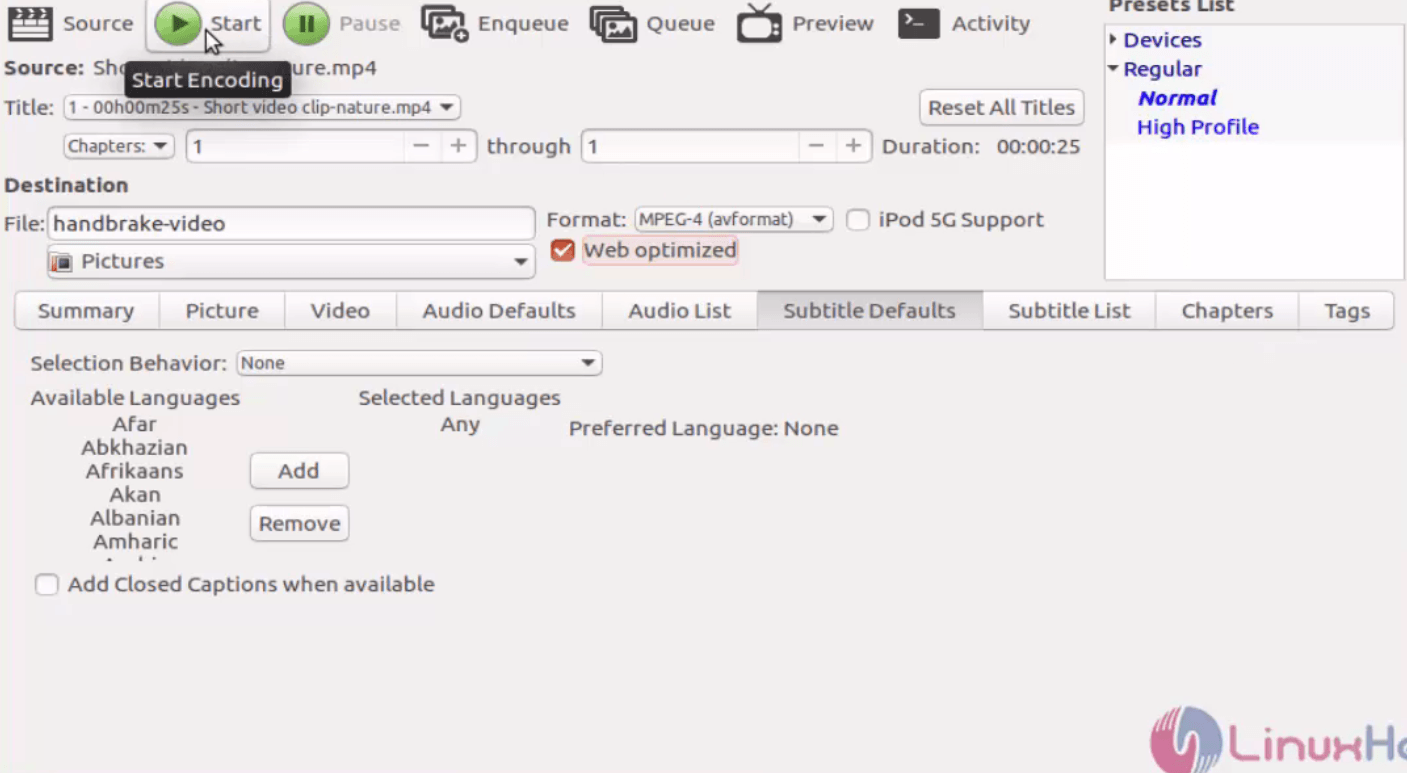
Install-Handbrake-Video-Editor-Tool-film-from-DVD-to-data-storage-device-Ubuntu16.04-start-encode

Install-Handbrake-Video-Editor-Tool-film-from-DVD-to-data-storage-device-Ubuntu16.04-encoding

Now the encoded file will be stored in the destination path that we have mentioned already.
Install-Handbrake-Video-Editor-Tool-film-from-DVD-to-data-storage-device-Ubuntu16.04-encoded-file-stored

Watch and enjoy the video.
Install-Handbrake-Video-Editor-Tool-film-from-DVD-to-data-storage-device-Ubuntu16.04-Watch-video

Tags:
benjamin
Author: 

Comments ( 0 )

No comments available

Add a comment
{{postCtrl.cmtErrMsg}}

Frequently asked questions ( 5 )

Q

How to update the latest version in Handbrake?

A

The Linux version of HandBrake does not have a built-in update checking feature. Your Linux distribution’s package manager will handle any updates to the official PPA.

Q

what are all the system requirements for Handbrake?

A

Processor: Intel Core 2 Duo, AMD Athlon X2, or better
Free Memory:
256 MB for transcoding standard definition video
1 GB for transcoding high definition video
2 GB or more for transcoding 4K

Q

Why I cannot able to find handbrake executables?

A

The HandBrake graphical interface executable is ghb. Simply launch your terminal application and type ghb followed by the return key.

Q

what are all Ways to open a video source in Handbrake video editor?

A

By default, HandBrake presents the Open Source dialog on launch. It is also accessible from the Toolbar at the top of HandBrake’s main window.

Q

What HandBrake does not do?

A

Combine multiple video clips into one

Pass-through video without conversion (video is always converted)

Create Blu-ray, AVCHD, or DVD discs

Make cocktails (yet)

Back To Top!
Rank
User
Points

Top Contributers

userNamenaveelansari
135850

Top Contributers

userNameayanbhatti
92510

Top Contributers

userNamehamzaahmed
32150

Top Contributers

1
userNamelinuxhelp
31040

Top Contributers

userNamemuhammadali
24500
Can you help Ganesh Konka ?
Zentya 6.1 http proxy configuration

please send link for creating zentyal 6.1 for http proxy and firewall as gateway.

Networking
  • Routing
  • trunk
  • Netmask
  • Packet Capture
  • domain
  • HTTP Proxy
Server Setup
  • NFS
  • KVM
  • Memory
  • Sendmail
  • WebDAV
  • LXC
Shell Commands
  • Cloud commander
  • Command line archive tools
  • last command
  • Shell
  • terminal
  • Throttle
Desktop Application
  • Linux app
  • Pithos
  • Retrospect
  • Scribe
  • TortoiseHg
  • 4Images
Monitoring Tool
  • Monit
  • Apache Server Monitoring
  • EtherApe 
  • Arpwatch Tool
  • Auditd
  • Barman
Web Application
  • Nutch
  • Amazon VPC
  • FarmWarDeployer
  • Rukovoditel
  • Mirror site
  • Chef
Contact Us | Terms of Use| Privacy Policy| Disclaimer
© 2025 LinuxHelp.com All rights reserved. Linux™ is the registered trademark of Linus Torvalds. This site is not affiliated with linus torvalds in any way.