How to install Htop 2.0 for Linux Process Monitoring
Htop Monitoring tool in Linux
Htop is the most popular interactive monitoring tool for Linux/Unix like systems. More than one process can be killed using Htop by inserting their PIDs. To print set of environment variables for process press e.
htop provides a full list of processes running and it uses color and gives visual information about processor, swap and memory status.
Method: 1
To install Htop using Binary packages
To fetch and install the htop package
The below commands is used to fetch and install the htop packages.
On Fedora
dnf install htop [On Fedora 22+ releases]
On Debian and Ubuntu
sudo apt-get install htop
On CentOS
[root@linuxhelp ~]# yum install htop
Loaded plugins: fastestmirror, refresh-packagekit, security
Setting up Install Process
...
...
Installed:
  htop.x86_64 0:1.0.1-2.el6

Complete!
Now, the installation process is completed.
Method: 2
Install Htop from source packages
If the htop package is not available for your system... you can download the htop source package by using the wget command.
[root@linuxhelp Desktop]# wget http://hisham.hm/htop/releases/2.0.0/htop-2.0.0.tar.gz
--2016-03-03 05:14:34--  http://hisham.hm/htop/releases/2.0.0/htop-2.0.0.tar.gz
Resolving hisham.hm... 69.163.225.224
Connecting to hisham.hm|69.163.225.224|:80... connected.
...
...
Saving to: “ htop-2.0.0.tar.gz”

100%[======================================> ] 473,765      206K/s   in 2.2s

2016-03-03 05:14:37 (206 KB/s) - “ htop-2.0.0.tar.gz”  saved [473765/473765]
Now extract the downloaded source package using the following command.
[root@linuxhelp Desktop]# tar -xvf htop-2.0.0.tar.gz
drwxr-xr-x 1000/100          0 2016-02-11 02:18 htop-2.0.0/
-rw-r--r-- 1000/100        617 2016-02-02 20:29 htop-2.0.0/ColumnsPanel.h
-rw-r--r-- 1000/100       5720 2016-02-02 20:43 htop-2.0.0/config.h.in
...
...
...
-rw-r--r-- 1000/100       2363 2015-10-05 19:52 htop-2.0.0/htop.desktop
-rw-r--r-- 1000/100        594 2016-02-02 20:29 htop-2.0.0/UsersTable.h
-rw-r--r-- 1000/100       2637 2016-02-02 20:28 htop-2.0.0/Affinity.c

[root@linuxhelp Desktop]# cd htop-2.0.0
[root@linuxhelp htop-2.0.0]#
To run the configure and make script to install and compile htop
[root@linuxhelp htop-2.0.0]# ./configure
checking for gcc... gcc
checking whether the C compiler works... yes
checking for C compiler default output file name... a.out
checking for suffix of executables...
...
...
...
config.status: creating config.h
config.status: config.h is unchanged
config.status: executing depfiles commands
config.status: executing libtool commands
[root@linuxhelp htop-2.0.0]# make
make  all-am
make[1]: Entering directory `/home/user1/Desktop/htop-2.0.0'
gcc -DHAVE_CONFIG_H -I.  -DNDEBUG  -pedantic -Wall -Wextra -std=c99 -D_XOPEN_SOURCE_EXTENDED -DSYSCONFDIR=" /usr/local/etc"  -I" ./linux"  -rdynamic  -g -O2 -MT htop-AvailableMetersPanel.o -MD -MP -MF .deps/htop-AvailableMetersPanel.Tpo -c -o htop-AvailableMetersPanel.o `test -f ' AvailableMetersPanel.c'  || echo ' ./' `AvailableMetersPanel.c
...
...
linux/htop-Platform.o linux/htop-IOPriorityPanel.o linux/htop-IOPriority.o linux/htop-LinuxProcess.o linux/htop-LinuxProcessList.o linux/htop-LinuxCRT.o linux/htop-Battery.o  -lncursesw -lm
make[1]: Leaving directory `/home/user1/Desktop/htop-2.0.0'
[root@linuxhelp htop-2.0.0]# make install
make  install-am
make[1]: Entering directory `/home/user1/Desktop/htop-2.0.0'
make[2]: Entering directory `/home/user1/Desktop/htop-2.0.0'
 /bin/mkdir -p ' /usr/local/bin'
  /bin/sh ./libtool   --mode=install /usr/bin/install -c htop ' /usr/local/bin'
libtool: install: /usr/bin/install -c htop /usr/local/bin/htop
 /bin/mkdir -p ' /usr/local/share/applications'
 /usr/bin/install -c -m 644 htop.desktop ' /usr/local/share/applications'
 /bin/mkdir -p ' /usr/local/share/man/man1'
 /usr/bin/install -c -m 644 htop.1 ' /usr/local/share/man/man1'
 /bin/mkdir -p ' /usr/local/share/pixmaps'
 /usr/bin/install -c -m 644 htop.png ' /usr/local/share/pixmaps'
make[2]: Leaving directory `/home/user1/Desktop/htop-2.0.0'
make[1]: Leaving directory `/home/user1/Desktop/htop-2.0.0'
Now, the installation is completed from source package.
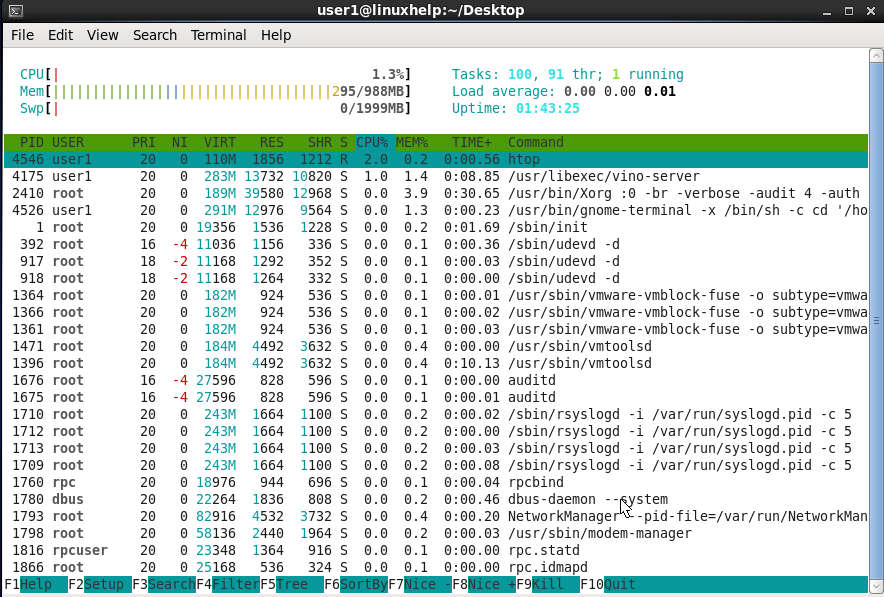
To run htop monitoring tool
Execute the following command to run the htop monitoring tool.
[root@linuxhelp htop-2.0.0]# htop
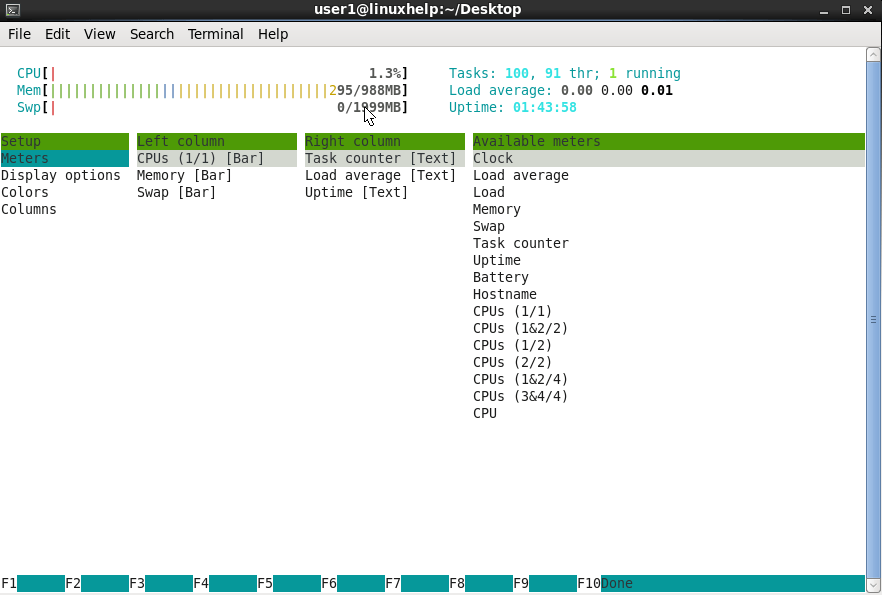
Press S or F2 for set menu
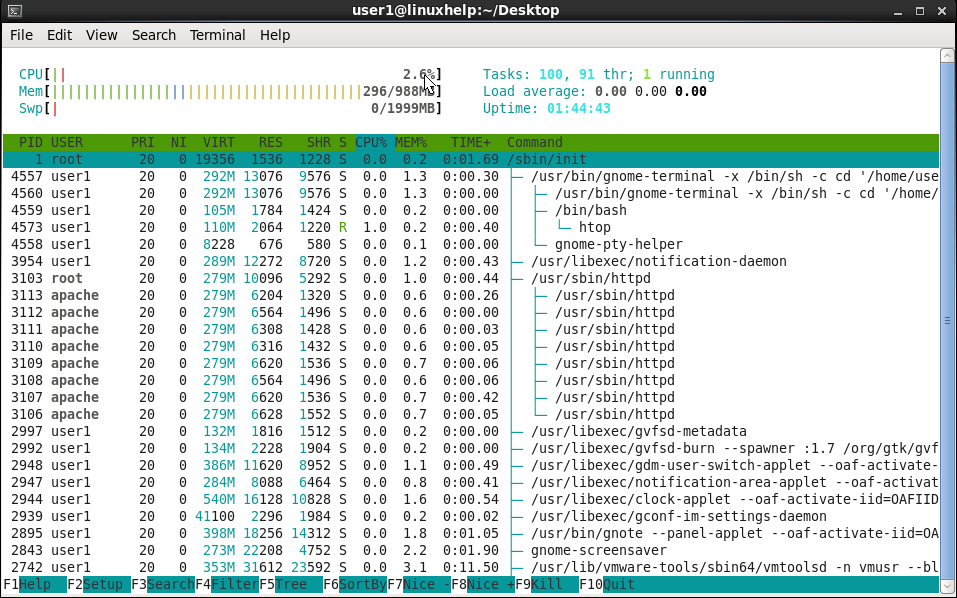
Type tree or t to display processes tree view
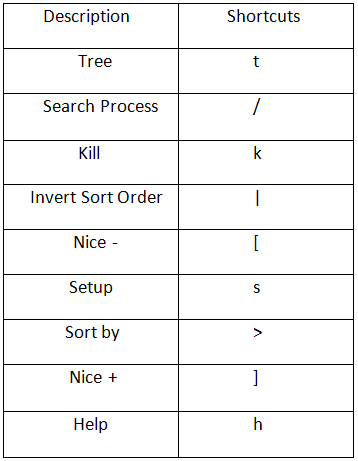
Htop Shortcut and Function Keys
Comments ( 0 )
No comments available