How to install Htop in Ubuntu
To install Htop in Ubuntu
Htop is a real time process monitoring tool for Unix and Linux Operating Systems. It offers interactive monitoring options. A process can be directly killed using Htop. In case you use Ncurses 6, scrolling through mouse is supported by Htop. This tutorial will guide you through the installation of Htop on your Ubuntu machine.
Installation of Htop
The installation of Htop requires certain prerequisites. Use the following command for the same.
root@linuxhelp1:~# apt-get install build-essential
Reading package lists... Done
Building dependency tree
Reading state information... Done
The following NEW packages will be installed:
  build-essential
0 upgraded, 1 newly installed, 0 to remove and 416 not upgraded.
.
.
Setting up build-essential (12.1ubuntu2) ...
Now install the dependencies by using the below command.
root@linuxhelp1:~# apt-get install libncurses5-dev libncursesw5-dev
Reading package lists... Done
Building dependency tree... 0%
Building dependency tree
Reading state information... Done
The following additional packages will be installed:
  libtinfo-dev
Suggested packages:
  ncurses-doc
The following NEW packages will be installed:
  libncurses5-dev libncursesw5-dev libtinfo-dev
0 upgraded, 3 newly installed, 0 to remove and 416 not upgraded.
Need to get 450 kB of archives.
.
.
.
Setting up libncurses5-dev:amd64 (6.0+20160213-1ubuntu1) ...
Setting up libncursesw5-dev:amd64 (6.0+20160213-1ubuntu1) ...
Download the Htop package by using the following command.
root@linuxhelp1:~# wget http://hisham.hm/htop/releases/2.0.2/htop-2.0.2.tar.gz
--2016-11-15 04:59:42--  http://hisham.hm/htop/releases/2.0.2/htop-2.0.2.tar.gz
Resolving hisham.hm (hisham.hm)... 69.163.217.231
Connecting to hisham.hm (hisham.hm)|69.163.217.231|:80... connected.
HTTP request sent, awaiting response... 200 OK
.
.
2016-11-15 04:59:46 (150 KB/s) - ‘ htop-2.0.2.tar.gz’  saved [476364/476364]
Once the Htop package is downloaded, extract it by using the ' tar' command.
root@linuxhelp1:~# tar xvfz htop-2.0.2.tar.gz
htop-2.0.2/
htop-2.0.2/ColumnsPanel.h
htop-2.0.2/config.h.in
htop-2.0.2/Settings.c
htop-2.0.2/SignalsPanel.c
htop-2.0.2/StringUtils.c
htop-2.0.2/AvailableColumnsPanel.h
htop-2.0.2/BatteryMeter.c
htop-2.0.2/CPUMeter.h
.
.
htop-2.0.2/UsersTable.h
htop-2.0.2/Affinity.c
Now change the directory for the extracted file.
root@linuxhelp1:~# cd htop-2.0.2/
root@linuxhelp1:~/htop-2.0.2#
Use the following command to run ./configure.
root@linuxhelp1:~/htop-2.0.2# ./configure
checking build system type... x86_64-unknown-linux-gnu
checking host system type... x86_64-unknown-linux-gnu
checking target system type... x86_64-unknown-linux-gnu
checking for a BSD-compatible install... /usr/bin/install -c
checking whether build environment is sane... yes
checking for a thread-safe mkdir -p... /bin/mkdir -p
checking for gawk... no
checking for mawk... mawk
.
.
config.status: executing depfiles commands
config.status: executing libtool commands
You can use the make command now to prepare the installation of Htop.
root@linuxhelp1:~/htop-2.0.2# make
make  all-am
make[1]: Entering directory ' /home/user1/htop-2.0.2'
gcc -DHAVE_CONFIG_H -I.  -DNDEBUG  -pedantic -Wall -Wextra -std=c99 -D_XOPEN_SOURCE_EXTENDED -DSYSCONFDIR=" /usr/local/etc"  -I" ./linux"  -rdynamic  -g -O2 -MT htop-AvailableMetersPanel.o -MD -MP -MF .deps/htop-AvailableMetersPanel.Tpo -c -o htop-AvailableMetersPanel.o `test -f ' AvailableMetersPanel.c'  || echo ' ./' `AvailableMetersPanel.c
mv -f .deps/htop-AvailableMetersPanel.Tpo .deps/htop-AvailableMetersPanel.Po
.
.
make[1]: Leaving directory ' /home/user1/htop-2.0.2'
Now use the make install command to install Htop
root@linuxhelp1:~/htop-2.0.2# make install
make  install-am
make[1]: Entering directory ' /home/user1/htop-2.0.2'
make[2]: Entering directory ' /home/user1/htop-2.0.2'
 /bin/mkdir -p ' /usr/local/bin'
.
.
make[2]: Leaving directory ' /home/user1/htop-2.0.2'
make[1]: Leaving directory ' /home/user1/htop-2.0.2'
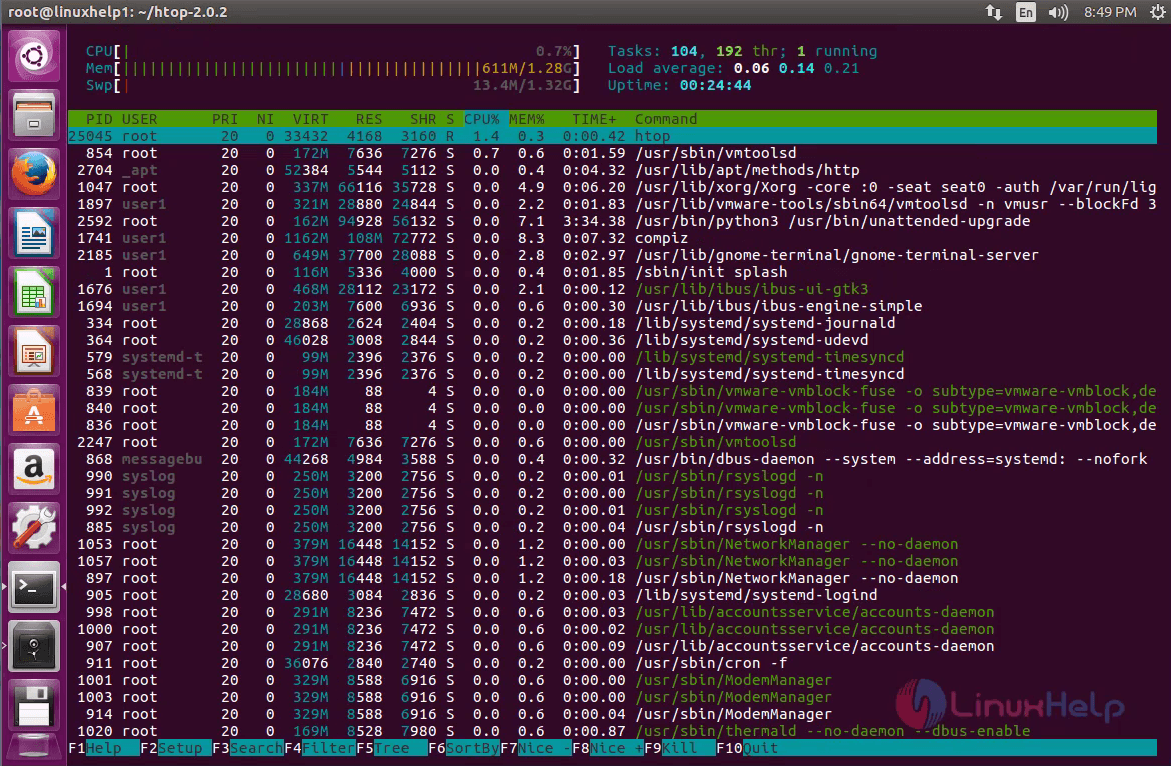
You can launch the Htop monitoring tool by executing the following command.
root@linuxhelp1:~/htop-2.0.2# htop
The Htop tool is now at your service.
Comments ( 0 )
No comments available