How to install Icinga on Ubuntu 17.04
To install Icinga on Ubuntu 17.04
Icinga is a flexible and powerful open source monitoring system used for checking health and status of hosts and services. It uses the Nagios Remote Plugin Executor (NRPE), to monitor their local resources. It monitors the load and up-time of a cluster of web workers, free disk space on a storage device, memory consumption on a caching service, and so on. If installed and set up properly, Icinga can generate an overview at glance on the status of large numbers of hosts and services, as well as notifications, downtime scheduling, and long-term storage of performance data. It is so simple to install Icinga and in this article, you will learn the method to install Icinga on Ubuntu 17.04
Requirements
Apache Webserver
Installing Icinga
Before you begin with the installation process, make sure you add the necessary repository in the " sources.list” file. Open it by using the following command.
root@linuxhelp:~# nano /etc/apt/sources.list
Add the following lines in that file.
deb http://ppa.launchpad.net/formorer/icinga/ubuntu xenial main
deb-src http://ppa.launchpad.net/formorer/icinga/ubuntu xenial main
Once the needed repo is added, you should update your system as follows.
root@linuxhelp:~# apt-get update
Hit:1 http://security.ubuntu.com/ubuntu zesty-security InRelease
Get:2 http://ppa.launchpad.net/formorer/icinga/ubuntu xenial InRelease [17.5 kB]
Ign:2 http://ppa.launchpad.net/formorer/icinga/ubuntu xenial InRelease
Hit:3 http://ppa.launchpad.net/js-reynaud/kicad-4/ubuntu zesty InRelease
Hit:4 http://in.archive.ubuntu.com/ubuntu zesty InRelease
Hit:5 http://in.archive.ubuntu.com/ubuntu zesty-updates InRelease
Hit:6 http://in.archive.ubuntu.com/ubuntu zesty-backports InRelease
Get:7 http://ppa.launchpad.net/formorer/icinga/ubuntu xenial/main Sources [1,584 B]
Get:8 http://ppa.launchpad.net/formorer/icinga/ubuntu xenial/main amd64 Packages [3,536 B]
Get:9 http://ppa.launchpad.net/formorer/icinga/ubuntu xenial/main i386 Packages [3,540 B]
Get:10 http://ppa.launchpad.net/formorer/icinga/ubuntu xenial/main Translation-en [1,980 B]
Fetched 28.2 kB in 3s (7,722 B/s)
Reading package lists... Done
Now, you shall install Icinga and all its dependent packages in the same way.
root@linuxhelp:~# apt-get install icinga icinga-doc icinga-idoutils mysql-server libdbd-mysql mysql-client
Reading package lists... Done
Building dependency tree
Reading state information... Done
The following additional packages will be installed:
  apache2 apache2-bin apache2-data apache2-utils bsd-mailx dbconfig-common
  icinga-cgi icinga-cgi-bin icinga-common icinga-core javascript-common
  libaio1 libapr1 libaprutil1 libaprutil1-dbd-sqlite3 libaprutil1-ldap libdbi1
  libevent-core-2.0-5 libhtml-template-perl libjs-jquery libjs-jquery-ui
  liblockfile-bin liblockfile1 liblua5.2-0 libmysqlclient20 libnet-snmp-perl
  libpq5 libsmbclient libtirpc1 libwbclient0 monitoring-plugins
  monitoring-plugins-basic monitoring-plugins-common
  monitoring-plugins-standard mysql-client-5.7 mysql-client-core-5.7
.
.
.
.
Created symlink /etc/systemd/system/multi-user.target.wants/mysql.service &rarr  /lib/systemd/system/mysql.service.
Setting up mysql-server (5.7.20-0ubuntu0.17.04.1) ...
Processing triggers for libc-bin (2.24-9ubuntu2) ...
Processing triggers for ureadahead (0.100.0-19) ...
Processing triggers for systemd (232-21ubuntu2) ...
Processing triggers for ufw (0.35-4) ...
Once the installation is done, make sure you restart all the services such as Icinga, Apache, MySQL by following.
root@linuxhelp:~# service icinga restart
root@linuxhelp:~# service apache2 restart
root@linuxhelp:~# service mysql restart
Now let us continue the process via browser. Give your domain name as the URL, and when asked for the credential, you enter your username and passwords and click Ok.

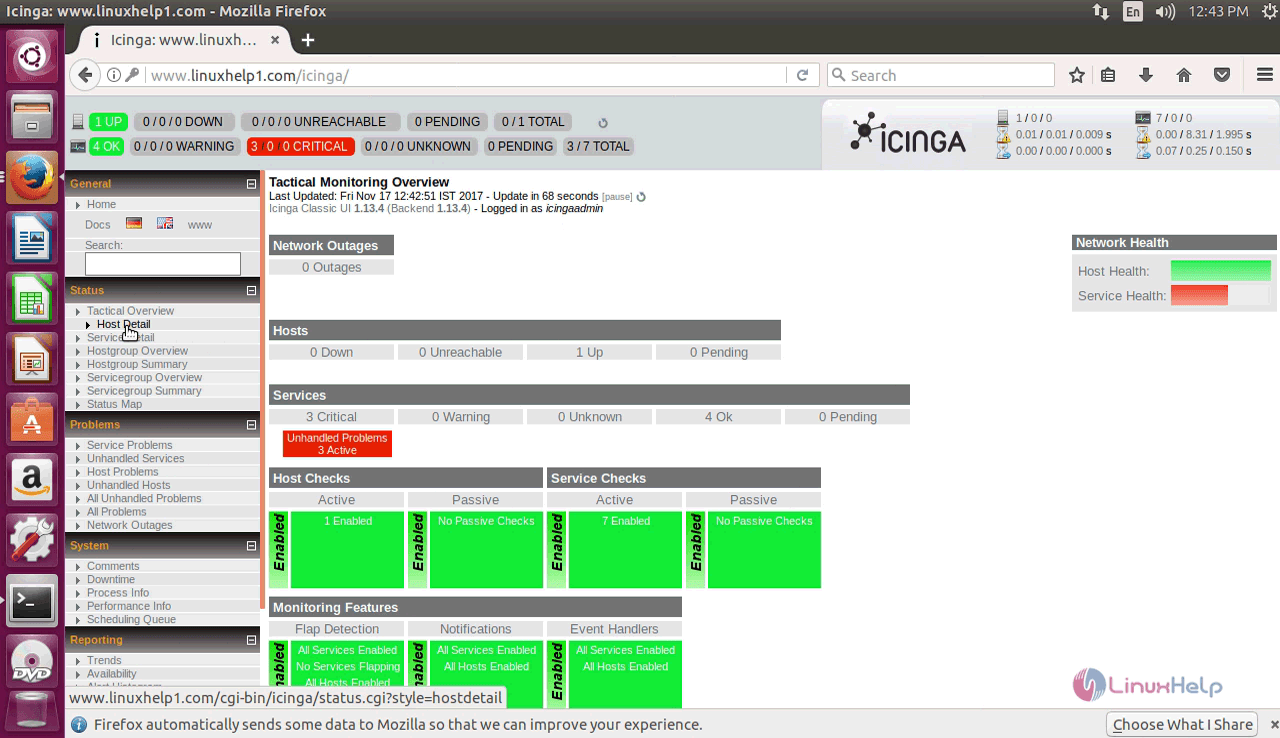
When you log in, you will be taken to the icinga dashboard in which the Tactical Monitoring Overview is displayed. You check the statrus of other things such as Host Detail, Service Detail, Status Map, etc.
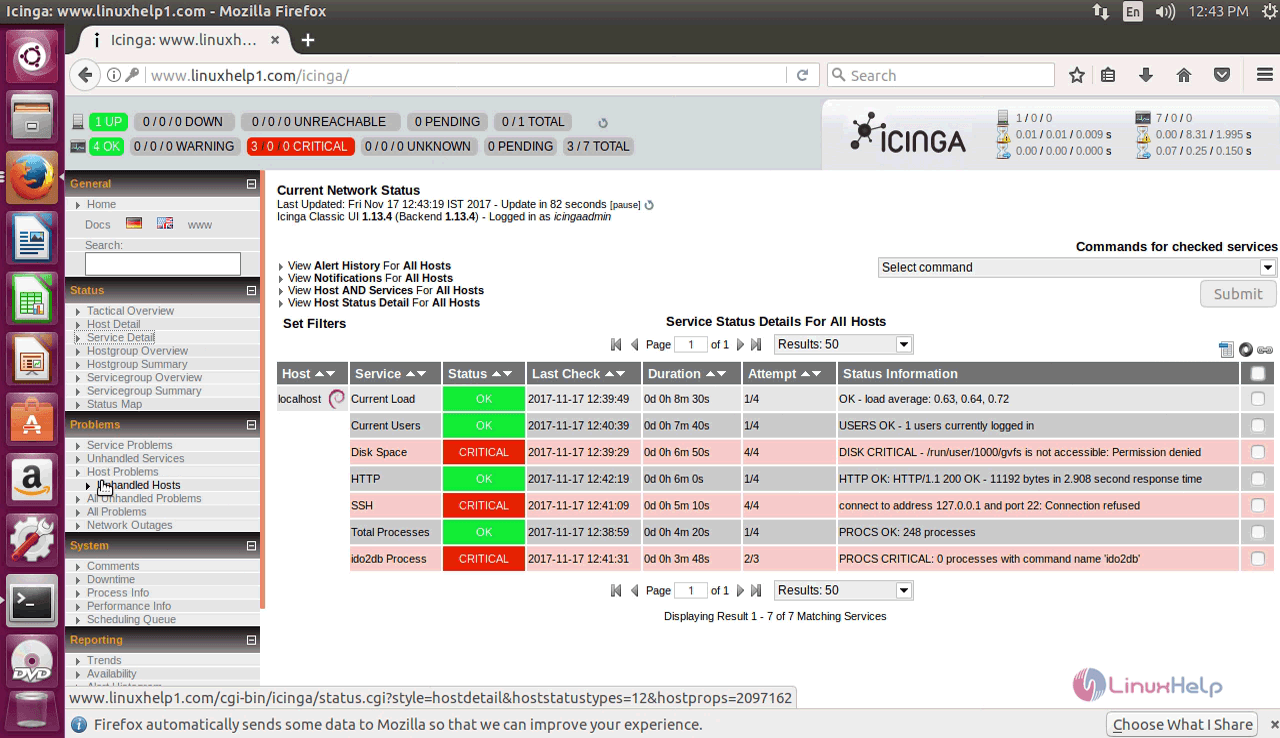
You can also view the problem areas related to Service, Host, Unhandled Services, etc.
You can also check our the reports on Trends, Alert Summary, Event Log, etc.

With this, the installation of Icinga comes to an end.
Comments ( 0 )
No comments available