How to Install Iftop on Ubuntu 19.04
To install and use iftop on Ubuntu 19.04
Installing iftop
First, before you begin with the actual installation, you are required to install a few library packages which are very essential for this process.
Check the Ubuntu version by using the following command.
root@linuxhelp:~# lsb_release -a
No LSB modules are available.
Distributor ID:	Ubuntu
Description:	Ubuntu 19.04
Release:	19.04
Codename:	disco
First, before you begin with the actual installation, required to install a few library packages which are very essential for this process.
root@linuxhelp:~# apt install libpcap0.8 libpcap0.8-dev libncurses5 libncurses5-dev
Reading package lists... Done
Building dependency tree
Reading state information... Done
libpcap0.8 is already the newest version (1.8.1-6ubuntu1).
libpcap0.8 set to manually installed.
The following additional packages will be installed:
  libncurses-dev libtinfo5
Suggested packages:
  ncurses-doc
The following NEW packages will be installed:
  libncurses-dev libncurses5 libncurses5-dev libpcap0.8-dev libtinfo5
.
.
.
Preparing to unpack .../libpcap0.8-dev_1.8.1-6ubuntu1_amd64.deb ...
Unpacking libpcap0.8-dev:amd64 (1.8.1-6ubuntu1) ...
Setting up libncurses-dev:amd64 (6.1+20181013-2ubuntu2) ...
Setting up libpcap0.8-dev:amd64 (1.8.1-6ubuntu1) ...
Setting up libncurses5-dev:amd64 (6.1+20181013-2ubuntu2) ...
Setting up libtinfo5:amd64 (6.1+20181013-2ubuntu2) ...
Setting up libncurses5:amd64 (6.1+20181013-2ubuntu2) ...
Processing triggers for man-db (2.8.5-2) ...
Processing triggers for libc-bin (2.29-0ubuntu2) ...
Download the iftop repository using the following command
root@linuxhelp:~# wget http://www.ex-parrot.com/pdw/iftop/download/iftop-0.17.tar.gz
--2019-05-27 14:08:01--  http://www.ex-parrot.com/pdw/iftop/download/iftop-0.17.tar.gz
Resolving www.ex-parrot.com (www.ex-parrot.com)... 93.93.130.166, 2a00:1098:0:82:1000:0:1:2
Connecting to www.ex-parrot.com (www.ex-parrot.com)|93.93.130.166|:80... connected.
HTTP request sent, awaiting response... 200 OK
Length: 160381 (157K) [application/gzip]
Saving to: ‘iftop-0.17.tar.gz’

iftop-0.17.tar.gz           100%[=========================================>] 156.62K  --.-KB/s    in 0.02s

2019-05-27 14:08:03 (6.95 MB/s) - ‘iftop-0.17.tar.gz’ saved [160381/160381]
Excatrct the downloaded package using the following command.
root@linuxhelp:~# tar -zxvf iftop-0.17.tar.gz
iftop-0.17/
iftop-0.17/aclocal.m4
iftop-0.17/addr_hash.c
iftop-0.17/addr_hash.h
iftop-0.17/addrs_dlpi.c
iftop-0.17/addrs_ioctl.c
.
.
.
iftop-0.17/stringmap.c
iftop-0.17/stringmap.h
iftop-0.17/tcp.h
iftop-0.17/threadprof.c
iftop-0.17/threadprof.h
iftop-0.17/TODO
iftop-0.17/token.h
iftop-0.17/ui.c
iftop-0.17/ui.h
iftop-0.17/util.c
iftop-0.17/vector.c
iftop-0.17/vector.h
Once it is done, you need to navigate to the iftop folder and list all the files.
root@linuxhelp:~# cd iftop-0.17
root@linuxhelp:~/iftop-0.17# ls
aclocal.m4     cfgfile.h     dlcommon.h   iftop.c     Makefile.am   ppp.h           sll.h          TODO
addr_hash.c    ChangeLog     edline.c     iftop.cat   Makefile.in   README          sorted_list.c  token.h
addr_hash.h    config        ether.h      iftop.h     Makefile.OLD  resolver.c      sorted_list.h  ui.c
addrs_dlpi.c   config.h.in   ethertype.h  iftop.spec  NEWS          resolver.h      stringmap.c    ui.h
addrs_ioctl.c  configure     extract.h    INSTALL     ns_hash.c     screenfilter.c  stringmap.h    util.c
AUTHORS        configure.in  hash.c       integers.h  ns_hash.h     screenfilter.h  tcp.h          vector.c
bootstrap      COPYING       hash.h       ip.h        options.c     serv_hash.c     threadprof.c   vector.h
cfgfile.c      dlcommon.c    iftop.8      llc.h       options.h     serv_hash.h     threadprof.h
Now execute the configuration script.
root@linuxhelp:~/iftop-0.17# ./configure
checking build system type... x86_64-unknown-linux-gnu
checking host system type... x86_64-unknown-linux-gnu
checking target system type... x86_64-unknown-linux-gnu
checking for a BSD-compatible install... /usr/bin/install -c
checking whether build environment is sane... yes
checking for gawk... no
checking for mawk... mawk
checking whether make sets ${MAKE}... yes
checking for gcc... gcc
checking for C compiler default output... a.out
checking whether the C compiler works... yes
.
.
.
config.status: creating config.h
config.status: executing depfiles commands
Now install Iftop by use of the make command.
root@linuxhelp:~/iftop-0.17# make
make  all-recursive
make[1]: Entering directory '/root/iftop-0.17'
Making all in config
make[2]: Entering directory '/root/iftop-0.17/config'
make[2]: Nothing to be done for 'all'.
make[2]: Leaving directory '/root/iftop-0.17/config'
make[2]: Entering directory '/root/iftop-0.17'
.
.
.
gcc -DHAVE_CONFIG_H -I. -I. -I.     -g -O2  -c `test -f 'vector.c' || echo './'`vector.c
gcc  -g -O2    -o iftop  addr_hash.o edline.o hash.o iftop.o ns_hash.o options.o resolver.o screenfilter.o serv_hash.o sorted_list.o threadprof.o ui.o util.o addrs_ioctl.o addrs_dlpi.o dlcommon.o stringmap.o cfgfile.o vector.o  -lpcap -lm  -lcurses -lpthread
make[2]: Leaving directory '/root/iftop-0.17'
make[1]: Leaving directory '/root/iftop-0.17'
root@linuxhelp:~/iftop-0.17# make install
Making install in config
make[1]: Entering directory '/root/iftop-0.17/config'
make[2]: Entering directory '/root/iftop-0.17/config'
make[2]: Nothing to be done for 'install-exec-am'.
make[2]: Nothing to be done for 'install-data-am'.
make[2]: Leaving directory '/root/iftop-0.17/config'
make[1]: Leaving directory '/root/iftop-0.17/config'
make[1]: Entering directory '/root/iftop-0.17'
make[2]: Entering directory '/root/iftop-0.17'
/bin/bash ./config/mkinstalldirs /usr/local/sbin
  /usr/bin/install -c iftop /usr/local/sbin/iftop
/bin/bash ./config/mkinstalldirs /usr/local/man/man8
mkdir -p -- /usr/local/man/man8
 /usr/bin/install -c -m 644 ./iftop.8 /usr/local/man/man8/iftop.8
make[2]: Leaving directory '/root/iftop-0.17'
make[1]: Leaving directory '/root/iftop-0.17'
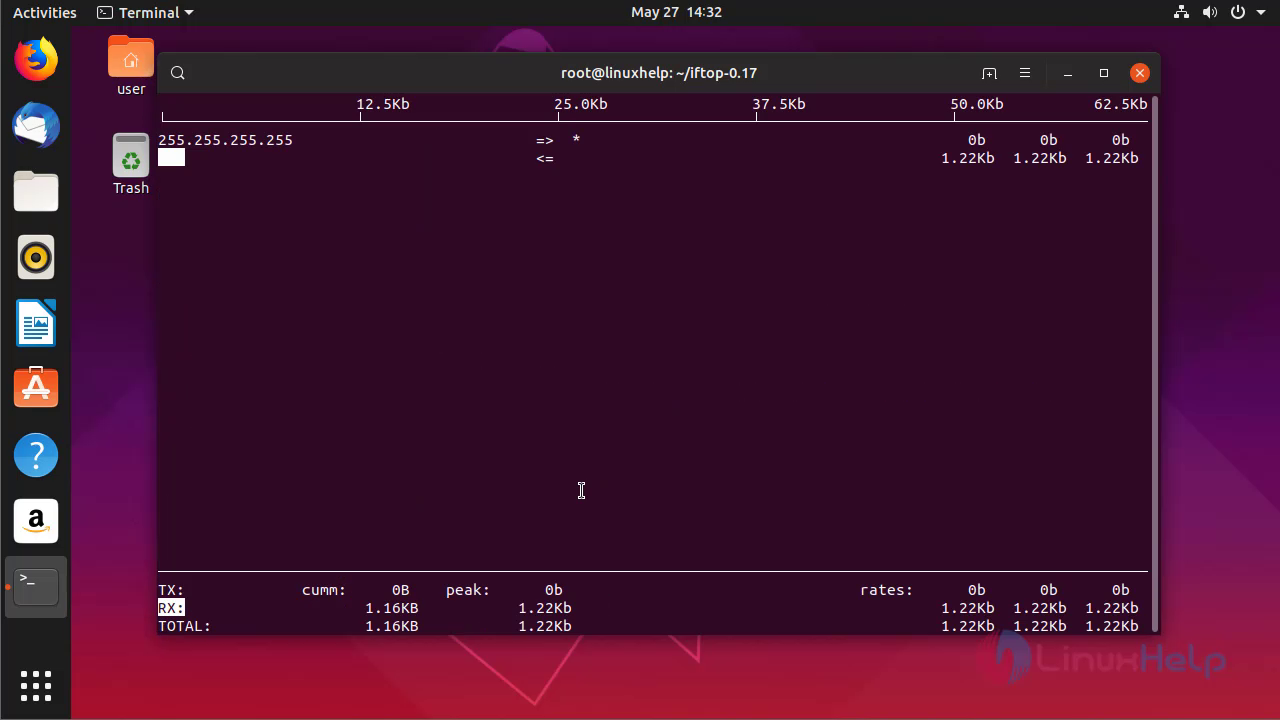
Once the installation is completed . run the iftop command by this Mehtod
root@linuxhelp:~/iftop-0.17# iftop
interface: ens33
IP address is: 192.168.7.227
MAC address is: 00:0c:29:f6:68:c8

You can use iftop to monitor Linux network Interface. For that, run the following ifconfig command or ip command to find all attached network interfaces on your Linux system.
root@linuxhelp:~/iftop-0.17# ip a
1: lo: <LOOPBACK,UP,LOWER_UP> mtu 65536 qdisc noqueue state UNKNOWN group default qlen 1000
    link/loopback 00:00:00:00:00:00 brd 00:00:00:00:00:00
    inet 127.0.0.1/8 scope host lo
       valid_lft forever preferred_lft forever
    inet6 ::1/128 scope host
       valid_lft forever preferred_lft forever
2: ens33: <BROADCAST,MULTICAST,UP,LOWER_UP> mtu 1500 qdisc fq_codel state UP group default qlen 1000
    link/ether 00:0c:29:f6:68:c8 brd ff:ff:ff:ff:ff:ff
    inet 192.168.7.227/24 brd 192.168.7.255 scope global noprefixroute ens33
       valid_lft forever preferred_lft forever
    inet6 fe80::8:4c29:53c1:41ac/64 scope link noprefixroute
       valid_lft forever preferred_lft forever
Then use the -i flag to specify the interface you want to monitor.
root@linuxhelp:~/iftop-0.17# iftop -i ens33
interface: ens33
IP address is: 192.168.7.227
MAC address is: 00:0c:29:f6:68:c8
With this, the tutorial to install and use iftop on Ubuntu 19.04 comes to an end.
Comments ( 0 )
No comments available