How to install ISPconfig in centos 7
To install ispconfig in centos 7
ISPConfig is a free hosting control panel for Linux, that allows you to configure email addresses, domains, user accounts, and site configurations. Installation of ISPconfig in CentOS 7 is explained in this article.
To install ISPconfig
Execute the “ systemctl status” command to check the status of the services.
[root@linuxhelp ~]# systemctl status mysqld.service

 mysqld.service - MySQL Community Server
   Loaded: loaded (/usr/lib/systemd/system/mysqld.service  enabled  vendor preset: disabled)
   Active: active (running) since Sat 2016-07-09 15:03:59 IST  4min 38s ago
 Main PID: 11365 (mysqld_safe)
   CGroup: /system.slice/mysqld.service
           ??11365 /bin/sh /usr/bin/mysqld_safe
           ??11518 /usr/sbin/mysqld --basedir=/usr --datadir=/var/lib/mysql --plugin-dir=/us...

Jul 09 15:03:51 linuxhelp.com systemd[1]: Starting MySQL Community Server...
Jul 09 15:03:52 linuxhelp.com mysqld_safe[11365]: 160709 15:03:52 mysqld_safe Logging to ' ...' .
Jul 09 15:03:52 linuxhelp.com mysqld_safe[11365]: 160709 15:03:52 mysqld_safe Starting mys...ql
Jul 09 15:03:59 linuxhelp.com systemd[1]: Started MySQL Community Server.
Hint: Some lines were ellipsized, use -l to show in full.
[root@linuxhelp ~]# systemctl status httpd.service
 httpd.service - The Apache HTTP Server
   Loaded: loaded (/usr/lib/systemd/system/httpd.service  disabled  vendor preset: disabled)
   Active: active (running) since Sat 2016-07-09 15:07:08 IST  1min 38s ago
     Docs: man:httpd(8)
           man:apachectl(8)
 Main PID: 12240 (httpd)
   Status: " Total requests: 0  Current requests/sec: 0  Current traffic:   0 B/sec"
   CGroup: /system.slice/httpd.service
           ??12240 /usr/sbin/httpd -DFOREGROUND
           ??12312 /usr/sbin/httpd -DFOREGROUND
           ??12313 /usr/sbin/httpd -DFOREGROUND
           ??12318 /usr/sbin/httpd -DFOREGROUND
           ??12319 /usr/sbin/httpd -DFOREGROUND
           ??12321 /usr/sbin/httpd -DFOREGROUND

Jul 09 15:07:07 linuxhelp.com systemd[1]: Starting The Apache HTTP Server...
Jul 09 15:07:08 linuxhelp.com systemd[1]: Started The Apache HTTP Server.
Then install php dependency files.
[root@linuxhelp ~]# yum -y install php-ldap php-mysql php-odbc php-pear php php-devel php-gd php-imap php-xml php-xmlrpc php-pecl-apc php-mbstring php-mcrypt php-mssql php-snmp php-soap php-tidy curl curl-devel mod_fcgid php-cli httpd-devel php-fpm perl-libwww-perl ImageMagick libxml2 libxml2-devel python-devel
Loaded plugins: fastestmirror, langpacks
Loading mirror speeds from cached hostfile
 * base: centos.webwerks.com
 * epel: epel.mirror.net.in
 * extras: centos.webwerks.com
 * updates: centos.webwerks.com
Package php-mysql-5.4.16-36.1.el7_2.1.x86_64 already installed and latest version
Package curl-7.29.0-25.el7.centos.x86_64 already installed and latest version
Package httpd-devel-2.4.6-40.el7.centos.1.x86_64 already installed and latest version
.
.
.
  perl-URI.noarch 0:1.60-9.el7
  perl-WWW-RobotRules.noarch 0:6.02-5.el7
  php-process.x86_64 0:5.4.16-36.1.el7_2.1
  t1lib.x86_64 0:5.1.2-14.el7
  unixODBC.x86_64 0:2.3.1-11.el7
  xz-devel.x86_64 0:5.1.2-12alpha.el7
  zlib-devel.x86_64 0:1.2.7-15.el7

Complete!
Download the ispconfig tar file from official site by using “ wget” command as follows.
[root@linuxhelp ~]# cd /tmp/
[root@linuxhelp tmp]# wget http://www.ispconfig.org/downloads/ISPConfig-3-stable.tar.gz
--2016-07-09 15:11:26--  http://www.ispconfig.org/downloads/ISPConfig-3-stable.tar.gz
Resolving www.ispconfig.org (www.ispconfig.org)... 104.25.54.32, 104.25.55.32
Connecting to www.ispconfig.org (www.ispconfig.org)|104.25.54.32|:80... connected.
HTTP request sent, awaiting response... 200 OK
Length: 2500184 (2.4M) [application/octet-stream]
Saving to: ‘ ISPConfig-3-stable.tar.gz’

100%[=====================================================> ] 25,00,184    452KB/s   in 6.2s

2016-07-09 15:11:33 (397 KB/s) - ‘ ISPConfig-3-stable.tar.gz’  saved [2500184/2500184]
Extract the downloaded file using “ tar” command.
[root@linuxhelp tmp]# tar -zxvf ISPConfig-3-stable.tar.gz
ispconfig3_install/
ispconfig3_install/install/
ispconfig3_install/install/dist/
ispconfig3_install/install/dist/conf/
ispconfig3_install/install/dist/conf/gentoo.conf.php
ispconfig3_install/install/dist/conf/centos53.conf.php
.
.
.
.
ispconfig3_install/remoting_client/API-docs/openvz_ip_add.html
ispconfig3_install/remoting_client/API-docs/mail_spamfilter_blacklist_get.html
ispconfig3_install/remoting_client/API-docs/client_get.html
ispconfig3_install/remoting_client/API-docs/openvz_vm_get_by_client.html
ispconfig3_install/remoting_client/API-docs/mail_whitelist_delete.html
List the Extracted files using “ ls” command.
[root@linuxhelp tmp]# ls
hogsuspend
hsperfdata_root
ispconfig3_install
ISPConfig-3-stable.tar.gz
Now go to the Extracted Directory and install ISPconfig file.
[root@linuxhelp tmp]# cd ispconfig3_install/
[root@linuxhelp ispconfig3_install]# ls
CODING_NOTES.php.txt  helper_scripts  interface        security  TODO.txt
docs                  install         remoting_client  server
[root@linuxhelp ispconfig3_install]#
Run the “ install.php” file by using “ php &ndash q” command to perform the initial configurations.
[root@linuxhelp install]# php -q install.php

--------------------------------------------------------------------------------
 _____ ___________   _____              __ _         ____
|_   _/  ___| ___  /  __             / _(_)       /__
  | |  `--.| |_/ / | /  / ___  _ __ | |_ _  __ _    _/ /
  | |  `--.   __/  | |    / _ | ' _ |  _| |/ _` |  |_ |
 _| |_/\__/ / |     | \__/ (_) | | | | | | | (_| | ___
 \___/\____/\_|      \____/\___/|_| |_|_| |_|\__, | \____/
                                              __/ |
                                             |___/
--------------------------------------------------------------------------------

> >  Initial configuration

Operating System: CentOS 7 or compatible

    Following will be a few questions for primary configuration so be careful.
    Default values are in [brackets] and can be accepted with .
    Tap in " quit"  (without the quotes) to stop the installer.

Select language (en,de) [en]:

Installation mode (standard,expert) [standard]:

Full qualified hostname (FQDN) of the server, eg server1.domain.tld  [linuxhelp.com]:
MySQL server hostname [localhost]:

MySQL root username [root]:

MySQL root password []: root

MySQL database to create [dbispconfig]:

MySQL charset [utf8]:

PHP Warning:  mysqli_connect(): Headers and client library minor version mismatch. Headers:50547 Library:50631 in /tmp/ispconfig3_install/install/lib/mysql.lib.php on line 78
Apache and nginx detected. Select server to use for ISPConfig: (apache,nginx) [apache]:

postalias: fatal: open /var/lib/mailman/data/aliases: No such file or directory
PHP Warning:  touch(): Unable to create file /etc/mailman/virtual-mailman because No such file or directory in /tmp/ispconfig3_install/install/dist/lib/fedora.lib.php on line 216
postmap: fatal: open /etc/mailman/virtual-mailman: No such file or directory
Generating a 4096 bit RSA private key
............................................++
.........++
writing new private key to ' smtpd.key'
-----
You are about to be asked to enter information that will be incorporated
into your certificate request.
What you are about to enter is what is called a Distinguished Name or a DN.
There are quite a few fields but you can leave some blank
For some fields there will be a default value,
If you enter ' .' , the field will be left blank.
-----
Country Name (2 letter code) [XX]:
State or Province Name (full name) []:
Locality Name (eg, city) [Default City]:
Organization Name (eg, company) [Default Company Ltd]:
Organizational Unit Name (eg, section) []:
Common Name (eg, your name or your server' s hostname) []:
Email Address []:
Configuring Jailkit
Configuring SASL
Configuring PAM
Configuring Courier
chmod: cannot access ‘ /etc/authlib/authmysqlrc~’ : No such file or directory
Configuring Spamassassin
Configuring Amavisd
Configuring Getmail
Configuring Pureftpd
Configuring MyDNS
Configuring Apache
Configuring Vlogger
Configuring Apps vhost
Configuring Bastille Firewall
Installing ISPConfig
ISPConfig Port [8080]:

Do you want a secure (SSL) connection to the ISPConfig web interface (y,n) [y]:

Generating RSA private key, 4096 bit long modulus
...................................................++
..............................................................................................................................................................................++
e is 65537 (0x10001)
You are about to be asked to enter information that will be incorporated
into your certificate request.
What you are about to enter is what is called a Distinguished Name or a DN.
There are quite a few fields but you can leave some blank
For some fields there will be a default value,
If you enter ' .' , the field will be left blank.
-----
Country Name (2 letter code) [XX]:
State or Province Name (full name) []:
Locality Name (eg, city) [Default City]:
Organization Name (eg, company) [Default Company Ltd]:
Organizational Unit Name (eg, section) []:
Common Name (eg, your name or your server' s hostname) []:
Email Address []:

Please enter the following ' extra'  attributes
to be sent with your certificate request
A challenge password []:
An optional company name []:
writing RSA key
Configuring DBServer
Installing ISPConfig crontab
no crontab for root
no crontab for getmail
Restarting services ...
PHP Warning:  date(): It is not safe to rely on the system' s timezone settings. You are *required* to use the date.timezone setting or the date_default_timezone_set() function. In case you used any of those methods and you are still getting this warning, you most likely misspelled the timezone identifier. We selected the timezone ' UTC'  for now, but please set date.timezone to select your timezone. in /tmp/ispconfig3_install/install/install.php on line 687
Installation completed.
Open your browser and navigate to https://< IP_address> :8080

Enter the user credentials and click login. By default, ispconfig “ username and password” is “ admin” .

Home page of ISPconfig appears as follows.

To view the System details, open System tab.

To Add new clients, click client tab.

To Add new DNS or to Import zone file, open DNS tab.

For more assistance, click help tab.

Click Email tab to add a new domain.

To add new websites, click sites tab.

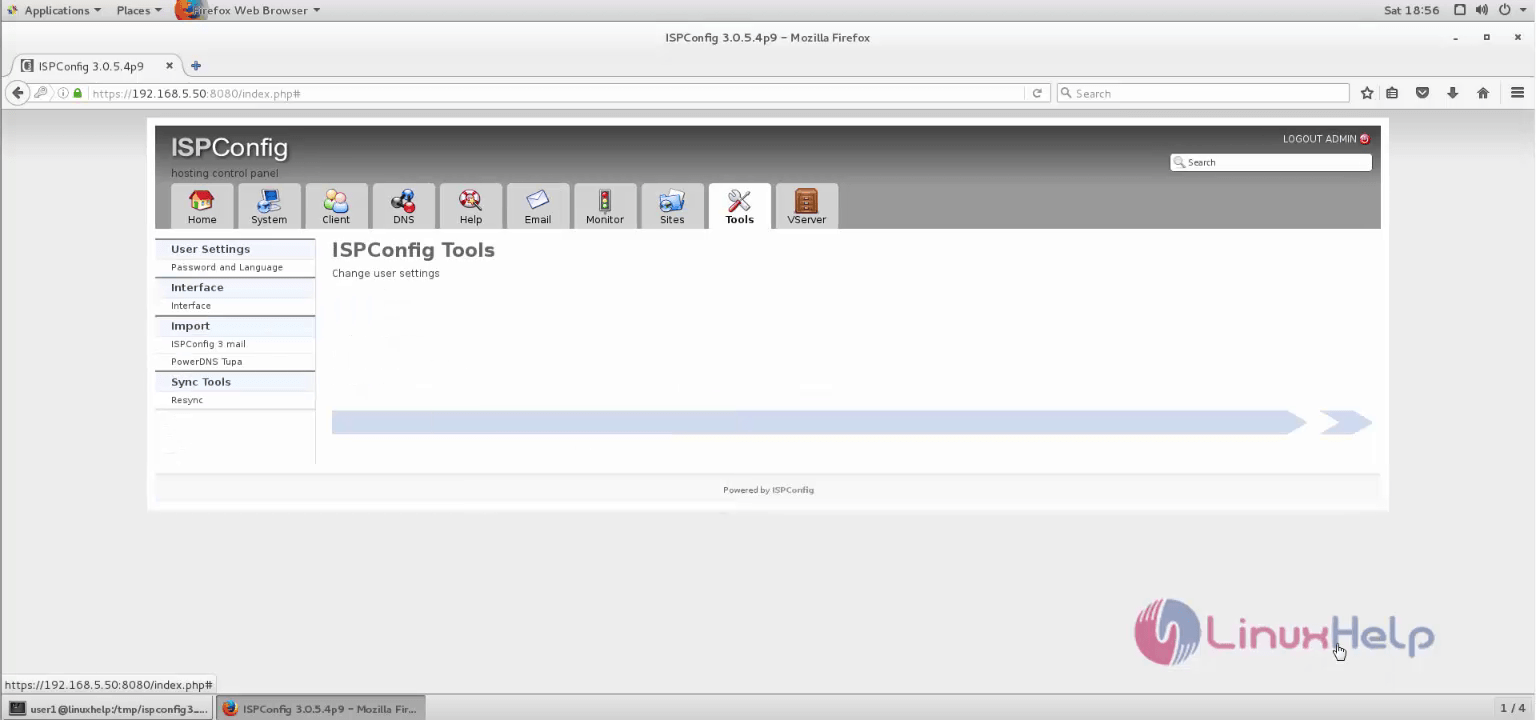
To change user settings, click tools.
Comments ( 0 )
No comments available