How to Install Jekyll in Ubuntu
{{postValue.id}}
Installing Jekyll in Ubuntu 16.04
Jekyll is used to develop static and simple website for all purpose. This is similar to CMS that runs without any data bases. It gets your contents in text format and produces a complete website. Installation of Jekyll in Ubuntu is explained in this manual.
Features
- Does not require databases.
- Supports HTML, CSS, Liquid.
- Static sites are readily available for deployment.
Installation steps of Jekyll
Utilise the following command to update your Ubuntu
root@linuxhelp1:~# apt-get update
Hit:1 http://in.archive.ubuntu.com/ubuntu xenial InRelease
Hit:2 http://security.ubuntu.com/ubuntu xenial-security InRelease
Hit:3 http://in.archive.ubuntu.com/ubuntu xenial-updates InRelease
Hit:4 http://in.archive.ubuntu.com/ubuntu xenial-backports InRelease
Reading package lists... Done
Install the ruby packages
root@linuxhelp1:~# apt-get install ruby-full -y
Reading package lists... Done
Building dependency tree
Reading state information... Done
The following packages were automatically installed and are no longer required:
  libpango1.0-0 libpangox-1.0-0 linux-headers-4.4.0-21
  linux-headers-4.4.0-21-generic linux-image-4.4.0-21-generic
  linux-image-extra-4.4.0-21-generic
Use ' sudo apt autoremove'  to remove them.
The following additional packages will be installed:
  fonts-lato javascript-common libgmp-dev libgmpxx4ldbl libjs-jquery
  libruby2.3 libtcltk-ruby rake ri ruby ruby-dev ruby-did-you-mean
  ruby-minitest ruby-net-telnet ruby-power-assert ruby-test-unit ruby2.3
  ruby2.3-dev ruby2.3-doc ruby2.3-tcltk rubygems-integration
.
.
.
Setting up ruby2.3-dev:amd64 (2.3.1-2~16.04) ...
Setting up ruby-dev:amd64 (1:2.3.0+1) ...
Setting up ruby-full (1:2.3.0+1) ...
Processing triggers for libc-bin (2.23-0ubuntu3) ...
Now install the Jekyll package using gem
root@linuxhelp1:~# gem install jekyll
Fetching: liquid-3.0.6.gem (100%)
Successfully installed liquid-3.0.6
Fetching: kramdown-1.11.1.gem (100%)
Successfully installed kramdown-1.11.1
Fetching: mercenary-0.3.6.gem (100%)
Successfully installed mercenary-0.3.6
.
.
.
Installing ri documentation for jekyll-watch-1.4.0
Parsing documentation for jekyll-3.1.6
Installing ri documentation for jekyll-3.1.6
Done installing documentation for liquid, kramdown, mercenary, safe_yaml, colorator, rouge, sass, jekyll-sass-converter, rb-fsevent, ffi, rb-inotify, listen, jekyll-watch, jekyll after 31 seconds
14 gems installed
Verify version of jekyll by running the following command.
root@linuxhelp1:~# jekyll -v
jekyll 3.1.6
Change to home directory and Create a new website
root@linuxhelp1:~# cd /home/
root@linuxhelp1:/home# jekyll new linuxhelp1.com
New jekyll site installed in /home/linuxhelp1.com.
The above command will create a new web directory under /home
root@linuxhelp1:/home# cd linuxhelp1.com/
root@linuxhelp1:/home/linuxhelp1.com# ls
about.md     css       _includes   _layouts  _sass
_config.yml  feed.xml  index.html  _posts
start the Jekyll application and replace below mentioned ip address with your ip.
root@linuxhelp1:/home/linuxhelp1.com# jekyll server --host 192.168.5.111
Configuration file: /home/linuxhelp1.com/_config.yml
            Source: /home/linuxhelp1.com
       Destination: /home/linuxhelp1.com/_site
 Incremental build: disabled. Enable with --incremental
      Generating...
                    done in 0.618 seconds.
 Auto-regeneration: enabled for ' /home/linuxhelp1.com'
Configuration file: /home/linuxhelp1.com/_config.yml
    Server address: http://192.168.5.111:4000/
  Server running... press ctrl-c to stop.
[2016-07-18 15:05:50] ERROR `/favicon.ico'  not found.
[2016-07-18 15:05:50] ERROR `/favicon.ico'  not found.
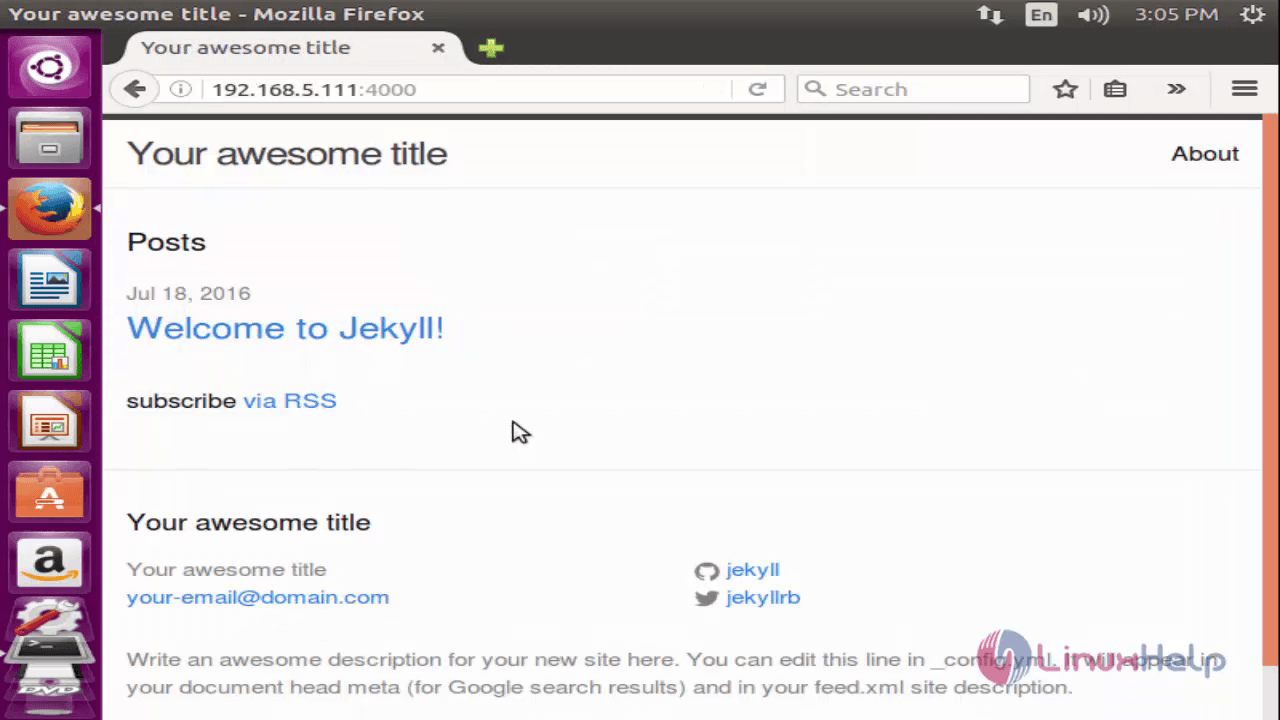
Open the browser and navigate to http://< IP_address> :4000
Comments ( 0 )
No comments available