How to install Jetty on CentOS 7
How to install Jetty on CentOS 7
Jetty is an open source java based HTTP Webserver and also java servlet container. It also performs as a server in several open source projects such as Lift, Hadoop and I2P. This tutorial shows you how to install Jetty on CentOS 7.
Installation procedure
To install jetty, first we need to install java. So enter the following command and press y to continue the installation.
[root@linuxhelp ~]# yum install java-1.7.0-openjdk -y
Loaded plugins: fastestmirror, langpacks
Loading mirror speeds from cached hostfile
 * base: mirror.fibergrid.in
 * extras: mirror.fibergrid.in
 * updates: mirror.fibergrid.in
Resolving Dependencies
-->  Running transaction check
--->  Package java-1.7.0-openjdk.x86_64 1:1.7.0.51-2.4.5.5.el7 will be updated
--->  Package java-1.7.0-openjdk.x86_64 1:1.7.0.131-2.6.9.0.el7_3 will be an update
-->  Processing Dependency: java-1.7.0-openjdk-headless = 1:1.7.0.131-2.6.9.0.el7_3 for package: 1:java-1.7.0-openjdk-1.7.0.131-2.6.9.0.el7_3.x86_64
-->  Running transaction check
--->  Package java-1.7.0-openjdk-headless.x86_64 1:1.7.0.51-2.4.5.5.el7 will be updated
--->  Package java-1.7.0-openjdk-headless.x86_64 1:1.7.0.131-2.6.9.0.el7_3 will be an update
-->  Processing Dependency: nss-softokn > = 3.16.2.3 for package: 1:java-1.7.0-openjdk-headless-1.7.0.131-2.6.9.0.el7_3.x86_64
.
.
.
Dependency Updated:
  chkconfig.x86_64 0:1.7.2-1.el7          java-1.7.0-openjdk-headless.x86_64 1:1.7.0.131-2.6.9.0.el7_3  nspr.x86_64 0:4.13.1-1.0.el7_3         nss.x86_64 0:3.28.2-1.6.el7_3
  nss-softokn.x86_64 0:3.16.2.3-14.4.el7  nss-softokn-freebl.x86_64 0:3.16.2.3-14.4.el7                 nss-sysinit.x86_64 0:3.28.2-1.6.el7_3  nss-tools.x86_64 0:3.28.2-1.6.el7_3
  nss-util.x86_64 0:3.28.2-1.1.el7_3      ntsysv.x86_64 0:1.7.2-1.el7
Complete!
Now use the below command to download jetty package.
[root@linuxhelp ~]# wget http://central.maven.org/maven2/org/eclipse/jetty/jetty-distribution/9.2.21.v20170120/jetty-distribution-9.2.21.v20170120.tar.gz
--2017-04-01 02:58:17--  http://central.maven.org/maven2/org/eclipse/jetty/jetty-distribution/9.2.21.v20170120/jetty-distribution-9.2.21.v20170120.tar.gz
Resolving central.maven.org (central.maven.org)... 151.101.40.209
Connecting to central.maven.org (central.maven.org)|151.101.40.209|:80... connected.
HTTP request sent, awaiting response... 200 OK
Length: 13743267 (13M) [application/x-gzip]
Saving to: ‘ jetty-distribution-9.2.21.v20170120.tar.gz’
100%[==========================================================================================================================================> ] 1,37,43,267 44.8KB/s   in 2m 41s
2017-04-01 03:00:58 (83.2 KB/s) - ‘ jetty-distribution-9.2.21.v20170120.tar.gz’  saved [13743267/13743267]
Next extract the tar package. Enter the ls command to list the files and then enter the tar package.
[root@linuxhelp ~]# ls
anaconda-ks.cfg  Desktop  Documents  Downloads  initial-setup-ks.cfg  jetty-distribution-9.2.21.v20170120.tar.gz  Music  Pictures  Public  Templates  Videos
[root@linuxhelp ~]# tar -xzvf jetty-distribution-9.2.21.v20170120.tar.gz -C /opt/
jetty-distribution-9.2.21.v20170120/
jetty-distribution-9.2.21.v20170120/webapps/
jetty-distribution-9.2.21.v20170120/etc/
jetty-distribution-9.2.21.v20170120/demo-base/
jetty-distribution-9.2.21.v20170120/demo-base/webapps/
jetty-distribution-9.2.21.v20170120/demo-base/webapps/ROOT/
jetty-distribution-9.2.21.v20170120/demo-base/webapps/ROOT/images/
jetty-distribution-9.2.21.v20170120/demo-base/webapps/test.d/
jetty-distribution-9.2.21.v20170120/demo-base/etc/
jetty-distribution-9.2.21.v20170120/demo-base/start.d/
.
.
.
jetty-distribution-9.2.21.v20170120/lib/jetty-quickstart-9.2.21.v20170120.jar
jetty-distribution-9.2.21.v20170120/lib/fcgi/fcgi-server-9.2.21.v20170120.jar
jetty-distribution-9.2.21.v20170120/lib/fcgi/fcgi-client-9.2.21.v20170120.jar
jetty-distribution-9.2.21.v20170120/notice.html
rename the extracted jetty directory inside /opt/
Then rename the the unzipped directory to jetty .
[root@linuxhelp ~]# cd /opt/
[root@linuxhelp opt]# ls
jetty-distribution-9.2.21.v20170120  rh
[root@linuxhelp opt]# mv jetty-distribution-9.2.21.v20170120 jetty
[root@linuxhelp opt]# ls
jetty  rh
Create the user for jetty and also change user and group ownership for /opt/jetty directory.
[root@linuxhelp ~]# useradd -m jetty
[root@linuxhelp ~]# chown -R jetty:jetty /opt/jetty/
Now create the following softlink for service.
[root@linuxhelp ~]# ln -s /opt/jetty/bin/jetty.sh /etc/init.d/jetty
Next enable jetty service in boot time automatically by using chkconfig command.
[root@linuxhelp ~]# chkconfig --add jetty
[root@linuxhelp ~]# chkconfig --level 345 jetty on
Create following configuration options.
[root@linuxhelp ~]# vim /etc/default/jetty
Entry:
JETTY_HOME=/opt/jetty
JETTY_USER=jetty
JETTY_PORT=8080
JETTY_HOST=192.168.5.160
JETTY_LOGS=/opt/jetty/logs/
The configuration options are added. Now start the service in the terminal.
[root@linuxhelp ~]# service jetty start
Starting Jetty: StartLog to /opt/jetty/logs/start.log
2017-04-01 03:07:46.385:INFO::main: Logging initialized @1616ms
2017-04-01 03:07:46.665:WARN:oejs.HomeBaseWarning:main: This instance of Jetty is not running from a separate {jetty.base} directory, this is not recommended.  See documentation at http://www.eclipse.org/jetty/documentation/current/startup.html
2017-04-01 03:07:46.963:INFO::main: Redirecting stderr/stdout to /opt/jetty/logs/2017_03_31.stderrout.log
OK Sat Apr  1 03:07:48 IST 2017
Change the current working directory to Jetty using the cd command.
[root@linuxhelp ~]# cd /opt/jetty/
The current working directory changes to jetty and enter the following command to remove the webapps.
[root@linuxhelp jetty]# rm -rf webapps/
Now copy the demo-base of the Jetty.
[root@linuxhelp jetty]# cp -r demo-base/webapps/ /opt/jetty/
Open the browser and call your ip address and port no 8080 with the URL http://192.168.5.160:8080
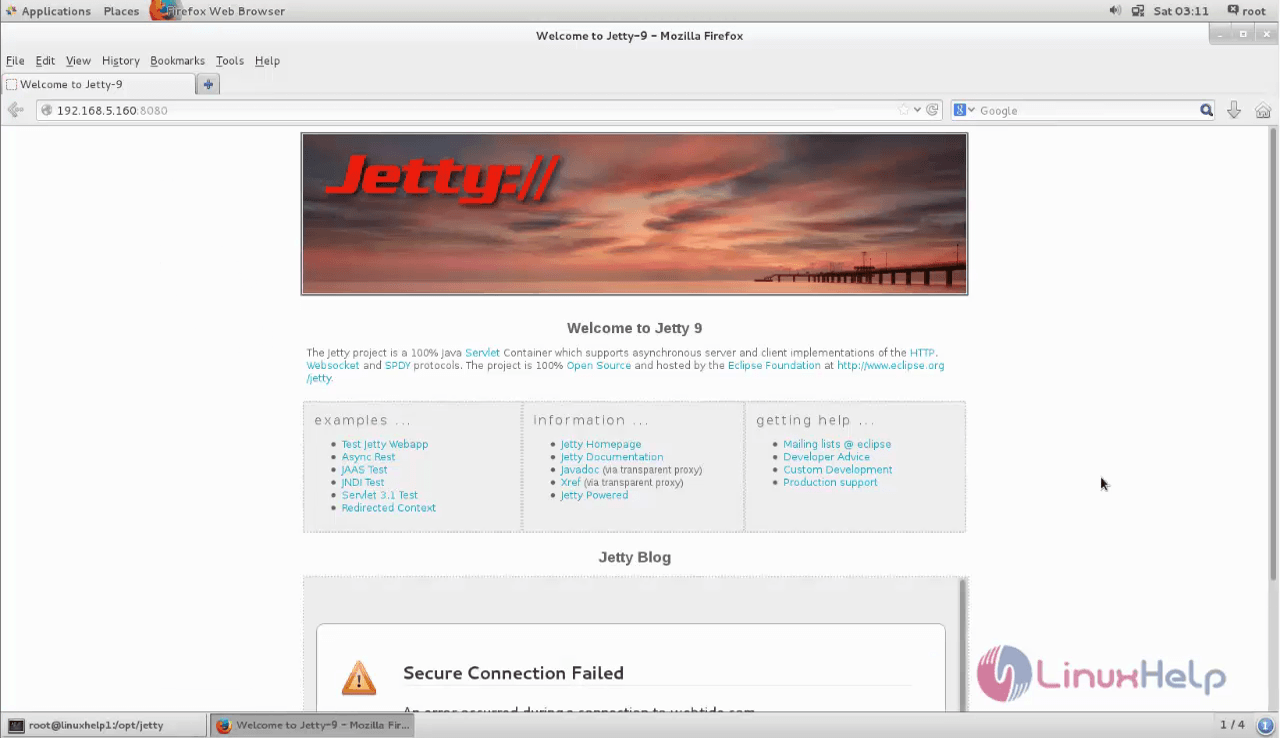
Wasn' t that an easy installation? Jetty is a java application running on Linux and also a servlet container.
Comments ( 0 )
No comments available