How to install KeePass2 on Ubuntu 17.04
How to install KeePass2 on Ubuntu 17.04
KeePass2 is a free and open source password manager where the user can can store the all the users passwords in a single highly-encrypted database. The user can put all the passwords in a single database, which can be unlocked with one master password or a key file. It also support data from various file formats and exported to various file formats as well. This tutorial explains the installation procedure of keepass2 on Ubuntu 17.04.
Installation procedure
To start the installation procedure, add the repo by executing the following command.
root@linuxhelp1:~# add-apt-repository ppa:eugenesan/ppa
This repository contains collection of customized, updated, ported and backported
packages for two last LTS releases and latest pre-LTS release.
Packages for older releases relocated to ppa:eugenesan/archive or deleted.
+-------------------------------------------------------------------------------------+
| Disclaimer:
+-------------------------------------------------------------------------------------+
* Packages in this a nd related PPAs are for personal use only.
  They developed specifically for several custom environments and may not work for you.
* Usage of packages in this PPA, in some forms, might contradict licenses of software
  packaged in this and related PPAs. End users and administrator are responsible for
  runtime licensing and possible legal consequences.
* Some packages provided with their dependencies while some might require additional
  Ubuntu repositories and external PPAs. Below is the list of
.
.
.
gpg: keybox ' /tmp/tmpep5uscs5/pubring.gpg'  created
gpg: /tmp/tmpep5uscs5/trustdb.gpg: trustdb created
gpg: key E61380B28313A596: public key " Launchpad synergy+"  imported
gpg: Total number processed: 1
gpg:imported: 1
OK
The repositories are added to the target system. Update the repo by executing the apt-get update command.
root@linuxhelp1:~# apt-get update
Get:1 http://security.ubuntu.com/ubuntu zesty-security InRelease [89.2 kB]
Get:2 http://ppa.launchpad.net/eugenesan/ppa/ubuntu zesty InRelease [15.4 kB]
Hit:3 http://in.archive.ubuntu.com/ubuntu zesty InRelease
Get:4 http://in.archive.ubuntu.com/ubuntu zesty-updates InRelease [89.2 kB]
Get:5 http://ppa.launchpad.net/eugenesan/ppa/ubuntu zesty/main i386 Packages [1,108 B]
Get:6 http://ppa.launchpad.net/eugenesan/ppa/ubuntu zesty/main amd64 Packages [1,100 B]
Get:7 http://ppa.launchpad.net/eugenesan/ppa/ubuntu zesty/main Translation-en [1,288 B]
Hit:8 http://in.archive.ubuntu.com/ubuntu zesty-backports InRelease
Fetched 197 kB in 3s (61.9 kB/s)
Reading package lists... Done
The target system is updated with the required repositories. Install the keepass2 package and press y to continue with the installation process.
root@linuxhelp1:~# apt-get install keepass2 -y
Reading package lists... Done
Building dependency tree
Reading state information... Done
The following additional packages will be installed:
binfmt-support ca-certificates-mono cli-common libgdiplus libgif7 libmono-accessibility4.0-cil libmono-corlib4.5-cil
libmono-data-tds4.0-cil libmono-i18n-west4.0-cil libmono-i18n4.0-cil libmono-posix4.0-cil libmono-security4.0-cil
libmono-system-configuration4.0-cil libmono-system-core4.0-cil libmono-system-data4.0-cil libmono-system-drawing4.0-cil
libmono-system-enterpriseservices4.0-cil libmono-system-numerics4.0-cil
libmono-system-runtime-serialization-formatters-soap4.0-cil libmono-system-security4.0-cil libmono-system-transactions4.0-cil
libmono-system-windows-forms4.0-cil libmono-system-xml4.0-cil libmono-system4.0-cil libmono-webbrowser4.0-cil mono-4.0-gac
mono-gac mono-runtime mono-runtime-common mono-runtime-sgen xsel
Suggested packages:
keepass2-doc mono-dmcs xdotool libmono-i18n4.0-all libgnomeui-0 libgamin0
.
.
.
Certificate added: C=US, O=Wells Fargo WellsSecure, OU=Wells Fargo Bank NA, CN=WellsSecure Public Root Certificate Authority
Certificate added: C=CN, O=WoSign CA Limited, CN=Certification Authority of WoSign
Certificate added: C=CN, O=WoSign CA Limited, CN=CA
Certificate added: C=US, OU=www.xrampsecurity.com, O=XRamp Security Services Inc, CN=XRamp Global Certification Authority
Certificate added: C=RO, O=certSIGN, OU=certSIGN ROOT CA
Certificate added: C=TW, O=" Chunghwa Telecom Co., Ltd." , OU=ePKI Root Certification Authority
Certificate added: C=US, O=" thawte, Inc." , OU=Certification Services Division, OU=" (c) 2006 thawte, Inc. - For authorized use only" , CN=thawte Primary Root CA
Certificate added: C=US, O=" thawte, Inc." , OU=" (c) 2007 thawte, Inc. - For authorized use only" , CN=thawte Primary Root CA - G2
Certificate added: C=US, O=" thawte, Inc." , OU=Certification Services Division, OU=" (c) 2008 thawte, Inc. - For authorized use only" , CN=thawte Primary Root CA - G3
173 new root certificates were added to your trust store.
Import process completed.
Done
done.
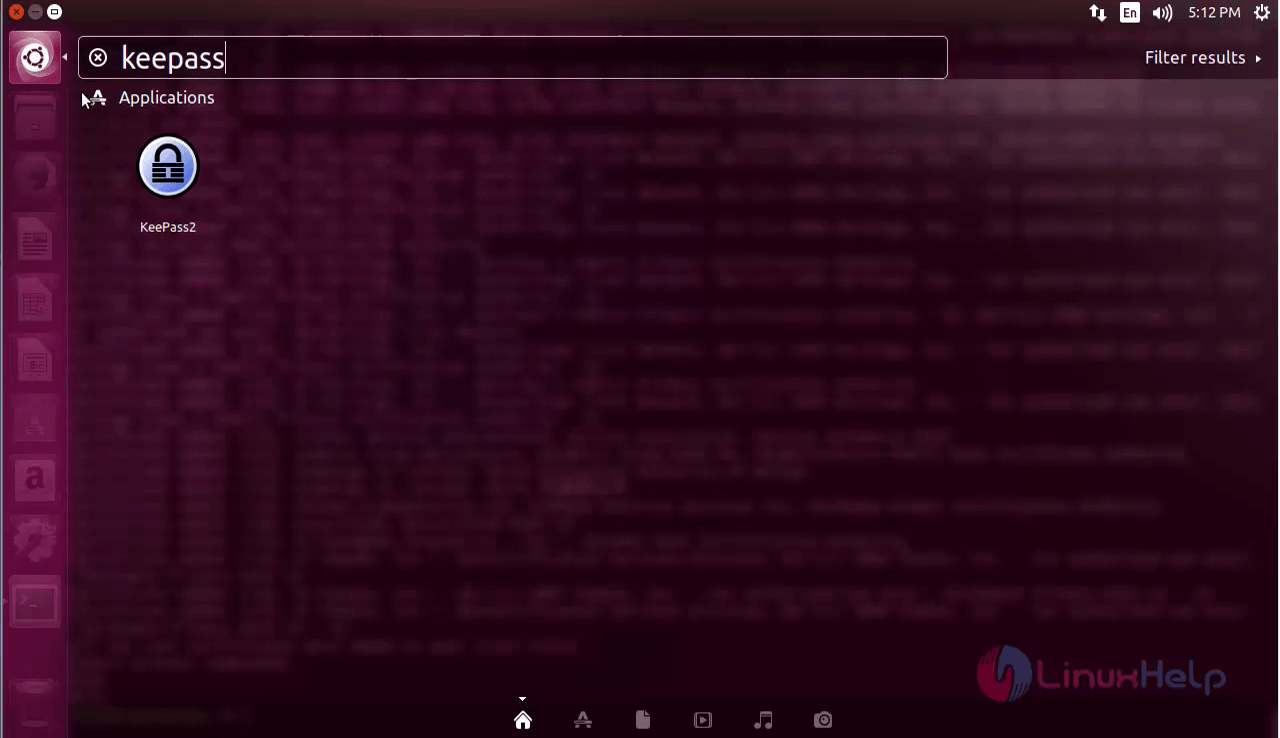
The application has been installed successfully. To open the keepass2 package, type the package name in the ubuntu dashboard and click on the icon to run the application.
The keepass2 application is running successfully. Now the user can use the application to safegaurd passwords and files.

For removing the package, execute the following remove command and press y to continue with the uninstallation process.
root@linuxhelp1:~# apt-get remove keepass2 -y
Reading package lists... Done
Building dependency tree
Reading state information... Done
The following packages were automatically installed and are no longer required:
ca-certificates-mono cli-common libgdiplus libgif7 libmono-accessibility4.0-cil libmono-corlib4.5-cil libmono-data-tds4.0-cil
libmono-i18n-west4.0-cil libmono-i18n4.0-cil libmono-posix4.0-cil libmono-security4.0-cil libmono-system-configuration4.0-cil
libmono-system-core4.0-cil libmono-system-data4.0-cil libmono-system-drawing4.0-cil libmono-system-enterpriseservices4.0-ci
libmono-system-numerics4.0-cil libmono-system-runtime-serialization-formatters-soap4.0-cil libmono-system-security4.0-cil
libmono-system-transactions4.0-cil libmono-system-windows-forms4.0-cil libmono-system-xml4.0-cil libmono-system4.0-cil
libmono-webbrowser4.0-cil mono-4.0-gac mono-gac mono-runtime mono-runtime-common mono-runtime-sgen xsel
Use ' apt autoremove'  to remove them.
The following packages will be REMOVED:
keepass2
0 upgraded, 0 newly installed, 1 to remove and 68 not upgraded.
After this operation, 3,175 kB disk space will be freed.
(Reading database ... 169161 files and directories currently installed.)
Removing keepass2 (2.35+dfsg-2) ...
Processing triggers for mime-support (3.60ubuntu1) ...
Processing triggers for desktop-file-utils (0.23-1ubuntu2) ...
Processing triggers for bamfdaemon (0.5.3+17.04.20170406-0ubuntu1) ...
Rebuilding /usr/share/applications/bamf-2.index...
Processing triggers for man-db (2.7.6.1-2) ...
Processing triggers for shared-mime-info (1.8-1) ...
Processing triggers for gnome-menus (3.13.3-6ubuntu5) ...
Processing triggers for hicolor-icon-theme (0.15-1) ...
Wasn' t that an easy installation procedure? KeePass2 also supports exportation to various formats, including txt, html, xml and csv files.
Comments ( 0 )
No comments available