How To Install Keeper Password Manager on Ubuntu 16.04
To Install Keeper Password Manager on Ubuntu 16.04
Keeper is one of the most powerful and secure online password manager tools. It uses Amazon AWS to host and operate the encrypted Cloud Security Vault which is why it provides its users with unlimited secure backups. This also uses 256-bit AES encryption and PBKDF2 to encrypt the user information and passwords to ensue the best security. It also comes with an extension, mobile app, and even desktop app support for all the browsers and operating systems. It supports two-factor authentication, fingerprint login and Keeper DNA which uses personal devices like your smartwatch to confirm your identity.
Installing Keeper
Before you begin the installation, make sure you download the latest and stable installation package of keeper by making use of the wget command in the following manner.
root@Linuxhelp:~# wget https://keepersecurity.com/en_US/static/apps/KeeperDesktopLinux.zip
--2018-02-15 01:44:51--  https://keepersecurity.com/en_US/static/apps/KeeperDesktopLinux.zip
Resolving keepersecurity.com (keepersecurity.com)... 52.204.60.27
Connecting to keepersecurity.com (keepersecurity.com)|52.204.60.27|:443... connected.
HTTP request sent, awaiting response... 200 OK
Length: 30316657 (29M) [application/zip]
Saving to: ‘ KeeperDesktopLinux.zip’

KeeperDesktopLinux. 100%[===================> ]  28.91M  1.11MB/s    in 30s

2018-02-15 01:45:22 (988 KB/s) - ‘ KeeperDesktopLinux.zip’  saved [30316657/30316657]
Once the file is downloaded, extract the downloaded file with the help of the following command.
root@Linuxhelp:~# unzip KeeperDesktopLinux.zip -d keeper
Archive:  KeeperDesktopLinux.zip
  inflating: keeper/aopalliance-1.0.jar
  inflating: keeper/bcprov-jdk15on-1.48.jar
  inflating: keeper/cacerts
  inflating: keeper/commons-io-1.4.jar
  inflating: keeper/commons-logging-1.1.3.jar
  inflating: keeper/guava-18.0.jar
  inflating: keeper/guice-4.0-no_aop.jar
  inflating: keeper/ini4j-0.5.4.jar
  inflating: keeper/javax.inject-1.jar
  inflating: keeper/jna-4.2.2.jar
  inflating: keeper/jna-platform-4.2.2.jar
  inflating: keeper/KeeperDesktop.jar
  inflating: keeper/log4j-1.2.17.jar
  inflating: keeper/proxy-vole-1.0.2.jar
  inflating: keeper/sqlite-jdbc-3.8.11.2.jar
  inflating: keeper/tika-core-1.6.jar
  inflating: keeper/tyrus-standalone-client-1.11.1.jar
  inflating: keeper/README.txt
Once it is done, enter into extracted directory. And You shall run the following java command which opens the application.
root@Linuxhelp:~# cd keeper/
root@Linuxhelp:~/keeper# java -Xms256m -Xmx1g -jar KeeperDesktop.jar
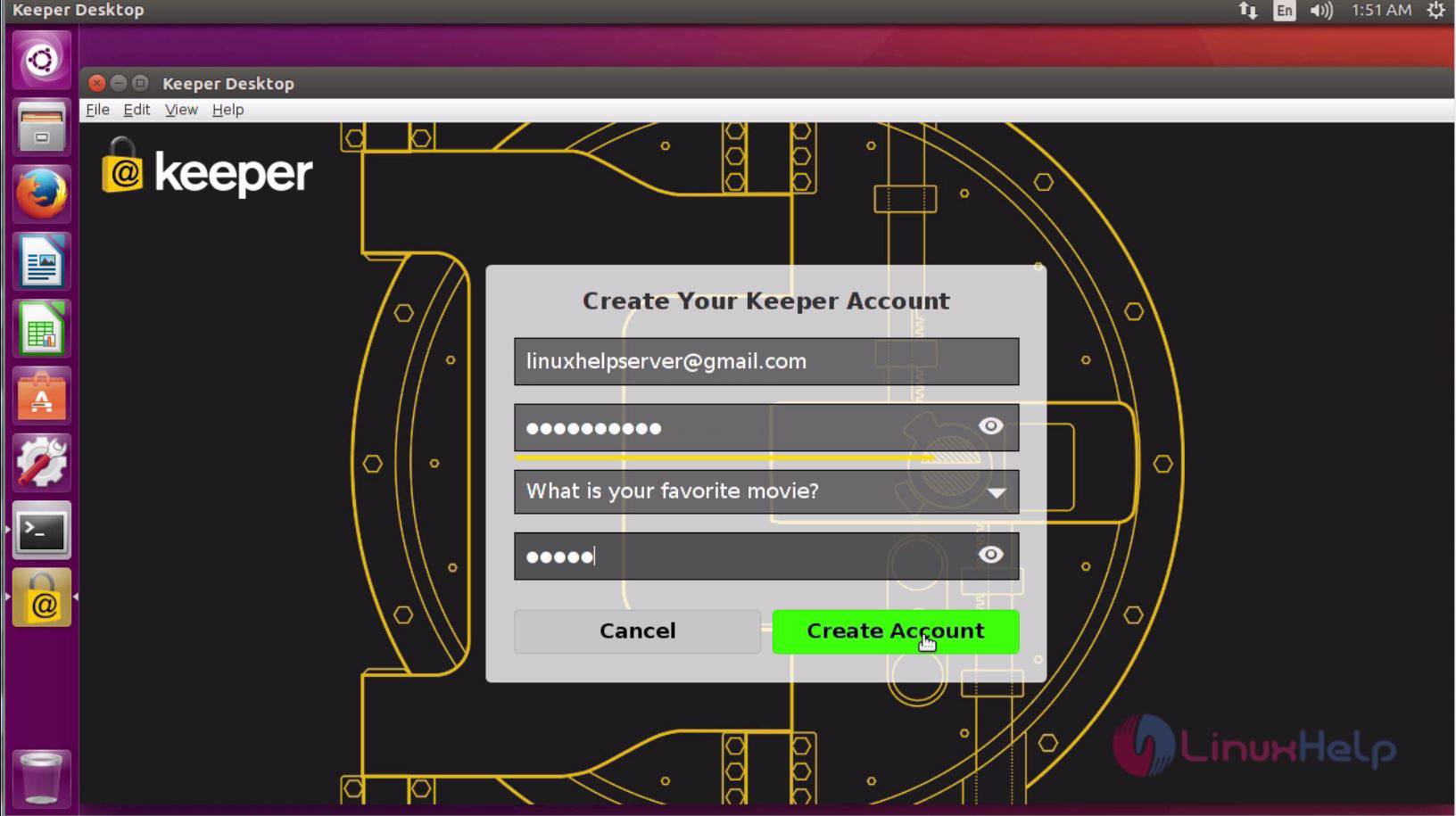
Later, it would prompt you to Login, so give your credentials if you have an account or else, click create an account to create a new account.

Fill all the details and click create an account.
The application is now open.

With this, the installation of Keeper Password Manager on Ubuntu 16.04 comes to an end.
Comments ( 0 )
No comments available