• Categories
    Category
    {{ postCtrl.tags }}
    • {{ category.tag_type }}

      • {{tag.tag_name}}
      • View more
  • Categories
    Category
    {{ postCtrl.tags }}
    • {{ category.tag_type }}

      • {{tag.tag_name}}
      • View more
  • News
  • Tutorials
  • Forums
  • Tags
  • Users
Tutorial News Comments FAQ Related Articles

How To Install KMplayer on linuxmint-18.03

{{postValue.id}}

To Install KMPlayer on linuxmint-18.03
KMPlayer is a cross-platform multimedia player application. It’ s available for all major operating systems i.e. Linux, Microsoft Windows, Mac OS. It supports all audio and video media file formats like AVI, MP4, MP3, WMV, MPEG and many more.

Installation

Update the system repository using apt-get command

linuxhelp ~ # apt-get update
Hit:1 http://archive.canonical.com/ubuntu xenial InRelease
Hit:2 http://security.ubuntu.com/ubuntu xenial-security InRelease   
Hit:3 http://archive.ubuntu.com/ubuntu xenial InRelease                  
Hit:4 http://archive.ubuntu.com/ubuntu xenial-updates InRelease          
Ign:5 http://packages.linuxmint.com sylvia InRelease                    
Hit:6 http://archive.ubuntu.com/ubuntu xenial-backports InRelease       
Hit:7 http://packages.linuxmint.com sylvia Release
Reading package lists... Done 

Install the KMPlayer application

linuxhelp ~ # apt-get install kmplayer -y
Reading package lists... Done
Building dependency tree       
Reading state information... Done
The following additional packages will be installed:
  breeze-icon-theme kate-data katepart kde-runtime kde-runtime-data kde-style-breeze
  kde-style-breeze-qt4 kdelibs-bin kdelibs5-data kdelibs5-plugins kdoctools libattica0.4
  libdlrestrictions1 libfam0 libkactivities6 libkatepartinterfaces4 libkcmutils4 libkde3support4
  libkdeclarative5 libkdecore5 libkdesu5 libkdeui5 libkdewebkit5 libkdnssd4 libkemoticons4
  libkf5auth-data libkf5auth5 libkf5codecs-data libkf5codecs5 libkf5config-data libkf5configcore5
  libkf5configgui5 libkf5configwidgets-data libkf5configwidgets5 libkf5coreaddons-data
  libkf5coreaddons5 libkf5guiaddons5 libkf5i18n-data libkf5i18n5 libkf5iconthemes-data
  .
.
.

Setting up phonon-backend-gstreamer-common:amd64 (4:4.8.2-0ubuntu2) ...
Setting up phonon-backend-gstreamer:amd64 (4:4.8.2-0ubuntu2) ...
Setting up phonon:amd64 (4:4.8.3-0ubuntu3) ...
Setting up ntrack-module-libnl-0 (016-1.3) ...
Setting up libntrack0 (016-1.3) ...
Setting up libntrack-qt4-1 (016-1.3) ...
Setting up kde-runtime (4:15.12.3-0ubuntu1) ...
update-alternatives: using /usr/lib/kde4/libexec/kdesu-distrib/kdesu to provide /usr/lib/kde4/libexec/kdesu (kdesu) in auto mode
Setting up kmplayer (1:0.11.3d-3) ...
Processing triggers for libc-bin (2.23-0ubuntu9) ...
Processing triggers for dbus (1.10.6-1ubuntu3.3) ...

Once the application is installed you can access the application from the menu
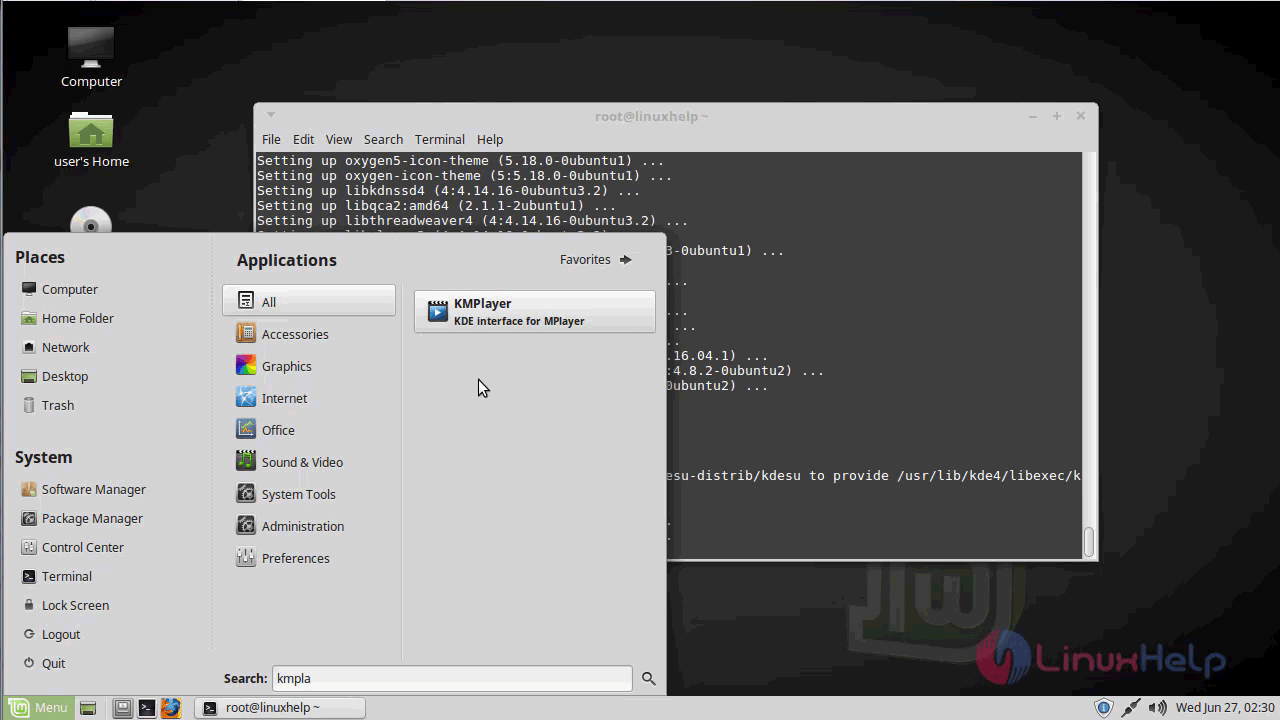
Snap1

Kmplayer application
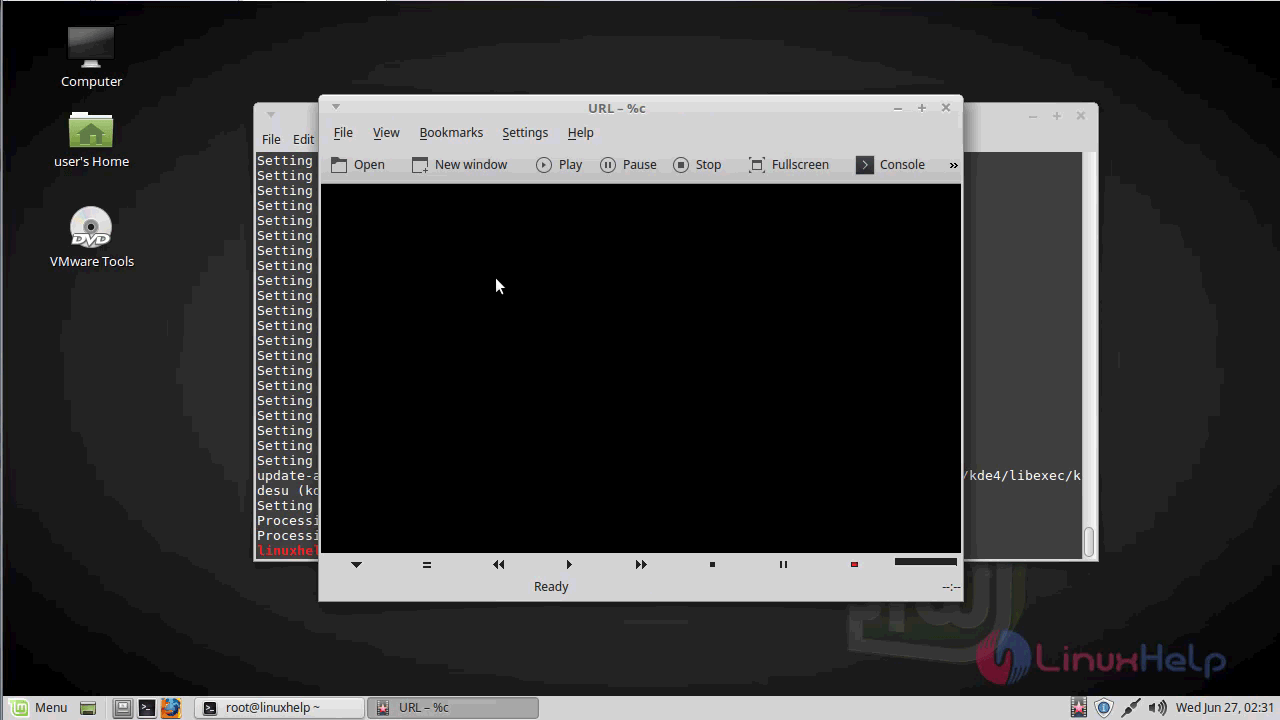
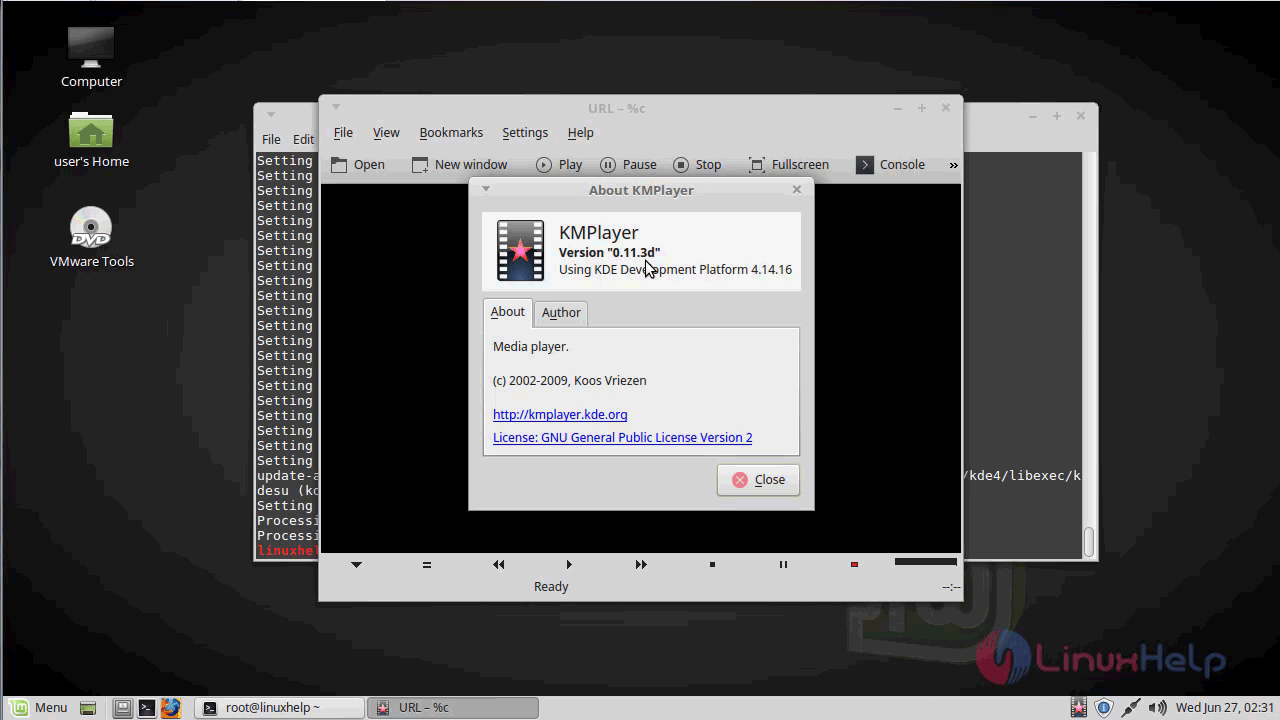
Snap2

The version of kmplayer
Snap3

With this, the method to install KMPlayer on linuxmint-18.03 comes to an end.

Tags:
kishore
Author: 

Comments ( 0 )

No comments available

Add a comment
{{postCtrl.cmtErrMsg}}

Frequently asked questions ( 5 )

Q

What are the alternative tools available for KMPlayer?

A

The following alternative tools are available for KMPlayer as given below,
VLC,
MPC-HC,
PotPlayer,
MPV,
SMPlayer

Q

How to download the KMPlayer?

A

For download the KMPlayer, use the following link as given below "https://kmplayer.en.uptodown.com/windows/download"

Q

How to access the Github repository of the KMPlayer?

A

For accessing the Github repository of the KMPlayer, use the following link as given below "https://github.com/KDE/kmplayer"

Q

What are the Player backends in KMPlayer?

A

Although not really needed, KMPlayer assumes you have a working mplayer somewhere in your PATH (comment out gui=yes in your mplayer config file, use player for MPlayer's own GUI instead)
Support for Xine, GStreamer and/or ffmpeg is optional, but the Xine backend is highly recommended esp. if you want to watch DVD. Of course, you need at least one of mplayer, Xine or GStreamer to play anything at all. Install xine-lib and ffmpeg if you want it. You should install xine-lib before compiling kmplayer (and don't forget to run ldconfig if you compile/install xine-lib yourself). Same goes for GStreamer. MPlayer and ffmpeg can be installed afterward.
MPlayer and Xine can use the binary-only codecs. Basically, you should unpack these and copy the files to /usr/lib/win32

Q

Why the need for KDE4 in KMPlayer?

A

Untar the source package

tar xfj kmplayer-.tar.bz2

Create a build directory, eg /tmp/kmplayer-build and enter this directory
Set your environment for building KDE4 apps

export QTDIR=path-to-qt4
export KDEDIR=path-to-kde4
export KDEDIRS=$KDEDIR
export KDE_BUILD=$KDEDIR
export DBUSDIR=$KDEDIR
export LD_LIBRARY_PATH=$QTDIR/lib:$KDEDIR/lib:$LD_LIBRARY_PATH
export PKG_CONFIG_PATH=$DBUSDIR/lib/pkgconfig:/usr/lib/pkgconfig
export PATH=$QTDIR/bin:$KDEDIR/bin:$PATH

Run cmake

cmake -DCMAKE_INSTALL_PREFIX=$KDEDIR -DCMAKE_BUILD_TYPE=release path-to-kmplayer-source

Run make

make

Install as root

make install

Back To Top!
Rank
User
Points

Top Contributers

userNamenaveelansari
135850

Top Contributers

userNameayanbhatti
92510

Top Contributers

userNamehamzaahmed
32150

Top Contributers

1
userNamelinuxhelp
31040

Top Contributers

userNamemuhammadali
24500
Can you help David Lopez Guillen ?
Ayuda urgente instale SSL para servidor Opensuse y ahora no funciona tengo servicio web

hola segui este tutorial para tener un certificado ssl y ahora no se ve mi app en la red, espero alguien pueda ayudarme, tengo M9oodle en3.5 en un servidor open suse y ahora no funciona por favor ayuda.

https://www.linuxhelp.com/how-to-create-ssl-certificate-in-opensuse

Networking
  • Routing
  • trunk
  • Netmask
  • Packet Capture
  • domain
  • HTTP Proxy
Server Setup
  • NFS
  • KVM
  • Memory
  • Sendmail
  • WebDAV
  • LXC
Shell Commands
  • Cloud commander
  • Command line archive tools
  • last command
  • Shell
  • terminal
  • Throttle
Desktop Application
  • Linux app
  • Pithos
  • Retrospect
  • Scribe
  • TortoiseHg
  • 4Images
Monitoring Tool
  • Monit
  • Apache Server Monitoring
  • EtherApe 
  • Arpwatch Tool
  • Auditd
  • Barman
Web Application
  • Nutch
  • Amazon VPC
  • FarmWarDeployer
  • Rukovoditel
  • Mirror site
  • Chef
Contact Us | Terms of Use| Privacy Policy| Disclaimer
© 2025 LinuxHelp.com All rights reserved. Linux™ is the registered trademark of Linus Torvalds. This site is not affiliated with linus torvalds in any way.