How to install Ktube media downloader in Ubuntu
How to install Ktube media downloader in Ubuntu
Ktube Media Downloader is a freeware YouTube video downloader which allows its users to use the available application features. The user can search, apply various search filters, select a current location, etc. There will be a limitation of two videos per day to download videos through the application. In order to break this limit the user has to unlock the full version of application. This tutorial covers the installation process of Ktube media downloader in Ubuntu.
Installation procedure
To start with the installation procedure, install the qt5 package by executing the following command.
root@linuxhelp:/home/user1/Desktop# apt-get install qt5-default
Reading package lists... Done
Building dependency tree
Reading state information... Done
&hellip
&hellip
&hellip
Setting up libx11-doc (2:1.6.3-1ubuntu2) ...
Setting up qt5-default:amd64 (5.5.1+dfsg-16ubuntu7.2) ...
Processing triggers for libc-bin (2.23-0ubuntu7) ...
The qt5 package has been successfully installed. Download the installation package by running the wget command with the following link.
root@linuxhelp:/home/user1/Desktop# wget https://github.com/keshavbhatt/Ktube-media-downloader/releases/download/1.0/ktube-media-downloader_1.0_amd64.deb
--2017-05-25 15:10:29--  https://github.com/keshavbhatt/Ktube-media-downloader/releases/download/1.0/ktube-media-downloader_1.0_amd64.deb
Resolving github.com (github.com)... 192.30.255.113, 192.30.255.112
&hellip
&hellip
&hellip
ktube-media-downloader_1.0_amd64.deb               100%[================================================================================================================> ] 379.53K   207KB/s    in 1.8s
2017-05-25 15:10:34 (207 KB/s) - ‘ ktube-media-downloader_1.0_amd64.deb’  saved [388634/388634]
root@linuxhelp:/home/user1/Desktop# dpkg -i ktube-media-downloader_1.0_amd64.deb
Selecting previously unselected package ktube-media-downloader.
(Reading database ... 178037 files and directories currently installed.)
..
&hellip
Processing triggers for mime-support (3.59ubuntu1) ...
Errors were encountered while processing:
 ktube-media-downloader
While installing some dependency error may occur during the installation. To solve the dependency problem, execute the following command.
root@linuxhelp:/home/user1/Desktop# apt-get -f install
Reading package lists... Done
Building dependency tree
Reading state information... Done
&hellip
&hellip
&hellip
Setting up mpv (0.14.0-1build1) ...
Setting up rtmpdump (2.4+20151223.gitfa8646d-1ubuntu0.1) ...
Processing triggers for libc-bin (2.23-0ubuntu7) ...
To open Ktube application, execute the following command in the terminal.
root@linuxhelp:/home/user1/Desktop# ktube-media-downloader
The Ktube application has been launched and a list of trending videos will appear in the ktube application.

The user can also select the video categories like popular, sports, comedy, news and politics, etc.

The user can also watch Live TV and browse through a score of channels.

As the limit is set to download only 2 videos per day. Unlock the software to relieve of this limit on downloading videos.

There is a panel of Settings found on the right side of the view area. The user can customize the settings according to the needs of the user.
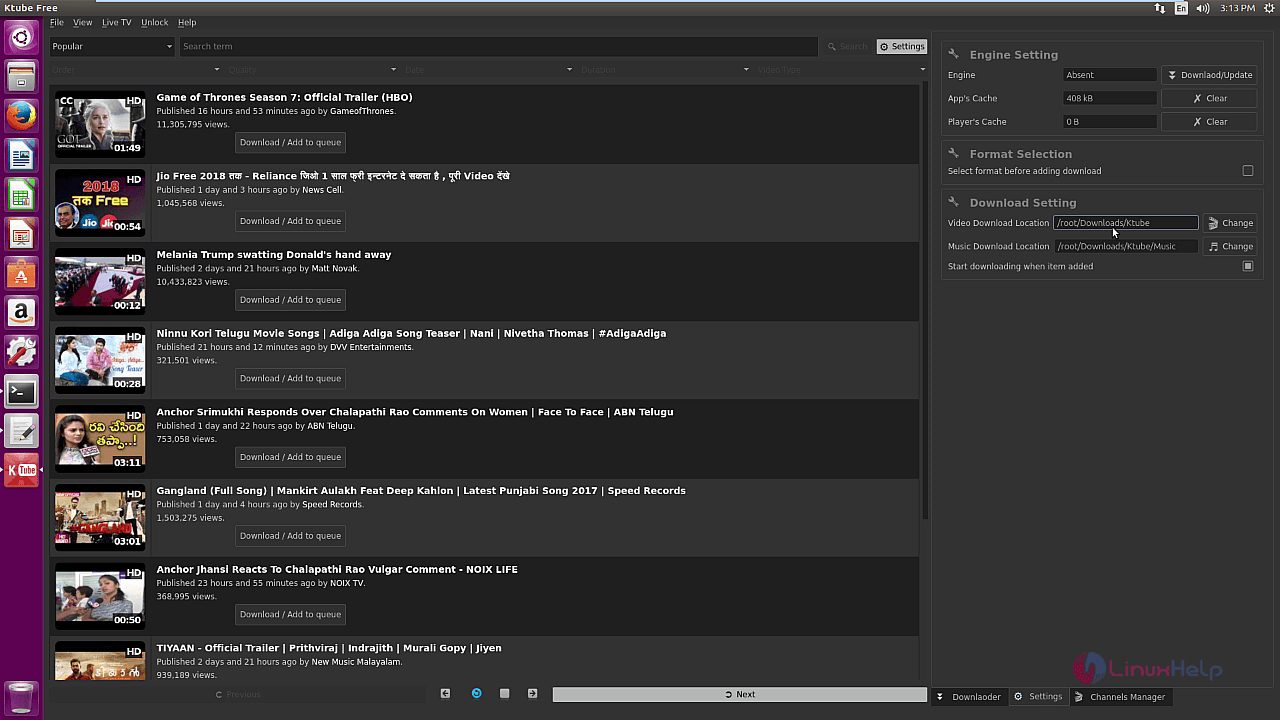
To start downloading a video, select any video from the list and click download button.

The selected video is in progress of downloading.

The downloaded video is stored in the downloads location of ktube in the target system.

Wasn' t that an wasy installation procedure? Ktube allows the users to download media files in different custom formats like YouTube video.
Comments ( 0 )
No comments available