How to Install LAMP on CentOS-8
How to Install LAMP on CentOS-8
Introduction:
LAMP an acronym of Linux, Apache, MySQL and PHP is a stack of software that comes with the Linux operating system, the Apache HTTP Server, the MySQL or mariadb relational database management system, and the PHP programming language.This tutorial covers the method of LAMP installation on CentOS 8.
Installation process:
To check the installed version of OS, run the following command.
[root@linuxhelp ~]# cat /etc/centos-release
CentOS Linux release 8.1.1911 (Core)
Install Apache service using below command
[root@linuxhelp ~]# yum install httpd -y

Last metadata expiration check: 1:23:11 ago on Tuesday 13 October 2020 12:10:30 PM IST.
Dependencies resolved.
httpd                                        x86_64                           2.4.37-21.module_el8.2.0+494+1df74eae                               AppStream                           1.7 M
Installing dependencies:
 …..
….
  apr-1.6.3-9.el8.x86_64                                       apr-util-1.6.1-6.el8.x86_64                                 httpd-filesystem-2.4.37-21.module_el8.2.0+494+1df74eae.noarch
  httpd-tools-2.4.37-21.module_el8.2.0+494+1df74eae.x86_64     mod_http2-1.11.3-3.module_el8.2.0+486+c01050f0.1.x86_64     centos-logos-httpd-80.5-2.el8.noarch
Complete!
Then install the mariadb
[root@linuxhelp user]# yum install mariadb mariadb-server
Last metadata expiration check: 1:34:08 ago on Tuesday 13 October 2020 12:10:30 PM IST.
Dependencies resolved.
….
 (5/10): mariadb-gssapi-server-10.3.17-1.module_el8.1.0+257+48736ea6.x86_64.rpm                                                                               256 kB/s |  49 kB     00:00
(6/10): mariadb-10.3.17-1.module_el8.1.0+257+48736ea6.x86_64.rpm                                                                                             244 kB/s | 6.1 MB     00:25
(7/10): mariadb-backup-10.3.17-1.module_el8.1.0+257+48736ea6.x86_64.rpm                                                                                      220 kB/s | 6.0 MB     00:28
(8/10): perl-DBD-MySQL-4.046-3.module_el8.1.0+203+e45423dc.x86_64.rpm                                                                                        235 kB/s | 156 kB     00:00
(9/10): mariadb-server-utils-10.3.17-1.module_el8.1.0+257+48736ea6.x86_64.rpm                                                                                293 kB/s | 1.6 MB     00:05
(10/10): mariadb-server-10.3.17-1.module_el8.1.0+257+48736ea6.x86_64.rpm                                                                                     397 kB/s |  16 MB     00:41
….
…
  mariadb-connector-c-3.0.7-1.el8.x86_64                                                                mariadb-connector-c-config3.0.71.el8.noarch
  mariadb-errmsg-3:10.3.17-1.module_el8.1.0+257+48736ea6.x86_64                                perl-DBD-MySQL-4.046-3.module_el8.1.0+203+e45423dc.x86_64

Complete!
Enable the secure installation to secure the mysql
[root@linuxhelp ~]# mysql_secure_installation

NOTE: RUNNING ALL PARTS OF THIS SCRIPT IS RECOMMENDED FOR ALL MariaDB
      SERVERS IN PRODUCTION USE!  PLEASE READ EACH STEP CAREFULLY!

In order to log into MariaDB to secure it, we'll need the current
password for the root user.  If you've just installed MariaDB, and
you haven't set the root password yet, the password will be blank,
so you should just press enter here.

Enter current password for root (enter for none):
ERROR 1045 (28000): Access denied for user 'root'@'localhost' (using password: NO)
Enter current password for root (enter for none):
OK, successfully used password, moving on...

Setting the root password ensures that nobody can log into the MariaDB
root user without the proper authorisation.

You already have a root password set, so you can safely answer 'n'.

Change the root password? [Y/n] y
New password:
Re-enter new password:
Password updated successfully!
Reloading privilege tables..
 ... Success!


By default, a MariaDB installation has an anonymous user, allowing anyone
to log into MariaDB without having to have a user account created for
them.  This is intended only for testing, and to make the installation
go a bit smoother.  You should remove them before moving into a
production environment.

Remove anonymous users? [Y/n] y
 ... Success!

Normally, root should only be allowed to connect from 'localhost'.  This
ensures that someone cannot guess at the root password from the network.

Disallow root login remotely? [Y/n] y
 ... Success!

By default, MariaDB comes with a database named 'test' that anyone can
access.  This is also intended only for testing, and should be removed
before moving into a production environment.

Remove test database and access to it? [Y/n] y
 - Dropping test database...
 ... Success!
 - Removing privileges on test database...
 ... Success!

Reloading the privilege tables will ensure that all changes made so far
will take effect immediately.

Reload privilege tables now? [Y/n] y
 ... Success!

Cleaning up...

All done!  If you've completed all of the above steps, your MariaDB
installation should now be secure.

Thanks for using MariaDB!
Install the PHP modules and required modules
[root@linuxhelp ~]# yum install php php-mbstring  php-gd php-mysqlnd  php-zip php-soap php-ldap php-curl
Last metadata expiration check: 0:00:14 ago on Tuesday 13 October 2020 03:10:48 PM IST.
Package php-mbstring-7.2.24-1.module_el8.2.0+313+b04d0a66.x86_64 is already installed.
Package php-gd-7.2.24-1.module_el8.2.0+313+b04d0a66.x86_64 is already installed.
Package php-mysqlnd-7.2.24-1.module_el8.2.0+313+b04d0a66.x86_64 is already installed.
Package php-pecl-zip-1.15.3-1.module_el8.2.0+313+b04d0a66.x86_64 is already installed.
Package php-soap-7.2.24-1.module_el8.2.0+313+b04d0a66.x86_64 is already installed.
Package php-ldap-7.2.24-1.module_el8.2.0+313+b04d0a66.x86_64 is already installed.
Package php-common-7.2.24-1.module_el8.2.0+313+b04d0a66.x86_64 is already installed.

Installing:
 php                                         x86_64                            7.2.24-1.module_el8.2.0+313+b04d0a66                               AppStream                            1.5 M
Installing dependencies:
 nginx-filesystem                            noarch                            1:1.14.1-9.module_el8.0.0+184+e34fea82                             AppStream                             24 k
 php-cli                                     x86_64                            7.2.24-1.module_el8.2.0+313+b04d0a66                               AppStream                            3.1 M
Installing weak dependencies:
 php-fpm                                     x86_64                            7.2.24-1.module_el8.2.0+313+b04d0a66                               AppStream                            1.6 M
……………….
……………..
………………….
 (4/4): php-cli-7.2.24-1.module_el8.2.0+313+b04d0a66.x86_64.rpm                                                                                               234 kB/s | 3.1 MB     00:13
  Preparing        :                                                                                                                                                                     1/1
  Installing       : php-cli-7.2.24-1.module_el8.2.0+313+b04d0a66.x86_64                                                                                                                 ¼
……………..
……………
  Verifying        : php-fpm-7.2.24-1.module_el8.2.0+313+b04d0a66.x86_64                                                                                                                 4/4

Installed:
  php-7.2.24-1.module_el8.2.0+313+b04d0a66.x86_64            php-fpm-7.2.24-1.module_el8.2.0+313+b04d0a66.x86_64        nginx-filesystem-1:1.14.1-9.module_el8.0.0+184+e34fea82.noarch
  php-cli-7.2.24-1.module_el8.2.0+313+b04d0a66.x86_64

Complete!
Configure the info.php by using the following command
[root@linuxhelp ~]# vim /var/www/html/info.php
<?
Phpinfo();
?>
Once the all the steps are completed restart the Apache service.
[root@linuxhelp ~]# systemctl restart httpd
Navigate to the Browser, where Enter IP address of your system with php filename
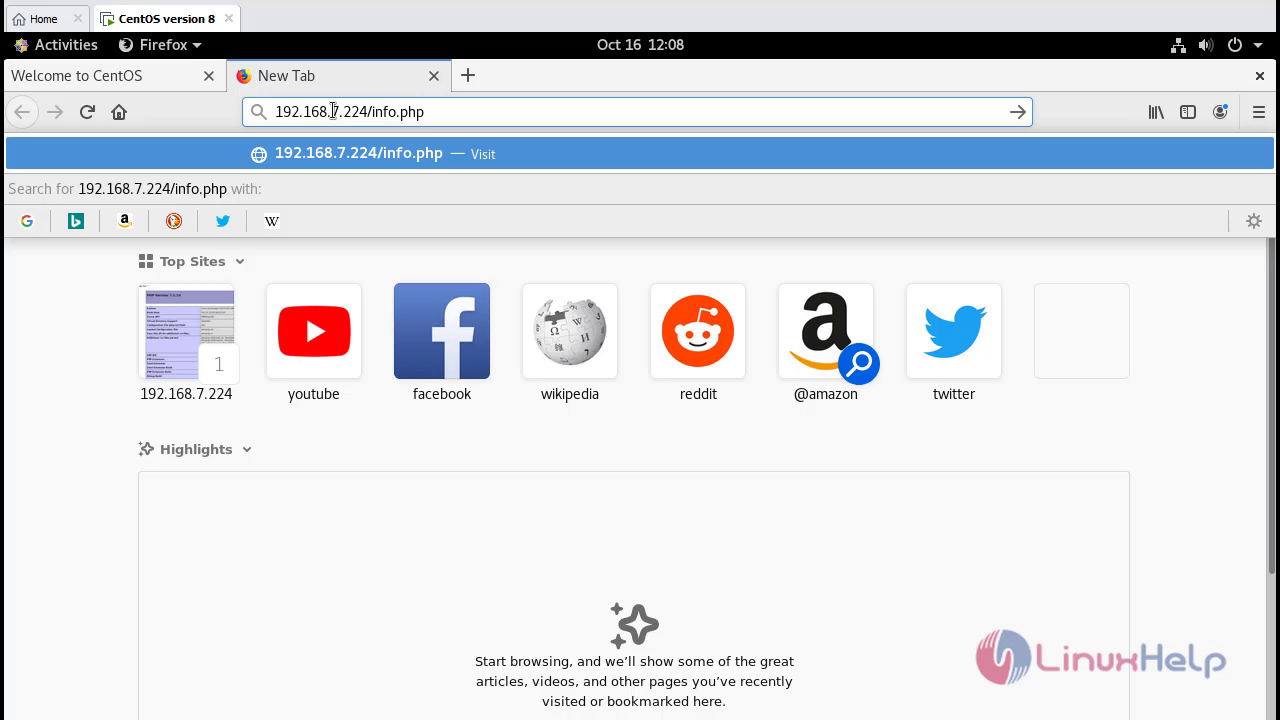
This is php test page.

With this the method to install the LAMP stack on CentOS 8 comes to an end.
Comments ( 0 )
No comments available