How to install Landing CMS on Debian 12.9
- 00:31 cat /etc/*-release
- 00:58 apt install apache2
- 01:30 wget https://github.com/Elias-Black/Landing-CMS/archive/0.0.6.zip
- 01:50 unzip 0.0.6.zip
- 02:10 mv Landing-CMS-0.0.6/ /var/www/landing
- 02:17 chown -R www-data:www-data /var/www/landing/
- 02:55 chmod -R 755 /var/www/landing/
- 03:05 vim /etc/apache2/sites-available/landing.conf
- 03:50 a2dissite 000-default.conf
- 03:59 a2ensite landing.conf
- 04:20 systemctl reload apache2
- 04:35 a2enmod rewrite
- 04:47 systemctl restart apache2
How to install Landing CMS on Debian 12.9
Introduction
Landing CMS is a user-friendly, cross-platform solution for managing landing pages that does not rely on any databases. In this tutorial, we will walk through the installation process of Landing CMS on Debian 12.9.
Procedure
Step:1 Check the OS version
root@Linuxhelp:/# cat /etc/*-release
PRETTY_NAME="Debian GNU/Linux trixie/sid"
NAME="Debian GNU/Linux"
VERSION_CODENAME=trixie
ID=debian
HOME_URL="https://www.debian.org/"
SUPPORT_URL="https://www.debian.org/support"
BUG_REPORT_URL="https://bugs.debian.org/"
Step2—Install Apache web server
root@Linuxhelp:/# apt install apache2
Installing:   apache2

Installing dependencies:
  apache2-data  apache2-utils

Suggested packages:
  apache2-doc  apache2-suexec-pristine  | apache2-suexec-custom  ufw

Summary:
  Upgrading: 0, Installing: 3, Removing: 0, Not Upgrading: 73
  Download size: 591 kB
  Space needed: 1,906 kB / 32.7 GB available

Continue? [Y/n] y
Get:1 http://deb.debian.org/debian trixie/main amd64 apache2-data all 2.4.63-1 [160 kB]
Get:2 http://deb.debian.org/debian trixie/main amd64 apache2-utils amd64 2.4.63-1 [212 kB]
Get:3 http://deb.debian.org/debian trixie/main amd64 apache2 amd64 2.4.63-1 [219 kB]

-------------------------------
Enabling site 000-default.
Created symlink '/etc/systemd/system/multi-user.target.wants/apache2.service' → '/usr/lib/systemd/system/apache2.service'.
Created symlink '/etc/systemd/system/multi-user.target.wants/apache-htcacheclean.service' → '/usr/lib/systemd/system/apache-htcacheclean.s
ervice'.
Processing triggers for man-db (2.13.0-1) ...
root@Linuxhelp:/#
Step 3: Get the landing CMS packages from internet by using wget command
root@Linuxhelp:/# wget https://github.com/Elias-Black/Landing-CMS/archive/0.0.6.zip
--2025-02-04 06:33:21--  https://github.com/Elias-Black/Landing-CMS/archive/0.0.6.zip
Resolving github.com (github.com)... 20.207.73.82
Connecting to github.com (github.com)|20.207.73.82|:443... connected.
HTTP request sent, awaiting response... 302 Found
Location: https://codeload.github.com/Elias-Black/Landing-CMS/zip/refs/tags/0.0.6 [following]
--2025-02-04 06:33:24--  https://codeload.github.com/Elias-Black/Landing-CMS/zip/refs/tags/0.0.6
Resolving codeload.github.com (codeload.github.com)... 20.207.73.88
Connecting to codeload.github.com (codeload.github.com)|20.207.73.88|:443... connected.
HTTP request sent, awaiting response... 200 OK
Length: unspecified [application/zip]
Saving to: ‘0.0.6.zip’

0.0.6.zip                              [   <=>                                                         ]   2.25M  5.32MB/s    in 0.4s
2025-02-04 06:33:25 (5.32 MB/s) - ‘0.0.6.zip’ saved [2359509]
Step 4: Unzip the file
root@Linuxhelp:/# unzip 0.0.6.zip
Archive:  0.0.6.zip
61d4ba5ff68cfe80e7f5a19d7d0e42d6c242acc0
   creating: Landing-CMS-0.0.6/
  inflating: Landing-CMS-0.0.6/LICENSE
  inflating: Landing-CMS-0.0.6/README.md
   creating: Landing-CMS-0.0.6/assets/
   creating: Landing-CMS-0.0.6/assets/_cms/
   creating: Landing-CMS-0.0.6/assets/_cms/css/
  inflating: Landing-CMS-0.0.6/assets/_cms/css/main.css
  inflating: Landing-CMS-0.0.6/assets/_cms/css/no_js.css
   creating: Landing-CMS-0.0.6/assets/_cms/img/
 extracting: Landing-CMS-0.0.6/assets/_cms/img/50-black.png
------------------
creating: Landing-CMS-0.0.6/modules/
  inflating: Landing-CMS-0.0.6/modules/rand_num.php
  inflating: Landing-CMS-0.0.6/robots.txt
root@Linuxhelp:/#
Step 5: Move the file to Apache default location.
root@Linuxhelp:/# mv Landing-CMS-0.0.6/ /var/www/landing
Step 6: Change the ownership for that file.
root@Linuxhelp:/# chown -R www-data:www-data /var/www/landing/
Step:7 Provide execution permission to landing page.
root@Linuxhelp:/# chmod -R 755 /var/www/landing/
Step 8: Open the file in vi editor and enter below content in that file then save and exit.
 root@Linuxhelp:/# vim /etc/apache2/sites-available/landing.conf
<virtualhost *:80>
servername www.linuxhelp1.com
documentroot /var/www/landing
</virtualhost>
Step 9: Disable Apache default.conf file.
root@Linuxhelp:/# a2dissite 000-default.conf
Step 10: Enable the new landing.conf file which we have created.
root@Linuxhelp:/# a2ensite landing.conf
Step 11: Reload the Apache service to activate new configuration in Apache.
root@Linuxhelp:/# systemctl reload apache2
Step 12: Enable the rewrite module
root@Linuxhelp:/# a2enmod rewrite
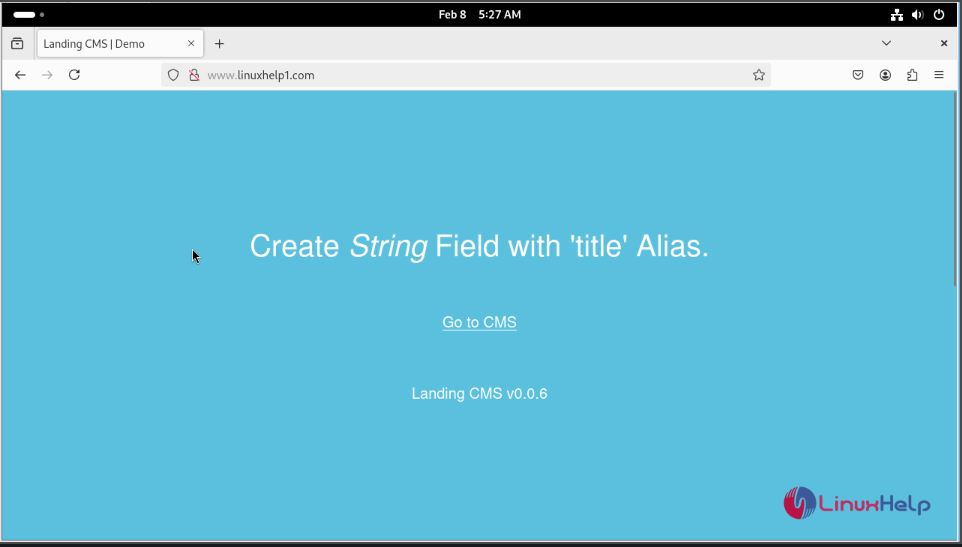
Step 13: Finally restart the apache service
root@Linuxhelp:/# systemctl restart apache2
Conclusion:
We have reached the end of this article. In this guide, we have walked you through the steps required to create and use custom category landing page on CMS. Your feedback is much welcome.
Comments ( 0 )
No comments available