• Categories
    Category
    {{ postCtrl.tags }}
    • {{ category.tag_type }}

      • {{tag.tag_name}}
      • View more
  • Categories
    Category
    {{ postCtrl.tags }}
    • {{ category.tag_type }}

      • {{tag.tag_name}}
      • View more
  • News
  • Tutorials
  • Forums
  • Tags
  • Users
Tutorial News Comments FAQ Related Articles

How to Install LLVM 6 on Ubuntu 17.04

{{postValue.id}}

To Install LLVM 6 on Ubuntu 17.04

LLVM is a C/C++ compiler toolset just like GCC. LLVM can compile C, C++ and Objective-C. LLVM is available on Linux, Windows and Mac OS X. So it’ s cross platform. You can either download LLVM source code and compile it yourself or download and use the pre-built binaries. It is really so simple to install LLVM on Ubuntu 17.04, and this tutorial covers the ground on the same process.

Installing LLVM 6

First go to the official website of LLVM package repository, since we use Ubuntu 17.04, so choose the following.

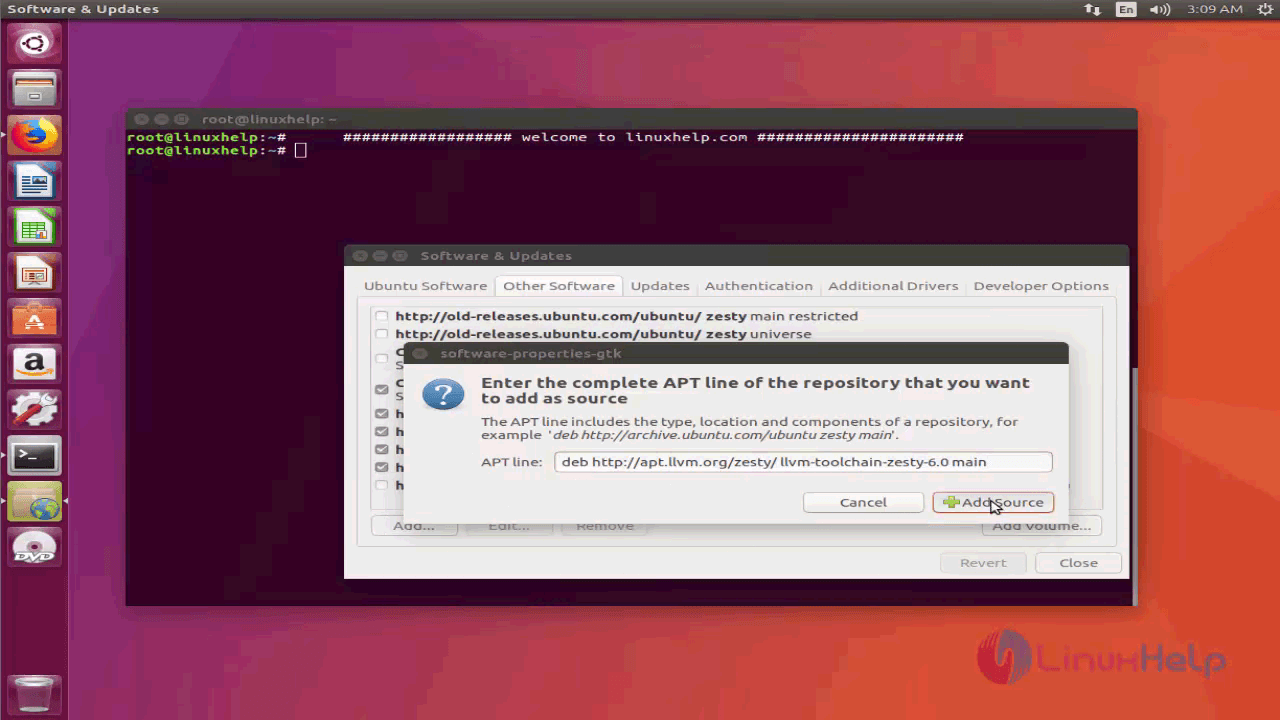
deb http://apt.llvm.org/zesty/ llvm-toolchain-zesty-6.0 main

Now go to the Application Menu and search for ‘ update’ . You should see something like this. Click on the “ Software & Updates” icon.
1

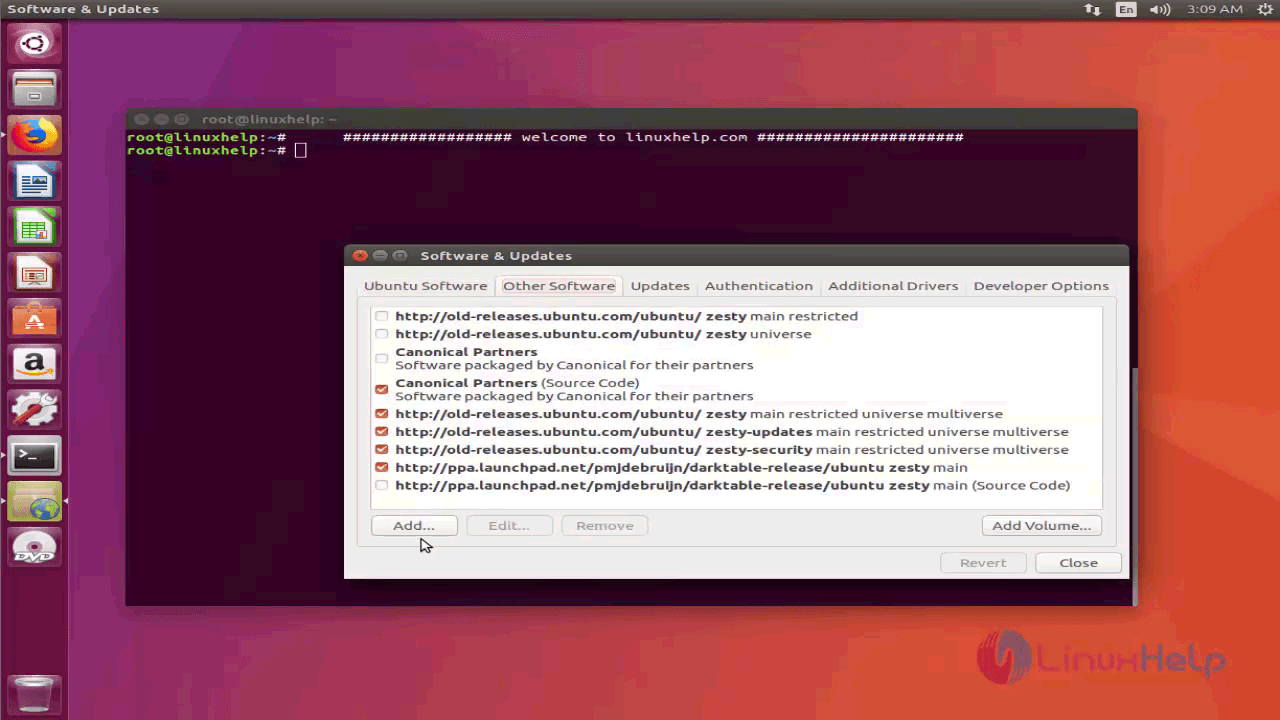
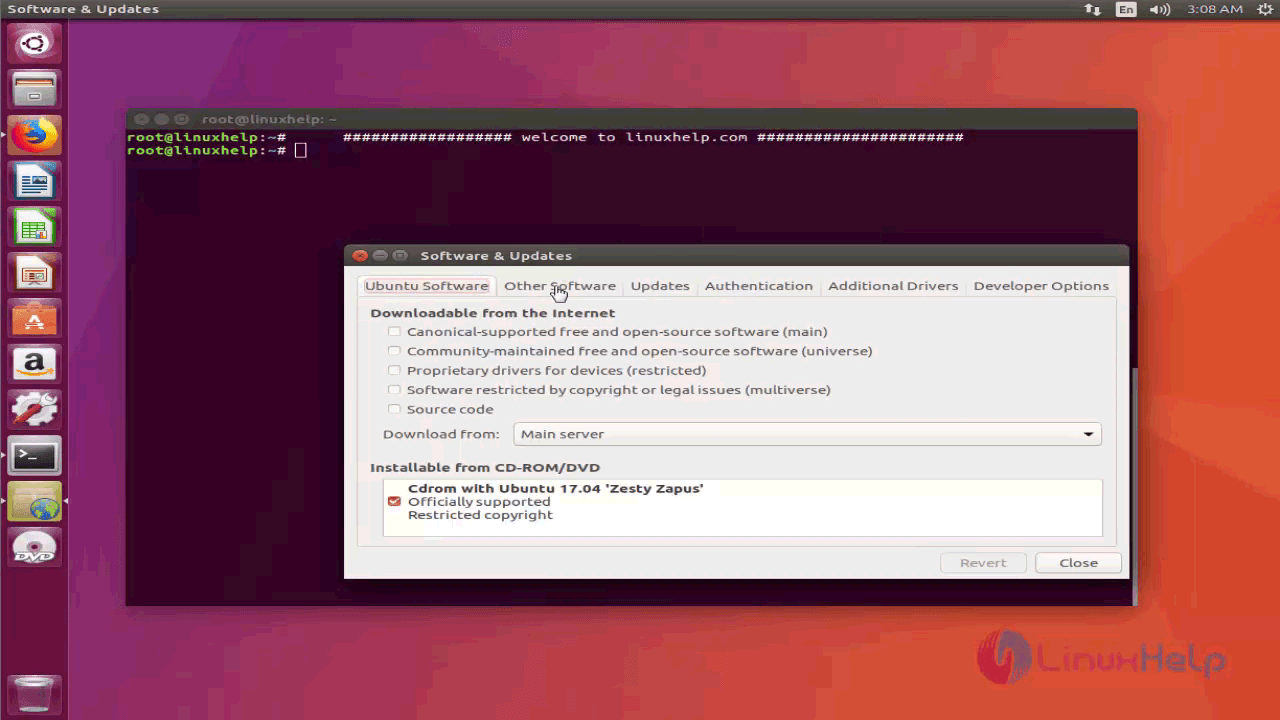
Now click on the “ Other Software” tab
2

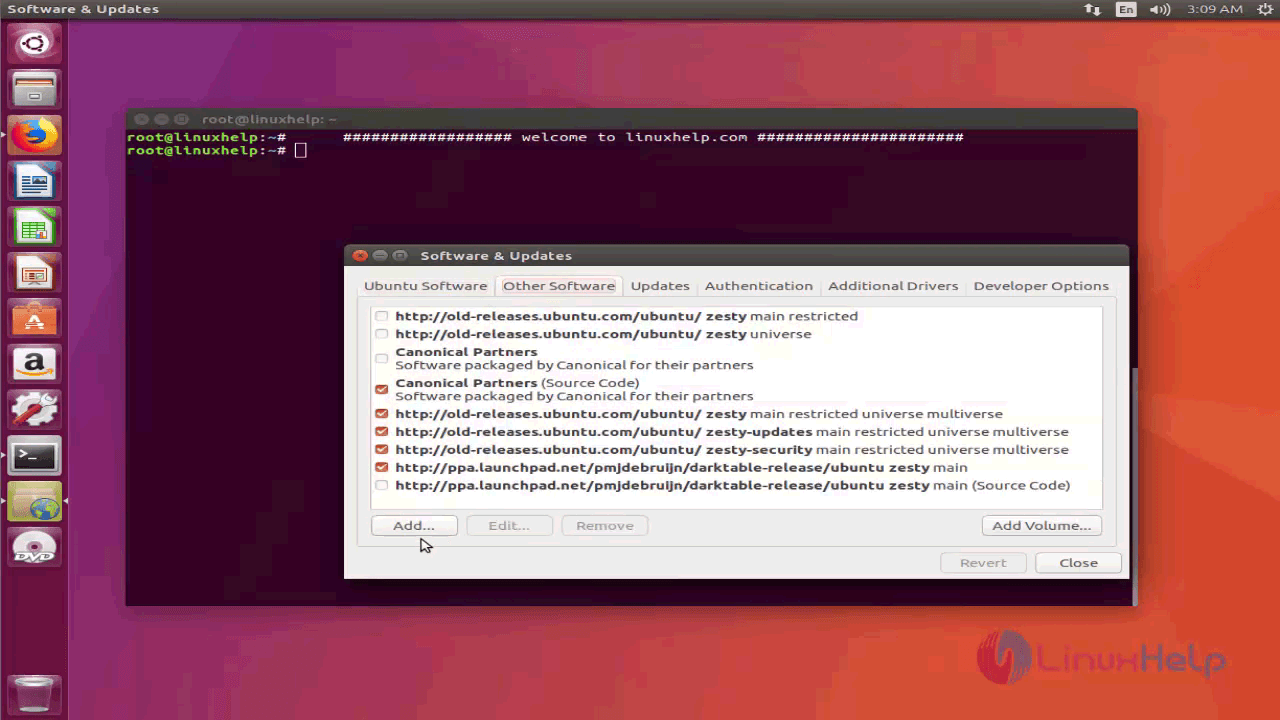
Now click on “ Add” button.

3

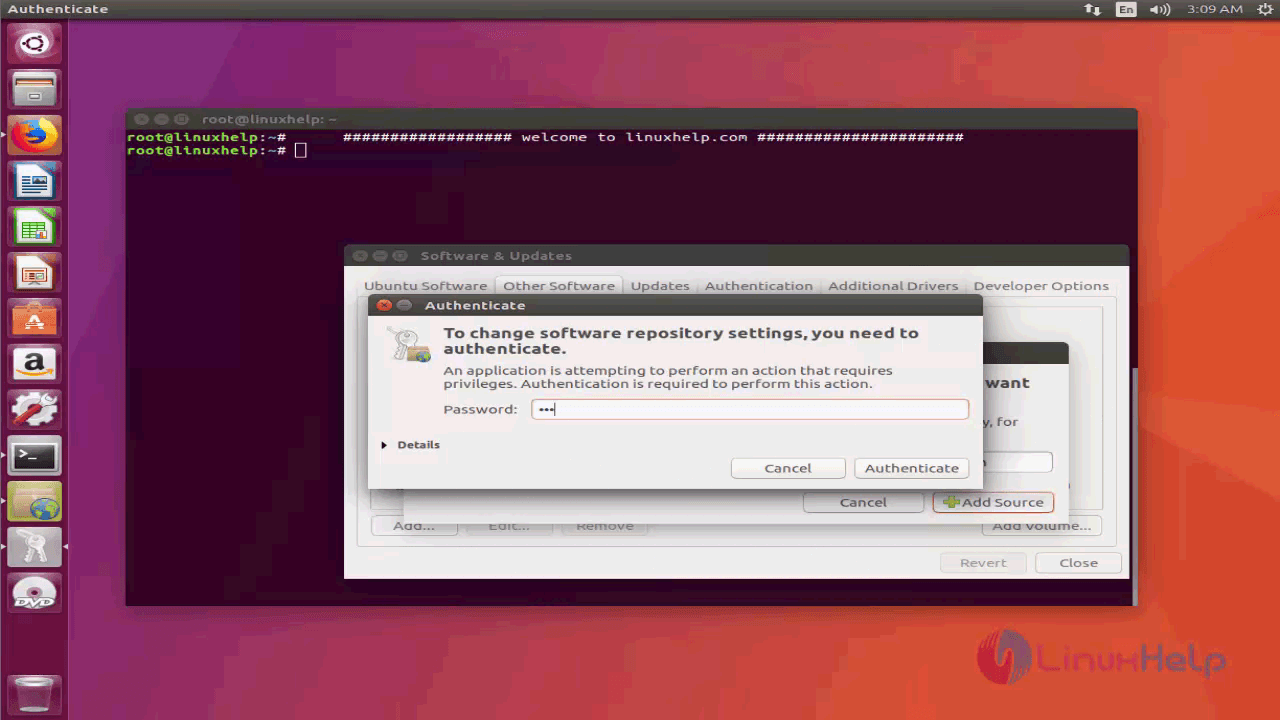
Here paste the APT line that you copied a while ago from http://apt.llvm.org, and click on the Add Source button.
authenticate

And give the password to complete the authentication.
4
And then close all the windows.

Now open a Terminal (Ctrl+Alt+T on Ubuntu) and run the following command to add the GPG key of LLVM.

root@linuxhelp:~# wget -O - https://apt.llvm.org/llvm-snapshot.gpg.key|sudo apt-key add -
--2018-01-28 03:10:59--  https://apt.llvm.org/llvm-snapshot.gpg.key
.
.
2018-01-28 03:11:00 (12.7 MB/s) - written to stdout [3145/3145]

OK

The GPG key has been added.

Now update the package repository cache with the following command

root@linuxhelp:~# apt-get update
Ign:1 cdrom://Ubuntu 17.04 _Zesty Zapus_ - Release amd64 (20170412) zesty InRelease
Hit:2 cdrom://Ubuntu 17.04 _Zesty Zapus_ - Release amd64 (20170412) zesty Release
. 
Fetched 18.4 kB in 1s (10.1 kB/s)
Reading package lists... Done

Now you can install LLVM Clang and LLDB. To install Clang and LLDB only, run the following command:

root@linuxhelp:~# apt-get install clang-6.0 lldb-6.0 lld-6.0 
Reading package lists... Done
Building dependency tree       
.
.
Processing triggers for libc-bin (2.24-9ubuntu2.2) ...

Once the installation is complete, you can run the following command to test whether LLVM Clang is working or not.

root@linuxhelp:~# clang-6.0 --version
clang version 6.0.0-svn322567-1~exp1 (branches/release_60)
Target: x86_64-pc-linux-gnu
Thread model: posix
InstalledDir: /usr/bin

Now lets try compiling a C program using Clang

root@linuxhelp:~# vim test.c
#include < stdio.h> 
int main(){
        printf(" Hello World
" ) 
        return 0 

Lets now compile, the output will come.

root@linuxhelp:~# clang-6.0 test.c -0 test_c_code
root@linuxhelp:~# ./test_c_code 
Hello World

Now we have compiled and run a C program Using LLVM. With this this tutorial comes to an end.


Tags:
liam
Author: 

Comments ( 0 )

No comments available

Add a comment
{{postCtrl.cmtErrMsg}}

Frequently asked questions ( 5 )

Q

What is LLVM?

A

LLVM is a C/C++ compiler toolset just like GCC. LLVM can compile C, C++ and Objective-C. LLVM is available on Linux, Windows and Mac OS X. So it’s cross platform. You can either download LL

Q

Where to download the package from?

A

use the following deb http://apt.llvm.org/zesty/ llvm-toolchain-zesty-6.0 main

Q

I have created ./test_c_code but it is not getting executed?

A

Make sure to provide executable permission for it by chmod +x test_c_code

Q

What API do I use to store a value to one of the virtual registers in LLVM IR’s SSA representation?

A

In short: you can’t. It’s actually kind of a silly question once you grok what’s going on. Basically, in code like:

%result = add i32 %foo, %bar

Q

What source languages are supported in LLVM?

A

LLVM currently has full support for C and C++ source languages through Clang. Many other language frontends have been written using LLVM, and an incomplete list is available at projects with LLVM.

Back To Top!
Rank
User
Points

Top Contributers

userNamenaveelansari
135850

Top Contributers

userNameayanbhatti
92510

Top Contributers

userNamehamzaahmed
32150

Top Contributers

1
userNamelinuxhelp
31040

Top Contributers

userNamemuhammadali
24500
Can you help Gibbson ?
How do i run both nginx and apache in same instance on centos

Hi...,

my server is based centos operating system and my webserver is already running on Apache.... i need to run both apache and nginx on same instance ... please help me to implement this concept...

Networking
  • Routing
  • trunk
  • Netmask
  • Packet Capture
  • domain
  • HTTP Proxy
Server Setup
  • NFS
  • KVM
  • Memory
  • Sendmail
  • WebDAV
  • LXC
Shell Commands
  • Cloud commander
  • Command line archive tools
  • last command
  • Shell
  • terminal
  • Throttle
Desktop Application
  • Linux app
  • Pithos
  • Retrospect
  • Scribe
  • TortoiseHg
  • 4Images
Monitoring Tool
  • Monit
  • Apache Server Monitoring
  • EtherApe 
  • Arpwatch Tool
  • Auditd
  • Barman
Web Application
  • Nutch
  • Amazon VPC
  • FarmWarDeployer
  • Rukovoditel
  • Mirror site
  • Chef
Contact Us | Terms of Use| Privacy Policy| Disclaimer
© 2025 LinuxHelp.com All rights reserved. Linux™ is the registered trademark of Linus Torvalds. This site is not affiliated with linus torvalds in any way.