• Categories
    Category
    {{ postCtrl.tags }}
    • {{ category.tag_type }}

      • {{tag.tag_name}}
      • View more
  • Categories
    Category
    {{ postCtrl.tags }}
    • {{ category.tag_type }}

      • {{tag.tag_name}}
      • View more
  • News
  • Tutorials
  • Forums
  • Tags
  • Users
Tutorial News Comments FAQ Related Articles

How to install manokwari desktop environment on Ubuntu 17.04

{{postValue.id}}

To Install Manokwari on Ubuntu 17.04

Manokwari is a desktop environment developed by BlankOn developer with HTML5 and CSS3 technology. With a web-based desktop like Manokwari, if you are accustomed to designing for the web or understand programming languages like HTML5 and CSS3, ManoKwari can be easily modified according to your taste. Manokwari is also often referred to as a desktop application.

Installing Manokwari

Before you begin with the installation of Monokwari, you need to add the dependency package via ppa. Run the following command for the same purpose.

root@linuxhelp:~# add-apt-repository ppa:dotovr/manokwari
 Manokwari is a desktop shell for GNOME 3. It features combined Gtk+ and HTML5 frontend (Gtk+ is legacy here and would be replaced totally with HTML5 in the future). It is an evolution from a shell called blankon-panel.
Manokwari is used by BlankOn Linux.
.
.
gpg: Total number processed: 1
gpg:               imported: 1  (RSA: 1)
OK

After adding the dependency packages are added, update the machine by executing the apt-get update command.

root@linuxhelp:~#  apt-get update
Hit:1 http://ppa.launchpad.net/dotovr/manokwari/ubuntu xenial InRelease
Hit:2 http://security.ubuntu.com/ubuntu xenial-security InRelease            
Hit:3 http://us.archive.ubuntu.com/ubuntu xenial InRelease                 
.
.
Fetched 287 kB in 2s (114 kB/s)                                                
Reading package lists... Done

Now is the time to install Manokwari. Run the following command to trigger its installation.

root@linuxhelp:~# apt install manokwari
Reading package lists... Done
Building dependency tree       
Reading state information... Done
The following additional packages will be installed:
  blankon-settings-gtk-3.0 bromo-theme cbatticon dleyna-server
.
.
Processing triggers for libc-bin (2.23-0ubuntu3) ...
Processing triggers for dbus (1.10.6-1ubuntu3) ...

The installation is done, now choose the desktop environment and then enter password and login.
1

The monakwari desktop environment looks as follows.
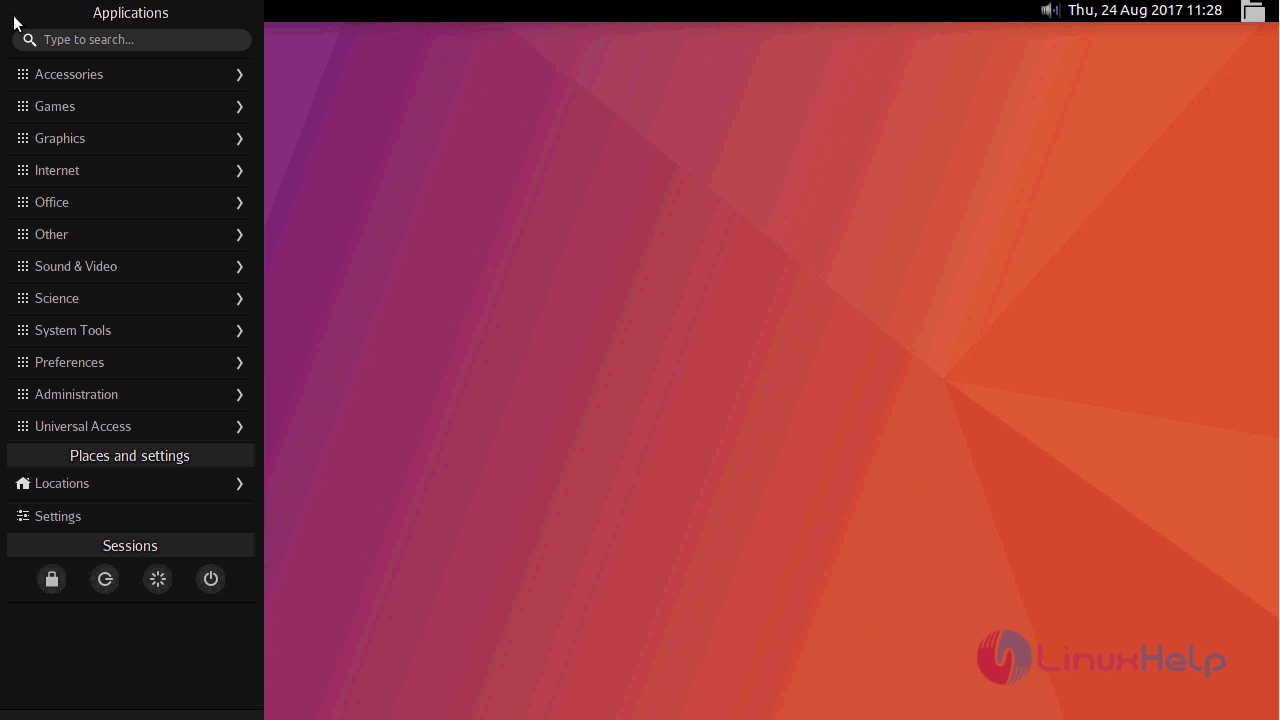
MONAKWARI
With this, the complete installation of Monakwari desktop environment is done.

Tags:
benjamin
Author: 

Comments ( 0 )

No comments available

Add a comment
{{postCtrl.cmtErrMsg}}

Frequently asked questions ( 5 )

Q

Where to get the source package of manokwari desktop environment?

A

Download the source code of Manokwari with git

#git clone https://github.com/BlankOn/manokwari.git

Q

What are the dependency packages of manokwari to install it in ubuntu?

A

Following command is used to install all dependency packages of manokwari in ubuntu
# sudo apt-get install gnome-common libcairo2-dev libgee-dev libglib2.0-dev libgnome-menu-dev libgtk-3-dev libtool libunique-3.0-dev libvala-0.12-dev valac

Q

Where to download the Master source package of manokwari ?

A

please refer Following link to download the manokwari
"https://codeload.github.com/BlankOn/manokwari/legacy.zip/master"

Q

How to install manokwari on Arch linux?

A

use the following link to get the procedure to install manokwari on arch linux

"https://aur.archlinux.org/packages/manokwari/"

Q

How to install manokwari from source?

A

First, download the source package from following the link
"https://codeload.github.com/BlankOn/manokwari/legacy.zip/master"

then extract the file and follow the steps Below

# cd manokwari
# sh autogen.sh
# make
# sudo make install

Back To Top!
Rank
User
Points

Top Contributers

userNamenaveelansari
135850

Top Contributers

userNameayanbhatti
92510

Top Contributers

userNamehamzaahmed
32150

Top Contributers

1
userNamelinuxhelp
31040

Top Contributers

userNamemuhammadali
24500
Can you help legeek ?
Installation of the call center module

hello

I wish to install a call center in virtual with issabel, I downloaded the latest version of it , but I don' t arrive to install the call center module in issabel. please help me

thanks!

Networking
  • Routing
  • trunk
  • Netmask
  • Packet Capture
  • domain
  • HTTP Proxy
Server Setup
  • NFS
  • KVM
  • Memory
  • Sendmail
  • WebDAV
  • LXC
Shell Commands
  • Cloud commander
  • Command line archive tools
  • last command
  • Shell
  • terminal
  • Throttle
Desktop Application
  • Linux app
  • Pithos
  • Retrospect
  • Scribe
  • TortoiseHg
  • 4Images
Monitoring Tool
  • Monit
  • Apache Server Monitoring
  • EtherApe 
  • Arpwatch Tool
  • Auditd
  • Barman
Web Application
  • Nutch
  • Amazon VPC
  • FarmWarDeployer
  • Rukovoditel
  • Mirror site
  • Chef
Contact Us | Terms of Use| Privacy Policy| Disclaimer
© 2025 LinuxHelp.com All rights reserved. Linux™ is the registered trademark of Linus Torvalds. This site is not affiliated with linus torvalds in any way.