How to Install Memcached on Ubuntu 16.04
To Install Memcached on Ubuntu 16.04
Memcached is a system daemon that allows you to cache information on RAM memory, this allows you to avoid bad performance on your dedicated or VPS server. It is very useful for optimizing dynamic websites and enabled speed by caching objects in memory. It is so simple to install Memcached on Ubuntu and this article covers the method to install Memcached on Ubuntu 16.04.
Installing Memcached
In order to install Memcached, it is very essential to have Apache installed in your machine, so make sure you run the following to install it in your system.
root@linuxhelp:~# apt-get install apache2 -y
Reading package lists... Done
Building dependency tree
Reading state information... Done
The following packages were automatically installed and are no longer required:
  gnome-software-common libgtkspell3-3-0
Use ' sudo apt autoremove'  to remove them.
The following additional packages will be installed:
  apache2-bin apache2-data apache2-utils libapr1 libaprutil1
  libaprutil1-dbd-sqlite3 libaprutil1-ldap liblua5.1-0
Suggested packages:
  apache2-doc apache2-suexec-pristine | apache2-suexec-custom
.
.
.
Processing triggers for libc-bin (2.23-0ubuntu3) ...
Processing triggers for ureadahead (0.100.0-19) ...
Processing triggers for systemd (229-4ubuntu4) ...
Processing triggers for ufw (0.35-0ubuntu2) ...
Once Apache is installed, you shall proceed with the installation of memcached in the following manner.
root@linuxhelp:~# apt-get install memcached
Reading package lists... Done
Building dependency tree
Reading state information... Done
The following packages were automatically installed and are no longer required:
  gnome-software-common libgtkspell3-3-0
Use ' sudo apt autoremove'  to remove them.
Suggested packages:
  libcache-memcached-perl libmemcached libanyevent-perl libyaml-perl
  libterm-readkey-perl
The following NEW packages will be installed:
  memcached
0 upgraded, 1 newly installed, 0 to remove and 598 not upgraded.
Need to get 89.0 kB of archives.
After this operation, 246 kB of additional disk space will be used.
Get:1 http://in.archive.ubuntu.com/ubuntu xenial-updates/main amd64 memcached amd64 1.4.25-2ubuntu1.2 [89.0 kB]
Fetched 89.0 kB in 1s (87.3 kB/s)
ySelecting previously unselected package memcached.
(Reading database ... 177856 files and directories currently installed.)
Preparing to unpack .../memcached_1.4.25-2ubuntu1.2_amd64.deb ...
Unpacking memcached (1.4.25-2ubuntu1.2) ...
Processing triggers for ureadahead (0.100.0-19) ...
Processing triggers for systemd (229-4ubuntu4) ...
Processing triggers for man-db (2.7.5-1) ...
Setting up memcached (1.4.25-2ubuntu1.2) ...
Processing triggers for ureadahead (0.100.0-19) ...
Processing triggers for systemd (229-4ubuntu4) ...
And then, you should also install the essential PHP modules by making use of the following command.
root@linuxhelp:~#  apt-get install -y php libapache2-mod-php php-memcached php-cli
Reading package lists... Done
Building dependency tree
Reading state information... Done
The following packages were automatically installed and are no longer required:
  gnome-software-common libgtkspell3-3-0
Use ' sudo apt autoremove'  to remove them.
The following additional packages will be installed:
  libapache2-mod-php7.0 libmemcached11 php-common php7.0 php7.0-cli
  php7.0-common php7.0-json php7.0-opcache php7.0-readline
Suggested packages:
  php-pear
The following NEW packages will be installed:
.
.
.
Setting up php-cli (1:7.0+35ubuntu6) ...
Setting up php-memcached (2.2.0-51-ge573a6e+2.2.0-2build2) ...
Processing triggers for libc-bin (2.23-0ubuntu3) ...
After that, you need to start the Apache service as follows.
root@linuxhelp:~# systemctl start apache2
And then start memcached by running the following command.
root@linuxhelp:~# systemctl start memcached
You should later create a PHP file in Apache document root location to get php info.
root@linuxhelp:~# nano /var/www/html/info.php
< ?php
phpinfo()
?>
Later you need to restart the Apache service.
root@linuxhelp:~# systemctl restart apache2
Once it is done, you shall open the browser and enter http://localhost/info.php as URL. The PHP modules that are installed in server as displayed.
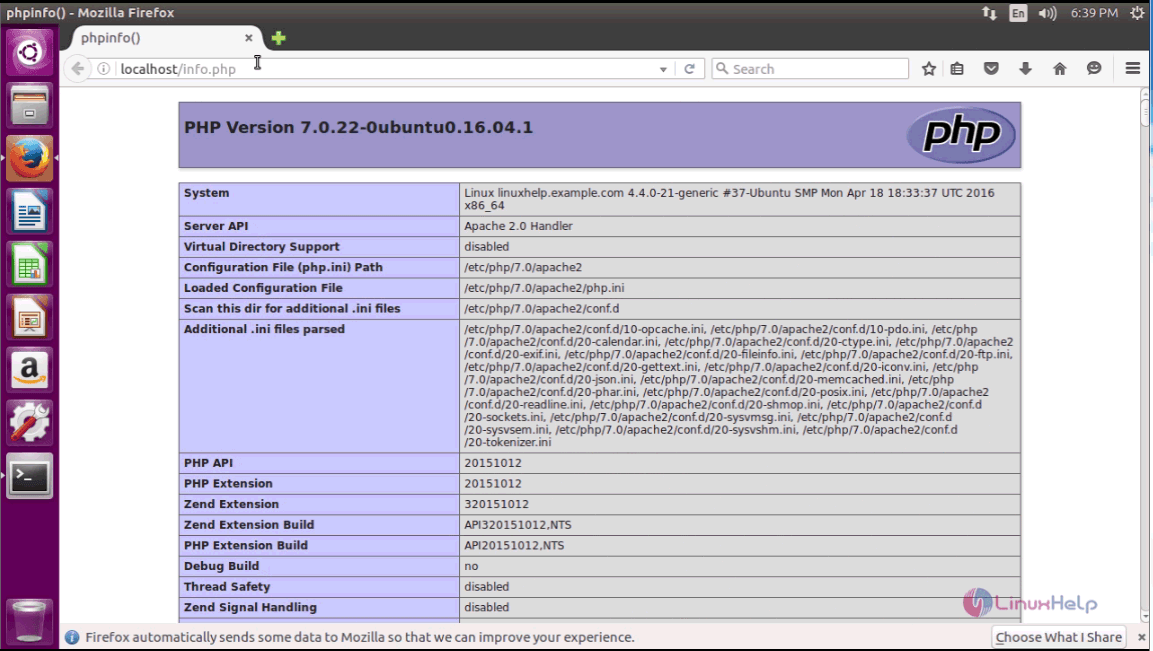
You shall scroll down and see whether the memcached is installed.

With this, the installation of Memcahed gets completed.
Comments ( 0 )
No comments available