How to install Musescore 2.1.0 on Ubuntu 18.04
To install Musescore 2.1.0 on Ubuntu 18.04
MuseScore is an open-source music composition and notation software for Linux distributions. The users can create, edit and print music in a comfortable environment. It is a WYSISYG environment in which musical scores can be created. Some of its features include playback of trills and other instruments, new templates for classical, easier search in Symbols palette, and default FluidR3 SoundFont. This tutorial explains the installation procedure of MuseScore on Ubuntu 18.04.
Installation
Update the system repository
root@linuxhelp1:~# apt-get update
Hit:1 http://archive.canonical.com/ubuntu bionic InRelease
Hit:2 http://in.archive.ubuntu.com/ubuntu bionic InRelease
Get:3 http://security.ubuntu.com/ubuntu bionic-security InRelease [83.2 kB]
Get:4 http://in.archive.ubuntu.com/ubuntu bionic-updates InRelease [83.2 kB]
Get:5 http://security.ubuntu.com/ubuntu bionic-security/main amd64 DEP-11 Metadata [204 B]
Get:6 http://security.ubuntu.com/ubuntu bionic-security/universe amd64 DEP-11 Metadata [2,452 B]
Get:7 http://in.archive.ubuntu.com/ubuntu bionic-backports InRelease [74.6 kB]
Get:8 http://in.archive.ubuntu.com/ubuntu bionic-updates/main amd64 Packages [146 kB]
Get:9 http://in.archive.ubuntu.com/ubuntu bionic-updates/main i386 Packages [132 kB]
Get:10 http://in.archive.ubuntu.com/ubuntu bionic-updates/main amd64 DEP-11 Metadata [112 kB]
Get:11 http://in.archive.ubuntu.com/ubuntu bionic-updates/main DEP-11 64x64 Icons [44.5 kB]
Get:12 http://in.archive.ubuntu.com/ubuntu bionic-updates/universe amd64 DEP-11 Metadata [120 kB]
Get:13 http://in.archive.ubuntu.com/ubuntu bionic-updates/universe DEP-11 64x64 Icons [198 kB]
Get:14 http://in.archive.ubuntu.com/ubuntu bionic-backports/universe amd64 DEP-11 Metadata [5,096 B]
Fetched 1,000 kB in 4s (280 kB/s)
Reading package lists... Done
Install Musescore application using the following command
root@www:~# apt-get install musescore -y
Reading package lists... Done
Building dependency tree
Reading state information... Done
The following additional packages will be installed:
  fluidr3mono-gm-soundfont libbrotli1 libportaudio2 libqt5help5 libqt5positioning5 libqt5printsupport5 libqt5qml5 libqt5quick5
    libqt5sensors5 libqt5sql5 libqt5sql5-sqlite libqt5webchannel5
  libqt5webkit5 libqt5xml5 libqt5xmlpatterns5 libwoff1 musescore-common qml-module-qtgraphicaleffects qml-module-qtquick-controls
   qml-module-qtquick-dialogs qml-module-qtquick-layouts
  qml-module-qtquick-privatewidgets qml-module-qtquick-window2 qml-module-qtquick2
Suggested packages:
  qt5-qmltooling-plugins fluid-soundfont-gm timgm6mb-soundfont
The following NEW packages will be installed:
  fluidr3mono-gm-soundfont libbrotli1 libportaudio2 libqt5help5 libqt5positioning5 libqt5printsupport5 libqt5qml5
libqt5quick5 libqt5sensors5 libqt5sql5 libqt5sql5-sqlite libqt5webchannel5
  libqt5webkit5 libqt5xml5 libqt5xmlpatterns5 libwoff1 musescore musescore-common qml-module-qtgraphicaleffects
qml-module-qtquick-controls qml-module-qtquick-dialogs
  qml-module-qtquick-layouts qml-module-qtquick-privatewidgets qml-module-qtquick-window2 qml-module-qtquick2
0 upgraded, 25 newly installed, 0 to remove and 9 not upgraded.
Need to get 47.2 MB of archives.
.
.
Setting up libqt5printsupport5:amd64 (5.9.5+dfsg-0ubuntu1) ...
Setting up libqt5xmlpatterns5:amd64 (5.9.5-0ubuntu1) ...
Setting up musescore-common (2.1.0+dfsg3-3build1) ...
Processing triggers for libc-bin (2.27-3ubuntu1) ...
Setting up qml-module-qtquick-privatewidgets:amd64 (5.9.5-0ubuntu1) ...
Setting up libqt5xml5:amd64 (5.9.5+dfsg-0ubuntu1) ...
Setting up libqt5positioning5:amd64 (5.9.5+dfsg-0ubuntu2) ...
Setting up qml-module-qtquick-window2:amd64 (5.9.5-0ubuntu1) ...
Setting up qml-module-qtquick-dialogs:amd64 (5.9.5-0ubuntu1) ...
Setting up libqt5sql5:amd64 (5.9.5+dfsg-0ubuntu1) ...
Processing triggers for man-db (2.8.3-2) ...
Processing triggers for shared-mime-info (1.9-2) ...
Processing triggers for gnome-menus (3.13.3-11ubuntu1) ...
Setting up libqt5webchannel5:amd64 (5.9.5-0ubuntu1) ...
Processing triggers for hicolor-icon-theme (0.17-2) ...
Setting up libqt5webkit5:amd64 (5.212.0~alpha2-7ubuntu1) ...
Setting up qml-module-qtgraphicaleffects:amd64 (5.9.5-0ubuntu1) ...
Setting up libqt5help5:amd64 (5.9.5-0ubuntu1) ...
Setting up libqt5sql5-sqlite:amd64 (5.9.5+dfsg-0ubuntu1) ...
Setting up qml-module-qtquick-controls:amd64 (5.9.5-0ubuntu1) ...
Setting up musescore (2.1.0+dfsg3-3build1) ...
Processing triggers for libc-bin (2.27-3ubuntu1) ...
Access the application from the menu as follows

Click to create a new score

Configure the user detail on the console

Choose the score template

Choose the Key signature

Configure the time signature and number of measures

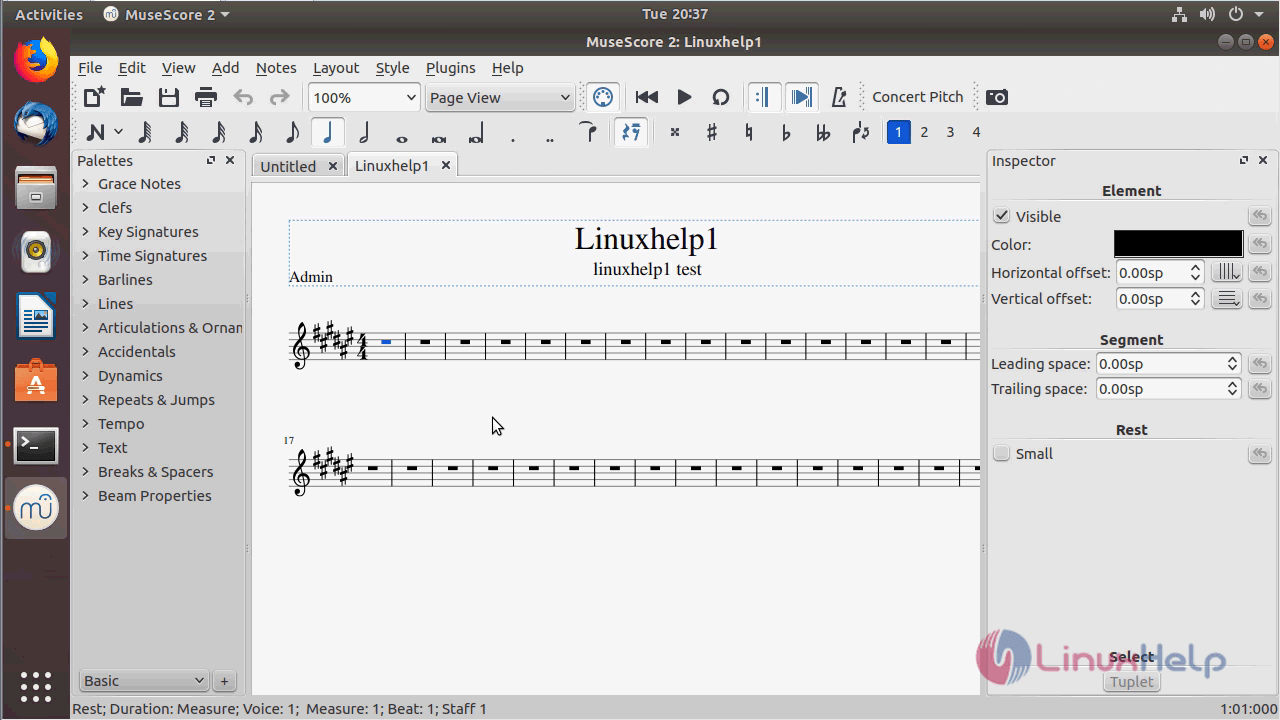
MuseScore application
With this, the method to install Musescore 2.1.0 on Ubuntu 18.04 comes to an end.
Comments ( 0 )
No comments available