• Categories
    Category
    {{ postCtrl.tags }}
    • {{ category.tag_type }}

      • {{tag.tag_name}}
      • View more
  • Categories
    Category
    {{ postCtrl.tags }}
    • {{ category.tag_type }}

      • {{tag.tag_name}}
      • View more
  • News
  • Tutorials
  • Forums
  • Tags
  • Users
Tutorial News Comments FAQ Related Articles

How to install Musique Audio player on Ubuntu 16.04

{{postValue.id}}

To install Musique Audio player on Ubuntu

Musique Player supports almost all audio formats which includes FLAC, OGG Vorbis, Monkey’ s Audio (APE), Musepack (MPC), WavPack (WV), True Audio (TTA). Users can browse their collection by artists, pictures and album covers. In the Info View, Musique finds and shows the song lyrics.

Features

  • Starts fast, very lightweight and can easily handle large collections.
  • Browse by artist photos, album covers and folders too, so you can organize your music your way.
  • Immersive Info View you can switch to while listening. It shows information about the current track, album and artist.
  • Supports most audio formats, including: FLAC, OGG Vorbis, Monkey’ s Audio (APE), Musepack (MPC), WavPack (WV), True Audio (TTA)
  • Automatically fixes misspellings and case in track titles, album titles and artist names, freeing you from the hassle of manually tagging your files.
  • Musique never ever modifies your files, it stores all of its data in its own database.
  • Supports scrobbling to Last.fm
  • Translated to more than 20 languages including German, French, Spanish, Portuguese, Italian, Russian and Chinese.

Add the Musique repo file via ppa.

root@linuxhelp1:~# add-apt-repository ppa:nilarimogard/webupd8
Press [ENTER] to continue or ctrl-c to cancel adding it
gpg: keyring `/tmp/tmphu0e2202/secring.gpg'  created
.
.
.
gpg: Total number processed: 1
gpg:               imported: 1  (RSA: 1)
OK

Once the repo file is added, update the machine by using the following command.

root@linuxhelp1:~# apt-get update
Hit:1 http://in.archive.ubuntu.com/ubuntu xenial InRelease
Get:2 http://security.ubuntu.com/ubuntu xenial-security InRelease [102 kB]                 
.
.
Get:5 http://in.archive.ubuntu.com/ubuntu xenial-backports InRelease [102 kB]              
Fetched 306 kB in 2s (128 kB/s)                                    
Reading package lists... Done

Now is the time to install the Musique package. Use the following command for the same purpose.

root@linuxhelp1:~# apt-get install musique
Reading package lists... Done
Building dependency tree       
Reading state information... Done
The following additional packages will be installed:
  libphonon4 libqt4-opengl phonon phonon-backend-gstreamer phonon-backend-gstreamer-common
.
.
.
Setting up phonon:amd64 (4:4.8.3-0ubuntu3) ...
Setting up musique (1.3-1~webupd8~xenial) ...
Processing triggers for libc-bin (2.23-0ubuntu3) ...

Open the dashboard of Ubuntu to launch Musique audio player.
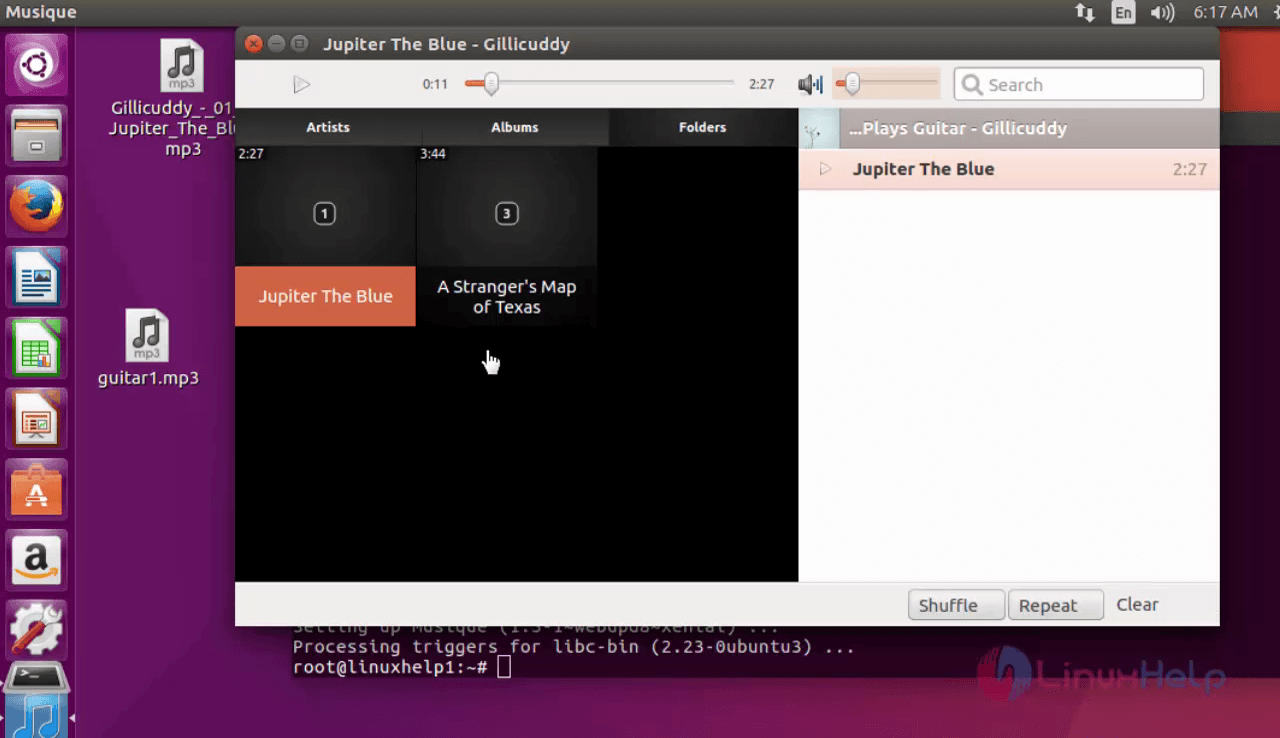
Musique

Select the song tracks and listen the songs.
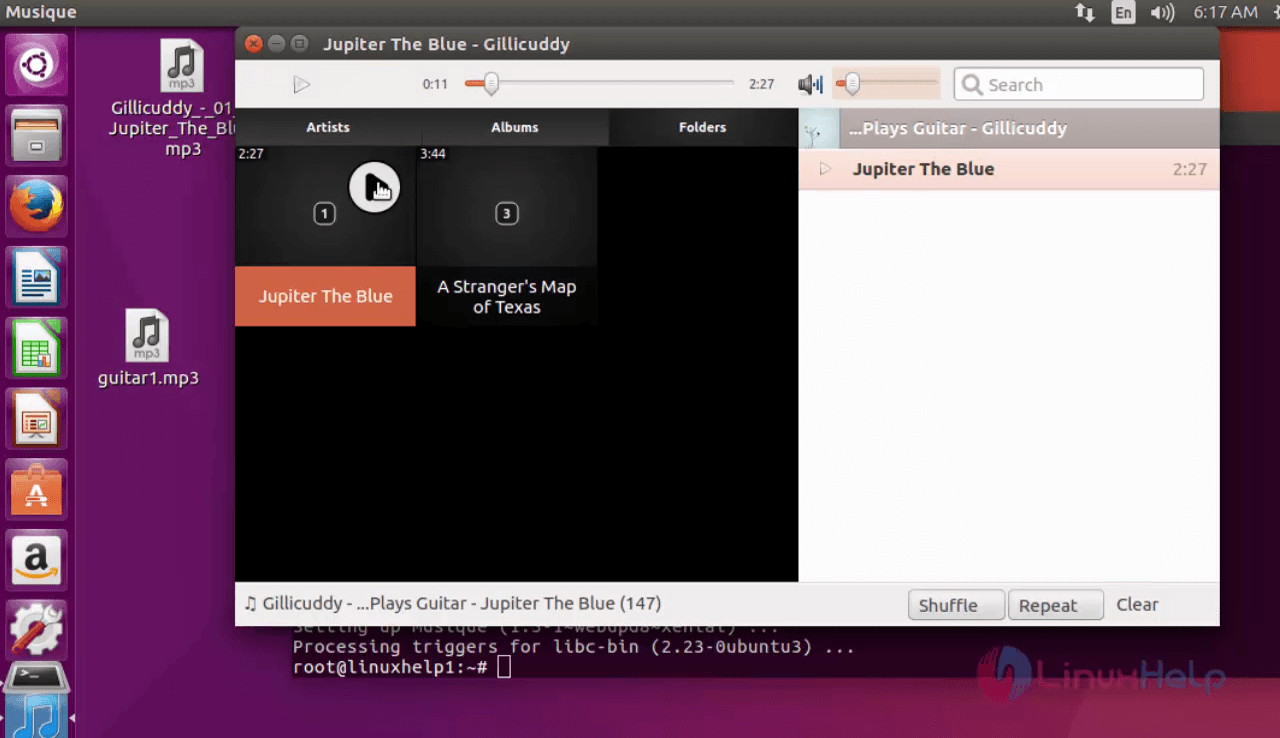
select


Tags:
isaac
Author: 

Comments ( 0 )

No comments available

Add a comment
{{postCtrl.cmtErrMsg}}

Frequently asked questions ( 5 )

Q

what are all the formats does it supports in Musique?

A

Musique Player supports almost all audio formats which includes FLAC, OGG Vorbis, Monkey’s Audio (APE), Musepack (MPC), WavPack (WV), True Audio (TTA

Q

Does it consumes more Cpu space in Musique?

A

No it is a llight weight application in Musique

Q

Does it support multiple language in Musique?

A

Translated to more than 20 languages including German, French, Spanish, Portuguese, Italian, Russian and Chinese.

Q

Does editing overwrites my file in Musique?

A

Musique never ever modifies your files, it stores all of its data in its own database.

Q

How can I organise my files in Musique?

A

Browse by artist photos, album covers and folders too, so you can organize your music your way.

Back To Top!
Rank
User
Points

Top Contributers

userNamenaveelansari
135850

Top Contributers

userNameayanbhatti
92510

Top Contributers

userNamehamzaahmed
32150

Top Contributers

1
userNamelinuxhelp
31040

Top Contributers

userNamemuhammadali
24500
Can you help Isaac ?
How to run windows application in linux

I need to run the windows application in my Linux machine, instead of installing from yum repo or any other repos. How to do that..??

Networking
  • Routing
  • trunk
  • Netmask
  • Packet Capture
  • domain
  • HTTP Proxy
Server Setup
  • NFS
  • KVM
  • Memory
  • Sendmail
  • WebDAV
  • LXC
Shell Commands
  • Cloud commander
  • Command line archive tools
  • last command
  • Shell
  • terminal
  • Throttle
Desktop Application
  • Linux app
  • Pithos
  • Retrospect
  • Scribe
  • TortoiseHg
  • 4Images
Monitoring Tool
  • Monit
  • Apache Server Monitoring
  • EtherApe 
  • Arpwatch Tool
  • Auditd
  • Barman
Web Application
  • Nutch
  • Amazon VPC
  • FarmWarDeployer
  • Rukovoditel
  • Mirror site
  • Chef
Contact Us | Terms of Use| Privacy Policy| Disclaimer
© 2025 LinuxHelp.com All rights reserved. Linux™ is the registered trademark of Linus Torvalds. This site is not affiliated with linus torvalds in any way.