How to Install MyBB CMS on Linux Mint 20
To Install MyBB CMS on Linux Help 20
MyBB is a multi-lingual, open-source blogging engine. All of its content is stored in text files. In addition, it supports a variety of plugins, widgets, and customizable themes. The following tutorial describes how to install MyBB cms on Linux Mint 20. Installation procedure:
Requirements for MyBB CMS:
Apache
Mysql
Php and its modules php php-xml php-mysql php-mbstring php-zip php-soap php-curl php-gd php-ldap php-imap php-common php-dev libmcrypt-dev php-pear
Check the version of the linux mint by using following command
root@linuxhelp:~# cat /etc/os-release
NAME="Linux Mint"
VERSION="20 (Ulyana)"
ID=linuxmint
ID_LIKE=ubuntu
PRETTY_NAME="Linux Mint 20"
VERSION_ID="20"
HOME_URL="https://www.linuxmint.com/"
Before I am download the mybb cms package now I am moving to create the database by using following command
root@linuxhelp:~# mysql -u root -p
Enter password:
Welcome to the MySQL monitor.  Commands end with ; or \g.
Your MySQL connection id is 4
Server version: 5.7.26-0ubuntu0.18.04.1 (Ubuntu)
Copyright (c) 2000, 2019, Oracle and/or its affiliates. All rights reserved.
Oracle is a registered trademark of Oracle Corporation and/or its
affiliates. Other names may be trademarks of their respective
owners.
Type 'help;' or '\h' for help. Type '\c' to clear the current input statement.
mysql> create database mybbdb;
Query OK, 1 row affected (0.00 sec)
mysql> create user 'mybbuse'@localhost identified by 'Linuxc';
Query OK, 0 rows affected (0.09 sec)
mysql> grant all privileges on mybbdb.* to 'mybbuse'@localhost;
Query OK, 0 rows affected (0.02 sec)
mysql> flush privileges;
Query OK, 0 rows affected (0.01 sec)
mysql> exit
Bye
Once the database configuration is done, download the MyBB CMS Installation package by using the wget command.
root@linuxhelp:~# wget https://resources.mybb.com/downloads/mybb_1821.zip
--2019-07-15 23:33:41--  https://resources.mybb.com/downloads/mybb_1821.zip
Resolving resources.mybb.com (resources.mybb.com)... 104.25.195.102, 104.25.196.102, 2606:4700:20::6819:c366, ...
Connecting to resources.mybb.com (resources.mybb.com)|104.25.195.102|:443... connected.
HTTP request sent, awaiting response... 200 OK
Length: 2220939 (2.1M) [application/zip]
Saving to: ‘mybb_1821.zip’
mybb_1821.zip               100%[==========================================>]   2.12M  1003KB/s    in 2.2s
2019-07-15 23:33:44 (1003 KB/s) - ‘mybb_1821.zip’ saved [2220939/2220939]
Once the download is completed extract the downloaded package using unzip command.
root@linuxhelp:~# unzip mybb_1821.zip
Archive:  mybb_1821.zip
   creating: Documentation/
  inflating: Documentation/credits.html
   creating: Documentation/images/
 extracting: Documentation/images/logo.png
.
.
  inflating: Upload/syndication.php
  inflating: Upload/task.php
   creating: Upload/uploads/
   creating: Upload/uploads/avatars/
  inflating: Upload/uploads/avatars/index.html
  inflating: Upload/uploads/index.html
  inflating: Upload/usercp.php
  inflating: Upload/warnings.php
  inflating: Upload/xmlhttp.php
Move the MyBB CMS directory to Apache root directory.
root@linuxhelp:~# mv Upload /var/www/mybb
Set the ownership and permission for Mybb cms by using the following command
root@linuxhelp:~# chown -R www-data.www-data /var/www/mybb
root@linuxhelp:~# chmod -R 755 /var/www/mybb
Once it is done, configure the virtualhost for accessing the MyBB CMS. Run the following command
root@linuxhelp:~# vi /etc/apache2/sites-available/mybb.conf
<Virtualhost *:80>
        Servername www.linuxhelp1.com
        Documentroot /var/www/mybb
<directory /var/www/mybb>
allowoverride all
allow from all
</directory>
</Virtualhost>
Disable the default site access.
root@linuxhelp:~# a2dissite 000-default.conf
Site 000-default disabled.
To activate the new configuration, you need to run:
systemctl reload apache2
Enable the site access for accessing the MyBB CMS.
root@linuxhelp:~# a2ensite mybb.conf
Enabling site mybb.
To activate the new configuration, you need to run:
systemctl reload apache2
Enable the rewrite module.
root@linuxhelp:~# a2enmod rewrite
Enabling module rewrite.
To activate the new configuration, you need to run:
systemctl restart apache2
Restart the apache service by using the following command.
root@linuxhelp:~# systemctl restart apache2
Once all the above configurations are over, switch to your browser and enter the domain name
 Welcome document of MyBB CMS appears on your screen
 Accept the license agreement and proceed further.
 Verify the requirements for the CMS.
 Configure the database details.
 Check the Table creation.
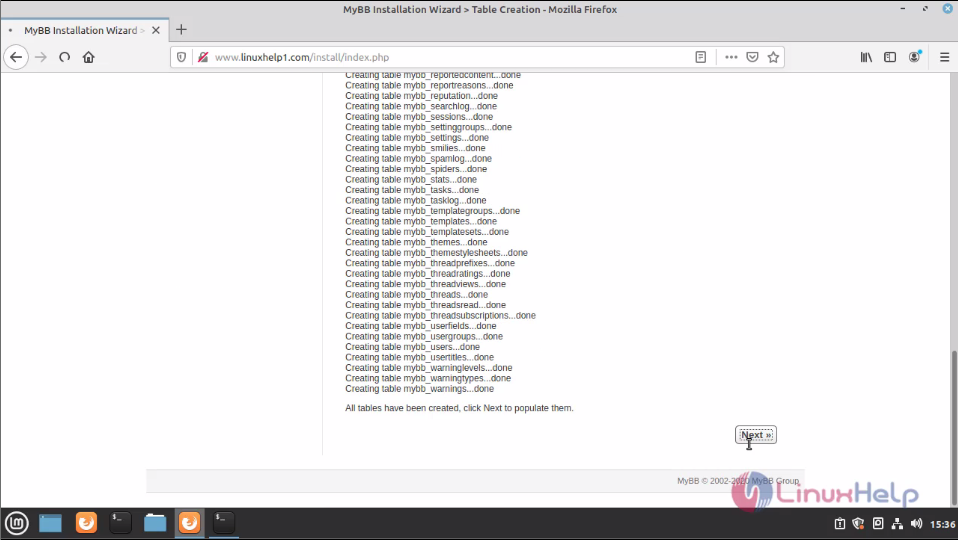 You can see the data insertion.
 Choose the theme installation.
 Configure the site information.
 Configure the Admin user credentials.
 Once the setup is finished you will see the following page.
 Log in using the Admin user credentials.
 The MyBB CMS dashboard looks like the following image.

With this, the method to install MyBB CMS on Linuxm Mint 20 comes to an end.
Comments ( 0 )
No comments available