How to install NCDU on Ubuntu 17.04
How to install NCDU on Ubuntu 17.04
NCDU or NCurses Disk Usage is a command line tool to view and analyse disk space usage on Linux. It can drill down into directories and report space used by individual directories. It allows the user to do much faster than a GUI file manager. This tutorial explains the installation procedure of NCDU on Ubuntu 17.04.
Installation procedure
To start the installation procedure, add the repo by executing the following command.
root@linuxhelp1:~# add-apt-repository ppa:eugenesan/ppa
This repository contains collection of customized, updated, ported and backported
packages for two last LTS releases and latest pre-LTS release.
Packages for older releases relocated to ppa:eugenesan/archive or deleted.

+-------------------------------------------------------------------------------------+
| Disclaimer:
+-------------------------------------------------------------------------------------+
* Packages in this a nd related PPAs are for personal use only.
  They developed specifically for several custom environments and may not work for you.
* Usage of packages in this PPA, in some forms, might contradict licenses of software
  packaged in this and related PPAs. End users and administrator are responsible for
  runtime licensing and possible legal consequences.
* Some packages provided with their dependencies while some might require additional
  Ubuntu repositories and external PPAs. Below is the list of
.
.
.
Press [ENTER] to continue or ctrl-c to cancel adding it
gpg: keybox ' /tmp/tmp58gcy2yp/pubring.gpg'  created
gpg: /tmp/tmp58gcy2yp/trustdb.gpg: trustdb created
gpg: key E61380B28313A596: public key " Launchpad synergy+"  imported
gpg: Total number processed: 1
gpg:imported: 1
OK
The repositories are added to the target system. Update the repo by executing the apt-get update command.
root@linuxhelp1:~# apt-get update
Get:1 http://ppa.launchpad.net/eugenesan/ppa/ubuntu zesty InRelease [15.4 kB]
Hit:2 http://in.archive.ubuntu.com/ubuntu zesty InRelease
Hit:3 http://security.ubuntu.com/ubuntu zesty-security InRelease
Hit:4 http://in.archive.ubuntu.com/ubuntu zesty-updates InRelease
Hit:5 http://in.archive.ubuntu.com/ubuntu zesty-backports InRelease
Get:6 http://ppa.launchpad.net/eugenesan/ppa/ubuntu zesty/main amd64 Packages [1,100 B]
Get:7 http://ppa.launchpad.net/eugenesan/ppa/ubuntu zesty/main i386 Packages [1,108 B]
Get:8 http://ppa.launchpad.net/eugenesan/ppa/ubuntu zesty/main Translation-en [1,288 B]
Fetched 18.9 kB in 1s (12.3 kB/s)
Reading package lists... Done
The target system is updated with the required repositories. Execute the following apt-get install command to install the NCDU application and press y to continue with the installation procedure.
root@linuxhelp1:~# apt-get install ncdu -y
Reading package lists... Done
Building dependency tree
Reading state information... Done
The following NEW packages will be installed:
ncdu
0 upgraded, 1 newly installed, 0 to remove and 33 not upgraded.
Need to get 38.6 kB of archives.
After this operation, 93.2 kB of additional disk space will be used.
Get:1 http://in.archive.ubuntu.com/ubuntu zesty/universe amd64 ncdu amd64 1.12-1 [38.6 kB]
Fetched 38.6 kB in 0s (40.5 kB/s)
Selecting previously unselected package ncdu.
(Reading database ... 202897 files and directories currently installed.)
Preparing to unpack .../archives/ncdu_1.12-1_amd64.deb ...
Unpacking ncdu (1.12-1) ...
Setting up ncdu (1.12-1) ...
Processing triggers for man-db (2.7.6.1-2) ...
The NCDU application is installed successfully. To start the application, type the package name ncdu in the terminal and execute it.
root@linuxhelp1:~# ncdu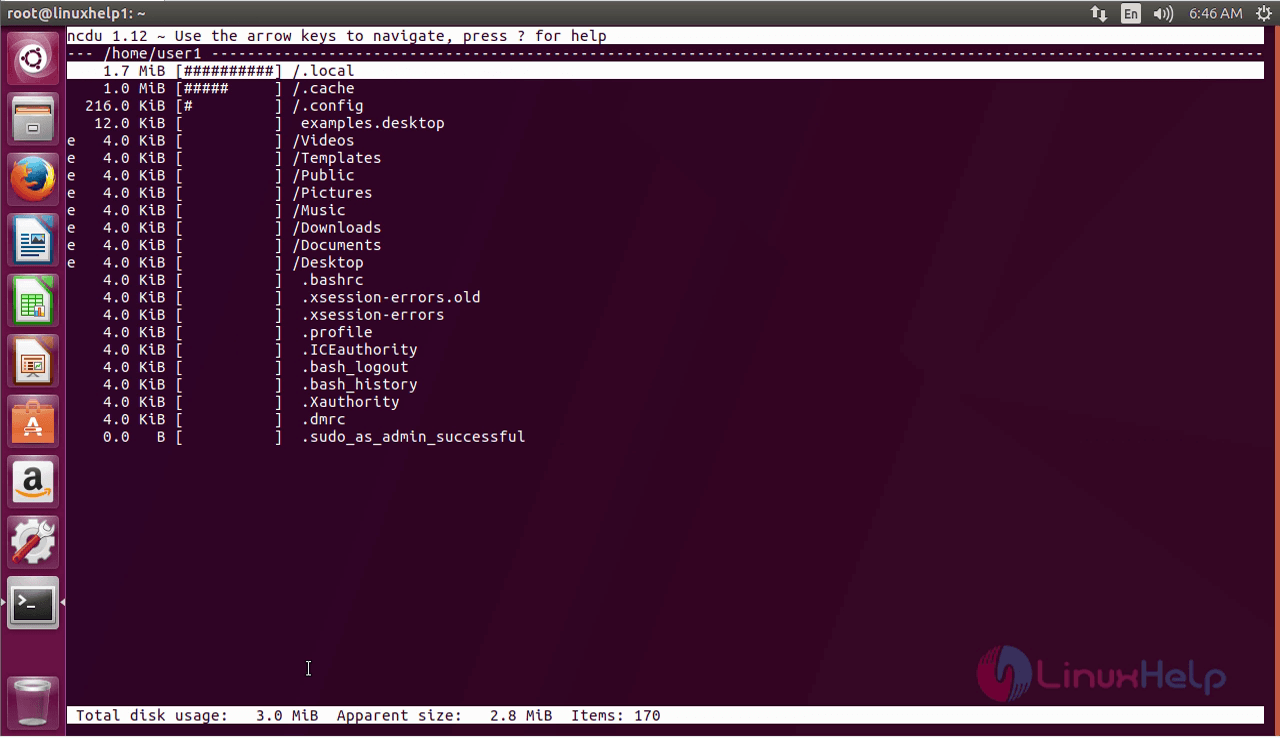
For removing the package, run the remove command and press y to continue with the uninstallation process.
root@linuxhelp1:~# apt-get remove ncdu -y
Reading package lists... Done
Building dependency tree
Reading state information... Done
The following packages will be REMOVED:
ncdu
0 upgraded, 0 newly installed, 1 to remove and 33 not upgraded.
After this operation, 93.2 kB disk space will be freed.
(Reading database ... 202901 files and directories currently installed.)
Removing ncdu (1.12-1) ...
Processing triggers for man-db (2.7.6.1-2) ...
Wasn' t that an easy installation procedure? NCDU does one task of reporting the space used by the directory and drill down operation.
Comments ( 0 )
No comments available