• Categories
    Category
    {{ postCtrl.tags }}
    • {{ category.tag_type }}

      • {{tag.tag_name}}
      • View more
  • Categories
    Category
    {{ postCtrl.tags }}
    • {{ category.tag_type }}

      • {{tag.tag_name}}
      • View more
  • News
  • Tutorials
  • Forums
  • Tags
  • Users
Tutorial News Comments FAQ Related Articles

How to install Nemo 3.4 file manager on Ubuntu 16.04

{{postValue.id}}

How to install Nemo 3.4 file manager on Ubuntu 16.04

Nemo is a free and open-source software and official file manager of the Cinnamon desktop environment. Nemo allows users to “ open as root” and “ open in terminal” . It comes with elevated privileges and is a wonderful tools to manager files without worrying about permissions. This tutorial covers the installation procedure of Nemo file manager on Ubuntu 16.04.

Installation procedure

To start the installation procedure, execute the following command to add the repository to the system.

root@linuxhelp:~#  add-apt-repository ppa:webupd8team/nemo
 !!! For Nemo 3.x you' ll need to use a different PPA: http://www.webupd8.org/2016/11/nemo-320-with-unity-patches-and-without.html
Nemo file manager patched for Unity (no Cinnamon dependencies except cinnamon-translations)
.
.
gpg: Total number processed: 1
gpg:               imported: 1  (RSA: 1)
OK

After adding the repository, update the repository using the following command.

root@linuxhelp:~# apt-get update
Hit:1 http://security.ubuntu.com/ubuntu xenial-security InRelease
Hit:2 http://in.archive.ubuntu.com/ubuntu xenial InRelease              
Get:3 http://ppa.launchpad.net/webupd8team/nemo/ubuntu xenial InRelease [17.6 kB]
.
.
Fetched 9850 kB in 132s (1380 kB/s)                                                
Reading package lists... Done

The target system is updated with the required repository. Install the nemo file manager and execute the following command.

root@linuxhelp:~# apt-get install nemo
Reading package lists... Done
Building dependency tree       
Reading state information... Done
.
.
Setting up nemo-fileroller (2.8.0-2~webupd8~xenial0) ...
Processing triggers for libc-bin (2.23-0ubuntu3) ...

The application has been installed in the system. Type the application name in the ubuntu dashboard and click on the icon to run the application.
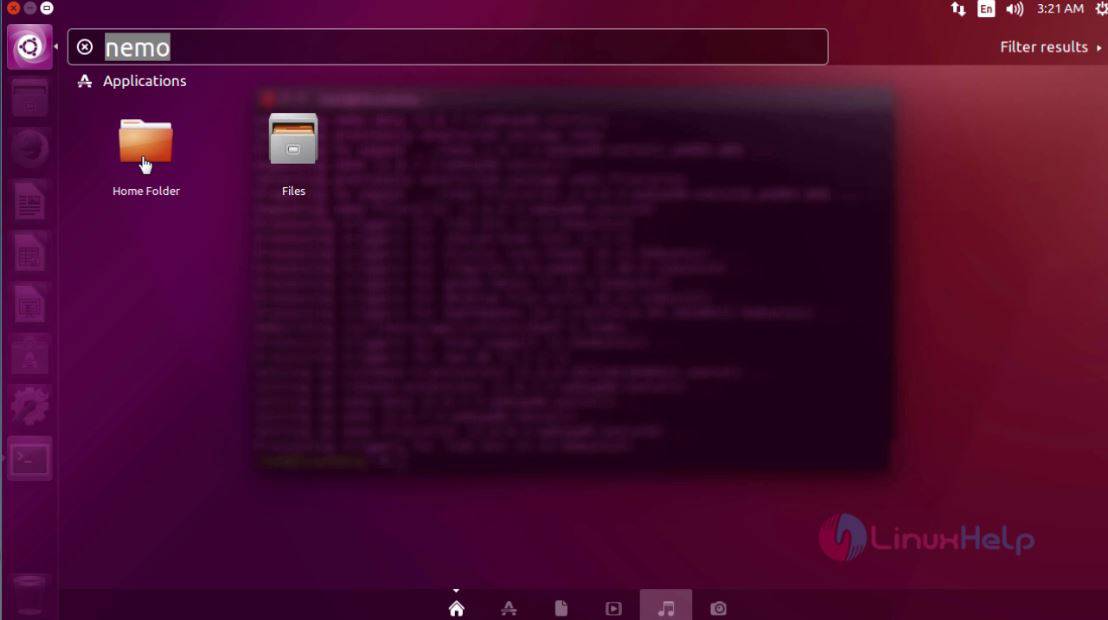
ubuntu dashboard

The Nemo application is running in the system without any glitches.
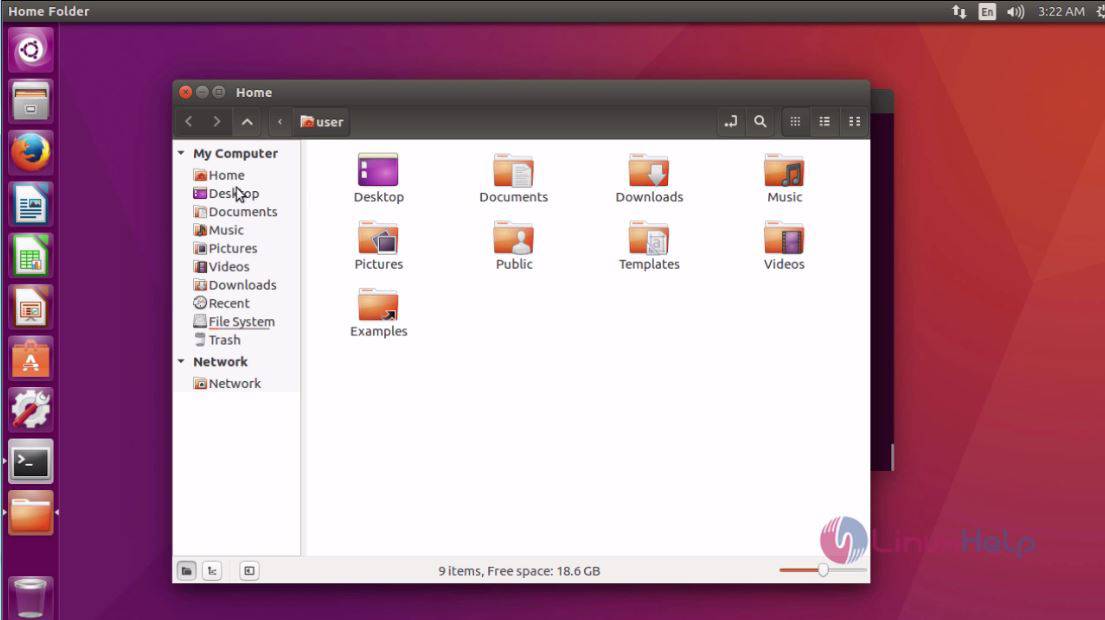
nemo file manager

The installation of Nemo file manager is done successfully.

Tags:
caden
Author: 

Comments ( 0 )

No comments available

Add a comment
{{postCtrl.cmtErrMsg}}

Frequently asked questions ( 5 )

Q

What are the features of Nemo file manager?

A

Followings are the features of Nemo file manager

1. Added GTK bookmarks to the MoveTo/CopyTo context menus
2. Switch view buttons on the toolbar (Grid, List and Compact views)
3. Collapsable sidebar categories
4. Drag and drop support for the bookmarks in the sidebar
5. Sidebar: indicators under each drive, displaying the free/used space
6. Support for sending files via Thunderbird and xdg-email
7. Image properties improvements
8. Built-in "Open as root" context menu item

Q

What are the bar's and special bottons available in Nemo file manager?

A

Followings are available on Nemo

1. Menubar.
2. Toolbar (back, forward, up, reload, home, my computer).
3. Address bar.
4. Toolbar (address toggle, new folder, search).
5. View buttons (icons, compact, details).
6. Left panel (My Computer, Devices, Network).
7. Main area.
8. Bottom toolbar (Folder View, Tree View, Hide Left Panel).
9. Status bar.
10. Zoom slider.

Q

What are the shortcut can be used in Nemo file manager?

A

The shortcut used in Nemo file manager are

1. New Tab - Ctrl+T
2. New Folder - Ctrl+Shift+N
3. Address Bar - Ctrl+L
4. Delete Folder - Shift+Delete
5. Search - Ctrl+F

Q

What are the file manager used other than Nemo ?

A

we can also use file manager like "Sunflower file manager" , "cloud commander", "Gnome commander" etc.

Q

Is there any other repository available to install Nemo file manager?

A

Yes, We can also use the following repository to install Nemo file manager
"add-apt-repository ppa:noobslab/nemo3"

Back To Top!
Rank
User
Points

Top Contributers

userNamenaveelansari
135850

Top Contributers

userNameayanbhatti
92510

Top Contributers

userNamehamzaahmed
32150

Top Contributers

1
userNamelinuxhelp
31040

Top Contributers

userNamemuhammadali
24500
Can you help Luke ?
workbench for debian

I am using workbench in CentOS whereas now I need to use Debian Operating system so could you please help to install and use in Debian?

Networking
  • Routing
  • trunk
  • Netmask
  • Packet Capture
  • domain
  • HTTP Proxy
Server Setup
  • NFS
  • KVM
  • Memory
  • Sendmail
  • WebDAV
  • LXC
Shell Commands
  • Cloud commander
  • Command line archive tools
  • last command
  • Shell
  • terminal
  • Throttle
Desktop Application
  • Linux app
  • Pithos
  • Retrospect
  • Scribe
  • TortoiseHg
  • 4Images
Monitoring Tool
  • Monit
  • Apache Server Monitoring
  • EtherApe 
  • Arpwatch Tool
  • Auditd
  • Barman
Web Application
  • Nutch
  • Amazon VPC
  • FarmWarDeployer
  • Rukovoditel
  • Mirror site
  • Chef
Contact Us | Terms of Use| Privacy Policy| Disclaimer
© 2025 LinuxHelp.com All rights reserved. Linux™ is the registered trademark of Linus Torvalds. This site is not affiliated with linus torvalds in any way.