How To Install Neofetch 4.0.2 On linuxmint 18.03
{{postValue.id}}
To Install Neofetch 4.0.2 on linuxmint 18.03
Neofetch is a command-line interface (CLI) system information tool written in BASH. It displays information about your system next to an image, your OS logo and many more. Neofetch is used to show other users information about the OS/Distro you’ re running, and also the theme/Icons you’ re using.
Installation
Add the repository of neofetch using PPA
linuxhelp ~ # add-apt-repository ppa:dawidd0811/neofetch
You are about to add the following PPA:
 CLI script to show your system' s info and display an image using w3m.
 More info: https://launchpad.net/~dawidd0811/+archive/ubuntu/neofetch
Press Enter to continue or Ctrl+C to cancel

Executing: /tmp/tmp.UXXuMiU9wp/gpg.1.sh --keyserver
hkp://keyserver.ubuntu.com:80
--recv-keys
4221BA96
gpg: requesting key 4221BA96 from hkp server keyserver.ubuntu.com
gpg: key 4221BA96: public key " Launchpad PPA for dawidd6"  imported
gpg: Total number processed: 1
gpg:               imported: 1  (RSA: 1)
Update the system repository using the following command.
linuxhelp ~ # apt-get update
Hit:1 http://archive.ubuntu.com/ubuntu xenial InRelease
Get:2 http://ppa.launchpad.net/dawidd0811/neofetch/ubuntu xenial InRelease [18.0 kB]
Ign:3 http://packages.linuxmint.com sylvia InRelease
Hit:4 http://archive.canonical.com/ubuntu xenial InRelease
.
.
.
Get:13 http://ppa.launchpad.net/dawidd0811/neofetch/ubuntu xenial/main amd64 Packages [528 B]
Get:14 http://ppa.launchpad.net/dawidd0811/neofetch/ubuntu xenial/main i386 Packages [528 B]
Get:15 http://ppa.launchpad.net/dawidd0811/neofetch/ubuntu xenial/main Translation-en [360 B]
Get:16 http://archive.ubuntu.com/ubuntu xenial-updates/main amd64 Packages [793 kB]
Get:17 http://archive.ubuntu.com/ubuntu xenial-updates/main i386 Packages [725 kB]
Get:18 http://archive.ubuntu.com/ubuntu xenial-updates/universe amd64 Packages [634 kB]
Get:19 http://archive.ubuntu.com/ubuntu xenial-updates/universe i386 Packages [579 kB]
Fetched 3,074 kB in 6s (490 kB/s)
Reading package lists... Done
Install the neofetch application using the following command.
linuxhelp ~ # apt-get install neofetch -y
Reading package lists... Done
Building dependency tree
Reading state information... Done
The following packages were automatically installed and are no longer required:
  libcurl3 libmcrypt4
Use ' sudo apt autoremove'  to remove them.
Suggested packages:
  w3m cmus feh mpc nitrogen scrot moc
The following NEW packages will be installed:
  neofetch
0 upgraded, 1 newly installed, 0 to remove and 374 not upgraded.
Need to get 67.8 kB of archives.
After this operation, 298 kB of additional disk space will be used.
Get:1 http://ppa.launchpad.net/dawidd0811/neofetch/ubuntu xenial/main amd64 neofetch all 4.0.2-1~ubuntu16.04.1 [67.8 kB]
Fetched 67.8 kB in 0s (88.3 kB/s)
Selecting previously unselected package neofetch.
(Reading database ... 221046 files and directories currently installed.)
Preparing to unpack .../neofetch_4.0.2-1~ubuntu16.04.1_all.deb ...
Unpacking neofetch (4.0.2-1~ubuntu16.04.1) ...
Processing triggers for man-db (2.7.5-1) ...
Setting up neofetch (4.0.2-1~ubuntu16.04.1) ...
Launch the Neofetch by typing ' neofetch' at the terminal.
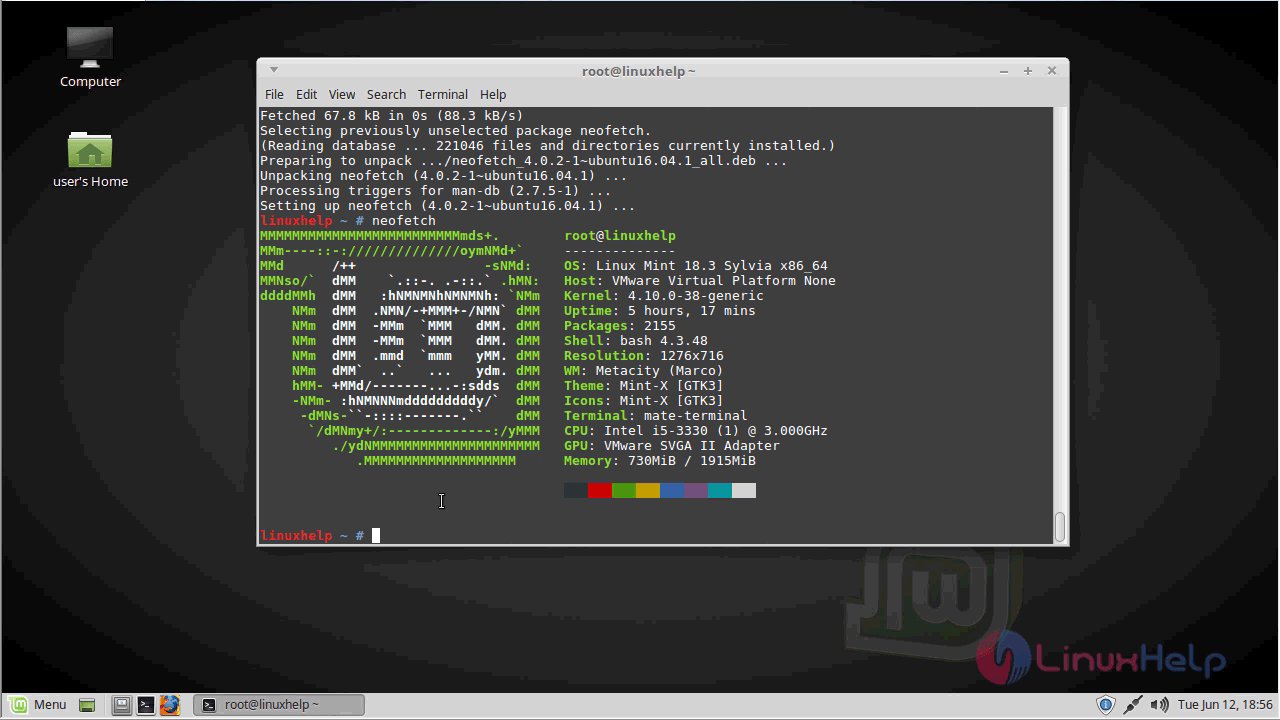
The version of Neofetch
linuxhelp ~ # neofetch --version
Neofetch 4.0.2
With this, the method to Install Neofetch 4.0.2 on linuxmint 18.03 comes to an end.
Comments ( 0 )
No comments available