How to install Nginx web server in OpenSUSE
To install Nginx web server in OpenSUSE
Nginx is an open source and high performance web server for Linux distributions. It is used to deliver large amounts of static content quickly with an efficient manner. Nginx can serve static content like plain HTML and media files. Installation of Nginx web server in OpenSuse is explained in this article.
Features
- Easy to use.
- Ability to handle static files, index files and auto-indexing.
- Supports TLS/SSL with SNI and OCSP stapling.
- SMTP, POP3 and IMAP proxy is available.
Installation of Ngnix
First add the repository, which is required to install Ngnix server.
linuxhelp:/home/user1 # zypper ar -r http://download.opensuse.org/repositories/server:/http/openSUSE_13.2/server:http.repo nginx
Adding repository ' Webservers and tools around it (openSUSE_13.2)'  ............................[done]
Repository ' Webservers and tools around it (openSUSE_13.2)'  successfully added
Enabled: Yes
Autorefresh: No
GPG check: Yes
URI: http://download.opensuse.org/repositories/server:/http/openSUSE_13.2/
Once the repository is added, refersh the machine.
linuxhelp:/home/user1 # zypper refresh
Repository ' openSUSE-13.2-0'  is up to date.
Retrieving repository ' openSUSE-13.2-Non-Oss'  metadata ........................................[done]
Building repository ' openSUSE-13.2-Non-Oss'  cache .............................................[done]
.
.
.
Retrieving repository ' Webservers and tools around it (openSUSE_13.2)'  metadata ...............[done]
Building repository ' Webservers and tools around it (openSUSE_13.2)'  cache ....................[done]
All repositories have been refreshed.
Install the Nginx package from the added repository by using the following command.
linuxhelp:/home/user1 # zypper install nginx
Loading repository data...
Reading installed packages...
Resolving package dependencies...
.
.
.
(1/3) Installing: libGeoIP1-1.5.1-4.1.2 .......................................................[done]
(2/3) Installing: GeoIP-1.5.1-4.1.2 ...........................................................[done]
(3/3) Installing: nginx-1.11.2-62.1 ...........................................................[done]
Start and enable the nginx service to access the Nginx server.
linuxhelp:/home/user1 # systemctl start nginx
linuxhelp:/home/user1 # systemctl enable nginx
Use the below command to check the status of Nginx service.
linuxhelp:/home/user1 # systemctl status nginx
nginx.service - The nginx HTTP and reverse proxy server
   Loaded: loaded (/usr/lib/systemd/system/nginx.service  enabled)
   Active: active (running) since Wed 2016-09-14 19:12:35 IST  34s ago
 Main PID: 34837 (nginx)
   CGroup: /system.slice/nginx.service
           ??34837 nginx: master process /usr/sbin/nginx -g daemon off
           ??34839 nginx: worker process

Sep 14 19:12:35 linuxhelp nginx[34835]: nginx: the configuration file /etc/nginx/nginx.conf sy...s ok
Sep 14 19:12:35 linuxhelp nginx[34835]: nginx: configuration file /etc/nginx/nginx.conf test i...sful
Hint: Some lines were ellipsized, use -l to show in full.
Go the web root directory, create a file and save as index.html.
linuxhelp:/home/user1 # cd /srv/www/htdocs/
Enter your own html codes into the newly created file.
linuxhelp:/srv/www/htdocs # vim index.html

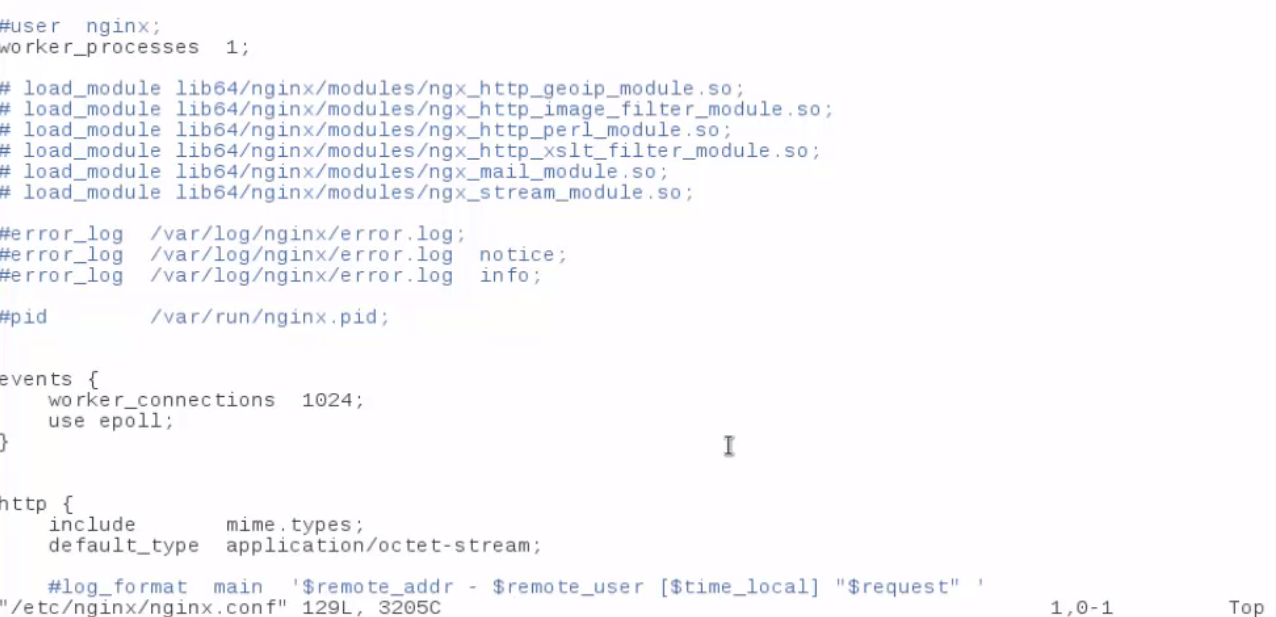
Configure the Nginx server in the location /etc/nginx/nginx.conf
Go to the web browser and enter " server-IP or hostname" to checkout the result.

Comments ( 0 )
No comments available