How to Install Nginx web server on Rocky Linux 9.2
To Install Nginx web server on Rocky Linux 9.2
Introduction :
NGINX (Engine X) is one of the most popular, powerful, and high-performance open-source HTTP web servers and reverse proxies that has an event-driven architecture and can also be used as a load balancer, mail proxy, and HTTP cache which is free, fast, stable, easy to configure, and consumes little resources.
Installation steps :
Step 1: Check the version of the OS by using the below command.
[root@Linuxhelp ~]# cat /etc/os-release
NAME="Rocky Linux"
VERSION="9.2 (Blue Onyx)"
ID="rocky"
ID_LIKE="rhel centos fedora"
VERSION_ID="9.2"
PLATFORM_ID="platform:el9"
PRETTY_NAME="Rocky Linux 9.2 (Blue Onyx)"
ANSI_COLOR="0;32"
LOGO="fedora-logo-icon"
CPE_NAME="cpe:/o:rocky:rocky:9::baseos"
HOME_URL="https://rockylinux.org/"
BUG_REPORT_URL="https://bugs.rockylinux.org/"
SUPPORT_END="2032-05-31"
ROCKY_SUPPORT_PRODUCT="Rocky-Linux-9"
ROCKY_SUPPORT_PRODUCT_VERSION="9.2"
REDHAT_SUPPORT_PRODUCT="Rocky Linux"
REDHAT_SUPPORT_PRODUCT_VERSION="9.2"
Step 2: Install Nginx package with DNF install
[root@Linuxhelp ~]# dnf install nginx
google-chrome                                                                  5.6 kB/s | 3.6 kB     00:00
Last metadata expiration check: 0:00:01 ago on Sat 01 Jul 2023 06:08:04 AM IST.
Dependencies resolved.
===============================================================================================================
 Package                        Architecture        Version                       Repository              Size
===============================================================================================================
Installing:
 nginx                          x86_64              1:1.20.1-14.el9               appstream               38 k
Installing dependencies:
 nginx-core                     x86_64              1:1.20.1-14.el9               appstream              567 k
 nginx-filesystem               noarch              1:1.20.1-14.el9               appstream               10 k


 rocky-logos-httpd              noarch              90.14-1.el9                   appstream               24 k

Transaction Summary
===============================================================================================================
Install  4 Packages

Total download size: 640 k
Installed size: 1.8 M
Is this ok [y/N]: y
Downloading Packages:
(1/4): nginx-filesystem-1.20.1-14.el9.noarch.rpm                                23 kB/s |  10 kB     00:00
(2/4): rocky-logos-httpd-90.14-1.el9.noarch.rpm                                 52 kB/s |  24 kB     00:00
(3/4): nginx-1.20.1-14.el9.x86_64.rpm                                           82 kB/s |  38 kB     00:00
(4/4): nginx-core-1.20.1-14.el9.x86_64.rpm                                     1.8 MB/s | 567 kB     00:00
---------------------------------------------------------------------------------------------------------------
Total                                                                          397 kB/s | 640 kB     00:01
Running transaction check
Transaction check succeeded.
Running transaction test
Transaction test succeeded.
Running transaction
  Preparing        :                                                                                       1/1
  Running scriptlet: nginx-filesystem-1:1.20.1-14.el9.noarch                                               1/4
  Installing       : nginx-filesystem-1:1.20.1-14.el9.noarch                                               1/4
  Installing       : nginx-core-1:1.20.1-14.el9.x86_64                                                     2/4
  Installing       : rocky-logos-httpd-90.14-1.el9.noarch                                                  3/4
  Installing       : nginx-1:1.20.1-14.el9.x86_64                                                          4/4


  Running scriptlet: nginx-1:1.20.1-14.el9.x86_64                                                          4/4
  Verifying        : rocky-logos-httpd-90.14-1.el9.noarch                                                  1/4
  Verifying        : nginx-filesystem-1:1.20.1-14.el9.noarch                                               2/4
  Verifying        : nginx-1:1.20.1-14.el9.x86_64                                                          3/4
  Verifying        : nginx-core-1:1.20.1-14.el9.x86_64                                                     4/4

Installed:
  nginx-1:1.20.1-14.el9.x86_64                            nginx-core-1:1.20.1-14.el9.x86_64
  nginx-filesystem-1:1.20.1-14.el9.noarch                 rocky-logos-httpd-90.14-1.el9.noarch

Complete!
Step 3: Enable the Nginx service by using the below command.
[root@Linuxhelp ~]# systemctl enable nginx
Created symlink /etc/systemd/system/multi-user.target.wants/nginx.service → /usr/lib/systemd/system/nginx.service.
Step 4: Start the Nginx service by using the below command..
[root@Linuxhelp ~]# systemctl start nginx
Step 5: Check the Status of the Nginx service by using the below command.
 [root@Linuxhelp ~]# systemctl status nginx
● nginx.service - The nginx HTTP and reverse proxy server
     Loaded: loaded (/usr/lib/systemd/system/nginx.service; enabled; preset: disabled)
     Active: active (running) since Sat 2023-07-01 06:09:34 IST; 18s ago
    Process: 6508 ExecStartPre=/usr/bin/rm -f /run/nginx.pid (code=exited, status=0/SUCCESS)
    Process: 6509 ExecStartPre=/usr/sbin/nginx -t (code=exited, status=0/SUCCESS)
    Process: 6511 ExecStart=/usr/sbin/nginx (code=exited, status=0/SUCCESS)
   Main PID: 6512 (nginx)
      Tasks: 3 (limit: 22877)


     Memory: 2.9M
        CPU: 120ms
     CGroup: /system.slice/nginx.service
             ├─6512 "nginx: master process /usr/sbin/nginx"
             ├─6513 "nginx: worker process"
             └─6514 "nginx: worker process"

Jul 01 06:09:34 Linuxhelp systemd[1]: Starting The nginx HTTP and reverse proxy server...
Jul 01 06:09:34 Linuxhelp nginx[6509]: nginx: the configuration file /etc/nginx/nginx.conf syntax is ok
Jul 01 06:09:34 Linuxhelp nginx[6509]: nginx: configuration file /etc/nginx/nginx.conf test is successful
Jul 01 06:09:34 Linuxhelp systemd[1]: Started The nginx HTTP and reverse proxy server.
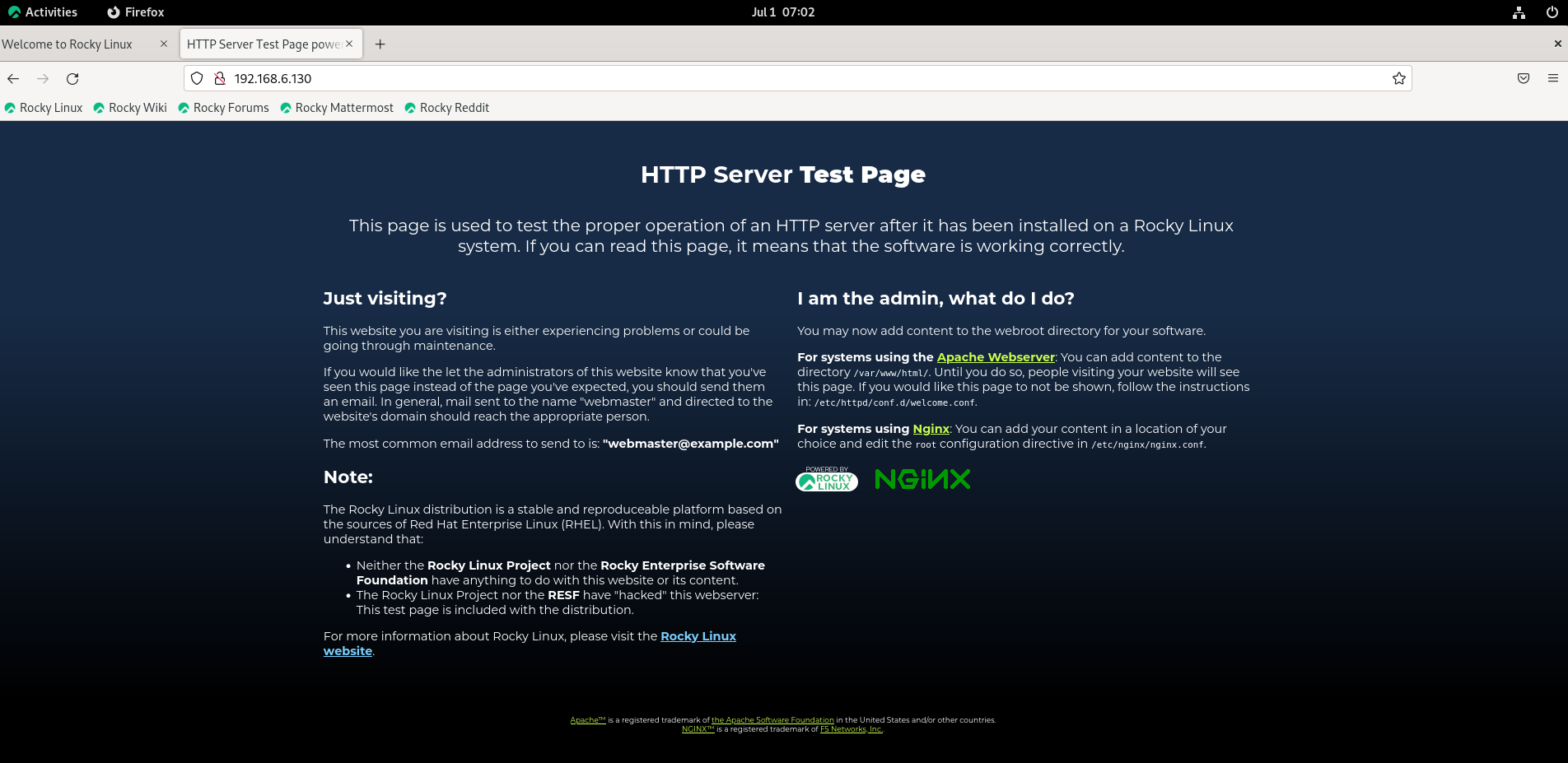
Step 6: Go to browser and search your server ip address. You should receive the default Nginx landing page as shown in the below image:
Conclusion:
We have reached the end of this article. In this guide, we have walked you through the steps required to install Nginx web server on Rocky Linux 9.2. Your feedback is much welcome.
Comments ( 0 )
No comments available