How to install OpenSearch Dashboards on Ubuntu 20.04
- 00:33 cat /etc/os-release
- 01:00 systemctl status opensearch
- 01:24 curl -o- https://artifacts.opensearch.org/publickeys/opensearch.pgp | sudo gpg --dearmor --batch --yes -o /usr/share/keyrings/opensearch-keyring
- 01:35 echo "deb [signed-by=/usr/share/keyrings/opensearch-keyring] https://artifacts.opensearch.org/releases/bundle/opensearch-dashboards/2.x/apt stable main" | sudo tee /etc/apt/sources.list.d/ope
- 01:44 apt-get update
- 02:12 apt list -a opensearch-dashboards
- 02:56 apt-get install opensearch-dashboards=2.12.0
- 03:43 systemctl enable opensearch-dashboards
- 04:04 systemctl start opensearch-dashboards
- 04:24 systemctl status opensearch-dashboards
To Install OpenSearch Dashboards On Ubuntu 20.04
Introduction
OpenSearch Dashboards is the primary visualization tool for data within OpenSearch, also doubling as a user interface for various OpenSearch plugins such as security, alerting, Index State Management, SQL, and additional functionalities.
Procedure Steps
Step 1: Check the OS version by using the below Command.
root@ubuntu:~# cat /etc/os-release
NAME="Ubuntu"
VERSION="20.04.6 LTS (Focal Fossa)"
ID=ubuntu
ID_LIKE=debian
PRETTY_NAME="Ubuntu 20.04.6 LTS"
VERSION_ID="20.04"
HOME_URL="https://www.ubuntu.com/"
SUPPORT_URL="https://help.ubuntu.com/"
BUG_REPORT_URL="https://bugs.launchpad.net/ubuntu/"
PRIVACY_POLICY_URL="https://www.ubuntu.com/legal/terms-and-policies/privacy-policy"
VERSION_CODENAME=focal
UBUNTU_CODENAME=focal
Step 2: Before installing the opensearch Dashboard need to check the status of opensearch.
root@ubuntu:~# systemctl status opensearch
● opensearch.service - OpenSearch
     Loaded: loaded (/lib/systemd/system/opensearch.service; enabled; vendor preset: enabled)
     Active: active (running) since Fri 2024-05-17 01:29:56 PDT; 1 weeks 0 days ago
       Docs: https://opensearch.org/
   Main PID: 17246 (java)
      Tasks: 70 (limit: 4556)
     Memory: 1.1G
     CGroup: /system.slice/opensearch.service
             └─17246 /usr/share/opensearch/jdk/bin/java -Xshare:auto -Dopensearch.networkaddress.cache.ttl=>

May 24 19:27:25 ubuntu systemd-entrypoint[17246]:         at org.opensearch.monitor.jvm.JvmGcMonitorService>
May 24 19:27:25 ubuntu systemd-entrypoint[17246]:         at org.opensearch.threadpool.Scheduler$Rescheduli>
May 24 19:27:25 ubuntu systemd-entrypoint[17246]:         at org.opensearch.common.util.concurrent.ThreadCo>
May 24 19:27:25 ubuntu systemd-entrypoint[17246]:         at org.opensearch.common.util.concurrent.Abstract>
May 24 19:27:25 ubuntu systemd-entrypoint[17246]:         at java.base/java.util.concurrent.Executors$Runna>
May 24 19:27:25 ubuntu systemd-entrypoint[17246]:         at java.base/java.util.concurrent.FutureTask.run(>
May 24 19:27:25 ubuntu systemd-entrypoint[17246]:         at java.base/java.util.concurrent.ScheduledThread>
May 24 19:27:25 ubuntu systemd-entrypoint[17246]:         at java.base/java.util.concurrent.ThreadPoolExecu>
May 24 19:27:25 ubuntu systemd-entrypoint[17246]:         at java.base/java.util.concurrent.ThreadPoolExecu>
May 24 19:27:25 ubuntu systemd-entrypoint[17246]:         at java.base/java.lang.Thread.run(Thread.java:158>
Step 3: Import the public GPG key by using the below command. This key is used to verify that the APT repository is signed.
root@ubuntu:~#  curl -o- https://artifacts.opensearch.org/publickeys/opensearch.pgp | sudo gpg --dearmor --batch --yes -o /usr/share/keyrings/opensearch-keyring
  % Total    % Received % Xferd  Average Speed   Time    Time     Time  Current
                                 Dload  Upload   Total   Spent    Left  Speed
100  4300  100  4300    0     0  39090      0 --:--:-- --:--:-- --:--:-- 39090
Step 4: Create an APT repository for OpenSearch Dashboard by using the below command.
root@ubuntu:~# echo "deb [signed-by=/usr/share/keyrings/opensearch-keyring] https://artifacts.opensearch.org/releases/bundle/opensearch-dashboards/2.x/apt stable main" | sudo tee /etc/apt/sources.list.d/opensearch-dashboards-2.x.list
deb [signed-by=/usr/share/keyrings/opensearch-keyring] https://artifacts.opensearch.org/releases/bundle/opensearch-dashboards/2.x/apt stable main
Step 5: Verify that the repository was created successfully by using the below command.
root@ubuntu:~# apt-get update
Hit:1 https://artifacts.opensearch.org/releases/bundle/opensearch/2.x/apt stable InRelease
Get:2 https://artifacts.opensearch.org/releases/bundle/opensearch-dashboards/2.x/apt stable InRelease [7,536 B]
Hit:3 http://security.ubuntu.com/ubuntu focal-security InRelease
Hit:4 http://us.archive.ubuntu.com/ubuntu focal InRelease
Hit:5 http://us.archive.ubuntu.com/ubuntu focal-updates InRelease
Get:6 https://artifacts.opensearch.org/releases/bundle/opensearch-dashboards/2.x/apt stable/main amd64 Packages [2,477 B]
Hit:7 http://us.archive.ubuntu.com/ubuntu focal-backports InRelease
Fetched 10.0 kB in 3s (2,903 B/s)
Reading package lists... Done
N: Skipping acquire of configured file 'main/binary-i386/Packages' as repository 'https://artifacts.opensearch.org/releases/bundle/opensearch/2.x/apt stable InRelease' doesn't support architecture 'i386'
N: Skipping acquire of configured file 'main/binary-i386/Packages' as repository 'https://artifacts.opensearch.org/releases/bundle/opensearch-dashboards/2.x/apt stable InRelease' doesn't support architecture 'i386'
Step 6: With the repository information added, list all available versions of OpenSearch Dashboard by using the below command.
root@ubuntu:~# apt list -a opensearch-dashboards
Listing... Done
opensearch-dashboards/stable 2.14.0 amd64
opensearch-dashboards/stable 2.13.0 amd64
opensearch-dashboards/stable 2.12.0 amd64
opensearch-dashboards/stable 2.11.1 amd64
opensearch-dashboards/stable 2.11.0 amd64
opensearch-dashboards/stable 2.10.0 amd64
opensearch-dashboards/stable 2.9.0 amd64
opensearch-dashboards/stable 2.8.0 amd64
opensearch-dashboards/stable 2.7.0 amd64
opensearch-dashboards/stable 2.6.0 amd64
opensearch-dashboards/stable 2.5.0 amd64
Step 7: To install a specific version of OpenSearch Dashboards, pass a version number after the package name. Unless otherwise indicated, the latest available version of OpenSearch is installed.
root@ubuntu:~# apt-get install opensearch-dashboards=2.12.0
Reading package lists... Done
Building dependency tree
Reading state information... Done
The following NEW packages will be installed:
  opensearch-dashboards
0 upgraded, 1 newly installed, 0 to remove and 5 not upgraded.
Need to get 305 MB of archives.
After this operation, 1,177 MB of additional disk space will be used.
Get:1 https://artifacts.opensearch.org/releases/bundle/opensearch-dashboards/2.x/apt stable/main amd64 opensearch-dashboards amd64 2.12.0 [305 MB]
Fetched 305 MB in 27s (11.2 MB/s)
Selecting previously unselected package opensearch-dashboards.
(Reading database ... 164421 files and directories currently installed.)
Preparing to unpack .../opensearch-dashboards_2.12.0_amd64.deb ...
Running OpenSearch-Dashboards Pre-Installation Script
Unpacking opensearch-dashboards (2.12.0) ...
Setting up opensearch-dashboards (2.12.0) ...
Running OpenSearch-Dashboards Post-Installation Script
### NOT starting on installation, please execute the following statements to configure opensearch-dashboards service to start automatically using systemd
 sudo systemctl daemon-reload
 sudo systemctl enable opensearch-dashboards.service
### You can start opensearch-dashboards service by executing
 sudo systemctl start opensearch-dashboards.service
### Upcoming breaking change in packaging
 In a future release of OpenSearch Dashboards, we plan to change the permissions associated with access to installed files
 If you are configuring tools that require read access to the OpenSearch Dashboards configuration files, we recommend you add the user that runs these tools to the 'opensearch-dashboards' group
 For more information, see https://github.com/opensearch-project/opensearch-build/pull/4043
Processing triggers for systemd (245.4-4ubuntu3.23) ...
Step 8: Once complete, enable and start the OpenSearch Dashboard by using the below command.
root@ubuntu:~# systemctl enable opensearch-dashboards
Synchronizing state of opensearch-dashboards.service with SysV service script with /lib/systemd/systemd-sysv-install.
Executing: /lib/systemd/systemd-sysv-install enable opensearch-dashboards
Created symlink /etc/systemd/system/multi-user.target.wants/opensearch-dashboards.service → /lib/systemd/system/opensearch-dashboards.service.
root@ubuntu:~# systemctl start opensearch-dashboards
Step 9: Verify the status of OpenSearch Dashboard by using the below command.
root@ubuntu:~# systemctl status opensearch-dashboards
● opensearch-dashboards.service - "OpenSearch Dashboards"
     Loaded: loaded (/lib/systemd/system/opensearch-dashboards.service; enabled; vendor preset: enabled)
     Active: active (running) since Fri 2024-05-24 19:49:38 PDT; 29s ago
   Main PID: 22249 (node)
      Tasks: 11 (limit: 4556)
     Memory: 315.8M
     CGroup: /system.slice/opensearch-dashboards.service
             └─22249 /usr/share/opensearch-dashboards/node/bin/node /usr/share/opensearch-dashboards/src/cl>

May 24 19:50:01 ubuntu opensearch-dashboards[22249]: [agentkeepalive:deprecated] options.freeSocketKeepAliv>
May 24 19:50:01 ubuntu opensearch-dashboards[22249]: [agentkeepalive:deprecated] options.freeSocketKeepAliv>
May 24 19:50:01 ubuntu opensearch-dashboards[22249]: [agentkeepalive:deprecated] options.freeSocketKeepAliv>
May 24 19:50:03 ubuntu opensearch-dashboards[22249]: {"type":"log","@timestamp":"2024-05-25T02:50:03Z","tag>
May 24 19:50:05 ubuntu opensearch-dashboards[22249]: {"type":"log","@timestamp":"2024-05-25T02:50:05Z","tag>
May 24 19:50:05 ubuntu opensearch-dashboards[22249]: {"type":"log","@timestamp":"2024-05-25T02:50:05Z","tag>
May 24 19:50:07 ubuntu opensearch-dashboards[22249]: {"type":"log","@timestamp":"2024-05-25T02:50:07Z","tag>
May 24 19:50:07 ubuntu opensearch-dashboards[22249]: {"type":"log","@timestamp":"2024-05-25T02:50:07Z","tag>
May 24 19:50:07 ubuntu opensearch-dashboards[22249]: {"type":"log","@timestamp":"2024-05-25T02:50:07Z","tag>
May 24 19:50:07 ubuntu opensearch-dashboards[22249]: {"type":"log","@timestamp":"2024-05-25T02:50:07Z","tag>
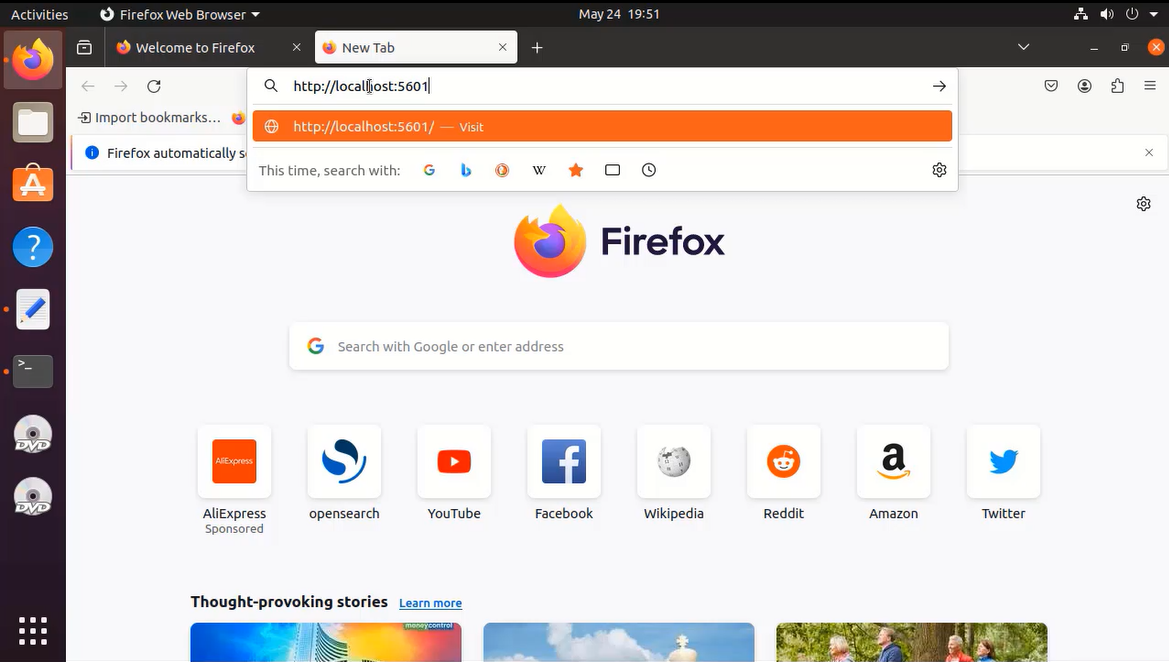
Step 10: Open web browser and access OpenSearch Dashboard by using default port 5601.
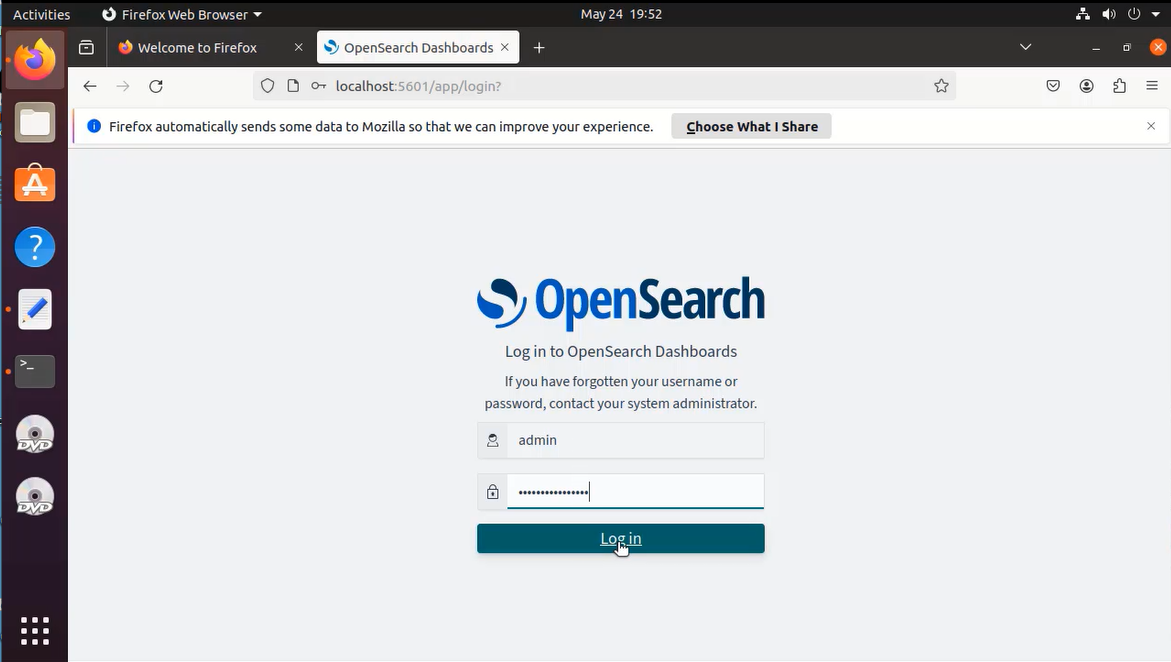
Step 11: Log in with the username and password which is created while installing opensearch. (For OpenSearch 2.12 and later, the password should be the custom admin password)
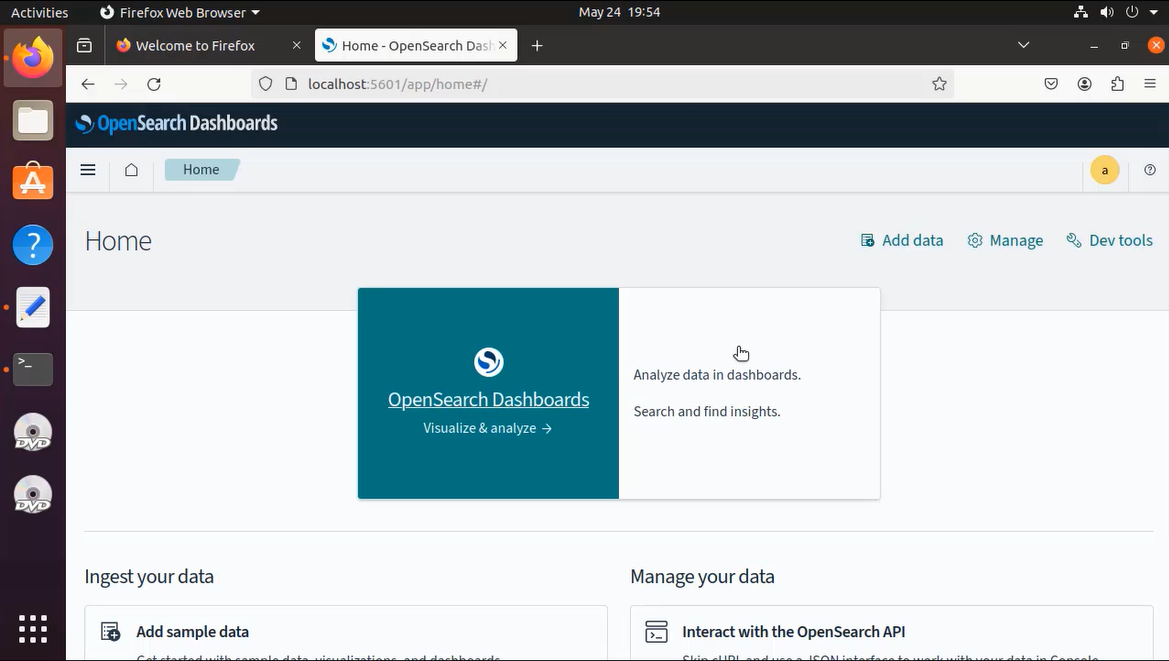
Step 12: Now we can see the OpenSearch Dashboard
Conclusion:
We have reached the end of this article. In this guide, we have walked you through the steps required to install OpenSearch Dashboard on Ubuntu 20.04. Your feedback is much welcome.
Comments ( 0 )
No comments available