• Categories
    Category
    {{ postCtrl.tags }}
    • {{ category.tag_type }}

      • {{tag.tag_name}}
      • View more
  • Categories
    Category
    {{ postCtrl.tags }}
    • {{ category.tag_type }}

      • {{tag.tag_name}}
      • View more
  • News
  • Tutorials
  • Forums
  • Tags
  • Users
Tutorial News Comments FAQ Related Articles

How to install Openshot on Fedora 34

  • 00:38 cat /etc/os-release
  • 00:54 su -c 'dnf install https://download0.rpmfusion.org/free/fedora/rpmfusion-free-release-$(rpm -E %fedora).noarch.rpm https://download0.rpmfusion.org/nonfree/fedora/rpmfusion-nonfree-release-$(r
  • 01:29 dnf install openshot
{{postValue.id}}

To Install Openshot on Fedora 34

Introduction:

The open-source OpenShot video editor supports the FFmpeg codecs WebM (VP9), AVCHD (libx264), HEVC (libx265), and audio codecs like mp3 and aac.

Installation procedure:

Step 1: Check the OS version by using the below command

[root@linuxhelp ~]# cat /etc/os-release
NAME=Fedora
VERSION="34 (Workstation Edition)"
ID=fedora
VERSION_ID=34
VERSION_CODENAME=""
PLATFORM_ID="platform:f34"
PRETTY_NAME="Fedora 34 (Workstation Edition)"
**Step 2: Type the following command and hit enter. This will add both free and non-free fusion repository sources to your Fedora installation.** ``` [root@linuxhelp ~]# su -c 'dnf install https://download0.rpmfusion.org/free/fedora/rpmfusion-free-release-$(rpm -E %fedora).noarch.rpm https://download0.rpmfusion.org/nonfree/fedora/rpmfusion-nonfree-release-$(rpm -E %fedora).noarch.rpm' Fedora 34 openh264 (From Cisco) - x86_64 5.7 kB/s | 989 B 00:00 Fedora Modular 34 - x86_64 6.7 kB/s | 5.6 kB 00:00 Fedora Modular 34 - x86_64 - Updates 6.4 kB/s | 5.2 kB 00:00 Fedora Modular 34 - x86_64 - Updates 168 kB/s | 824 kB 00:04 Fedora 34 - x86_64 - Updates 6.4 kB/s | 5.2 kB 00:00 Fedora 34 - x86_64 - Updates 1.2 MB/s | 13 MB 00:11 Preparing : 1/1 Installing : rpmfusion-nonfree-release-34-1.noarch 1/2 Installing : rpmfusion-free-release-34-1.noarch 2/2 Verifying : rpmfusion-free-release-34-1.noarch 1/2 Verifying : rpmfusion-nonfree-release-34-1.noarch 2/2

Installed: rpmfusion-free-release-34-1.noarch rpmfusion-nonfree-release-34-1.noarch

Complete!


**Step 3:  Now use dnf command to install OpenShot.**

[root@linuxhelp ~]# dnf install openshot RPM Fusion for Fedora 34 - Free - Updates 263 kB/s | 421 kB 00:01
RPM Fusion for Fedora 34 - Free 702 kB/s | 941 kB 00:01
RPM Fusion for Fedora 34 - Nonfree - Updates 83 kB/s | 82 kB 00:00
RPM Fusion for Fedora 34 - Nonfree 248 kB/s | 246 kB 00:00
Dependencies resolved.

Complete!

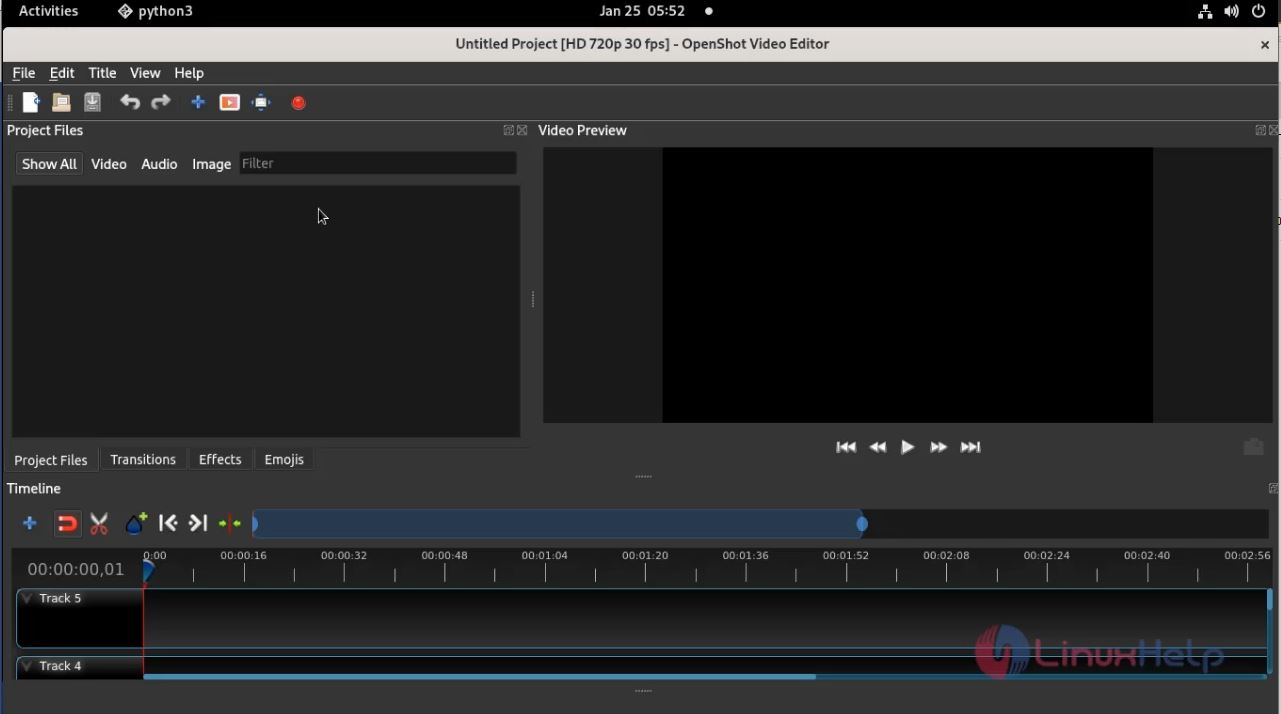
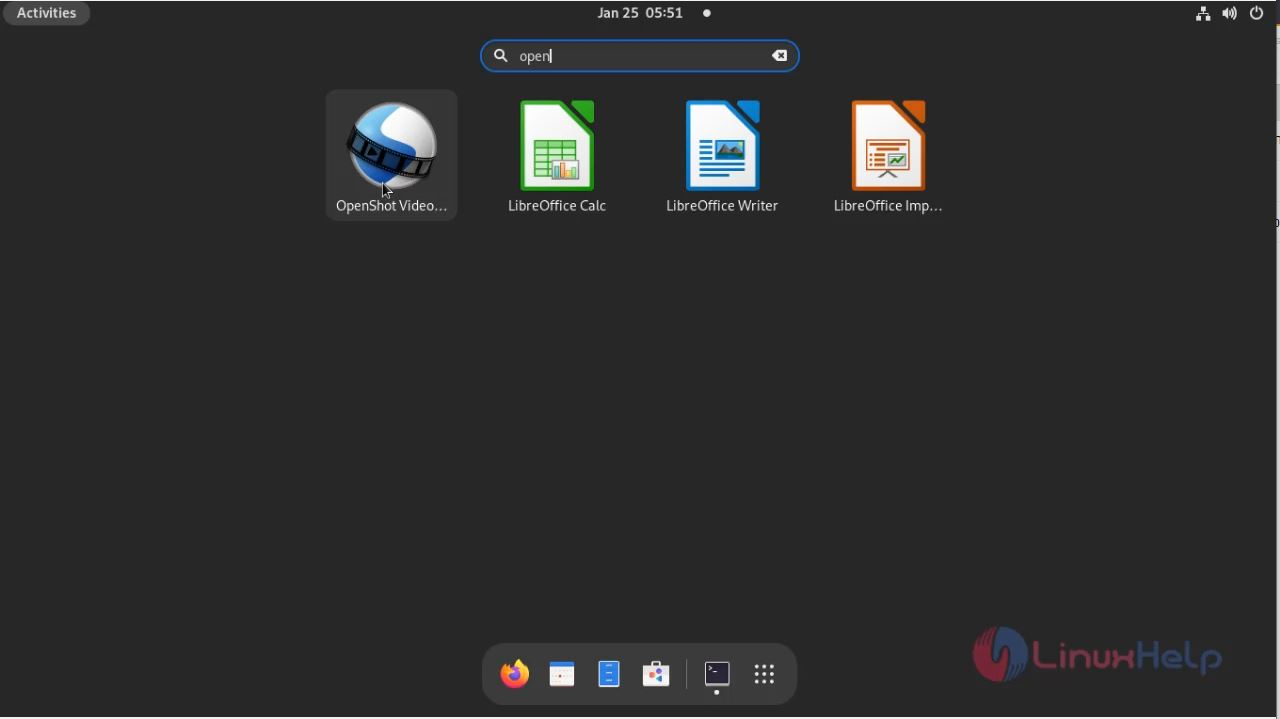
**Step 4: Now Search the menu bar to verify whether the OpenShot is installed.** ![snap1](https://assets.linuxhelp.com/scr/859909fe6aecb28bac8419aa1763b58d.png) ![snap2](https://assets.linuxhelp.com/scr/32176527e4c7e50b0fec7263411af726.png) **With this process the installing Openshot video editor on Fedora 34 comes to an end**
Tags:
michael
Author: 

Comments ( 0 )

No comments available

Add a comment
{{postCtrl.cmtErrMsg}}

Frequently asked questions ( 5 )

Q

Where do we get stable releases of PPA for OpenShot?

A

To get stable releases of PPA use the following link "https://www.openshot.org/ppa/"

Q

What files do OpenShot support?

A

OpenShot Supports all sorts of audio, video, and image formats, Key Frame animation, Digital zooming of video clips, and so on

Q

What are the features of OpenShot?

A

The features of OpenShot is

- Transform Tool &ndash A new transform tool, which allows real-time transformations in the video preview window.
- Zooming Improvements &ndash Zooming in and out of the timeline, in order to increase the precision of your edits, has been greatly improved. When zooming the timeline, it now centers on your mouse position, similar to image editing applications.
- New Preview Window &ndash Previewing files now have their own dedicated video player, which allows for multiple video preview windows at the same time. Also, audio files render a waveform by default. The speed of previewing files is also improved.

Q

What is an OpenShot?

A

An OpenShot is a free and cross-platform video editor. It supports several codecs by FFmpeg like WebM (VP9), AVCHD (libx264), HEVC (libx265), and audio codecs like mp3 and aac.

Q

What are the alternative tools related to OpenShot?

A

The alternative tools related to OpenShot are
Joyoshare Media Cutter
Filmora Video Editor
Avidemux
Kdenlive
iMovie

Back To Top!
Rank
User
Points

Top Contributers

userNamenaveelansari
135850

Top Contributers

userNameayanbhatti
92510

Top Contributers

userNamehamzaahmed
32150

Top Contributers

1
userNamelinuxhelp
31040

Top Contributers

userNamemuhammadali
24500
Can you help Luk Van De Looverbosch ?
How to create a root ?

Hello,
How to create root@linuxhelp in Linux Mint 20.1 64-bit ?
Thanks in advance for your reply.
Best regards.

Networking
  • Routing
  • trunk
  • Netmask
  • Packet Capture
  • domain
  • HTTP Proxy
Server Setup
  • NFS
  • KVM
  • Memory
  • Sendmail
  • WebDAV
  • LXC
Shell Commands
  • Cloud commander
  • Command line archive tools
  • last command
  • Shell
  • terminal
  • Throttle
Desktop Application
  • Linux app
  • Pithos
  • Retrospect
  • Scribe
  • TortoiseHg
  • 4Images
Monitoring Tool
  • Monit
  • Apache Server Monitoring
  • EtherApe 
  • Arpwatch Tool
  • Auditd
  • Barman
Web Application
  • Nutch
  • Amazon VPC
  • FarmWarDeployer
  • Rukovoditel
  • Mirror site
  • Chef
Contact Us | Terms of Use| Privacy Policy| Disclaimer
© 2025 LinuxHelp.com All rights reserved. Linux™ is the registered trademark of Linus Torvalds. This site is not affiliated with linus torvalds in any way.