How to install PAC Manager with its features
A Remote SSH/FTP/Telnet Session Management Tool- PAC Manager
PAC Manager is a GUI based Open source tool, used for configuring remote SSH/Telnet connections and it supports local executions, VNC, RDP, Cluster connections,EXPECT regular expressions and Macros, pre/post connections.
To Install PAC Manager in Linux
For Debian, Ubuntu and Linux Mint
Run the following command to download PAC manager.
user1@linuxhelp:~$ wget https://sourceforge.net/projects/pacmanager/files/pac-4.0/pac-4.5.5.7-all.deb
--2016-04-15 00:20:47--  https://sourceforge.net/projects/pacmanager/files/pac-4.0/pac-4.5.5.7-all.deb
...
...
Saving to: ‘ pac-4.5.5.7-all.deb’

pac-4.5.5.7-all.deb 100%[=====================> ]   1.07M   349KB/s   in 3.1s

2016-04-15 00:20:56 (349 KB/s) - ‘ pac-4.5.5.7-all.deb’  saved [1124680/1124680]
To install PAC Manager
Execute the below command to install PAC Manager.
user1@linuxhelp:~$ sudo dpkg -i pac-4.5.5.7-all.deb
(Reading database ... 176038 files and directories currently installed.)
Preparing to unpack pac-4.5.5.7-all.deb ...
Unpacking pac (4.5.5.7) over (4.5.5.7) ...
Setting up pac (4.5.5.7) ...
Processing triggers for man-db (2.7.4-1) ...
Processing triggers for gnome-menus (3.13.3-6ubuntu1) ...
Processing triggers for desktop-file-utils (0.22-1ubuntu3) ...
Processing triggers for bamfdaemon (0.5.2~bzr0+15.10.20150627.1-0ubuntu1) ...
Rebuilding /usr/share/applications/bamf-2.index...
Processing triggers for mime-support (3.58ubuntu1) ...
The dependency problem may occur during the installation process as shown below.
user1@linuxhelp:~$ sudo dpkg -i pac-4.5.5.7-all.deb
[sudo] password for user1:
Selecting previously unselected package pac.
(Reading database ... 175273 files and directories currently installed.)
Preparing to unpack pac-4.5.5.7-all.deb ...
Unpacking pac (4.5.5.7) ...
dpkg: dependency problems prevent configuration of pac:
 pac depends on gtk2-engines-pixbuf  however:
..
...
...
Processing triggers for bamfdaemon (0.5.2~bzr0+15.10.20150627.1-0ubuntu1) ...
Rebuilding /usr/share/applications/bamf-2.index...
Processing triggers for mime-support (3.58ubuntu1) ...
Errors were encountered while processing:
 pac
To solve the dependency problem
Use the following command.
user1@linuxhelp:~$ sudo apt-get -f install
Reading package lists... Done
Building dependency tree
Reading state information... Done
Correcting dependencies... Done
The following extra packages will be installed:
  gtk2-engines-pixbuf libcairo-perl libcrypt-blowfish-perl libcrypt-cbc-perl
  libcrypt-rijndael-perl libexpect-perl libglade2-0 libglib-perl
  libgnome2-gconf-perl libgtk2-ex-simple-list-perl libgtk2-gladexml-perl
  libgtk2-perl libgtk2-unique-perl libio-stty-perl libnet-arp-perl
...
...
...
Processing triggers for libc-bin (2.21-0ubuntu4.1) ...
Processing triggers for systemd (225-1ubuntu9.1) ...
Processing triggers for ureadahead (0.100.0-19) ...
Features of PAC Manager
Support for Multiple Protocol
It supports multiple protocol from SSH, FTP, VNC and RDP.
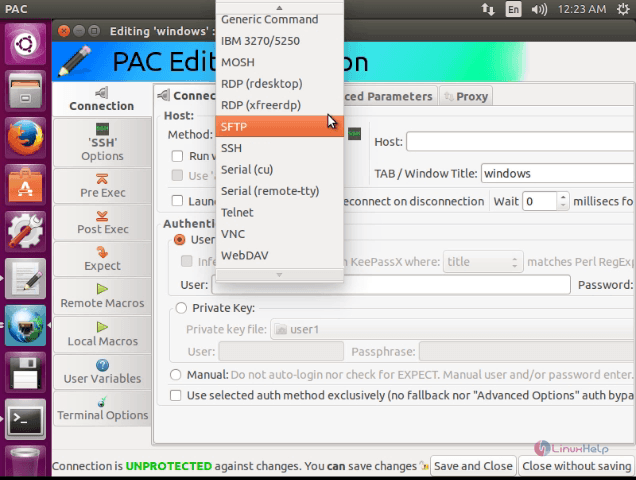
To install rdesktop
Use the following command to install rdesktop.
user1@linuxhelp:~$ sudo apt-get install rdesktop
[sudo] password for user1:
Reading package lists... Done
Building dependency tree
...
...
...
Unpacking rdesktop (1.8.3-1) ...
Processing triggers for man-db (2.7.4-1) ...
Setting up libgssglue1:amd64 (0.4-2ubuntu1) ...
Setting up rdesktop (1.8.3-1) ...
Processing triggers for libc-bin (2.21-0ubuntu4.1) ...
After rdesktop is installed use RDP to remote Windows machine.
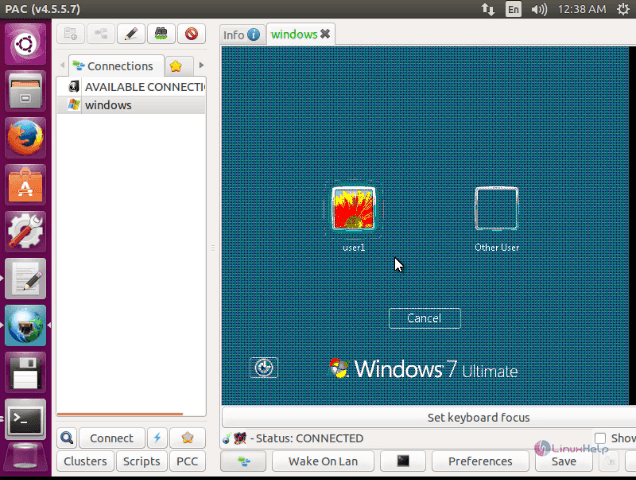
Support for Tab
When you run multiple remote connections using this manager, the appropriate connections will be shown in Tabs:
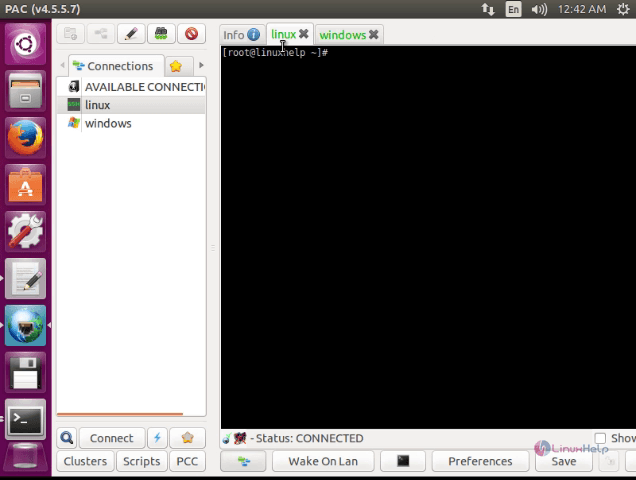
It also enables you to split connections display to do so, right click on the connections tab name and select Split and then Horizontally with tab or select vertically with tab.
Support for Proxy
Proxy parameter can be set either globally or for each connections individually.
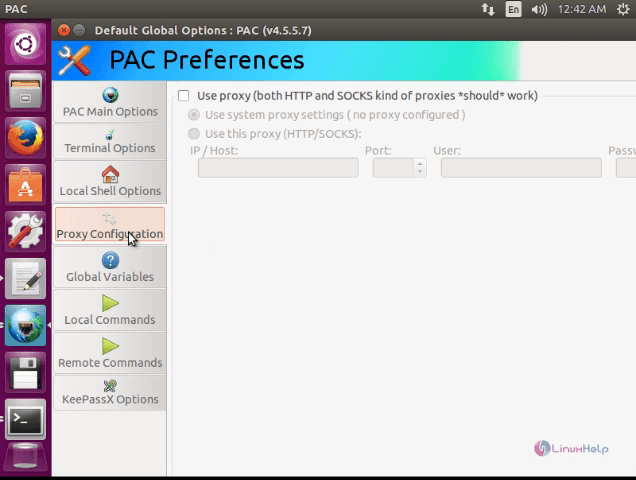
For Cluster connections
Cluster connections feature, opens up a window with multiple connections to specified hosts.
In order to add a cluster, choose the cluster tab that is available on the left pane and then select Manage Clusters to display PAC Cluster Management.
For creating a cluster name, click add button and type a name. Next you will be prompted to assign cluster members from running clusters, auto clusters or saved clusters on the right side of the pane.
Choose a cluster connection from the available connection and choose add to cluster button and give ok.
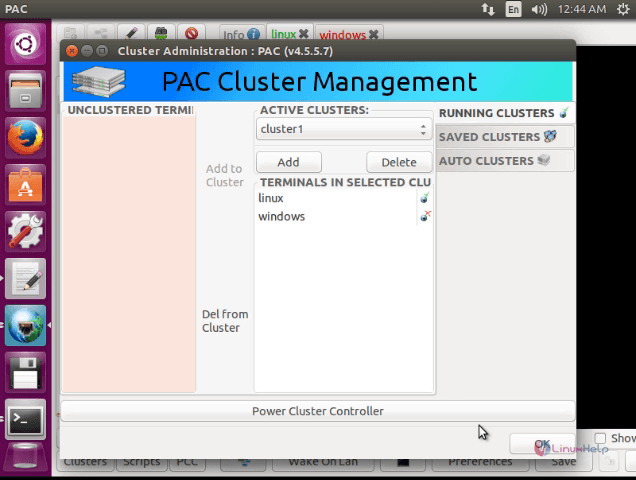
Now go to cluster tab and select the cluster name and click connect button, in order to run the cluster.
Integration KeePass
PAC Manager employs KeePass database password to prevent user entering his credentials manually. It can take the credentials from KeePass database and then load for you automatically, if you provide it KeePass master password for opening the database. If you would like to enable KeePass integration, you should have installed KeePass software earlier. Next select Infer “ User / Password” from KeePassX. PAC Manager checks the title field by default and the available fields are created, comment, password, url, title and username.
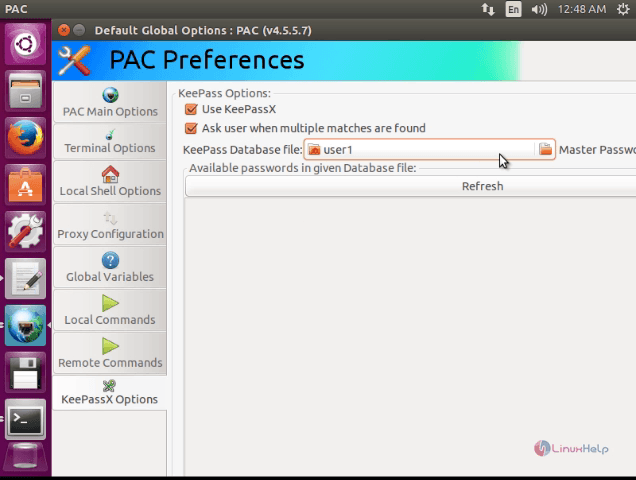
Now you need to provide a Perl Regulars Expression pattern in order to check inside the KeePass database and click check button to display the result.
Comments ( 1 )