• Categories
    Category
    {{ postCtrl.tags }}
    • {{ category.tag_type }}

      • {{tag.tag_name}}
      • View more
  • Categories
    Category
    {{ postCtrl.tags }}
    • {{ category.tag_type }}

      • {{tag.tag_name}}
      • View more
  • News
  • Tutorials
  • Forums
  • Tags
  • Users
Tutorial News Comments FAQ Related Articles

How to install PHPMyAdmin On CentOS 8.3

  • 00:50 cat /etc/centos-release
  • 01:10 yum install -y epel-release
  • 03:05 systemctl status httpd
  • 03:35 yum --enablerepo=remi install phpmyadmin
{{postValue.id}}

To Install PhpMyAdmin On CentOS 8.1

Introduction:

PhpMyAdmin is a web-based interface for handling MySQL / MariaDB databases that are used as a replacement for command-line utilities. It was written in PHP language, through this application you can do various MySQL administration tasks such as create, drop, alter, delete, import, export, search, query, repair, optimize and run other database management command via browser.

Installation Procedure:

[root@linuxhelp ~]# cat /etc/centos-release
CentOS Linux release 8.3.2011

CentOS 7 does not have access to phpMyAdmin in its default software repository. You’ll need to get access to the EPEL repository – the Extra Packages for Enterprise Linux Type the following at the command prompt, then hit enter:

[root@linuxhelp ~]# sudo yum install -y epel-release

Once that operation finishes, it’s a good idea to refresh and update the EPEL repository:

[root@linuxhelp ~]#sudo yum –y update
Install apache server:

I havae already installed apache server so check the status for apache server using the following command

[root@linuxhelp mnt]# systemctl status httpd
● httpd.service - The Apache HTTP Server
   Loaded: loaded (/usr/lib/systemd/system/httpd.service; enabled; vendor preset: disabled)
  Drop-In: /usr/lib/systemd/system/httpd.service.d
           └─php-fpm.conf
   Active: active (running) since Tue 2020-12-08 12:16:43 IST; 3 weeks 1 days ago
     Docs: man:httpd.service(8)
 Main PID: 59092 (httpd)
   Status: "Running, listening on: port 80"
    Tasks: 213 (limit: 11340)
   Memory: 10.9M
Installing PhpMyAdmin Web Interface

Once you’ve installed above repositories, now its’ time to install PhpMyAdmin with the help of following command as shown

[root@linuxhelp mnt]#  yum --enablerepo=remi install phpmyadmin

Finally, restart Apache to apply changes.

[root@linuxhelp mnt]#   systemctl restart httpd

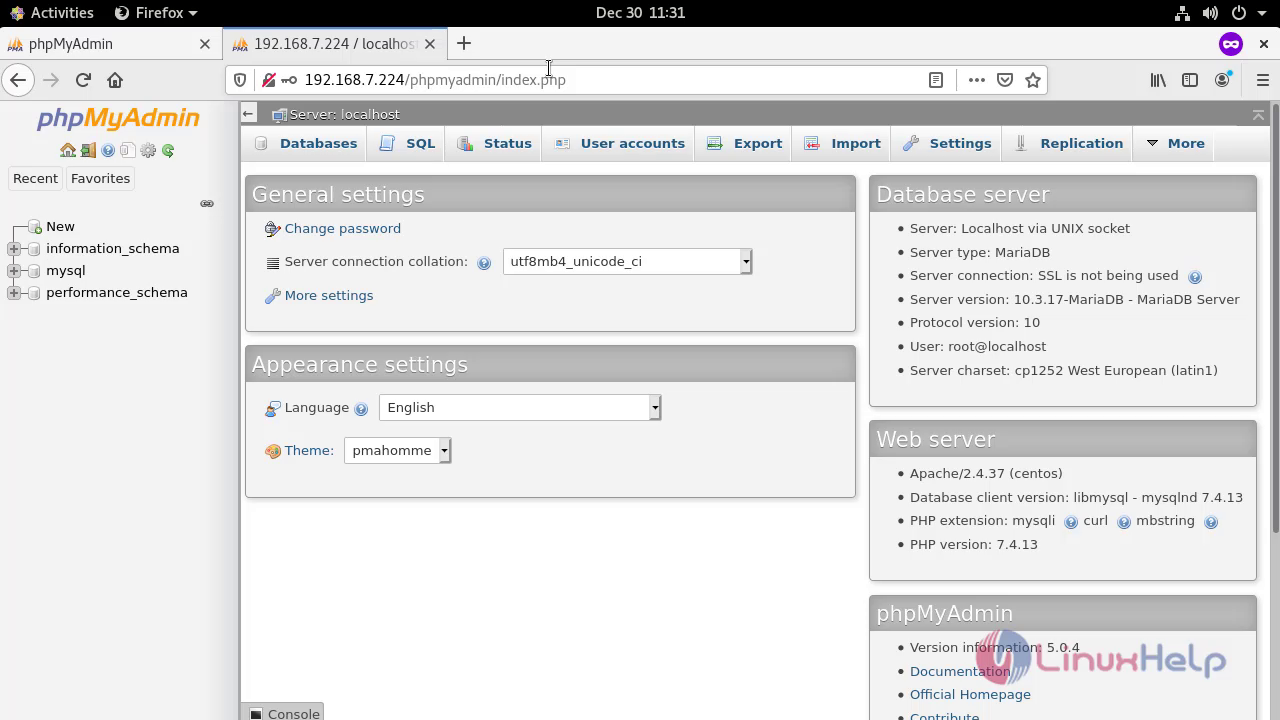
Open your browser and point your browser to http:///phpmyadmin. It should open the phpmyadmin interface (as shown in the image below). vlcsnap-2020-12-30-16h22m23s044 Hence with this method the installation of PhpMyAdmin on centOS 8.3 comes to an end.
Tags:
michael
Author: 

Comments ( 0 )

No comments available

Add a comment
{{postCtrl.cmtErrMsg}}

Frequently asked questions ( 5 )

Q

Using phpMyAdmin on IIS, I’m facing crashes and/or any error messages with the HTTP.

A

This is a known problem with the PHP ISAPI filter: it’s not so stable. Please use instead the cookie authentication mode.

Q

I have lost my MySQL root password, what can I do?

A

To recover from phpMyAdmin password loss, you need to recover at MySQL level.
The MySQL manual explains how to reset the permissions.

Q

Which Database version does phpMyAdmin support?

A

For MySQL, versions 5.5 and newer are supported. For older MySQL versions, the PHPMyAdmin Downloads page offers older phpMyAdmin versions

Q

I don’t see the “Location of text file” field, so I cannot upload.

A

This is most likely because, in php.ini, your file_uploads parameter is not set to “on”

Q

I get the error “navigation.php: Missing hash”.

A

This problem is known to happen when the server is running Turck MMCache but upgrading MMCache to version 2.3.21 solves the problem.

Back To Top!
Rank
User
Points

Top Contributers

userNamenaveelansari
135850

Top Contributers

userNameayanbhatti
92510

Top Contributers

userNamehamzaahmed
32150

Top Contributers

1
userNamelinuxhelp
31040

Top Contributers

userNamemuhammadali
24500
Can you help Gibbson ?
How do i run both nginx and apache in same instance on centos

Hi...,

my server is based centos operating system and my webserver is already running on Apache.... i need to run both apache and nginx on same instance ... please help me to implement this concept...

Networking
  • Routing
  • trunk
  • Netmask
  • Packet Capture
  • domain
  • HTTP Proxy
Server Setup
  • NFS
  • KVM
  • Memory
  • Sendmail
  • WebDAV
  • LXC
Shell Commands
  • Cloud commander
  • Command line archive tools
  • last command
  • Shell
  • terminal
  • Throttle
Desktop Application
  • Linux app
  • Pithos
  • Retrospect
  • Scribe
  • TortoiseHg
  • 4Images
Monitoring Tool
  • Monit
  • Apache Server Monitoring
  • EtherApe 
  • Arpwatch Tool
  • Auditd
  • Barman
Web Application
  • Nutch
  • Amazon VPC
  • FarmWarDeployer
  • Rukovoditel
  • Mirror site
  • Chef
Contact Us | Terms of Use| Privacy Policy| Disclaimer
© 2025 LinuxHelp.com All rights reserved. Linux™ is the registered trademark of Linus Torvalds. This site is not affiliated with linus torvalds in any way.