• Categories
    Category
    {{ postCtrl.tags }}
    • {{ category.tag_type }}

      • {{tag.tag_name}}
      • View more
  • Categories
    Category
    {{ postCtrl.tags }}
    • {{ category.tag_type }}

      • {{tag.tag_name}}
      • View more
  • News
  • Tutorials
  • Forums
  • Tags
  • Users
Tutorial News Comments FAQ Related Articles

How to install plex media server on ubuntu 16.04

{{postValue.id}}

To install Plex Media Server on Ubuntu 16.04

Plex Media Server is a free and user friendly media library platform that enables you to manage and organize all of your personal media files stored on your computer or any other device. Furthermore, it lets you to stream media files to all of your devices such as mobile phones, tablets, smart TVs, etc. from anywhere whether you’ re at home or on-the-go. The installation of Plex Media Server is so simple and this article covers the method to install it on Ubuntu

Installing Plex Media Server

In order to install Plex Media Server in your Ubuntu machine, you need to install the gdebi - debian installer file in your system. This action can be completed using the following command.

root@example:~# apt-get install gdebi
Reading package lists... Done
Building dependency tree
Reading state information... Done
The following packages were automatically installed and are no longer required:
.
.
Setting up gdebi (0.9.5.7ubuntu1) ...
Processing triggers for libc-bin (2.23-0ubuntu3) ...

Once it is done, download the package for Plex media server with the help of the following command.

root@example:~# wget https://downloads.plex.tv/plex-media-server/1.5.5.3634-995f1dead/plexmediaserver_1.5.5.3634-995f1dead_amd64.deb
--2017-09-05 03:22:57-- https://downloads.plex.tv/plex-media-server/1.5.5.3634-995f1dead/plexmediaserver_1.5.5.3634-995f1dead_amd64.deb
Resolving downloads.plex.tv (downloads.plex.tv)... 104.20.6.9, 104.20.7.9, 2400:cb00:2048:1::6814:609, ...
.
.
plexmediaserver_1.5 100%[===================> ] 100.61M 480KB/s in 3m 6s
2017-09-05 03:26:03 (553 KB/s) - ‘ plexmediaserver_1.5.5.3634-995f1dead_amd64.deb’  saved [105497618/105497618]

Now is the time to install Plex Media Server. Run the following command for triggering the installation process.

root@example:~# gdebi plexmediaserver_1.5.5.3634-995f1dead_amd64.deb
Reading package lists... Done
Building dependency tree
Reading state information... Done
.
.
Rebuilding /usr/share/applications/bamf-2.index...
Processing triggers for mime-support (3.59ubuntu1) ...

After installing the file, go to Ubuntu dashboard and type plex in the search-bar. It will display the application icon, click on it to open.

SEARCH

The Plex server is now open in the browser.
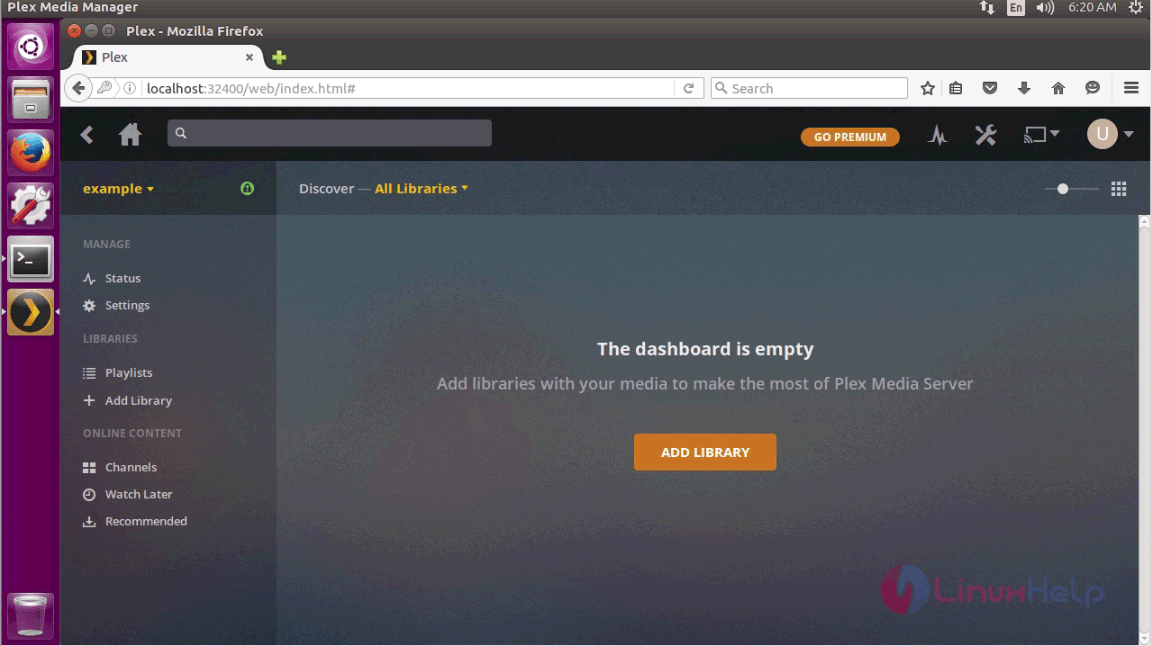
Plex

With this, the installation of Plex Media Server is complete. Enjoy streaming media files from anywhere you desire.

Tags:
jacob
Author: 

Comments ( 0 )

No comments available

Add a comment
{{postCtrl.cmtErrMsg}}

Frequently asked questions ( 5 )

Q

What is Plex Media Server?

A

The Plex media server is a solution to play media files (music, videos, & view Photos) whenever wherever you want via local network connectivity or using the internet to play remotely either using the web browser or Plex media player apps.

Q

How to find Plex media server IP address?

A

After installing the Plex Media server the default port at which it works is the 32400.
#http://localhost:32400/web

Q

How to install Plex media server on Raspberry Pi?

A

There are dozens of Raspberry Pi Linux operating systems on which you can install the Plex Media server, however, we don’t know which one you are using right now; so we are going to show the installation on the common Raspbian operating system.

Q

How to uninstall plex media server?

A

The methods to uninstall the Plex server is different from device to device. Here, we have mentioned the way to remove the Plex server from Windows, Mac, Linux and Nas devices. Before removing the Plex Media server completely be sure that it is not running.

Q

How to uninstall plex media server on ubuntu?

A

Run the following command to uninstall plex media server on Debian or Ubuntu

# dpkg -r plexmediaserver

Back To Top!
Rank
User
Points

Top Contributers

userNamenaveelansari
135850

Top Contributers

userNameayanbhatti
92510

Top Contributers

userNamehamzaahmed
32150

Top Contributers

1
userNamelinuxhelp
31040

Top Contributers

userNamemuhammadali
24500
Can you help David Lopez Guillen ?
Ayuda urgente instale SSL para servidor Opensuse y ahora no funciona tengo servicio web

hola segui este tutorial para tener un certificado ssl y ahora no se ve mi app en la red, espero alguien pueda ayudarme, tengo M9oodle en3.5 en un servidor open suse y ahora no funciona por favor ayuda.

https://www.linuxhelp.com/how-to-create-ssl-certificate-in-opensuse

Networking
  • Routing
  • trunk
  • Netmask
  • Packet Capture
  • domain
  • HTTP Proxy
Server Setup
  • NFS
  • KVM
  • Memory
  • Sendmail
  • WebDAV
  • LXC
Shell Commands
  • Cloud commander
  • Command line archive tools
  • last command
  • Shell
  • terminal
  • Throttle
Desktop Application
  • Linux app
  • Pithos
  • Retrospect
  • Scribe
  • TortoiseHg
  • 4Images
Monitoring Tool
  • Monit
  • Apache Server Monitoring
  • EtherApe 
  • Arpwatch Tool
  • Auditd
  • Barman
Web Application
  • Nutch
  • Amazon VPC
  • FarmWarDeployer
  • Rukovoditel
  • Mirror site
  • Chef
Contact Us | Terms of Use| Privacy Policy| Disclaimer
© 2025 LinuxHelp.com All rights reserved. Linux™ is the registered trademark of Linus Torvalds. This site is not affiliated with linus torvalds in any way.