• Categories
    Category
    {{ postCtrl.tags }}
    • {{ category.tag_type }}

      • {{tag.tag_name}}
      • View more
  • Categories
    Category
    {{ postCtrl.tags }}
    • {{ category.tag_type }}

      • {{tag.tag_name}}
      • View more
  • News
  • Tutorials
  • Forums
  • Tags
  • Users
Tutorial News Comments FAQ Related Articles

How to install Powder Player on Ubuntu 17.04 

{{postValue.id}}

To install Powder Player on Ubuntu 17.04

Powder Player is a smart and fast video player and torrent client hybrid built based on NW.js, Peerflix and WebChimera.js. It supports video streaming to DLNA, Chromecast, AppleTV, browser and other players. Installing Powder Player is very simple and in this article, we are going to see about the method to install Powder Player on Ubuntu 17.04.


Features

  • Fast and reliable
  • A host of incredible hotkeys that rival those of VLC
  • You can finds subtitles in all languages as well as auto-selects your language
  • Furthermore, it supports encoding selection and adding your own subtitles
  • Comes with lots of configuration options to make your torrent streaming and downloading experience unique to your personality and needs


Installing Powder Player

In order to install the Powder Player application, make sure you download its package using wget command.

root@linuxhelp:~# wget https://github.com/jaruba/PowderPlayer/releases/download/v1.10/PowderPlayer_v1.10.tar.gz
--2017-08-05 04:54:16--  https://github.com/jaruba/PowderPlayer/releases/download/v1.10/PowderPlayer_v1.10.tar.gz
Resolving github.com (github.com)... 192.30.255.112, 192.30.255.113
Connecting to github.com (github.com)|192.30.255.112|:443... connected.
.
.
.
PowderPlayer_v1.10. 100%[===================> ] 114.78M   464KB/s    in 5m 55s  
2017-08-05 05:00:16 (331 KB/s) - ‘ PowderPlayer_v1.10.tar.gz’  saved [120353400/120353400]

Once the file is downloaded, extract the downloaded file by invoking the tar command.

root@linuxhelp:~# tar xvf PowderPlayer_v1.10.tar.gz
PowderPlayer/resources/bin/ffmpeg/linux/
PowderPlayer/locales/te.pak
PowderPlayer/resources/bin/youtube-dl/youtube-dl
.
.
.
PowderPlayer/locales/fi.pak
PowderPlayer/locales/sl.pak

After that, go to the the extracted directory with the following command.

root@linuxhelp:~# cd PowderPlayer/

Now, execute the following command to trigger the installation of Powder player.

root@linuxhelp:~/PowderPlayer# ./Powder 
ATTENTION: default value of option force_s3tc_enable overridden by environment.
App Startup Time: 0 minutes 16.281 seconds

During the execution process , it will automatically open the powder application
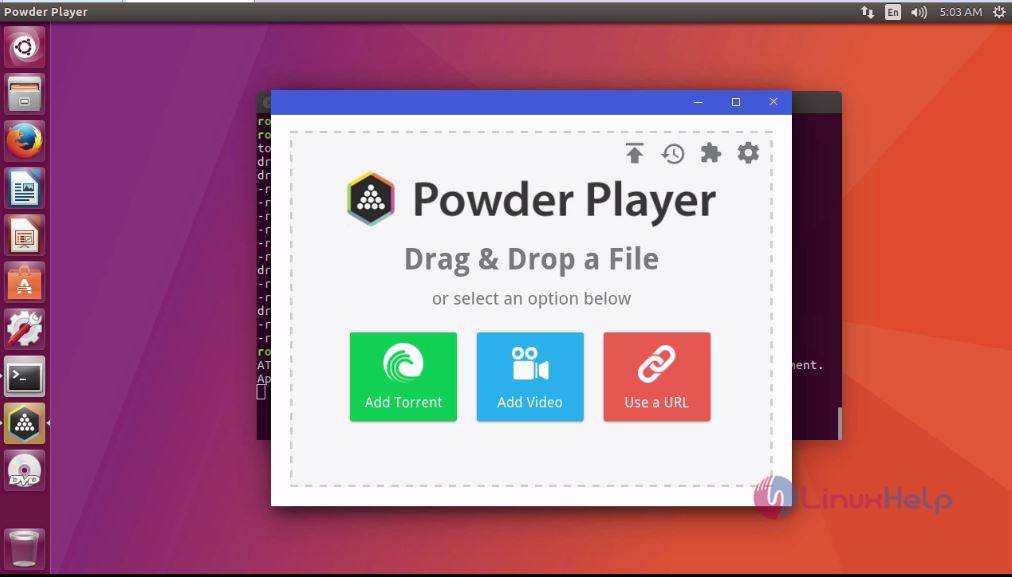
Powder Player

With this the installation of Powder application is done. Enjoy playing your video files with Powder Player.

Tags:
ethan
Author: 

Comments ( 0 )

No comments available

Add a comment
{{postCtrl.cmtErrMsg}}

Frequently asked questions ( 5 )

Q

What is powder player?

A

Powder Player is a smart  and fast video player and torrent client hybrid built based on NW.js,  Peerflix and WebChimera.js. It  supports video streaming to DLNA, Chromecast, AppleTV, browse

Q

What are it featured with?

A

Fast and reliable A host of incredible hotkeys that rival those of VLC You can finds subtitles in all languages as well as auto-selects your language Furthermore, it supports encoding selecti

Q

How to resolve while execute the command of ./Powder is not getting launched?

A

Make sure it has executable permission for it.

Q

why make it powder player?

A

Torrents have always been the symbol of freedom of information on the internet, our target is ease of access to this sea of information in an ever growing technological world.

Q

Is there any alternative in powder player?

A

Popcorn Time, WebTorrent, Stremio and much more.

Back To Top!
Rank
User
Points

Top Contributers

userNamenaveelansari
135850

Top Contributers

userNameayanbhatti
92510

Top Contributers

userNamehamzaahmed
32150

Top Contributers

1
userNamelinuxhelp
31040

Top Contributers

userNamemuhammadali
24500
Can you help Sebastian ?
How to change non required to required field in SuiteCRM Custom/Default Modules

How to change not required to the required field in SuiteCRM Custom/Default Modules?

Networking
  • Routing
  • trunk
  • Netmask
  • Packet Capture
  • domain
  • HTTP Proxy
Server Setup
  • NFS
  • KVM
  • Memory
  • Sendmail
  • WebDAV
  • LXC
Shell Commands
  • Cloud commander
  • Command line archive tools
  • last command
  • Shell
  • terminal
  • Throttle
Desktop Application
  • Linux app
  • Pithos
  • Retrospect
  • Scribe
  • TortoiseHg
  • 4Images
Monitoring Tool
  • Monit
  • Apache Server Monitoring
  • EtherApe 
  • Arpwatch Tool
  • Auditd
  • Barman
Web Application
  • Nutch
  • Amazon VPC
  • FarmWarDeployer
  • Rukovoditel
  • Mirror site
  • Chef
Contact Us | Terms of Use| Privacy Policy| Disclaimer
© 2025 LinuxHelp.com All rights reserved. Linux™ is the registered trademark of Linus Torvalds. This site is not affiliated with linus torvalds in any way.