How to Install ProcessWire CMS 3.0.123v on CentOS 7.6
Installation Of ProcessWire CMS 3.0.123v On Centos 7.6
Pre-requisites:**
LAMP Stack
Centos 7.6
Apache 2.4.34
MariaDB 5.5+ and
PHP 7.2
PHP Modules:**
php php-gd php-mbstring php-mcrypt php-mysql php-curl php-simplexml php-zip
Download Link:
composer create-project processwire/processwire
Installation
Configure the MariaDB For processWire CMS using the root password
[root@linuxhelp ~]# mysql -u root -p
Enter password:
Welcome to the MariaDB monitor.  Commands end with ; or \g.
Your MariaDB connection id is 32
Server version: 5.5.60-MariaDB MariaDB Server
Copyright (c) 2000, 2018, Oracle, MariaDB Corporation Ab and others.
Type 'help;' or '\h' for help. Type '\c' to clear the current input statement.
MariaDB [(none)]> create database wire character set utf8mb4;
Query OK, 1 row affected (0.00 sec)
MariaDB [(none)]> use wire;
Database changed
MariaDB [wire]> create user wireuser@localhost identified by 'linuxc';
Query OK, 0 rows affected (0.00 sec)
MariaDB [wire]> grant all on wire.* to wireuser@localhost;
Query OK, 0 rows affected (0.00 sec)
MariaDB [wire]> flush privileges;
Query OK, 0 rows affected (0.00 sec)
MariaDB [wire]> exit
Bye
Change the directory to Apache’s document root directory as follows
[root@linuxhelp ~]# cd /var/www
Create a directory for ProcessWire CMS
[root@linuxhelp www]# mkdir wire
Change the directory to newly created directory for ProcessWire CMS
[root@linuxhelp www]# cd wire
Download the ProcessWire CMS using composer by executing the following command
[root@linuxhelp wire]#  composer create-project processwire/processwire
Do not run Composer as root/super user! See https://getcomposer.org/root for details
Installing processwire/processwire (3.0.123)
  - Installing processwire/processwire (3.0.123): Loading from cache
Created project in /var/www/wire/processwire
Loading composer repositories with package information
Updating dependencies (including require-dev)
Nothing to install or update
Writing lock file
Generating autoload files
List the contents to view the files created using composer
[root@linuxhelp wire]# ll
total 4
drwxr-xr-x 10 root root 4096 Apr 25 08:09 processwire
Rename the directory to final
[root@linuxhelp wire]# mv processwire/ final
Change the directory to final to assign the permissions
[root@linuxhelp wire]# cd final/
List the contents in the final directory
[root@linuxhelp final]# ll
total 116
-rw-r--r-- 1 root root   537 Dec 22 01:00 composer.json
-rw-r--r-- 1 root root   589 Apr 25 08:09 composer.lock
-rw-r--r-- 1 root root  3571 Dec 22 01:00 CONTRIBUTING.md
-rw-r--r-- 1 root root 12709 Dec 22 01:00 htaccess.txt
-rw-r--r-- 1 root root  2421 Dec 22 01:00 index.php
-rw-r--r-- 1 root root 53399 Dec 22 01:00 install.php
-rw-r--r-- 1 root root 19125 Dec 22 01:00 LICENSE.TXT
-rw-r--r-- 1 root root  6289 Dec 22 01:00 README.md
drwxr-xr-x 6 root root    85 Dec 22 01:00 site-beginner
drwxr-xr-x 6 root root    85 Dec 22 01:00 site-blank
drwxr-xr-x 6 root root    85 Dec 22 01:00 site-classic
drwxr-xr-x 6 root root   138 Dec 22 01:00 site-default
drwxr-xr-x 6 root root    85 Dec 22 01:00 site-languages
drwxr-xr-x 6 root root   102 Dec 22 01:00 site-regular
drwxr-xr-x 3 root root    42 Apr 25 08:09 vendor
drwxr-xr-x 5 root root   137 Dec 22 01:00 wire
Assign ownership permissions to the final directory with apache user.
[root@linuxhelp final]# chown -R apache. ./
Assign Writable permissions to the final directory
[root@linuxhelp final]# chmod -R 775 ./
Create a customised configuration file to the process wire cms
[root@linuxhelp final]# vim /etc/httpd/conf.d/wire.conf
<virtualhost *:80>
servername www.linuxhelp1.com
documentroot /var/www/wire/final/
<directory /var/www/wire/final/>
allowoverride all
require all granted
</directory>
</virtualhost>
Restart the service of Apache
[root@linuxhelp final]# systemctl restart httpd
Open the browser and enter the servername that has set in the configuration file of Processwire CMS
 In the welcome page of process wire cms , click get started to proceed further.
 Select Beginner edition as the installation profile and click continue

 After the successful requirements check ,click continue to next step to proceed further.
 Enter the database details that has configured in the MariaDB database for Processwire CMS
 Set the time-zone ,check the file-permissions and HTTP Host names. Click Continue

 Enroll the admin credentials and click continue.

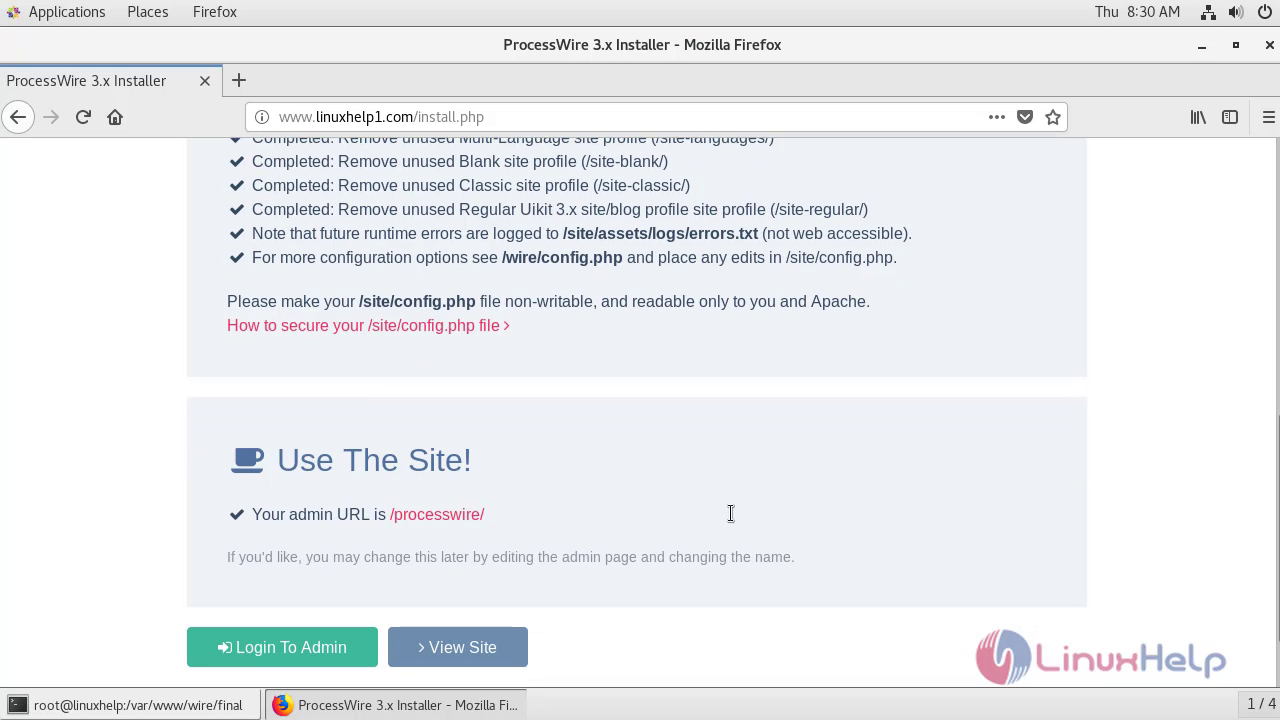
 Click Login to Admin and enter login credentials
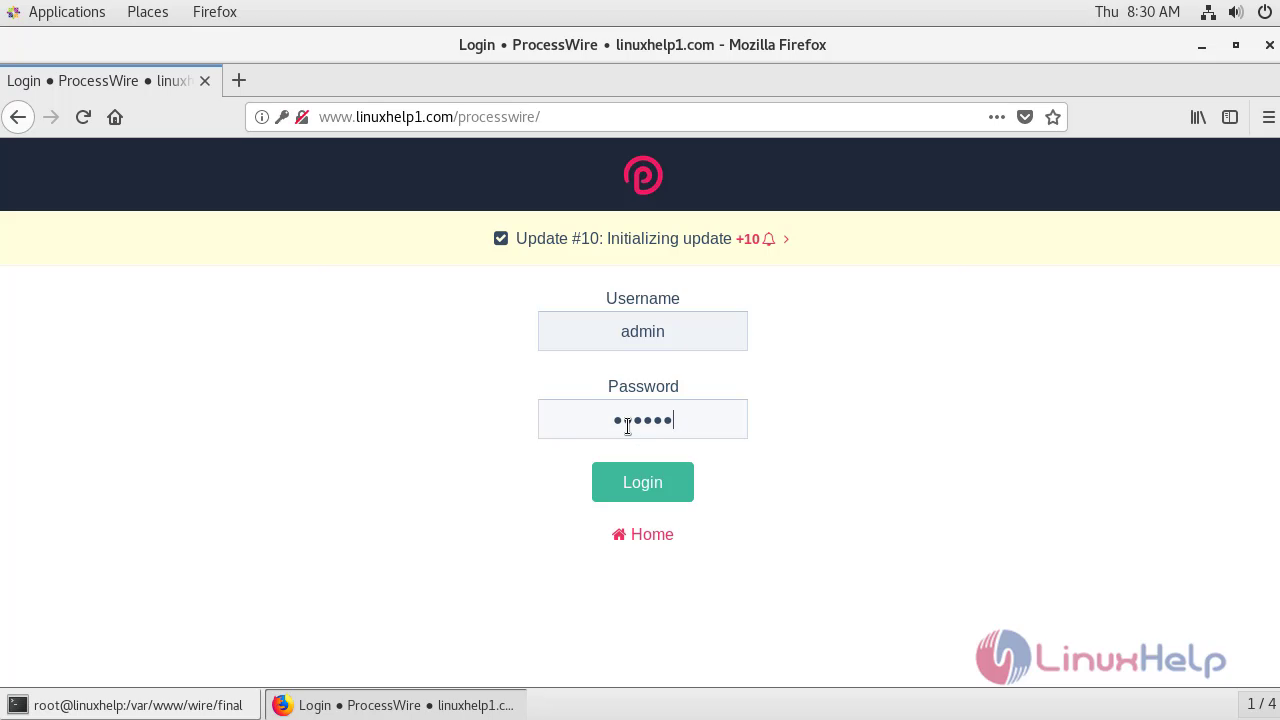 The Admins account of processWire CMS gets opened.
 Therefore,Installation Of ProcessWire CMS 3.0.123v on Centos 7.6 comes to end.
Comments ( 0 )
No comments available