How to install Psensor in Linux
Installation of Psensor in Linux
Psensor is a GTK+ (Widget Toolkit for creating Graphical User Interface) based application software and is one the simplest application to monitor hardware temperature and plot Real Time graph from the obtained data for quick review.
Features
- Show CPU fan speed.
- Show Temperature of motherboard, CPU, GPU (Nvidia), Hard Disk Drives.
- Show CPU usages, as well.
- Psensor is capable of showing remote server Temperature and Fan Speed.
- Alarms and Alerts ensures you don’ t miss a critical System Hardware Temperature and Fan Speed related issues.
- All the temperatures are plotted in one graph.
- Infact Psensor will detect any supported Hardware and report the Temperature as text and over graph, automatically.
- Easy to Configure. Easy to use.
Dependencies
- psensor-server : It is an optional package, which is required if you want to gather information about Remote Server Temperature and Fan Speed.
- lm-sensor and hddtemp: : Psensor depends upon these two packages to get the reports about temperature and fan speed.
To Install Psensor
Before installing Psensor, install lm-sensor and hddtemp package on your system.
In RedHat/CentOS based systems, you need to install and enable epel-release repository to get these packages.
On Debian based distributions
root@linuxhelp:~# apt-get install lm-sensors hddtemp psensor -y
Reading package lists... Done
Building dependency tree
Reading state information... Done
The following additional packages will be installed:
  libxnvctrl0 psensor-common
Suggested packages:
  ksensors fancontrol sensord read-edid i2c-tools
.
.
.
Setting up hddtemp (0.3-beta15-52) ...
Setting up lm-sensors (1:3.4.0-2) ...
Processing triggers for libc-bin (2.23-0ubuntu3) ...
Processing triggers for ureadahead (0.100.0-19) ...
Processing triggers for systemd (229-4ubuntu4) ...
On RedHat based distributions
# yum install epel-release
# yum install lm_sensors hddtemp lm_sensors-devel
To Install Psensor Server
On Debian based distributions
Run the following command to Install Psensor Server . It is required only if you want to see the temperature and fan speed of remote server.
root@linuxhelp:~# apt-get install psensor-server
Reading package lists... Done
Building dependency tree
Reading state information... Done
The following additional packages will be installed:
  javascript-common libjs-jquery libmicrohttpd10
Suggested packages:
  apache2 | lighttpd | httpd
The following NEW packages will be installed:
  javascript-common libjs-jquery libmicrohttpd10 psensor-server
0 upgraded, 4 newly installed, 0 to remove and 264 not upgraded.
Need to get 317 kB of archives.
After this operation, 1,392 kB of additional disk space will be used.
.
.
.
Setting up libmicrohttpd10 (0.9.44+dfsg-1ubuntu2) ...
Setting up psensor-server (1.1.3-2ubuntu3) ...
Processing triggers for libc-bin (2.23-0ubuntu3) ...
Psensor Server package is only available under Debian alike systems, there isn’ t any binary or source packages available for RedHat systems.
On RedHat based distributions
Download all the depedency packages before installing Psensor Server
# yum install gcc gtk3-devel GConf2-devel cppcheck libatasmart-devel libcurl-devel json-c-devel libmicrohttpd-devel help2man libnotify-devel libgtop2-devel make
Next, download the most recent stable Psensor source tarball and compile it using following commands.
# wget http://wpitchoune.net/psensor/files/psensor-1.1.5.tar.gz
# tar zxvf psensor-1.1.5.tar.gz
# cd psensor-1.1.5/
# ./configure
# make
# make install
To test the Usage of Psensor
Run sensors-detect as root to diagnose the hardwares.
root@linuxhelp:~# sensors-detect
# sensors-detect revision 6284 (2015-05-31 14:00:33 +0200)
# System: VMware, Inc. VMware Virtual Platform [None]
# Board: Intel Corporation 440BX Desktop Reference Platform
# Kernel: 4.4.0-21-generic x86_64
# Processor: Intel(R) Core(TM) i5-2310 CPU @ 2.90GHz (6/42/7)

This program will help you determine which kernel modules you need
to load to use lm_sensors most effectively. It is generally safe
and recommended to accept the default answers to all questions,
unless you know what you' re doing.

Some south bridges, CPUs or memory controllers contain embedded sensors.
Do you want to scan for them? This is totally safe. (YES/no):
.
.
.
To load everything that is needed, add this to /etc/modules:
#----cut here----
# Chip drivers
coretemp
#----cut here----
If you have some drivers built into your kernel, the list above will
contain too many modules. Skip the appropriate ones!

Do you want to add these lines automatically to /etc/modules? (yes/NO)

Unloading cpuid... OK
Run sensors as root to display the temperature of various Hardware Devices.
root@linuxhelp:~# sensors
coretemp-isa-0000
Adapter: ISA adapter
Physical id 0: +100.0° C (high = +100.0° C, crit = +100.0° C)
Core 0: +100.0° C (high = +100.0° C, crit = +100.0° C)
Run Psensor from the desktop Application menu to get the graphical view.

Select all the Sensors to plot graph and also you may notice the color codes.

To Customize Psensor
Go to Psensor &rarr Preferences &rarr Interface. Here, you have options for Interface customization.

Select startup tab. Here, you can configure Launch/Hide at Startup and Restore Window Position and Size.

Choose Graph tab to configure Foreground/Background Color, Monitoring Duration, Update Interval, etc.

Open Sensors tab to configure sensors logging options.
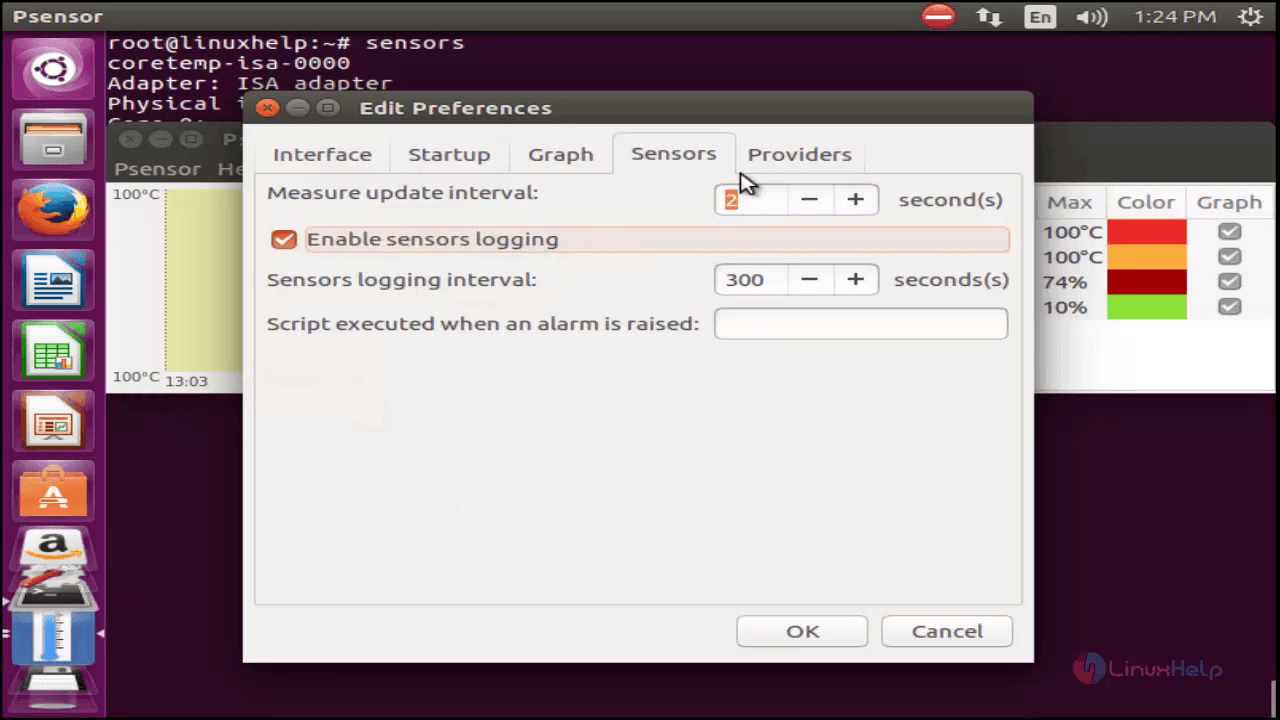
Select providers tab to configure the hardware options.

Then go to Psensor &rarr Edit Sensor Preferences to edit the graph.


Comments ( 0 )
No comments available