How to install Puddletag on Ubuntu 17.04
To install Puddletag on Ubuntu 17.04
Puddletag is an open source audio tag editor. It is similar to spreadsheet and allows the user to edit tags easily and quickly. This application extracts the tag information from filenames, changes the file names on the basis of tags, contains a plugin for default installation and provides filtering support. It contains features such as creating playlists, remove parts of tag, import tags from filename, regular expressions, and automated mass tagging. This tutorial will explain the installation of Puddletag on Ubuntu 17.04.
Installation procedure
To proceed with the installation procedure, add the required repository by running the following command.
root@linuxhelp:~# add-apt-repository ppa:nilarimogard/webupd8
 The main Web Upd8 PPA maintained by: http://www.webupd8.org/
To add this PPA, simply paste this in a terminal:
sudo add-apt-repository ppa:nilarimogard/webupd8

Packages in this PPA: audacious, ap-hotspot, awn-applet-radio, awn-applet-wm, calise, cmus, dockbarx, dockbarx-themes-extra, dropbox-share, emerald, exaile, fbmessenger, gnome-subtitles, gnome-window-applets, grsync, grive, gthumb, launchpad-getkeys, mc, mdm (Mint Display Manager), minitunes, minitube, musique, notifyosdconfig, nautilus-columns, powertop, ppa-purge, rosa-media-player, fixed pulseaudio-equalizer, subtitleeditor, syncwall, umplayer, unity-reboot, wimlib, youtube-dl, xfce4-dockbarx-plugin, xournal, yad, yarock and others. Almost all packages are updated to their latest version.

For other (specialized) PPAs we maintain, see: https://launchpad.net/~webupd8team
 More info: https://launchpad.net/~nilarimogard/+archive/ubuntu/webupd8
Press [ENTER] to continue or ctrl-c to cancel adding it

gpg: keybox ' /tmp/tmp19mo22lh/pubring.gpg'  created
gpg: /tmp/tmp19mo22lh/trustdb.gpg: trustdb created
gpg: key 531EE72F4C9D234C: public key " Launchpad webupd8"  imported
gpg: Total number processed: 1
gpg:               imported: 1
OK
The repositories are added to the system. Next update the target system by running the apt-get update command.
root@linuxhelp:~# apt-get update
Get:1 http://ppa.launchpad.net/nilarimogard/webupd8/ubuntu zesty InRelease [15.4 kB]
Get:2 http://security.ubuntu.com/ubuntu zesty-security InRelease [89.2 kB]
Hit:3 http://in.archive.ubuntu.com/ubuntu zesty InRelease
Get:4 http://ppa.launchpad.net/nilarimogard/webupd8/ubuntu zesty/main i386 Packages [24.9 kB]
Get:5 http://in.archive.ubuntu.com/ubuntu zesty-updates InRelease [89.2 kB]
Get:6 http://ppa.launchpad.net/nilarimogard/webupd8/ubuntu zesty/main amd64 Packages [24.9 kB]
Get:7 http://ppa.launchpad.net/nilarimogard/webupd8/ubuntu zesty/main Translation-en [17.8 kB]
Get:8 http://security.ubuntu.com/ubuntu zesty-security/main amd64 Packages [152 kB]
Get:9 http://in.archive.ubuntu.com/ubuntu zesty-backports InRelease [89.2 kB]
Get:10 http://security.ubuntu.com/ubuntu zesty-security/main i386 Packages [149 kB]
Get:11 http://security.ubuntu.com/ubuntu zesty-security/main amd64 DEP-11 Metadata [12.8 kB]
.
.
.
Get:27 http://in.archive.ubuntu.com/ubuntu zesty-updates/multiverse amd64 DEP-11 Metadata [5,840 B]
Get:28 http://in.archive.ubuntu.com/ubuntu zesty-backports/universe amd64 DEP-11 Metadata [4,588 B]
Fetched 2,257 kB in 11s (193 kB/s)
Reading package lists... Done
The system is updated with the required repositories. Install the Puddletag application by executing the following command and press y to continue with the installation.
root@linuxhelp:~# apt-get install puddletag -y
Reading package lists... Done
Building dependency tree
Reading state information... Done
The following additional packages will be installed:
  javascript-common libchromaprint-tools libjs-jquery libjs-sphinxdoc libjs-underscore libmysqlclient20 libqt4-designer libqt4-help libqt4-scripttools libqt4-svg libqt4-test
  libqtassistantclient4 mysql-common python-acoustid python-audioread python-cffi-backend python-chardet python-configobj python-cryptography python-enum34 python-gi
  python-gst-1.0 python-idna python-ipaddress python-levenshtein python-mutagen python-mysqldb python-ndg-httpsclient python-openssl python-pkg-resources python-pyasn1
  python-pymad python-pyparsing python-qt4 python-requests python-setuptools python-sip python-six python-urllib3
Suggested packages:

.
.
.
.
Setting up python-chardet (2.3.0-2) ...
Setting up python-levenshtein (0.12.0-2build1) ...
Setting up python-mysqldb (1.3.7-1.1) ...
Setting up python-cryptography (1.7.1-2) ...
Setting up python-requests (2.10.0-2) ...
Setting up python-qt4 (4.11.4+dfsg-2) ...
Setting up python-acoustid (1.1.2-2) ...
Setting up python-openssl (16.2.0-1) ...
Setting up puddletag (1.2.0-1) ...
Setting up python-ndg-httpsclient (0.4.2-1) ...
Processing triggers for libc-bin (2.24-9ubuntu2) ...
The application is installed successfully in the system and to run the Puddletag, type the application name in the Ubuntu dashboard and click on the icon to run it.
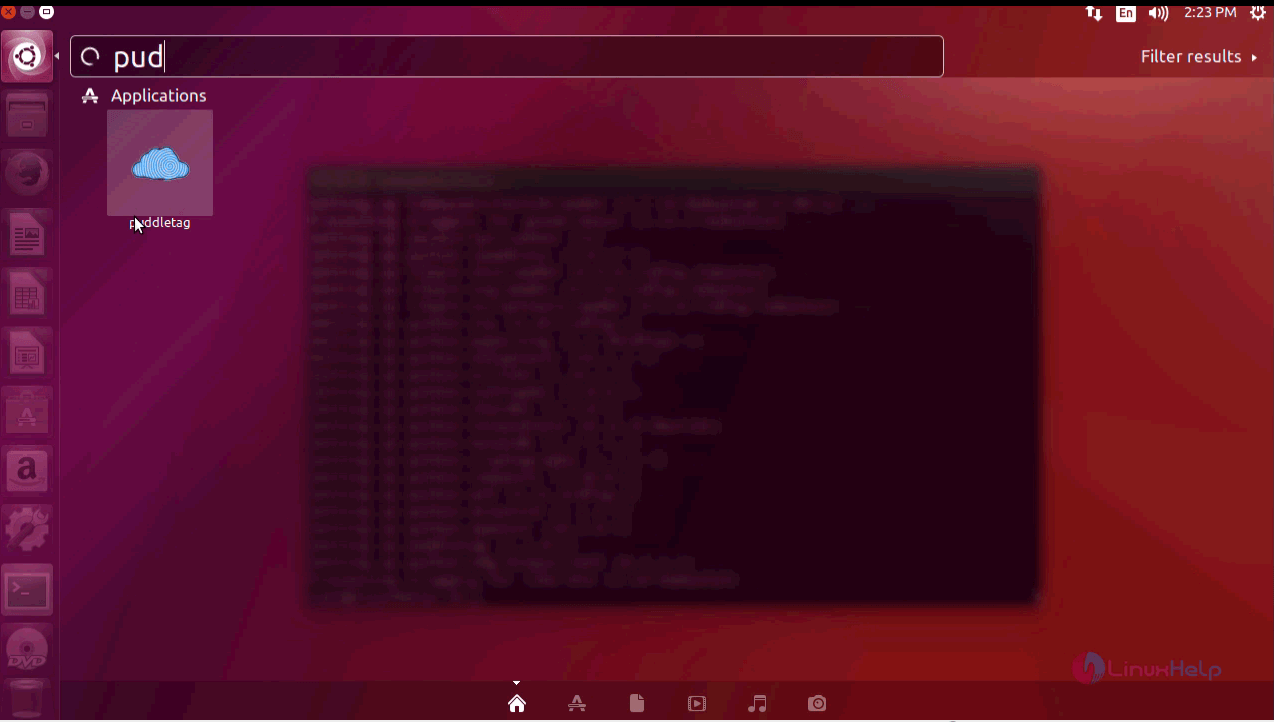
The Puddletag is running successfully without any glitches.
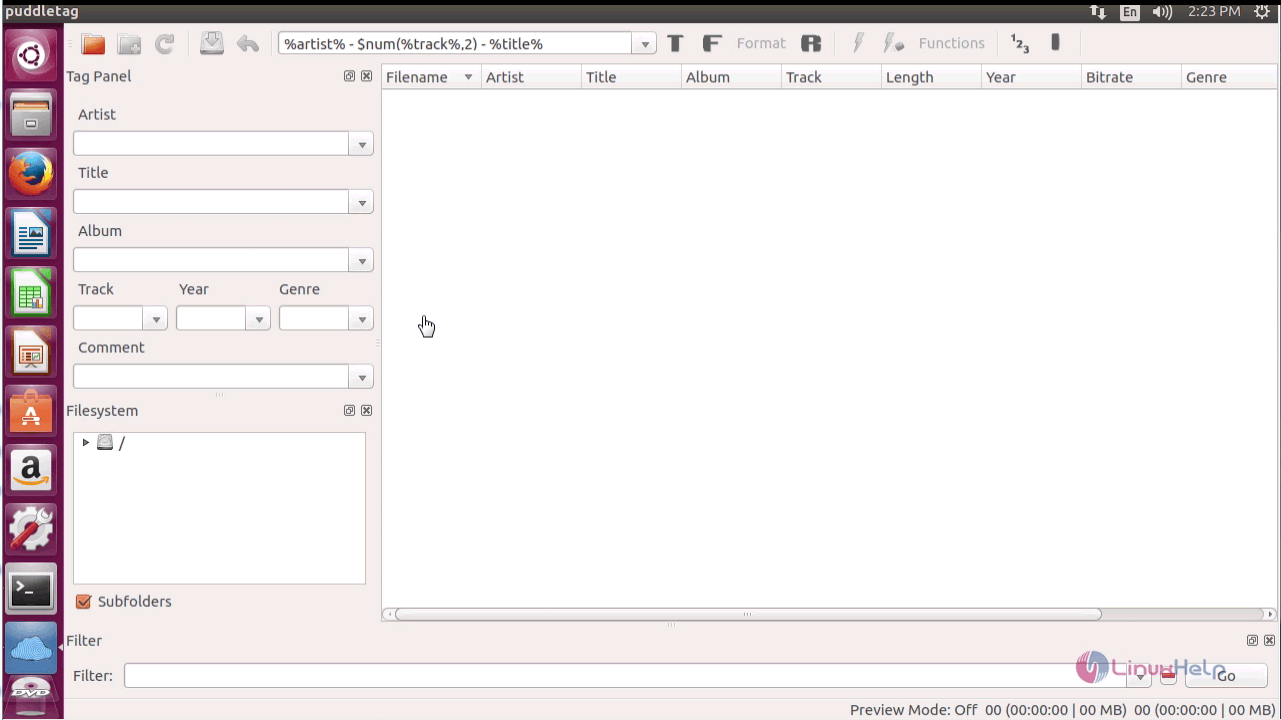
The installation procedure of Puddletag on Ubuntu 17.04 is done successfully.
Comments ( 0 )
No comments available