• Categories
    Category
    {{ postCtrl.tags }}
    • {{ category.tag_type }}

      • {{tag.tag_name}}
      • View more
  • Categories
    Category
    {{ postCtrl.tags }}
    • {{ category.tag_type }}

      • {{tag.tag_name}}
      • View more
  • News
  • Tutorials
  • Forums
  • Tags
  • Users
Tutorial News Comments FAQ Related Articles

How to install Python hwinfo in Ubuntu 16.04

{{postValue.id}}

To install in Ubuntu 16.04

Python hwinfo is a python library for inspecting hardware and devices by parsing the outputs of system utilities such as lspci and dmidecode. It’ s Additionally you can execute this on remote server by providing a Server IP or Host name, username, and password. Also, you can use this tool to view other utilities captured outputs like demidecode as ‘ dmidecode.out’ , /proc/cpuinfo as ‘ cpuinfo’ , lspci -nnm as ‘ lspci-nnm.out’ , etc,.

It can be installed through pip package to all major Linux distributions. In order to install python-hwinfo but make sure your system has python and python-pip packages as a prerequisite

Installing python hwinfo

First, you need to update the system by making use of the following command.

root@localhost:~# apt-get update
Hit:1 http://in.archive.ubuntu.com/ubuntu xenial InRelease
Get:2 http://in.archive.ubuntu.com/ubuntu xenial-updates InRelease [102 kB]
.
.
Fetched 4,216 kB in 7s (595 kB/s)                                                             
Reading package lists... Done

Once it is done, you need to installing python-pip package.
root@localhost:~# apt-get install python-pip
Reading package lists... Done
.
.
Setting up python-wheel (0.29.0-1) ...
Processing triggers for libc-bin (2.23-0ubuntu3) ...

You shall now install Python hwinfo package by making use of the following command.

root@localhost:~# pip install python-hwinfo
Collecting python-hwinfo
.
.
Successfully installed asn1crypto-0.24.0 bcrypt-3.1.4 cffi-1.11.4 cryptography-2.1.4 enum34-1.1.6 idna-2.6 ipaddress-1.0.19 paramiko-2.4.0 prettytable-0.7.2 pyasn1-0.4.2 pycparser-2.18 pynacl-1.2.1 python-hwinfo-0.1.6 six-1.11.0

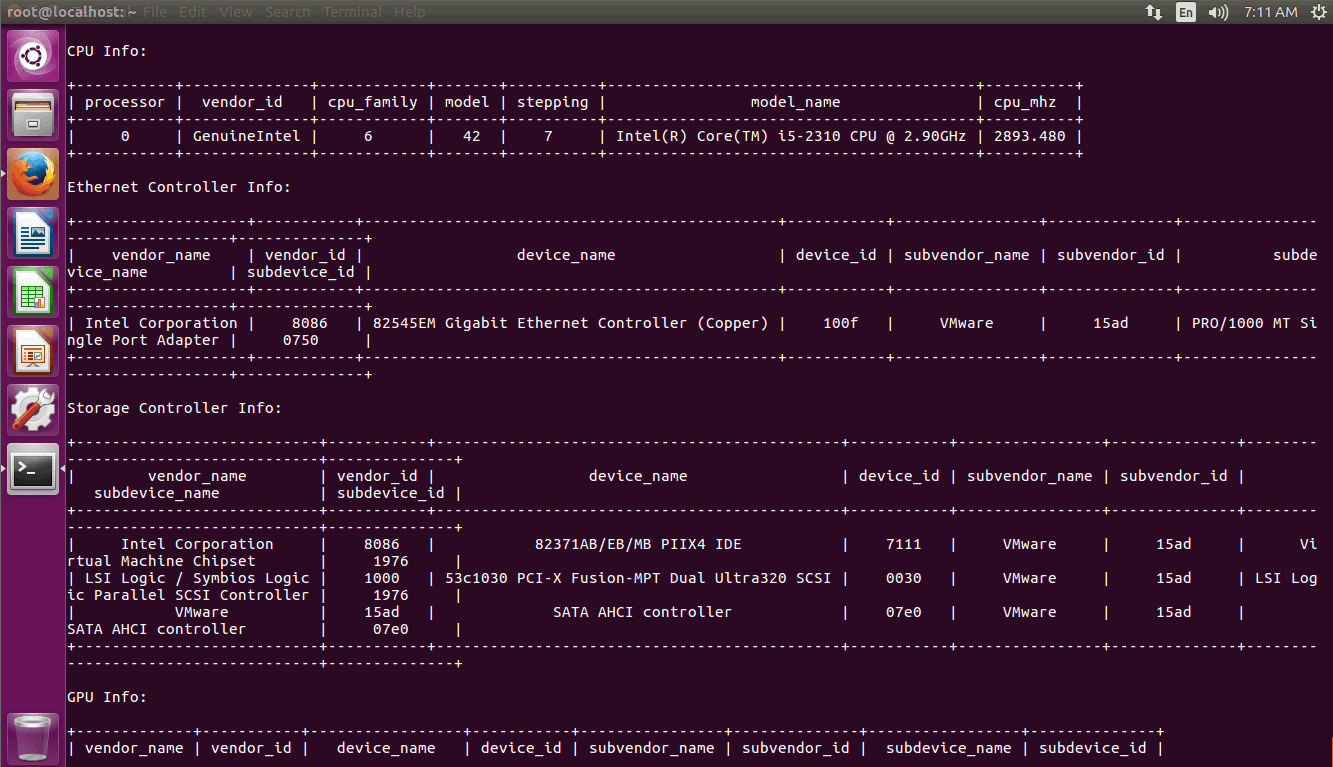
Now that Python hwinfo has been installed you shall launch it by making use of the following command.

root@localhost:~# hwinfo 
Python

With this, the tutorial comes to an end.

Tags:
matthew
Author: 

Comments ( 0 )

No comments available

Add a comment
{{postCtrl.cmtErrMsg}}

Frequently asked questions ( 5 )

Q

is there any other way to install hwinfo?

A

try the following command to install hwinfo

# pip install git+https://github.com/rdobson/python-hwinfo.git "

Q

What is HWiNFO?

A

HWiNFO is a free system information tool that gives a quick overview, as well as a detailed look, at hardware components. You can save full or custom reports, use HWiNFO on a portable device, and monitor various hardware pieces in real-time.

Q

where to get a source package for hwinfo?

A

Use the following link to get source package for hwinfo
"https://files.pythonhosted.org/packages/8a/be/f391353de3993c6ebe94a4e265449b233f4430a470829443488b9431f797/python-hwinfo-0.1.6.tar.gz".

Q

How to install Hwinfo on SUSE?

A

Use the following command to install hwinfo on SUSE

$ yast -i hwinfo

Q

How to install Hwinfo on centos/RHEL?

A

Use the following command to install hwinfo on centos/RHEL

$ yum install hwinfo

Back To Top!
Rank
User
Points

Top Contributers

userNamenaveelansari
135850

Top Contributers

userNameayanbhatti
92510

Top Contributers

userNamehamzaahmed
32150

Top Contributers

1
userNamelinuxhelp
31040

Top Contributers

userNamemuhammadali
24500
Can you help Gibbson ?
How do i run both nginx and apache in same instance on centos

Hi...,

my server is based centos operating system and my webserver is already running on Apache.... i need to run both apache and nginx on same instance ... please help me to implement this concept...

Networking
  • Routing
  • trunk
  • Netmask
  • Packet Capture
  • domain
  • HTTP Proxy
Server Setup
  • NFS
  • KVM
  • Memory
  • Sendmail
  • WebDAV
  • LXC
Shell Commands
  • Cloud commander
  • Command line archive tools
  • last command
  • Shell
  • terminal
  • Throttle
Desktop Application
  • Linux app
  • Pithos
  • Retrospect
  • Scribe
  • TortoiseHg
  • 4Images
Monitoring Tool
  • Monit
  • Apache Server Monitoring
  • EtherApe 
  • Arpwatch Tool
  • Auditd
  • Barman
Web Application
  • Nutch
  • Amazon VPC
  • FarmWarDeployer
  • Rukovoditel
  • Mirror site
  • Chef
Contact Us | Terms of Use| Privacy Policy| Disclaimer
© 2025 LinuxHelp.com All rights reserved. Linux™ is the registered trademark of Linus Torvalds. This site is not affiliated with linus torvalds in any way.