• Categories
    Category
    {{ postCtrl.tags }}
    • {{ category.tag_type }}

      • {{tag.tag_name}}
      • View more
  • Categories
    Category
    {{ postCtrl.tags }}
    • {{ category.tag_type }}

      • {{tag.tag_name}}
      • View more
  • News
  • Tutorials
  • Forums
  • Tags
  • Users
Tutorial News Comments FAQ Related Articles

How to install Qmmp 1.1.9 on Linux Mint 18.1

{{postValue.id}}

How to install Qmmp 1.1.9 on Linux Mint 18.1

The Qmmp is a popular open-source, cross-platform multimedia player, similar to Winamp and written in Qt. It is a simple, intitutive user interface and supports Ogg Vorbis, FLAC and MP3 music formats and also supports embedded ID3v2 album images. This tutorial covers the installation procedure of Qmmp version 1.1.9 on Linux Mint 18.1.

Features

  • playlist formats: m3u, pls, xspf
  • audio formats conveter
  • XMMS and Winamp 2.x skins support
  • 10-band equalizer
  • MP3, Vorbis, AAC, AAC+ streams support
  • video playback via Mplayer

Installation procedure

To begin with the installation procedure, add the Qmmp package into repository via ppa.

root@linuxhelp1:~# add-apt-repository ppa:forkotov02/ppa
 Releases of Qt-based multimedia player (Qmmp)
More info: https://launchpad.net/~forkotov02/+archive/ubuntu/ppa
Press [ENTER] to continue or ctrl-c to cancel adding it
.
.
.
gpg: key 0F2BC52FC4FBC3E6: public key " Launchpad PPA for Ilya Kotov"  imported
gpg: Total number processed: 1
gpg:               imported: 1
OK

The repositories are added to the target system. Update the system by running the apt-get update command.

root@linuxhelp1:~# apt-get update
Get:1 http://ppa.launchpad.net/forkotov02/ppa/ubuntu zesty InRelease [15.4 kB]                 
Hit:2 http://in.archive.ubuntu.com/ubuntu zesty InRelease                                      
Get:3 http://security.ubuntu.com/ubuntu zesty-security InRelease [89.2 kB]                     
.
.
.
Get:8 http://ppa.launchpad.net/forkotov02/ppa/ubuntu zesty/main Translation-en [1,328 B]       
Get:9 http://in.archive.ubuntu.com/ubuntu zesty-backports InRelease [89.2 kB]                  
Fetched 288 kB in 2s (101 kB/s)                              
Reading package lists... Done

The target system is updated with the required repositories. Install the Qmmp package by executing the following command.

root@linuxhelp1:~# apt-get install qmmp qmmp-plugin-pack
Reading package lists... Done
Building dependency tree      
Reading state information... Done
The following additional packages will be installed:
  freepats i965-va-driver libaacs0 libadplug-2.2.1-0v5 libavcodec57 libavformat57 libavutil55
  libbdplus0 libbinio1v5 libbluray2 libbs2b0 libcddb2 libchromaprint1 libcrystalhd3 libenca0
.
.
.
Setting up libavformat57:amd64 (7:3.2.4-1build2) ...
Setting up qmmp (1.1.9-1ubuntu1~zesty0) ...
Setting up qmmp-plugin-pack (1.1.3-1ubuntu1~zesty0) ...
Processing triggers for libc-bin (2.24-9ubuntu2) ...

Now the Qmmp application is successfully installed in the target system. Enjoy listening to favorite music through Qmmp application.
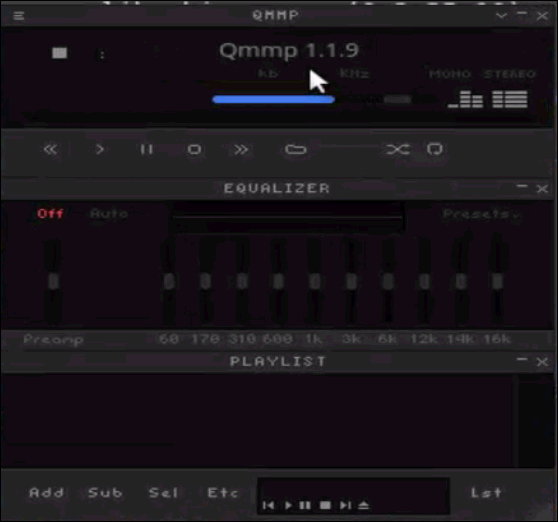
qmmp

That was an easy installation procedure, Wasn' t it? The Qmmp is inspired by Winamp which is the software' s default user interface.

Tags:
ethan
Author: 

Comments ( 0 )

No comments available

Add a comment
{{postCtrl.cmtErrMsg}}

Frequently asked questions ( 5 )

Q

How to check the qmmp player version in copmmand line?

A

use the command as follow "# qmmp -V".

Q

How to remove the qmmp player in Ubuntu?

A

run the following command to remove this
"# apt-get remove qmmp* qmmp-plugin-pack* && sudo apt-get autoremove".

Q

Is there any other distro install qmmp player?

A

Yes, there is distro:
Just follow this link,
https://www.linuxhelp.com/how-to-install-qmmp-on-debian-8-3/

Q

How to install Qmmp 1.1.9 on Linux Mint?

A

Use the following command:
$ sudo apt-get install qmmp

Q

What is Qmmp on Linux Mint?

A

The Qmmp is a popular open-source, cross-platform multimedia player, similar to Winamp and written in Qt. It is a simple, intuitive user interface and supports Ogg Vorbis, FLAC, and MP3 music formats and also supports embedded ID3v2 album images.

Load more

Back To Top!
Rank
User
Points

Top Contributers

userNamenaveelansari
135850

Top Contributers

userNameayanbhatti
92510

Top Contributers

userNamehamzaahmed
32150

Top Contributers

1
userNamelinuxhelp
31040

Top Contributers

userNamemuhammadali
24500
Can you help legeek ?
Installation of the call center module

hello

I wish to install a call center in virtual with issabel, I downloaded the latest version of it , but I don' t arrive to install the call center module in issabel. please help me

thanks!

Networking
  • Routing
  • trunk
  • Netmask
  • Packet Capture
  • domain
  • HTTP Proxy
Server Setup
  • NFS
  • KVM
  • Memory
  • Sendmail
  • WebDAV
  • LXC
Shell Commands
  • Cloud commander
  • Command line archive tools
  • last command
  • Shell
  • terminal
  • Throttle
Desktop Application
  • Linux app
  • Pithos
  • Retrospect
  • Scribe
  • TortoiseHg
  • 4Images
Monitoring Tool
  • Monit
  • Apache Server Monitoring
  • EtherApe 
  • Arpwatch Tool
  • Auditd
  • Barman
Web Application
  • Nutch
  • Amazon VPC
  • FarmWarDeployer
  • Rukovoditel
  • Mirror site
  • Chef
Contact Us | Terms of Use| Privacy Policy| Disclaimer
© 2025 LinuxHelp.com All rights reserved. Linux™ is the registered trademark of Linus Torvalds. This site is not affiliated with linus torvalds in any way.