• Categories
    Category
    {{ postCtrl.tags }}
    • {{ category.tag_type }}

      • {{tag.tag_name}}
      • View more
  • Categories
    Category
    {{ postCtrl.tags }}
    • {{ category.tag_type }}

      • {{tag.tag_name}}
      • View more
  • News
  • Tutorials
  • Forums
  • Tags
  • Users
Tutorial News Comments FAQ Related Articles

How to install QT creator on linuxmint-18.03

{{postValue.id}}

To install QT creator on linuxmint-18.03
Qt Creator is a cross-platform C++, JavaScript development environment for the Qt GUI application development framework. It is supported for several operating systems such us, Linux, Microsoft Windows and mac os.

Installation

Update your system repository using the apt-get command

linuxhelp ~ # apt-get update
Hit:1 http://archive.canonical.com/ubuntu xenial InRelease
Hit:2 http://archive.ubuntu.com/ubuntu xenial InRelease                                   
Hit:3 http://ppa.launchpad.net/ondrej/php/ubuntu xenial InRelease                         
Ign:4 http://packages.linuxmint.com sylvia InRelease                                           
Get:5 http://security.ubuntu.com/ubuntu xenial-security InRelease [107 kB]                     
Get:6 http://archive.ubuntu.com/ubuntu xenial-updates InRelease [109 kB]       
Get:7 http://archive.ubuntu.com/ubuntu xenial-backports InRelease [107 kB]
Hit:8 http://packages.linuxmint.com sylvia Release       
Fetched 323 kB in 2s (142 kB/s)
Reading package lists... Done

Install the qtcreator application using the following command.

linuxhelp ~ # apt-get install qtcreator -y
Reading package lists... Done
Building dependency tree       
Reading state information... Done
Suggested packages:
  cmake kdelibs5-data subversion ubuntu-sdk
Recommended packages:
  g++ qmlscene qt5-qmake qtbase5-dev-tools qtcreator-doc qtdeclarative5-dev-tools qttools5-dev-tools
  qttranslations5-l10n qtxmlpatterns5-dev-tools
The following NEW packages will be installed:
  qtcreator
0 upgraded, 1 newly installed, 0 to remove and 336 not upgraded.
Need to get 0 B/11.9 MB of archives.
After this operation, 48.2 MB of additional disk space will be used.
Selecting previously unselected package qtcreator.
(Reading database ... 223653 files and directories currently installed.)
Preparing to unpack .../qtcreator_3.5.1+dfsg-2ubuntu2_amd64.deb ...
Unpacking qtcreator (3.5.1+dfsg-2ubuntu2) ...
Processing triggers for libc-bin (2.23-0ubuntu9) ...
Processing triggers for shared-mime-info (1.5-2ubuntu0.1) ...
Processing triggers for man-db (2.7.5-1) ...
Processing triggers for desktop-file-utils (0.22+linuxmint1) ...
Processing triggers for mime-support (3.59ubuntu1) ...
Setting up qtcreator (3.5.1+dfsg-2ubuntu2) ...
Processing triggers for libc-bin (2.23-0ubuntu9) ...

Once Installation is done you can access the application from the Menu as shown here
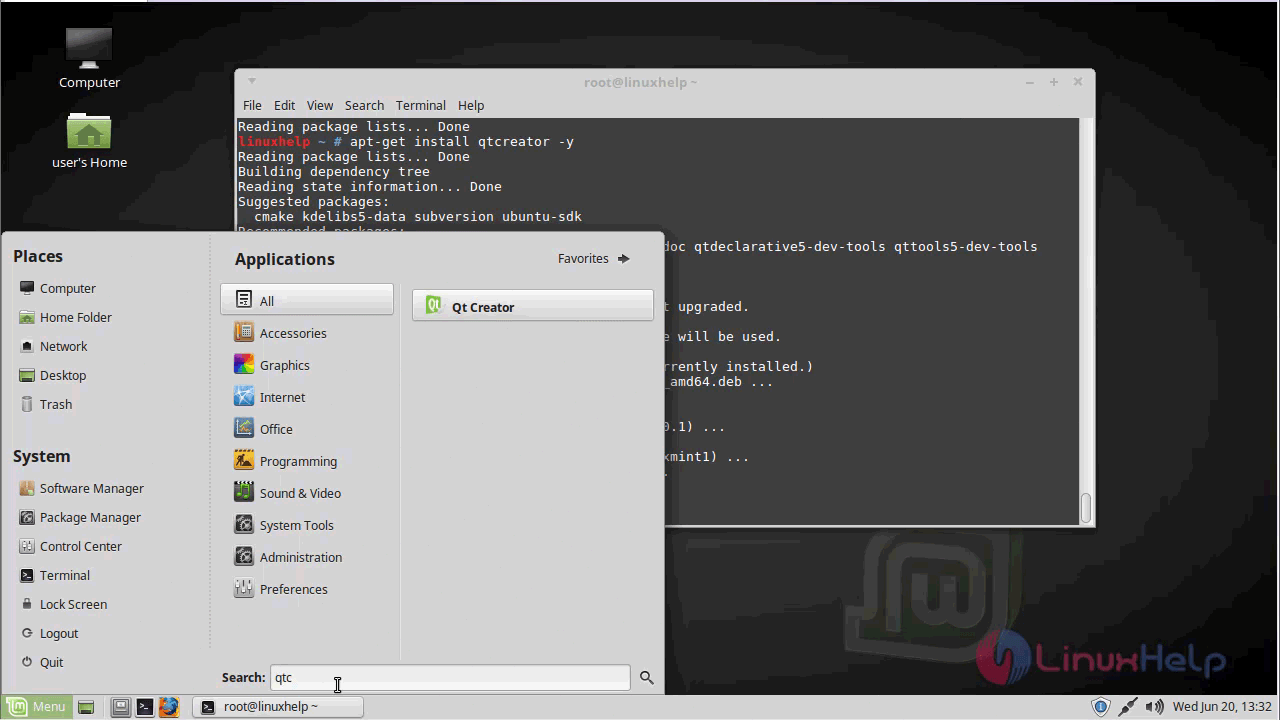
menu

QT creator application is shown below.
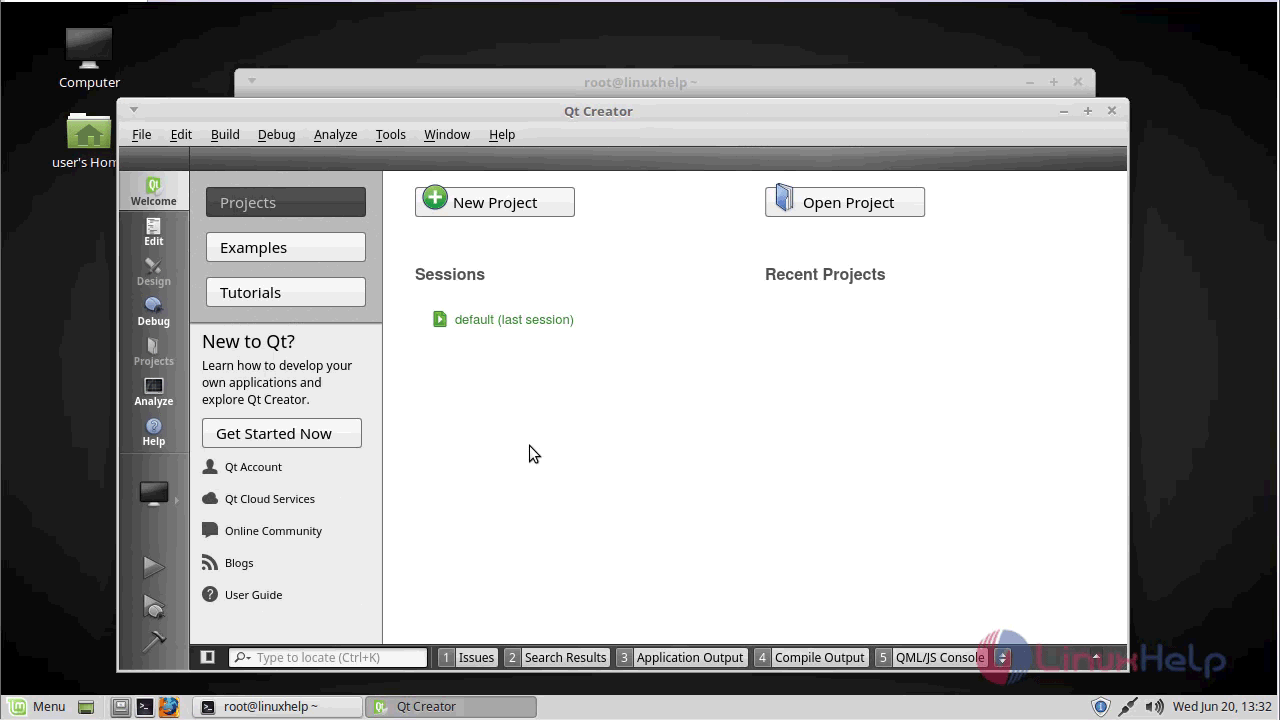
qt_application

The version of QT creator application is available in the Help menu.
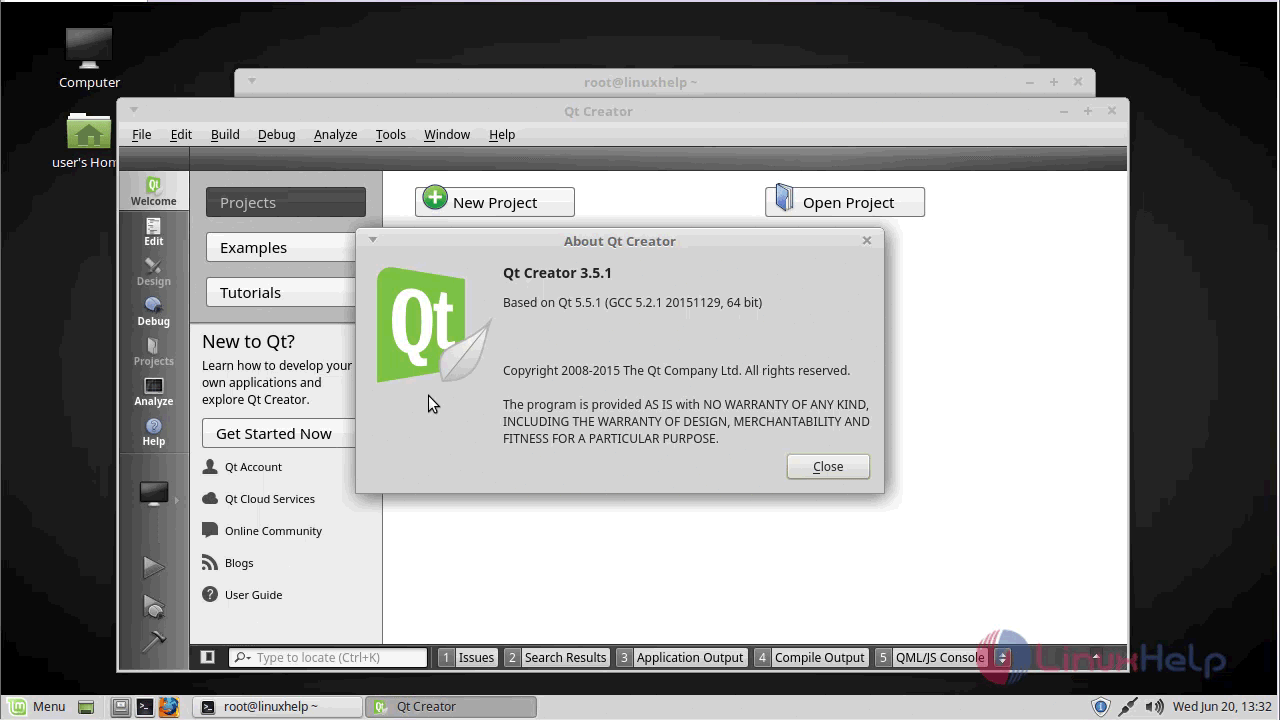
qt_version

With this, the method to install QT creator on linuxmint-18.03 comes to an end.

Tags:
connor
Author: 

Comments ( 0 )

No comments available

Add a comment
{{postCtrl.cmtErrMsg}}

Frequently asked questions ( 5 )

Q

is it open source ?

A

yes, it is

Q

what are the supporting Operating system for this tool?

A

Linux, OS X, BSD family, Windows

Q

Can I use the Community open source version to develop my commercial product?

A

It depends on how you license and distribute your product. The open source version of Qt is mainly distributed under the LGPL, version 3 and GPLv2/v3. You will need to fulfill the license obl

Q

Is it possible to distribute applications developed with open source version of Qt via public application stores?

A

Each application store has their own unique terms and conditions, which may or may not be compatible with distributing applications under LGPL or GPL licenses. The commercial license of Qt i

Q

Is it possible to use both LGPLv2.1 and LGPLv3 licensed libraries in the same application?

A

Yes, it is possible to use both LGPLv2.1 and LGPLv3 licensed libraries in the same application for example by having these as separate shared libraries. Doing this does not require changing l

Back To Top!
Rank
User
Points

Top Contributers

userNamenaveelansari
135850

Top Contributers

userNameayanbhatti
92510

Top Contributers

userNamehamzaahmed
32150

Top Contributers

1
userNamelinuxhelp
31040

Top Contributers

userNamemuhammadali
24500
Can you help Owen ?
How to add SSH key to my Gitlab account

I need to add the SSH key in my gitlab account. How to do so ????

Networking
  • Routing
  • trunk
  • Netmask
  • Packet Capture
  • domain
  • HTTP Proxy
Server Setup
  • NFS
  • KVM
  • Memory
  • Sendmail
  • WebDAV
  • LXC
Shell Commands
  • Cloud commander
  • Command line archive tools
  • last command
  • Shell
  • terminal
  • Throttle
Desktop Application
  • Linux app
  • Pithos
  • Retrospect
  • Scribe
  • TortoiseHg
  • 4Images
Monitoring Tool
  • Monit
  • Apache Server Monitoring
  • EtherApe 
  • Arpwatch Tool
  • Auditd
  • Barman
Web Application
  • Nutch
  • Amazon VPC
  • FarmWarDeployer
  • Rukovoditel
  • Mirror site
  • Chef
Contact Us | Terms of Use| Privacy Policy| Disclaimer
© 2025 LinuxHelp.com All rights reserved. Linux™ is the registered trademark of Linus Torvalds. This site is not affiliated with linus torvalds in any way.