How to install qTractor on ParrotOs 3.9
To install qTractor on ParrotOs 3.9
qTractor is an open-source audio and MIDI sequencer, built based on C++ and uses the Qt framework, along with ALSA drivers for MIDI files and JACK drivers for audios. qTractor is also an audio editing tool and features a multi-track tape recorder, multi-select, point-and-click, and drag & drop interaction, undo and redo functionality. It is really so simple to install qTractor on ParrotOS 3.9, and this article covers the ground on the same process.
Installing qTractor
Before you start with the installation of qTractor on your ParrotOS machine, make sure you add the needed repo for which you need to access the sources.list file. Run the following command to open the file.
┌──[root@linuxhelp]─[~]
└──╼ #vim /etc/apt/sources.list
And in that file, you need to add the following lines.
deb http://deb.debian.org/debian/ stable main contrib non-free
deb-src http://deb.debian.org/debian/ stable main contrib non-free
After that, you need to save and exit from the file.
Once it is done, update the machine as follows.
┌─[root@linuxhelp]─[~]
└──╼ #apt-get update
Ign:1 http://deb.debian.org/debian stable InRelease
Hit:2 http://deb.parrotsec.org/parrot stable InRelease
Hit:3 http://deb.debian.org/debian stable Release
Reading package lists... Done
All is set for the installation of qTractor. Trigger the installation process by running the following command.
┌─[root@linuxhelp]─[~]
└──╼ #apt-get install qtractor
Reading package lists... Done
Building dependency tree
Reading state information... Done
The following additional packages will be installed:
  jackd jackd2 jackd2-firewire libconfig++9v5 libffado2 liblo7 libsuil-0-0
  libxml++2.6-2v5 qjackctl
Suggested packages:
  jack-tools meterbridge liblo-dev
The following NEW packages will be installed:
  jackd jackd2 jackd2-firewire libconfig++9v5 libffado2 liblo7 libsuil-0-0
  libxml++2.6-2v5 qjackctl qtractor
0 upgraded, 10 newly installed, 0 to remove and 1298 not upgraded.
Need to get 3,701 kB of archives.
After this operation, 17.6 MB of additional disk space will be used.
Do you want to continue? [Y/n] y
Get:4 http://deb.debian.org/debian stable/main amd64 jackd2 amd64 1.9.10+20150825git1ed50c92~dfsg-5 [313 kB]
Get:6 http://deb.debian.org/debian stable/main amd64 jackd all 5 [2,020 B]
Get:8 http://deb.debian.org/debian stable/main amd64 jackd2-firewire amd64 1.9.10+20150825git1ed50c92~dfsg-5 [69.1 kB]
Get:1 https://mirror.kku.ac.th/parrot stable/main amd64 libconfig++9v5 amd64 1.5-0.4 [40.0 kB]
..
.
.
.
Setting up jackd2-firewire (1.9.10+20150825git1ed50c92~dfsg-5) ...
Processing triggers for hicolor-icon-theme (0.17-1) ...
Setting up jackd (5) ...
Setting up qjackctl (0.5.0-1) ...
Setting up qtractor (0.8.5-1) ...
Processing triggers for libc-bin (2.24-17) ...
Configuring sandbox profiles....
Sandbox profiles updated!
qTractor has been installed. You can access it using your Application option. Choose Sound and video in the Applications to launch qtractor. 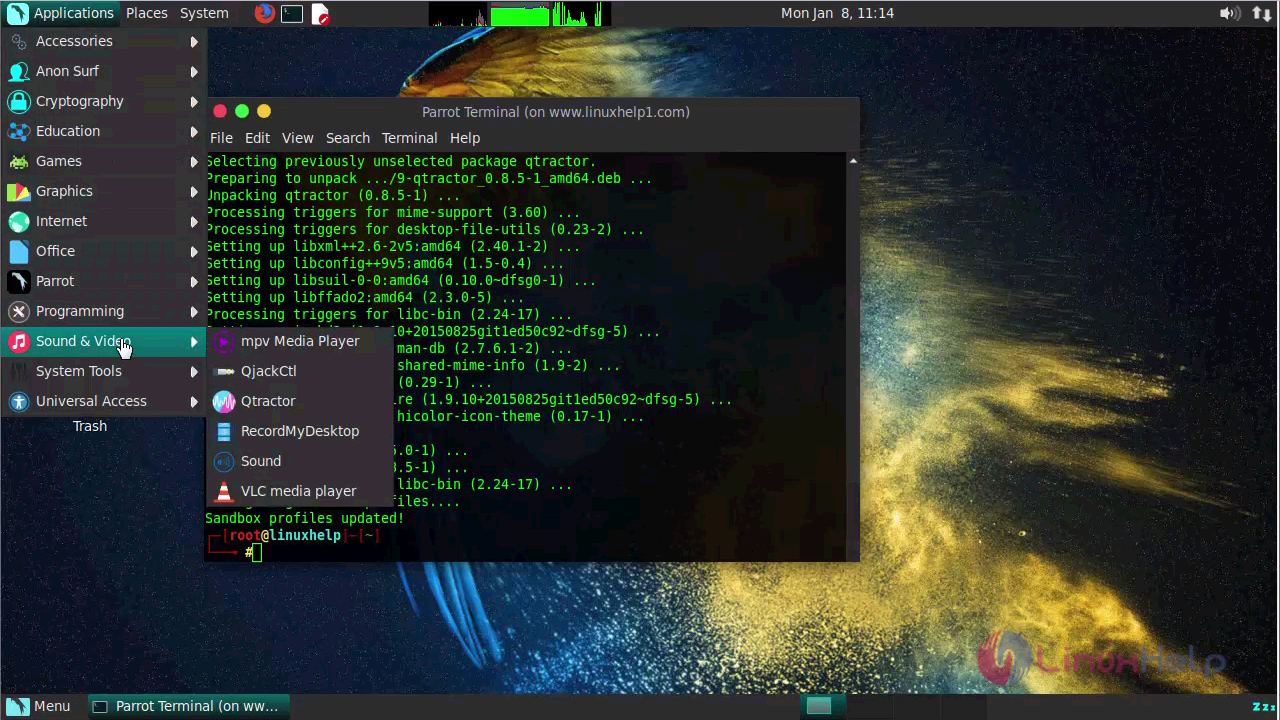
Your qTractor application will look like the one in the following image.
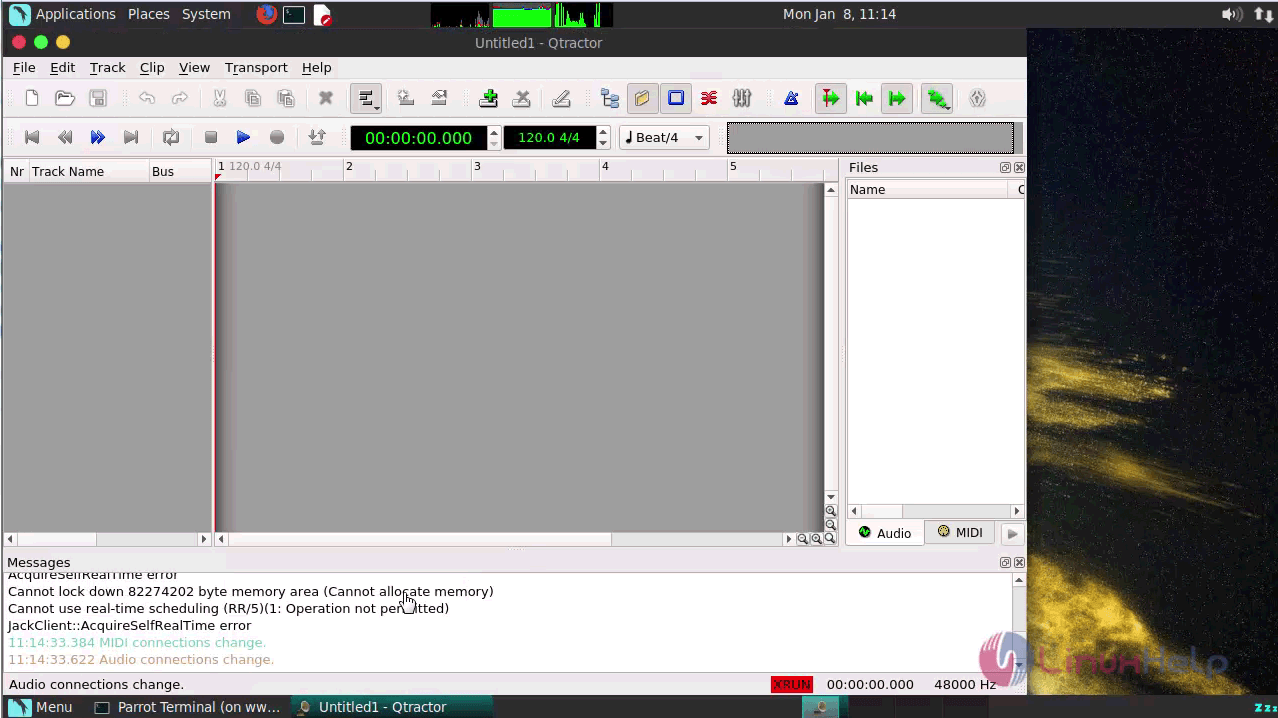
With this, the installation of qTractor comes to an end.
Comments ( 0 )
No comments available