How to install Quassel in Ubuntu
To install Quassel in Ubuntu
Quassel is an open-source IRC client that can attach to or detach from a central core. The text-based graphical IRC client is specially developed in Qt and also support all Linux distributions. Installation of Quassel in Ubuntu is explained in this article.
Installation of Quassel
For installing quassel for that first you need to add the repository
root@linuxhelp:~# add-apt-repository ppa:mamarley/quassel
The latest stable release of the Quassel IRC core, client, and monolithic build.

NOTE: If you are running Precise, you will need to also add " ppa:mamarley/build-dep"  in order to install these packages.
More info: https://launchpad.net/~mamarley/+archive/ubuntu/quassel
Press [ENTER] to continue or ctrl-c to cancel adding it

gpg: keyring `/tmp/tmpz0h2zfeh/secring.gpg'  created
gpg: keyring `/tmp/tmpz0h2zfeh/pubring.gpg'  created
gpg: requesting key 40618B66 from hkp server keyserver.ubuntu.com
gpg: /tmp/tmpz0h2zfeh/trustdb.gpg: trustdb created
gpg: key 40618B66: public key " Launchpad PPA for Michael Marley"  imported
gpg: no ultimately trusted keys found
gpg: Total number processed: 1
gpg: imported: 1 (RSA: 1)
OK
Next update the newly added repository with the following command.
root@linuxhelp:~# apt-get update
Hit:1 http://in.archive.ubuntu.com/ubuntu xenial InRelease
Get:2 http://security.ubuntu.com/ubuntu xenial-security InRelease [94.5 kB]
Get:3 http://ppa.launchpad.net/mamarley/quassel/ubuntu xenial InRelease [17.5 kB]
Get:4 http://in.archive.ubuntu.com/ubuntu xenial-updates InRelease [95.7 kB]
Get:5 http://ppa.launchpad.net/mamarley/quassel/ubuntu xenial/main amd64 Packages [2,008 B]
Get:6 http://ppa.launchpad.net/mamarley/quassel/ubuntu xenial/main i386 Packages [2,008 B]
Get:7 http://ppa.launchpad.net/mamarley/quassel/ubuntu xenial/main Translation-en [920 B]
Hit:8 http://in.archive.ubuntu.com/ubuntu xenial-backports InRelease
Get:9 http://in.archive.ubuntu.com/ubuntu xenial-updates/main amd64 Packages [373 kB]
Get:10 http://security.ubuntu.com/ubuntu xenial-security/main amd64 Packages [134 kB]
.
.
.
Get:22 http://in.archive.ubuntu.com/ubuntu xenial-updates/main DEP-11 64x64 Icons [159 kB]
Get:23 http://in.archive.ubuntu.com/ubuntu xenial-updates/universe amd64 Packages [319 kB]
Get:24 http://in.archive.ubuntu.com/ubuntu xenial-updates/universe i386 Packages [316 kB]
Get:25 http://in.archive.ubuntu.com/ubuntu xenial-updates/universe Translation-en [109 kB]
Get:26 http://in.archive.ubuntu.com/ubuntu xenial-updates/universe amd64 DEP-11 Metadata [88.6 kB]
Get:27 http://in.archive.ubuntu.com/ubuntu xenial-updates/universe DEP-11 64x64 Icons [89.9 kB]
Fetched 2,911 kB in 11s (254 kB/s)
Reading package lists... Done
Now install the quassel package.
root@linuxhelp:~# apt-get install quassel -y
Reading package lists... Done
Building dependency tree
Reading state information... Done
The following additional packages will be installed:
kwayland-data kwayland-integration libfam0 libkf5attica5 libkf5auth-data libkf5auth5 libkf5codecs-data libkf5codecs5
libkf5completion-data libkf5completion5 libkf5config-bin libkf5config-data libkf5configcore5 libkf5configgui5
libkf5configwidgets-data libkf5configwidgets5 libkf5coreaddons-data libkf5coreaddons5 libkf5crash5 libkf5dbusaddons-bin
libkf5dbusaddons-data libkf5dbusaddons5 libkf5globalaccel-bin libkf5globalaccel-data libkf5globalaccel5
libkf5globalaccelprivate5 libkf5guiaddons5 libkf5i18n-data libkf5i18n5 libkf5iconthemes-bin libkf5iconthemes-data
libkf5iconthemes5 libkf5idletime5 libkf5itemviews-data libkf5itemviews5 libkf5jobwidgets-data libkf5jobwidgets5 libkf5kiocore5
libkf5kiowidgets5 libkf5notifications-data libkf5notifications5 libkf5notifyconfig-data libkf5notifyconfig5 libkf5service-bin
libkf5service-data libkf5service5 libkf5sonnet5-data libkf5sonnetcore5 libkf5sonnetui5 libkf5textwidgets-data libkf5textwidgets5
libkf5waylandclient5 libkf5widgetsaddons-data libkf5widgetsaddons5 libkf5windowsystem-data libkf5windowsystem5 libkf5xmlgui-bin
libkf5xmlgui-data libkf5xmlgui5 libphonon4qt5-4 libpolkit-qt5-1-1 libqca-qt5-2 libqca-qt5-2-plugins libqt5script5
libqt5waylandclient5 libqt5x11extras5 libvoikko1 oxygen-icon-theme oxygen5-icon-theme qtwayland5 quassel-data sonnet-plugins
Suggested packages:
fam voikko-fi inxi hspell
The following NEW packages will be installed:
kwayland-data kwayland-integration libfam0 libkf5attica5 libkf5auth-data libkf5auth5 libkf5codecs-data libkf5codecs5
libkf5completion-data libkf5completion5 libkf5config-bin libkf5config-data libkf5configcore5 libkf5configgui5
.
.
.
Setting up libqca-qt5-2:amd64 (2.1.1-0ubuntu2) ...
Setting up libqca-qt5-2-plugins:amd64 (2.1.1-0ubuntu2) ...
Setting up libqt5waylandclient5:amd64 (5.5.1-2build1) ...
Setting up libvoikko1:amd64 (4.0.1-3ubuntu1) ...
Setting up oxygen5-icon-theme (5.18.0-0ubuntu1) ...
Setting up oxygen-icon-theme (5:5.18.0-0ubuntu1) ...
Setting up qtwayland5:amd64 (5.5.1-2build1) ...
Setting up quassel-data (1:0.12.4-0ubuntu0~ppa1~xenial0) ...
Setting up quassel (1:0.12.4-0ubuntu0~ppa1~xenial0) ...
Setting up sonnet-plugins (5.18.0-0ubuntu1) ...
Processing triggers for libc-bin (2.23-0ubuntu3) ...
Processing triggers for dbus (1.10.6-1ubuntu3) ...
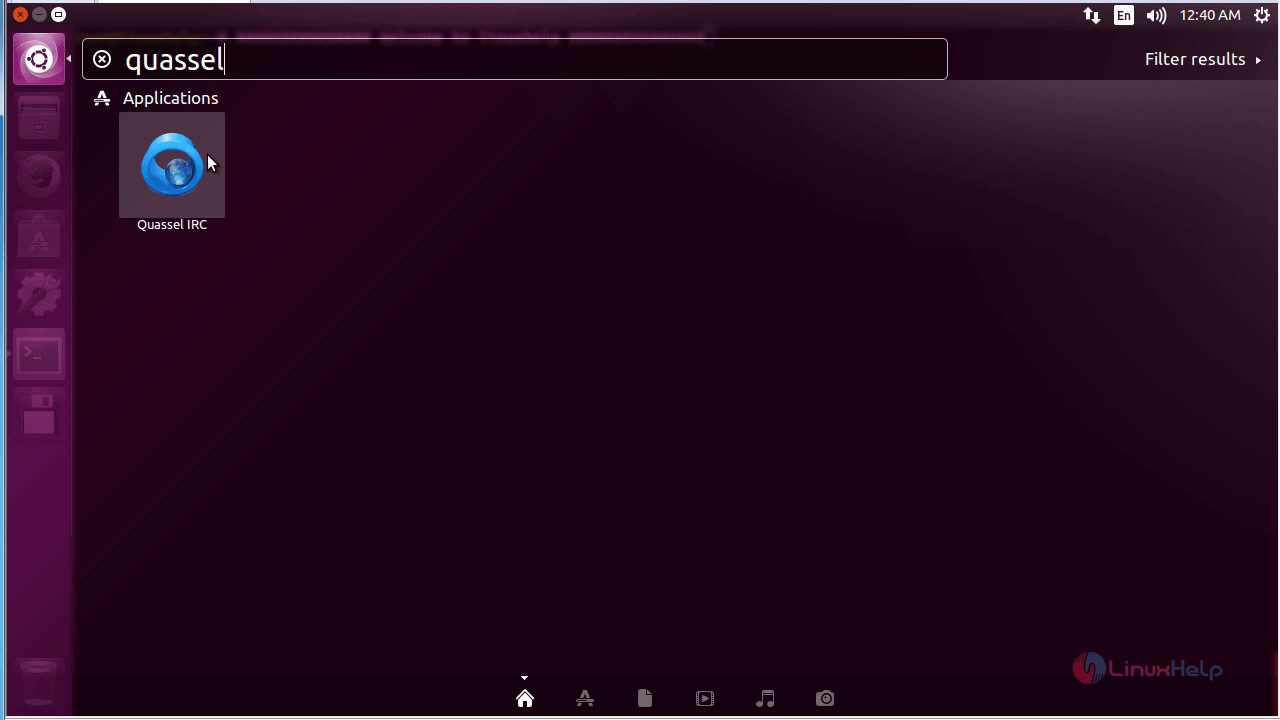
To open the quassel, type installed package name in the search bar. Click on the displayed icon.
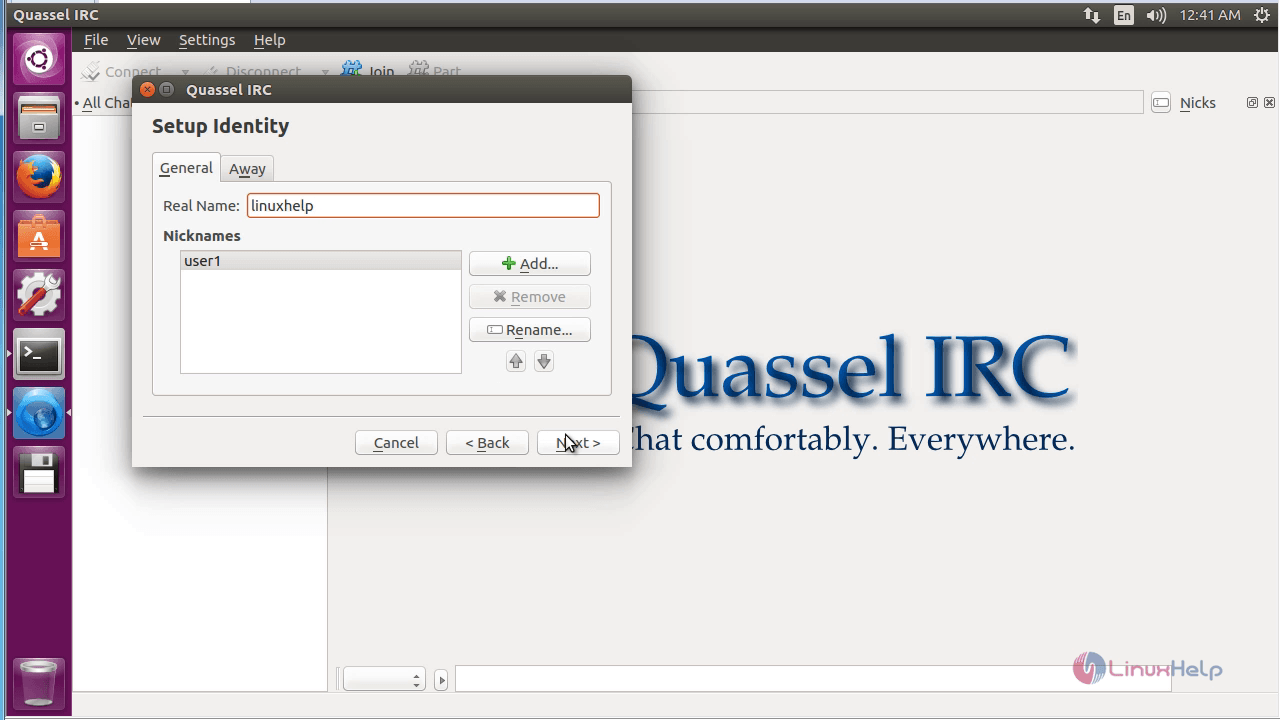
Enter the following credentials as shown below.
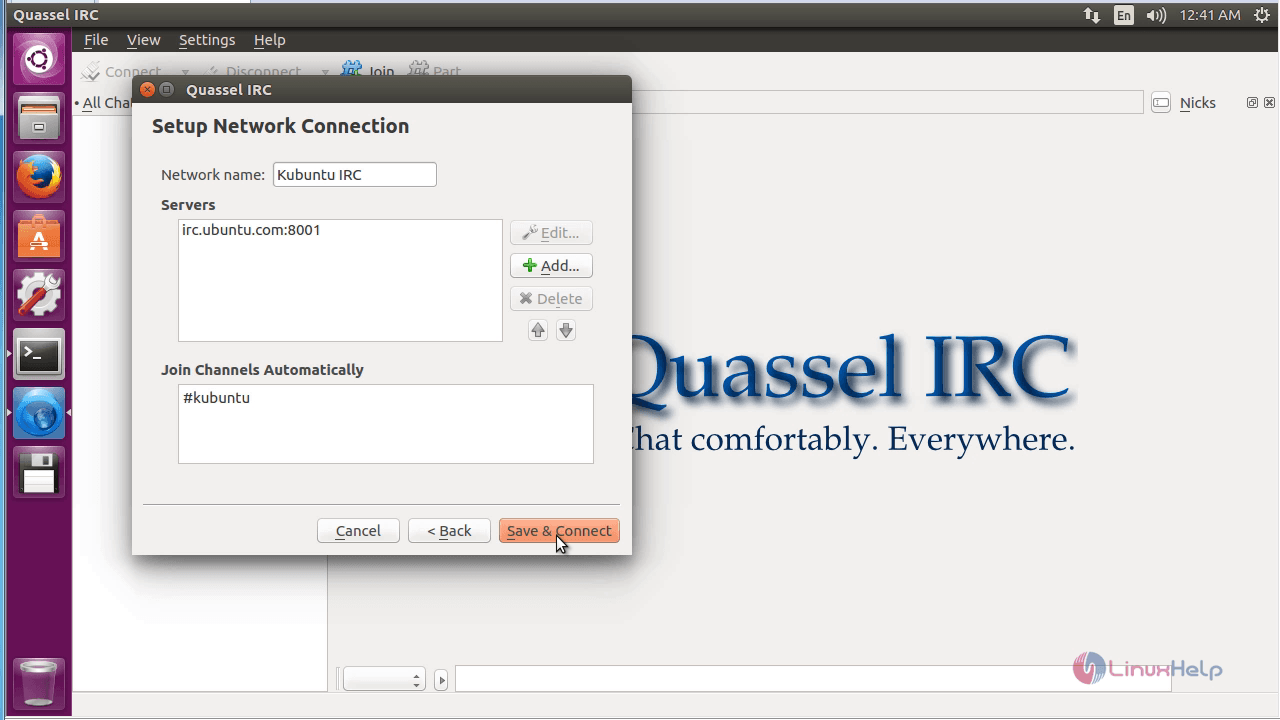
If you need to add new server, just click on the add option in the ' Setup network connection'
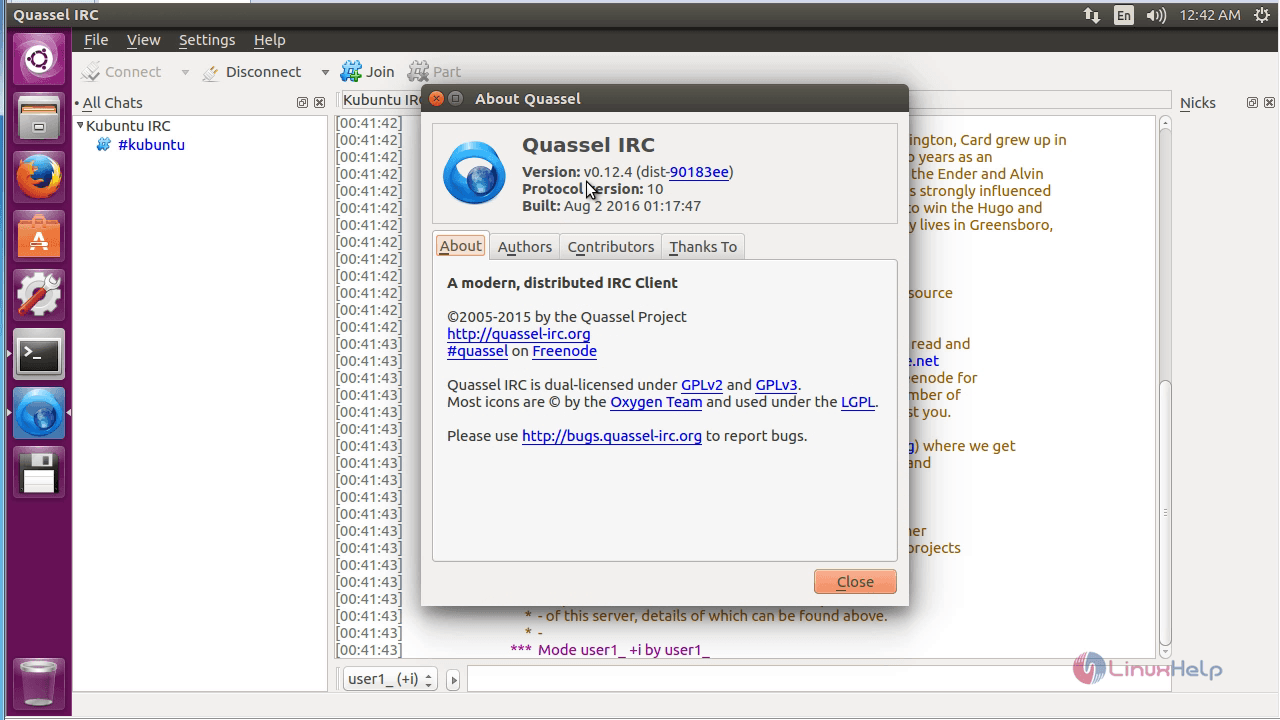
Click on About option to know more details.
To remove Quassel package
Run the below command to uninstall the quassel software.
root@linuxhelp:~# apt-get remove quassel -y
Reading package lists... Done
Building dependency tree
Reading state information... Done
The following packages were automatically installed and are no longer required:
kwayland-data kwayland-integration libfam0 libkf5attica5 libkf5auth-data libkf5auth5 libkf5codecs-data libkf5codecs5
libkf5completion-data libkf5completion5 libkf5config-bin libkf5config-data libkf5configcore5 libkf5configgui5
libkf5configwidgets-data libkf5configwidgets5 libkf5coreaddons-data libkf5coreaddons5 libkf5crash5 libkf5dbusaddons-bin
libkf5dbusaddons-data libkf5dbusaddons5 libkf5globalaccel-bin libkf5globalaccel-data libkf5globalaccel5
libkf5globalaccelprivate5 libkf5guiaddons5 libkf5i18n-data libkf5i18n5 libkf5iconthemes-bin libkf5iconthemes-data
libkf5iconthemes5 libkf5idletime5 libkf5itemviews-data libkf5itemviews5 libkf5jobwidgets-data libkf5jobwidgets5 libkf5kiocore5
libkf5kiowidgets5 libkf5notifications-data libkf5notifications5 libkf5notifyconfig-data libkf5notifyconfig5 libkf5service-bin
libkf5service-data libkf5service5 libkf5sonnet5-data libkf5sonnetcore5 libkf5sonnetui5 libkf5textwidgets-data libkf5textwidgets5
libkf5waylandclient5 libkf5widgetsaddons-data libkf5widgetsaddons5 libkf5windowsystem-data libkf5windowsystem5 libkf5xmlgui-bin
libkf5xmlgui-data libkf5xmlgui5 libphonon4qt5-4 libpolkit-qt5-1-1 libqca-qt5-2 libqca-qt5-2-plugins libqt5script5
libqt5x11extras5 libvoikko1 oxygen-icon-theme oxygen5-icon-theme quassel-data sonnet-plugins
Use ' sudo apt autoremove'  to remove them.
The following packages will be REMOVED:
quassel
.
.
.
Processing triggers for desktop-file-utils (0.22-1ubuntu5) ...
Processing triggers for bamfdaemon (0.5.3~bzr0+16.04.20160415-0ubuntu1) ...
Rebuilding /usr/share/applications/bamf-2.index...
Processing triggers for mime-support (3.59ubuntu1) ...
Comments ( 0 )
No comments available