• Categories
    Category
    {{ postCtrl.tags }}
    • {{ category.tag_type }}

      • {{tag.tag_name}}
      • View more
  • Categories
    Category
    {{ postCtrl.tags }}
    • {{ category.tag_type }}

      • {{tag.tag_name}}
      • View more
  • News
  • Tutorials
  • Forums
  • Tags
  • Users
Tutorial News Comments FAQ Related Articles

How to Install R(R Studio) on Linux Mint 20

  • 00:36 lsb_release -a
  • 00:45 apt update -y
  • 00:58 add-apt-repository 'deb https://cloud.r-project.org/bin/linux/ubuntu bionic-cran35/'
  • 01:07 apt install r-base
  • 01:24 R --version
{{postValue.id}}

To Install R on linux Mint 20

Introduction:

R is a familiar open-source programming language that is used for graphical and statistical computing which is supported by the R Foundation for Statistical Computing and largely used by statisticians and data miners for developing statistical software and performing data analysis. This tutorial will cover the installation of R (R Studio) on Linux Mint 20.

Installation Procedure:

Check the version of Linux Mint OS

root@LinuxHelp:~# lsb_release -a
No LSB modules are available.
Distributor ID:	Linuxmint
Description:	Linux Mint 20to Install R (R Studio) on linux Mint 20
Release:	20
Codename:	ulyana

Now update the packages

root@LinuxHelp:~# apt update
Hit:1 http://archive.canonical.com/ubuntu focal InRelease                                 
Hit:2 http://archive.ubuntu.com/ubuntu focal InRelease                                    
Get:3 http://security.ubuntu.com/ubuntu focal-security InRelease [109 kB]
.
.
.
Fetched 5,263 kB in 11s (490 kB/s)                                                                                         
Reading package lists... Done
Building dependency tree       
Reading state information... Done
403 packages can be upgraded. Run 'apt list --upgradable' to see them.

Once the update is completed the add the repository by using following command

root@LinuxHelp:~# add-apt-repository 'deb https://cloud.r-project.org/bin/linux/ubuntu bionic-cran35/'

Once the repository is added then install R (R Studio) by using following command

root@LinuxHelp:~# apt install r-base
Reading package lists... Done
Building dependency tree       
Reading state information... Done
The following additional packages will be installed:
  build-essential bzip2-doc cpp-9 g++ g++-9 gcc-10-base gcc-9 gcc-9-base gfortran gfortran-9 icu-devtools libasan5
.
Processing triggers for doc-base (0.10.9) ...
Processing 8 added doc-base files...
Processing triggers for gnome-menus (3.36.0-1ubuntu1) ...
Processing triggers for libc-bin (2.31-0ubuntu9) ...
Processing triggers for man-db (2.9.1-1) ...
Processing triggers for install-info (6.7.0.dfsg.2-5) ...

The installation is completed then check the version of the R ( R Studio) by using following command

root@LinuxHelp:~# R --version
R version 3.6.3 (2020-02-29) -- "Holding the Windsock"
Copyright (C) 2020 The R Foundation for Statistical Computing
Platform: x86_64-pc-linux-gnu (64-bit)
R is free software and comes with ABSOLUTELY NO WARRANTY.
You are welcome to redistribute it under the terms of the
GNU General Public License versions 2 or 3.
For more information about these matters see
https://www.gnu.org/licenses/.

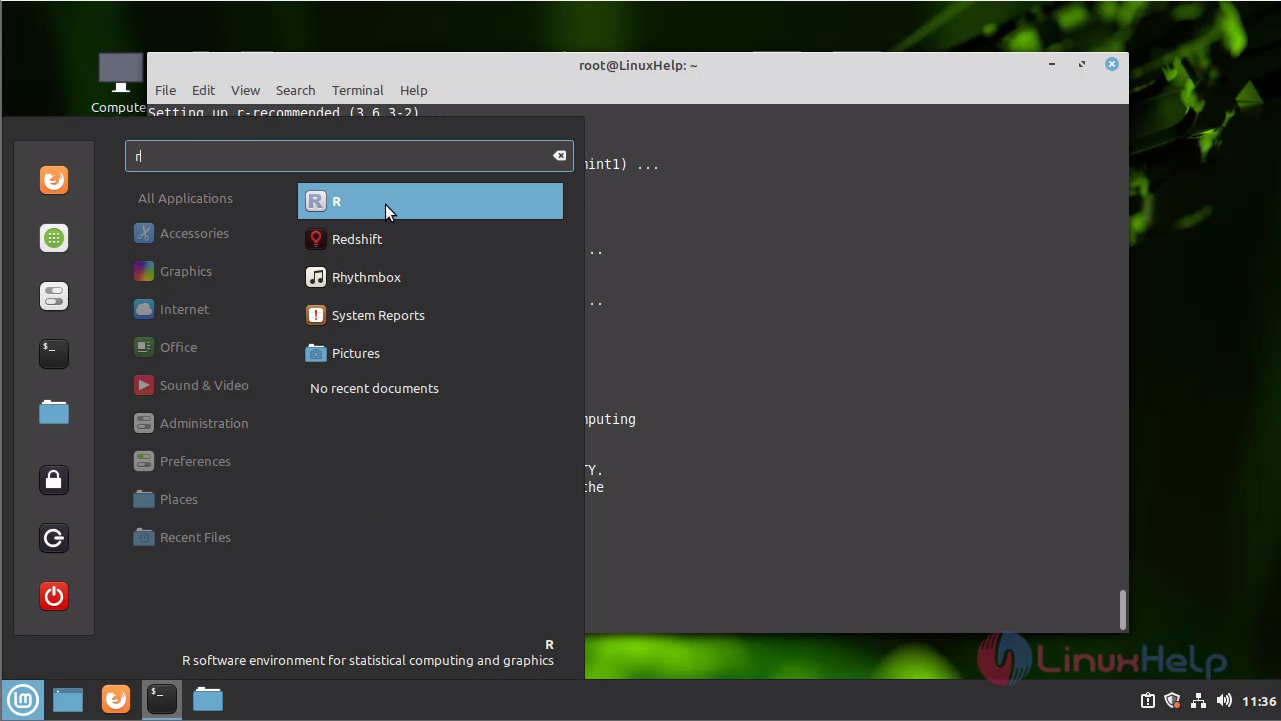
Here you can see the R language application on Menu Bar snap1 With this method, the installation of R (R Studio) on Linux Mint 20 is comes to an end.
Tags:
perlinjones
Author: 

Comments ( 0 )

No comments available

Add a comment
{{postCtrl.cmtErrMsg}}

Frequently asked questions ( 5 )

Q

What are the different types of sorting algorithms available in the R language?

A

Bucket Sort,Selection Sort,Quick Sort,Bubble Sort,
Merge sort.

Q

What is R language?

A

R is a popular open-source programming language, its use for graphical and statistical computing. It is supported by the
R Foundation for Statistical Computing is mainly used by statisticians and data miners for developing statistical software and performing data analysis.

Q

How do you add the R language repository?

A

To add the R Language repository by using the following command
#add-apt-repository 'deb https://cloud.r-project.org/bin/linux/ubuntu bionic-cran35/'

Q

What is the significance of transpose in the R language?

A

Transpose t () is the easiest method for reshaping the data before analysis.

Q

How many data structures do R language have?

A

R language has Homogeneous and Heterogeneous data structures. Homogeneous data structures have the same type of objects – Vector,
Matrix ad Array. Heterogeneous data structures have different types of objects – Data frames and lists.

Back To Top!
Rank
User
Points

Top Contributers

userNamenaveelansari
135850

Top Contributers

userNameayanbhatti
92510

Top Contributers

userNamehamzaahmed
32150

Top Contributers

1
userNamelinuxhelp
31040

Top Contributers

userNamemuhammadali
24500
Can you help Gibbson ?
How do i run both nginx and apache in same instance on centos

Hi...,

my server is based centos operating system and my webserver is already running on Apache.... i need to run both apache and nginx on same instance ... please help me to implement this concept...

Networking
  • Routing
  • trunk
  • Netmask
  • Packet Capture
  • domain
  • HTTP Proxy
Server Setup
  • NFS
  • KVM
  • Memory
  • Sendmail
  • WebDAV
  • LXC
Shell Commands
  • Cloud commander
  • Command line archive tools
  • last command
  • Shell
  • terminal
  • Throttle
Desktop Application
  • Linux app
  • Pithos
  • Retrospect
  • Scribe
  • TortoiseHg
  • 4Images
Monitoring Tool
  • Monit
  • Apache Server Monitoring
  • EtherApe 
  • Arpwatch Tool
  • Auditd
  • Barman
Web Application
  • Nutch
  • Amazon VPC
  • FarmWarDeployer
  • Rukovoditel
  • Mirror site
  • Chef
Contact Us | Terms of Use| Privacy Policy| Disclaimer
© 2025 LinuxHelp.com All rights reserved. Linux™ is the registered trademark of Linus Torvalds. This site is not affiliated with linus torvalds in any way.