How to install RabbitMQ on linuxmint 18.3
To install RabbitMQ on Linux Mint 18.3
RabbitMQ is an open source message broker software (sometimes called message-oriented middleware) that originally implemented the Advanced Message Queuing Protocol (AMQP) and has since been extended with a plug-in architecture to support Streaming Text Oriented Messaging Protocol (STOMP), MQTT, and other protocols
Installing RabbitMQ
First, make sure you update your system by making use of the following command.
linuxhelp ~ # apt-get update
Hit:1 http://archive.ubuntu.com/ubuntu xenial InRelease
Hit:2 http://archive.canonical.com/ubuntu xenial InRelease
Ign:3 http://packages.linuxmint.com sylvia InRelease
Get:4 http://archive.ubuntu.com/ubuntu xenial-updates InRelease [102 kB]
Get:5 http://packages.linuxmint.com sylvia Release [24.2 kB]
Get:6 http://packages.linuxmint.com sylvia Release.gpg [819 B]
Get:7 http://archive.ubuntu.com/ubuntu xenial-backports InRelease [102 kB]
.
.
Get:23 http://security.ubuntu.com/ubuntu xenial-security/universe i386 Packages [281 kB]
Get:24 http://security.ubuntu.com/ubuntu xenial-security/universe Translation-en [121 kB]
Fetched 5,296 kB in 9s (540 kB/s)
Reading package lists... Done
Once this is done, we can enable the RabbitMQ application repository.
linuxhelp ~ # echo " deb http://www.rabbitmq.com/debian/ testing main" > > /etc/apt/sources.list
Now, we can add the verification key of The RabbitMQ package.
linuxhelp ~ # curl http://www.rabbitmq.com/rabbitmq-signing-key-public.asc | sudo apt-key add -
  % Total    % Received % Xferd  Average Speed   Time    Time     Time  Current
                                 Dload  Upload   Total   Spent    Left  Speed
100  1702    0  1702    0     0  19573      0 --:--:-- --:--:-- --:--:-- 19790
OK
Once it is done, you need to update your system again.
linuxhelp ~ # apt-get update
Get:1 http://www.rabbitmq.com/debian testing InRelease [33.0 kB]
Ign:1 http://www.rabbitmq.com/debian testing InRelease
Get:2 http://www.rabbitmq.com/debian testing/main amd64 Packages [455 B]
Get:3 http://www.rabbitmq.com/debian testing/main i386 Packages [455 B]
.
.
Hit:9 http://archive.ubuntu.com/ubuntu xenial-backports InRelease
Hit:10 http://packages.linuxmint.com sylvia Release
Fetched 33.9 kB in 0s (36.5 kB/s)
Reading package lists... Done
You can now finally install the RabbitMQ server by running the following command.
linuxhelp ~ # apt-get install rabbitmq-server
Reading package lists... Done
Building dependency tree
Reading state information... Done
The following additional packages will be installed:
  erlang-asn1 erlang-base erlang-corba erlang-crypto erlang-diameter erlang-edoc erlang-eldap erlang-erl-docgen erlang-eunit erlang-ic
.
.
dding system user `rabbitmq'  (UID 124) ...
Adding new user `rabbitmq'  (UID 124) with group `rabbitmq'  ...
Not creating home directory `/var/lib/rabbitmq' .
Processing triggers for libc-bin (2.23-0ubuntu9) ...
Processing triggers for systemd (229-4ubuntu21) ...
Processing triggers for ureadahead (0.100.0-19) ...
Enable RabbitMQ Management console
And then, run the following command to enable the RabbitMQ Management Console.
linuxhelp ~ # rabbitmq-plugins enable rabbitmq_management
The following plugins have been enabled:
  amqp_client
  cowlib
  cowboy
  rabbitmq_web_dispatch
  rabbitmq_management_agent
  rabbitmq_management
After that, you need to apply plugin configuration
linuxhelp ~ # rabbitmq-plugins enable rabbitmq_management
The following plugins have been enabled:
  amqp_client
  cowlib
  cowboy
  rabbitmq_web_dispatch
  rabbitmq_management_agent
  rabbitmq_management
Applying plugin configuration to rabbit started 6 plugins.Once this is done, you can see that management plugin is enabled and console is up on the URL - http://localhost:15672/
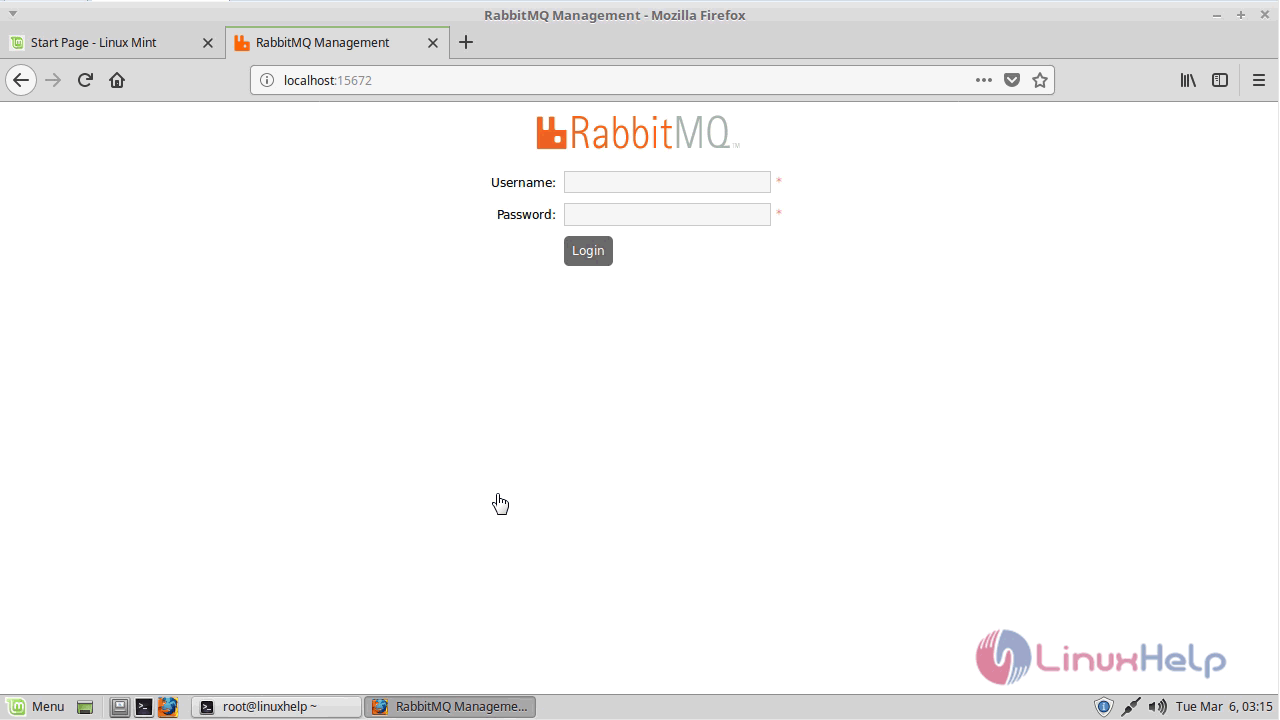
You can log in and see what all operations we can perform.
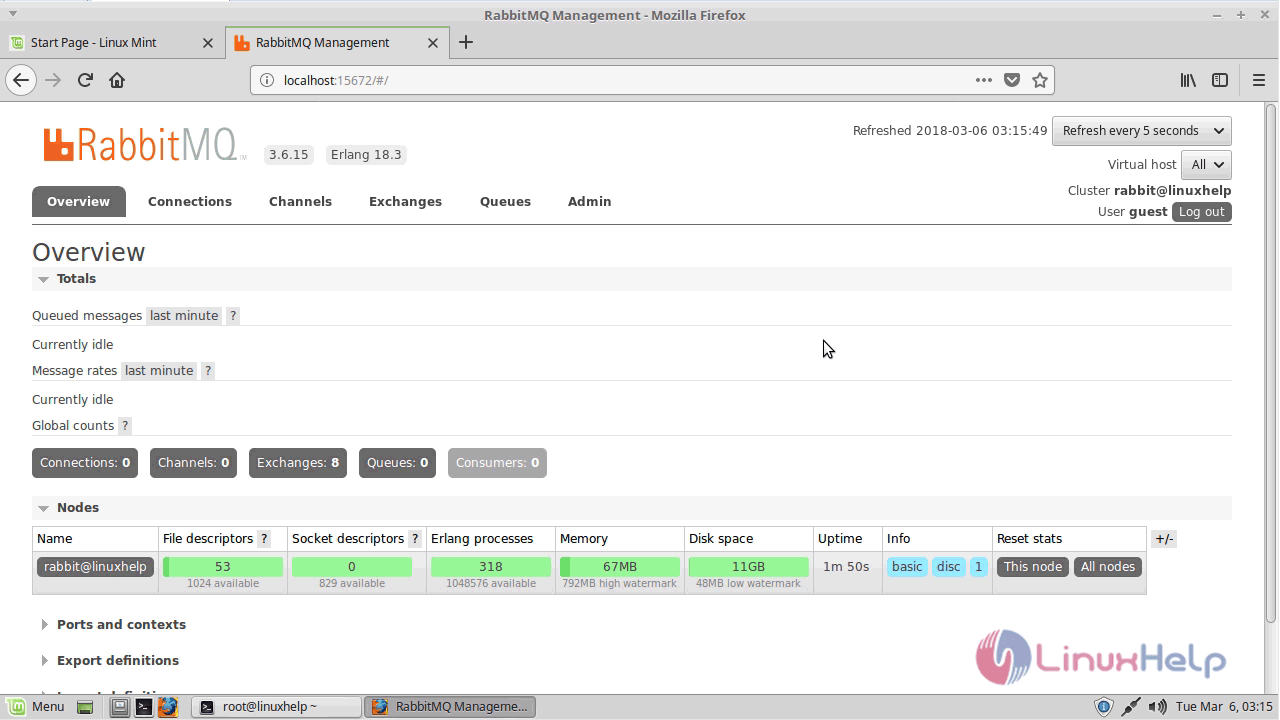
In general, no manual configuration will be needed with RabbitMQ as it already comes packaged with production-grade configuration.
Comments ( 0 )
No comments available