How to install RawTherapee-4.2 in Ubuntu
{{postValue.id}}
To Install RawTherapee-4.2 in Ubuntu 16.04 via PPA
RawTherapee-4.2 is an advanced software designed for developing raw photos and also for processing non-raw photos. It is non-destructive and supports all cameras. RawTherapee supports JPEG, PNG, and TIFF as output format for the processed photos. Installation of Rawtherapee in Ubuntu is explained in this manual.
Features
- Speed, precision, stability and memory usage optimizations.
- It has a Powerful color toning tool.
- It supports Curve control of luminance noise reduction.
- Supports Median filter in the noise reduction tool.
- Film simulation tool using Hald CLUT pattern files.
- Command-line option to define bit depth of output TIFF/PNG file.
- Multiple improvements to dead/hot pixel handling, see RawPedia.
- Filename of currently opened image shown in the titlebar.
- Clip control for the flat-field correction tool.
To install Rawtherapee
Run the following command to add the repository required for the installation of Rawtherapee.
user1@linuxhelp:~$ sudo add-apt-repository ppa:dhor/myway
[sudo] password for user1:
 Every photographer needs some tools...

 More info: https://launchpad.net/~dhor/+archive/ubuntu/myway
Press [ENTER] to continue or ctrl-c to cancel adding it

gpg: keyring `/tmp/tmpau9grm9z/secring.gpg'  created
gpg: keyring `/tmp/tmpau9grm9z/pubring.gpg'  created
gpg: requesting key 93330B78 from hkp server keyserver.ubuntu.com
gpg: /tmp/tmpau9grm9z/trustdb.gpg: trustdb created
gpg: key 93330B78: public key " Launchpad PPA for Dariusz Duma"  imported
gpg: Total number processed: 1
gpg:               imported: 1  (RSA: 1)
OK
Run the following command to update the apt sourcelist.
user1@linuxhelp:~$ sudo apt-get update
Hit:1 http://in.archive.ubuntu.com/ubuntu xenial InRelease
Get:2 http://ppa.launchpad.net/dhor/myway/ubuntu xenial InRelease [17.5 kB]
Get:3 http://security.ubuntu.com/ubuntu xenial-security InRelease [94.5 kB]
Get:4 http://in.archive.ubuntu.com/ubuntu xenial-updates InRelease [95.7 kB]
Get:5 http://ppa.launchpad.net/dhor/myway/ubuntu xenial/main amd64 Packages [8,824 B]
Get:6 http://ppa.launchpad.net/dhor/myway/ubuntu xenial/main i386 Packages [8,640 B]
Hit:7 http://in.archive.ubuntu.com/ubuntu xenial-backports InRelease
Get:8 http://ppa.launchpad.net/dhor/myway/ubuntu xenial/main Translation-en [5,336 B]
Fetched 230 kB in 4s (48.1 kB/s)
Reading package lists... Done
After updating the apt sourcelist, install the RawTherapee package by the following command.
user1@linuxhelp:~$ sudo apt-get install rawtherapee
Reading package lists... Done
Building dependency tree
Reading state information... Done
The following additional packages will be installed:
  libgtkmm-2.4-1v5 libiptcdata0 rawtherapee-data
The following NEW packages will be installed:
  libgtkmm-2.4-1v5 libiptcdata0 rawtherapee rawtherapee-data
0 upgraded, 4 newly installed, 0 to remove and 352 not upgraded.
Need to get 9,056 kB of archives.
After this operation, 26.1 MB of additional disk space will be used.
Do you want to continue? [Y/n] y
Get:1 http://in.archive.ubuntu.com/ubuntu xenial/main amd64 libgtkmm-2.4-1v5 amd64 1:2.24.4-2 [671 kB]
.
.
Setting up rawtherapee-data (4.2-4) ...
Setting up rawtherapee (4.2-4) ...
Processing triggers for libc-bin (2.23-0ubuntu3) ...
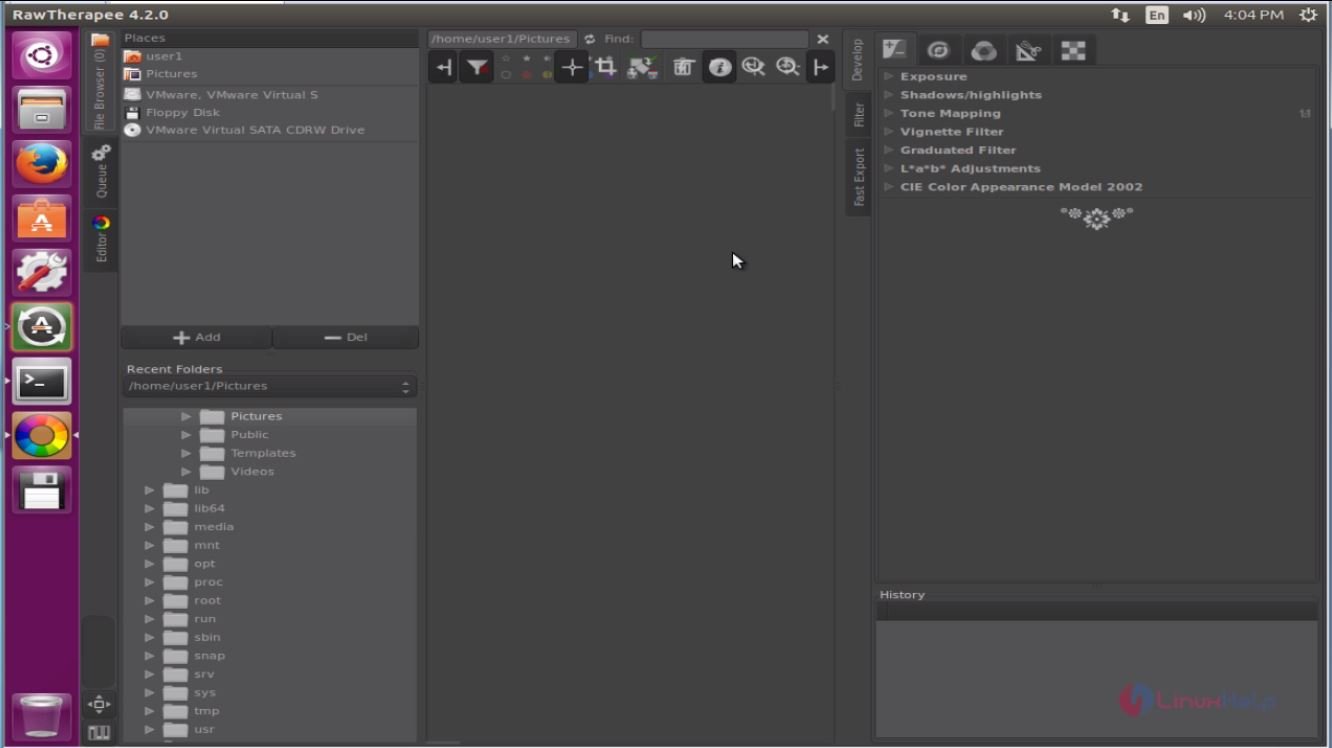
Open the installed RawTherapee from Ubuntu Dash or Menu.
To uninstall RawTherapee
Run the following command to uninstall RawTherapee from Ubuntu Systems.
user1@linuxhelp:~$ sudo apt-get remove rawtherapee
Reading package lists... Done
Building dependency tree
Reading state information... Done
The following packages were automatically installed and are no longer required:
  libgtkmm-2.4-1v5 libiptcdata0 rawtherapee-data
Use ' sudo apt autoremove'  to remove them.
The following packages will be REMOVED:
  rawtherapee
0 upgraded, 0 newly installed, 1 to remove and 352 not upgraded.
After this operation, 9,813 kB disk space will be freed.
Do you want to continue? [Y/n] y
(Reading database ... 173081 files and directories currently installed.)
Removing rawtherapee (4.2-4) ...
Processing triggers for gnome-menus (3.13.3-6ubuntu3) ...
Processing triggers for desktop-file-utils (0.22-1ubuntu5) ...
Processing triggers for bamfdaemon (0.5.3~bzr0+16.04.20160415-0ubuntu1) ...
Rebuilding /usr/share/applications/bamf-2.index...
Processing triggers for mime-support (3.59ubuntu1) ...
Processing triggers for man-db (2.7.5-1) ...
Processing triggers for hicolor-icon-theme (0.15-0ubuntu1) ...
Comments ( 0 )
No comments available