• Categories
    Category
    {{ postCtrl.tags }}
    • {{ category.tag_type }}

      • {{tag.tag_name}}
      • View more
  • Categories
    Category
    {{ postCtrl.tags }}
    • {{ category.tag_type }}

      • {{tag.tag_name}}
      • View more
  • News
  • Tutorials
  • Forums
  • Tags
  • Users
Tutorial News Comments FAQ Related Articles

How to Install Recordmydesktop on Ubuntu 16.04

{{postValue.id}}

To Install Recordmydesktop on Ubuntu 16.04

Recordmydesktop is an open source and simple screen recorder application used for Linux and other Unix based operating systems. The recordmydesktop application can record either the whole screen or a predefined area within it. It is a very useful application which can be very helpful when one needs to record and share desktop activities to someone else. recordmydesktop can capture both &ndash audio and video of a desktop screen.

Installing Recordmydesktop

Before you begin with the installation process, you need to update your machine, so run the following command for the same purpose.

root@linuxhelp:~# apt-get update
Hit:1 http://security.ubuntu.com/ubuntu xenial-security InRelease
Hit:2 http://in.archive.ubuntu.com/ubuntu xenial InRelease
Hit:3 http://in.archive.ubuntu.com/ubuntu xenial-updates InRelease
Hit:4 http://in.archive.ubuntu.com/ubuntu xenial-backports InRelease
Hit:5 http://ppa.launchpad.net/plushuang-tw/uget-stable/ubuntu xenial InRelease
Hit:6 http://ppa.launchpad.net/starws-box/deadbeef-player/ubuntu xenial InRelease
Reading package lists... Done

Once the machine is updated, you shall proceed with the installation process of recordmydesktop by simply running the following command.

root@linuxhelp:~# apt-get install gtk-recordmydesktop
Reading package lists... Done
Building dependency tree
Reading state information... Done
The following packages were automatically installed and are no longer required:
gnome-software-common libgtkspell3-3-0
Use ' sudo apt autoremove'  to remove them.
The following additional packages will be installed:
libappindicator1 libindicator7 python-appindicator python-cairo python-gi
python-gobject python-gobject-2 python-gtk2 recordmydesktop
Suggested packages:
python-gi-cairo python-gobject-2-dbg python-gtk2-doc
The following NEW packages will be installed:
gtk-recordmydesktop libappindicator1 libindicator7 python-appindicator
python-cairo python-gi python-gobject python-gobject-2 python-gtk2
recordmydesktop
.
.
.
Setting up gtk-recordmydesktop (0.3.8-4.1ubuntu1) ...
Setting up python-gi (3.20.0-0ubuntu1) ...
Setting up python-gobject (3.20.0-0ubuntu1) ...
Setting up python-appindicator (12.10.1+16.04.20170215-0ubuntu1) ...
Processing triggers for libc-bin (2.23-0ubuntu3) ...

Once the application is installed, you shall launch it directly from your to Ubuntu dashboard. Go to the search field, type the name of the application, the respective icon gets displayed on the screen. Click on it to open the application.
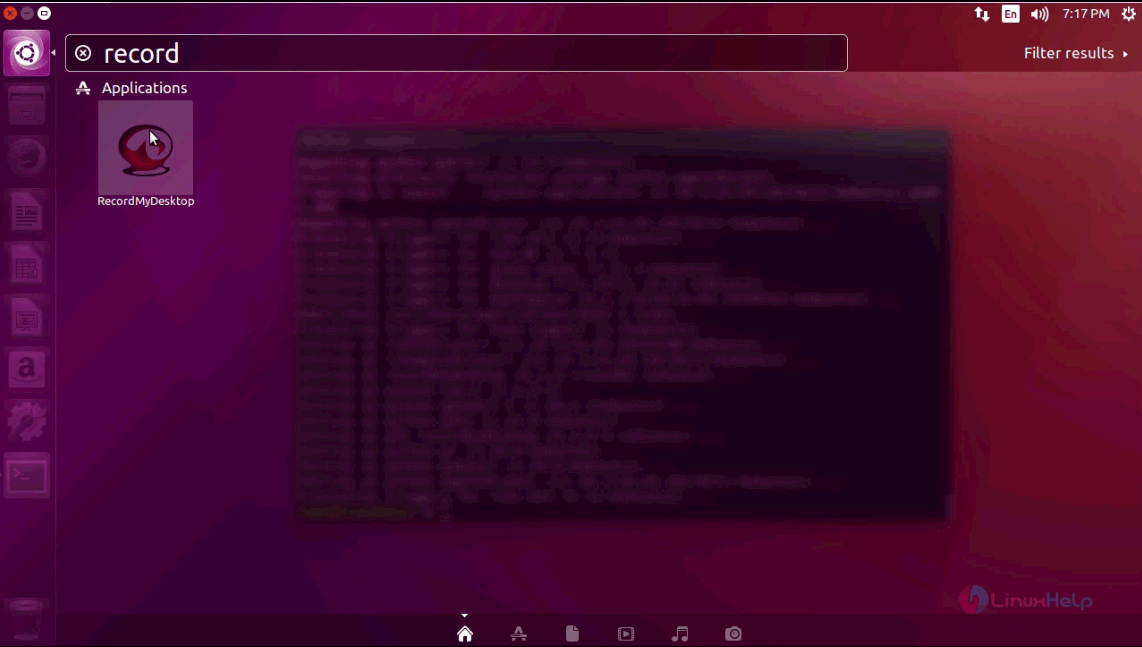
search

The application now gets opened and appears on your screen.
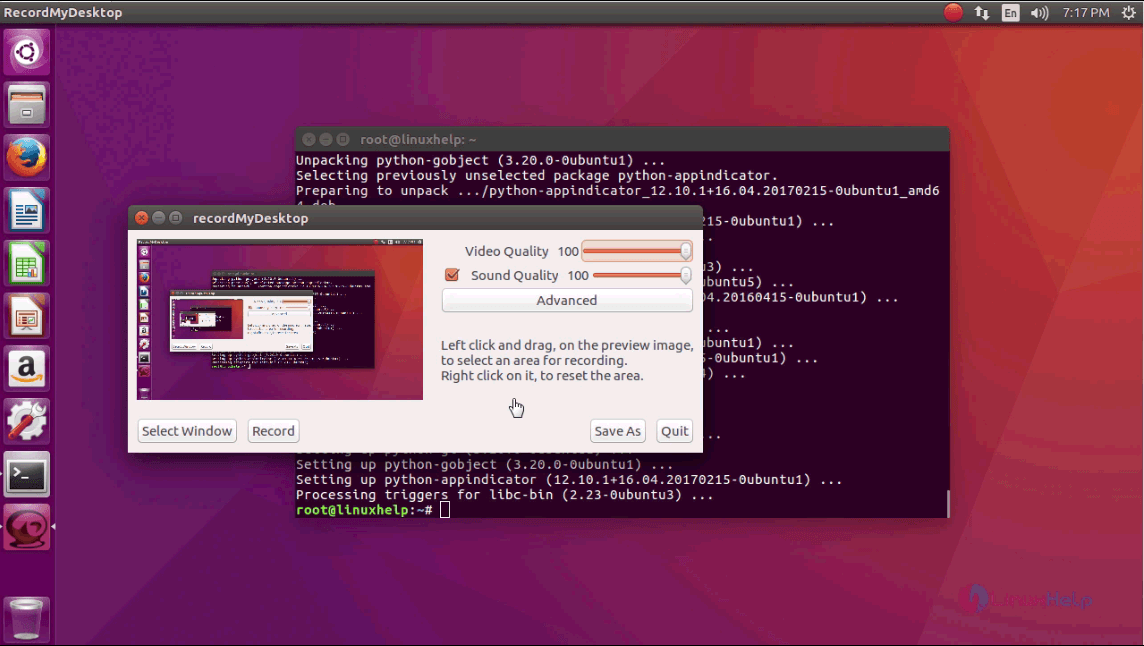
search

With this, the installation of Recordmydesktop comes to an end.

Tags:
ethan
Author: 

Comments ( 0 )

No comments available

Add a comment
{{postCtrl.cmtErrMsg}}

Frequently asked questions ( 5 )

Q

I still have no sound for the Recordmydesktop?

A

The solution is in your mixer's settings. Keep playing with it ;).

Q

Some windows are not recorded?

A

ecordMyDesktop is based on extensive usage of the Xdamage extension. Instead of capturing
whole screenshots, the program marks the areas that have changed and updates them.
This approach fails on two occasions. Video played throught the Xv extension and hardware
accelerated glx context. This generally means 3d games and video windows.

Q

What are the alternative tool like this ?

A

Open Broadcaster Software, SimpleScreenRecorder, recordMyDesktop . This are tools similar to ScreenStudio

Q

how to install recordmyDesktop?

A

follow this link : "https://www.linuxhelp.com/how-to-install-recordmydesktop-on-ubuntu-16-04/"

Q

When recording, some windows don't receive drag'n drop events.

A

There are some occassions where recordMyDesktop seems to interfere with dragging and dropping.
Disabling the frame will probably resolve any such problems. To do this on the commandline,
use the --no-frame option, while for the graphical frontends, consult this page
(uncheck the Outline Capture Area On Screen checkbox, in Advanced => Misc.).

Back To Top!
Rank
User
Points

Top Contributers

userNamenaveelansari
135850

Top Contributers

userNameayanbhatti
92510

Top Contributers

userNamehamzaahmed
32150

Top Contributers

1
userNamelinuxhelp
31040

Top Contributers

userNamemuhammadali
24500
Can you help Ryan ?
how to use visual traceroute tool

Am using traceroute command to check for the route. i got this tool while surfing. So pls help me out installation and usage of Visual traceroute tool.

Networking
  • Routing
  • trunk
  • Netmask
  • Packet Capture
  • domain
  • HTTP Proxy
Server Setup
  • NFS
  • KVM
  • Memory
  • Sendmail
  • WebDAV
  • LXC
Shell Commands
  • Cloud commander
  • Command line archive tools
  • last command
  • Shell
  • terminal
  • Throttle
Desktop Application
  • Linux app
  • Pithos
  • Retrospect
  • Scribe
  • TortoiseHg
  • 4Images
Monitoring Tool
  • Monit
  • Apache Server Monitoring
  • EtherApe 
  • Arpwatch Tool
  • Auditd
  • Barman
Web Application
  • Nutch
  • Amazon VPC
  • FarmWarDeployer
  • Rukovoditel
  • Mirror site
  • Chef
Contact Us | Terms of Use| Privacy Policy| Disclaimer
© 2025 LinuxHelp.com All rights reserved. Linux™ is the registered trademark of Linus Torvalds. This site is not affiliated with linus torvalds in any way.