How to install RStudio on Fedora 34
To Install RStudio on Fedora 34
Introduction:
R is an open-source programming language for graphical and statistical computing that is mainly used by statisticians and data miners to develop statistical software and perform data analysis. This language is supported by the R Foundation for Statistical Computing.
Installation Procedure:
Step 1: Check the version of the OS by using the below command
[root@linuxhelp ~]# cat /etc/os-release
NAME=Fedora
VERSION="34 (Workstation Edition)"
ID=fedora
VERSION_ID=34
VERSION_CODENAME=""
PLATFORM_ID="platform:f34"
PRETTY_NAME="Fedora 34 (Workstation Edition)"
ANSI_COLOR="0;38;2;60;110;180"
LOGO=fedora-logo-icon
CPE_NAME="cpe:/o:fedoraproject:fedora:34"
HOME_URL="https://fedoraproject.org/"
DOCUMENTATION_URL="https://docs.fedoraproject.org/en-US/fedora/34/system-administrators-guide/"
SUPPORT_URL="https://fedoraproject.org/wiki/Communicating_and_getting_help"
BUG_REPORT_URL="https://bugzilla.redhat.com/"
REDHAT_BUGZILLA_PRODUCT="Fedora"
REDHAT_BUGZILLA_PRODUCT_VERSION=34
REDHAT_SUPPORT_PRODUCT="Fedora"
REDHAT_SUPPORT_PRODUCT_VERSION=34
PRIVACY_POLICY_URL="https://fedoraproject.org/wiki/Legal:PrivacyPolicy"
VARIANT="Workstation Edition"
VARIANT_ID=workstation
Step 2: Install the R base package on your system by using the below command
[root@linuxhelp ~]# dnf install -y R
Fedora 34 openh264 (From Cisco) - x86_64                                      1.0 kB/s | 989  B     00:00
Fedora Modular 34 - x86_64                                                    5.9 kB/s | 5.6 kB     00:00
Fedora Modular 34 - x86_64 - Updates                                          5.5 kB/s | 5.2 kB     00:00
Fedora Modular 34 - x86_64 - Updates                                          291 kB/s | 823 kB     00:02
Fedora 34 - x86_64 - Updates                                                  6.7 kB/s | 5.2 kB     00:00
Fedora 34 - x86_64 - Updates                                                  1.1 MB/s |  13 MB     00:11
Fedora 34 - x86_64                                                            5.8 kB/s | 5.7 kB     00:00
MySQL 8.0 Community Server                                                    4.9 kB/s | 2.6 kB     00:00
MySQL 8.0 Community Server                                                    6.9 MB/s | 1.0 MB     00:00
MySQL Connectors Community                                                    6.4 kB/s | 2.6 kB     00:00
MySQL Connectors Community                                                    402 kB/s |  36 kB     00:00
MySQL Tools Community                                                         6.0 kB/s | 2.6 kB     00:00
MySQL Tools Community                                                         3.4 MB/s | 239 kB     00:00
determining the fastest mirror (44 hosts).. done.===========================] 9.2 kB/s | 3.5 kB     00:00 ETA
Remi's Modular repository - Fedora 34 - x86_64                                271  B/s | 858  B     00:03
done.s Modular repository - Fedora 100% [===================================]  10 kB/s | 3.5 kB     00:00 ETA
Remi's Modular repository - Fedora 34 - x86_64                                419 kB/s | 516 kB     00:01
Remi's RPM repository - Fedora 34 - x86_64                                    1.1 kB/s | 858  B     00:00
Remi's RPM repository - Fedora 34 - x86_64                                    1.9 MB/s | 3.0 MB     00:01
Dependencies resolved.
==============================================================================================================
Package                                 Arch       Version                                 Repository   Size
==============================================================================================================
Installing:
R                                       x86_64     4.0.5-2.fc34                            updates     9.6 k
Installing dependencies:

R-core                                  x86_64     4.0.5-2.fc34                            updates      57 M
R-core-devel                            x86_64     4.0.5-2.fc34                            updates      87 k
R-devel                                 x86_64     4.0.5-2.fc34                            updates     8.9 k
R-java                                  x86_64     4.0.5-2.fc34                            updates      10 k
R-java-devel                            x86_64     4.0.5-2.fc34                            updates     9.6 k
R-rpm-macros                            noarch     1.2.1-2.fc34                            fedora       11 k
annobin                                 x86_64     9.79-2.fc34                             updates     133 k
biber                                   noarch     2.14-6.fc34                             updates     297 k
brotli                                  x86_64     1.0.9-4.fc34                            fedora      321 k
brotli-devel                            x86_64     1.0.9-4.fc34                            fedora       32 k
bzip2-devel                             x86_64     1.0.8-6.fc34                            fedora      214 k
texlive-zapfding-9:svn31835.0-39.fc34.noarch
 tre-common-0.8.0-32.20140228gitc2f5d13.fc34.noarch
 tre-devel-0.8.0-32.20140228gitc2f5d13.fc34.x86_64
 ttmkfdir-3.0.9-63.fc34.x86_64
 xorg-x11-fonts-Type1-7.5-31.fc34.noarch
 xorg-x11-proto-devel-2021.4-1.fc34.noarch
 zziplib-0.13.71-3.fc34.x86_64

Complete!
Step 3: After the installation of R package, run the below command to get the R version.
[root@linuxhelp ~]# R --version
R version 4.0.5 (2021-03-31) -- "Shake and Throw"
Copyright (C) 2021 The R Foundation for Statistical Computing
Platform: x86_64-redhat-linux-gnu (64-bit)

R is free software and comes with ABSOLUTELY NO WARRANTY.
You are welcome to redistribute it under the terms of the
GNU General Public License versions 2 or 3.
For more information about these matters see
https://www.gnu.org/licenses/.
Step 4: Additionally, you may want to install the multi-threaded OpenBlas library to get higher performance for linear algebra operations by using the below command.
[root@linuxhelp ~]# dnf install -y openblas
Last metadata expiration check: 0:06:36 ago on Tue 25 Jan 2022 04:12:07 AM IST.
Package openblas-0.3.12-2.fc34.x86_64 is already installed.
Dependencies resolved.
Nothing to do.
Complete!
Step 5: Install RStudio available in the Fedora repository using the DNF command
[root@linuxhelp ~]# dnf install -y rstudio-desktop
Last metadata expiration check: 0:07:13 ago on Tue 25 Jan 2022 04:12:07 AM IST.
Dependencies resolved.
==============================================================================================================
Package                             Architecture  Version                               Repository      Size
==============================================================================================================
Installing:
rstudio-desktop                     x86_64        2021.09.2+382-1.fc34                  updates        999 k
Installing dependencies:
boost-program-options               x86_64        1.75.0-4.fc34                         fedora         110 k
glyphography-newscycle-fonts        noarch        0.5.2-6.fc34                          fedora         115 k
lato-fonts                          noarch        2.015-11.fc34                         fedora         3.1 M
libpq                               x86_64        13.4-1.fc34                           updates        203 k
mathjax                             noarch        2.7.4-8.fc34                          fedora          11 M
mathjax-ams-fonts                   noarch        2.7.4-8.fc34                          fedora         131 k
mathjax-caligraphic-fonts           noarch        2.7.4-8.fc34                          fedora          62 k
mathjax-fraktur-fonts               noarch        2.7.4-8.fc34                          fedora         138 k
mathjax-main-fonts                  noarch        2.7.4-8.fc34                          fedora         272 k
mathjax-math-fonts                  noarch        2.7.4-8.fc34                          fedora         126 k


mathjax-sansserif-fonts             noarch        2.7.4-8.fc34                          fedora         127 k
mathjax-size3-fonts-2.7.4-8.fc34.noarch                  mathjax-size4-fonts-2.7.4-8.fc34.noarch
 mathjax-stixweb-fonts-2.7.4-8.fc34.noarch                mathjax-typewriter-fonts-2.7.4-8.fc34.noarch
 mathjax-vector-fonts-2.7.4-8.fc34.noarch                 mathjax-winchrome-fonts-2.7.4-8.fc34.noarch
 mathjax-winie6-fonts-2.7.4-8.fc34.noarch                 pandoc-2.9.2.1-9.fc34.x86_64
 pandoc-common-2.9.2.1-9.fc34.noarch                      qt5-qtlocation-5.15.2-5.fc34.x86_64
 qt5-qttools-common-5.15.2-5.fc34.noarch                  qt5-qttools-libs-designer-5.15.2-5.fc34.x86_64
 qt5-qtwebchannel-5.15.2-3.fc34.x86_64                    qt5-qtwebengine-5.15.5-1.fc34.x86_64
 qtlockedfile-qt5-2.4-34.20150629git5a07df5.fc34.x86_64   qtsingleapplication-qt5-2.6.1-41.fc34.x86_64
 re2-1:20190801-8.fc34.x86_64                             rstudio-2021.09.2+382-1.fc34.x86_64
 rstudio-desktop-2021.09.2+382-1.fc34.x86_64              soci-4.0.1.alpha2-8.fc34.x86_64
 soci-postgresql-4.0.1.alpha2-8.fc34.x86_64               soci-sqlite3-4.0.1.alpha2-8.fc34.x86_64
 yaml-cpp-0.6.3-4.fc34.x86_64
Complete!
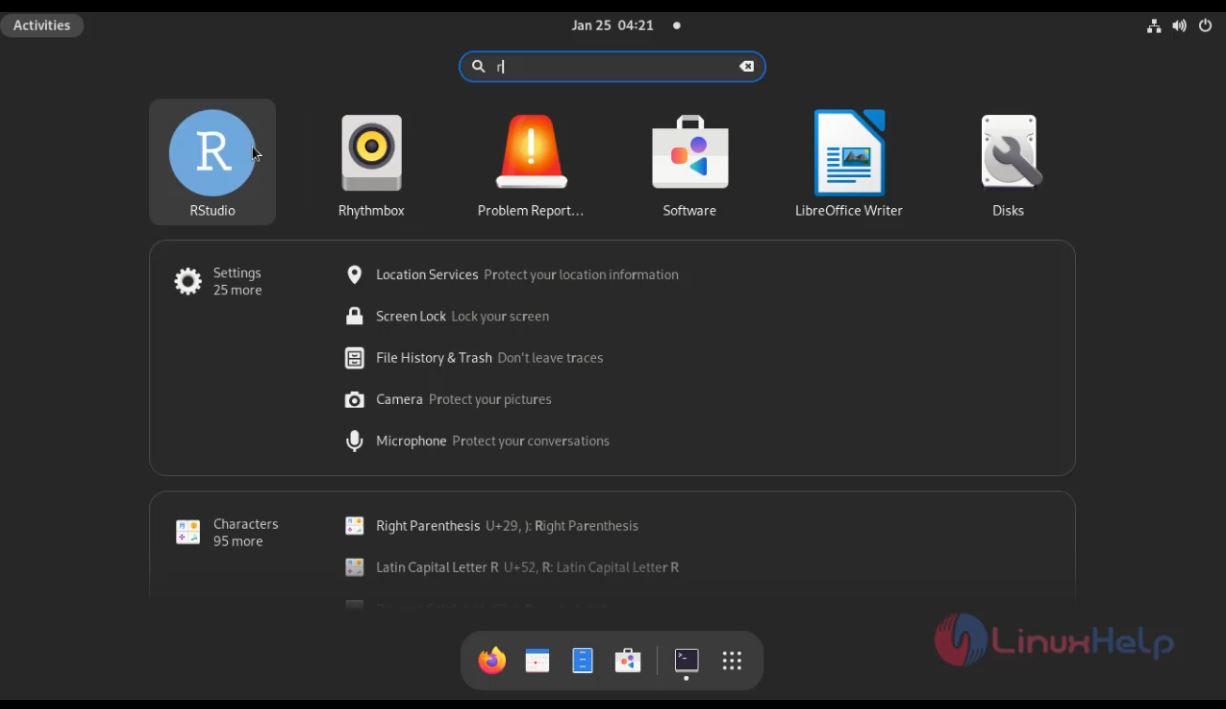
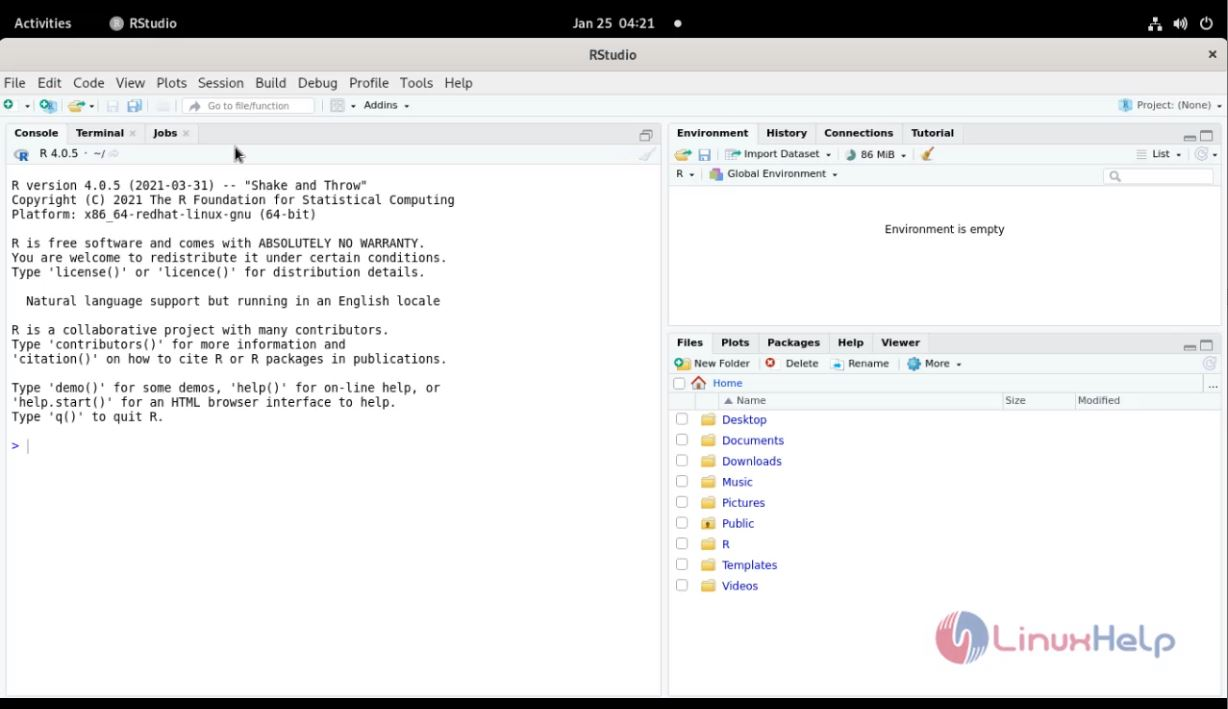
Step 6: RStudio is running on Fedora 34 as shown in the below images.
Conclusion:
We have reached the end of this article. In this guide, we have walked you through the steps required to install RStudio on Fedora 34. Your feedback is much welcome.
Comments ( 0 )
No comments available