How to install Selene on Linux mint 18.03
To install Selene on Linux mint 18.03
Selene is an audio/video converter for converting files to the desired audio/video formats. It is designed using a simple GUI to convert files to the desired with powerful command-line options for automated/unattended encoding. It supports almost every file format that you are likely to come across and can encode them to popular output formats like MKV, MP4, etc. In this tutorial, we will cover the installation of Selene on Linux mint 18.03.
Installation
Add the repository of Selene using PPA.
linuxhelp ~ # apt-add-repository ppa:teejee2008/ppa
No protocol specified
Failed to connect to Mir: Failed to connect to server socket: No such file or directory
Unable to init server: Could not connect: Connection refused
No protocol specified
Failed to connect to Mir: Failed to connect to server socket: No such file or directory
Unable to init server: Could not connect: Connection refused
You are about to add the following PPA:
 More info: https://launchpad.net/~teejee2008/+archive/ubuntu/ppa
Press Enter to continue or Ctrl+C to cancel

Executing: /tmp/tmp.tB0TjyIa90/gpg.1.sh --keyserver
hkp://keyserver.ubuntu.com:80
--recv-keys
2D0F61F0
gpg: requesting key 2D0F61F0 from hkp server keyserver.ubuntu.com
gpg: key 2D0F61F0: public key "Launchpad PPA for Tony George" imported
gpg: Total number processed: 1
gpg:               imported: 1  (RSA: 1)
Let's first start with updating the system repositories
linuxhelp ~ # apt-get update
Hit:1 http://archive.canonical.com/ubuntu xenial InRelease
Hit:2 http://ppa.launchpad.net/ondrej/php/ubuntu xenial InRelease
Hit:3 http://archive.ubuntu.com/ubuntu xenial InRelease
Ign:4 http://packages.linuxmint.com sylvia InRelease
Hit:5 http://packages.linuxmint.com sylvia Release
Get:6 http://ppa.launchpad.net/teejee2008/ppa/ubuntu xenial InRelease \[17.5 kB\]
Get:8 http://archive.ubuntu.com/ubuntu xenial-updates InRelease \[109 kB\]
Hit:9 http://archive.ubuntu.com/ubuntu xenial-backports InRelease
Get:10 http://ppa.launchpad.net/teejee2008/ppa/ubuntu xenial/main Sources \[3,168 B\]
Get:11 http://security.ubuntu.com/ubuntu xenial-security InRelease \[107 kB\]
Get:12 http://ppa.launchpad.net/teejee2008/ppa/ubuntu xenial/main amd64 Packages \[2,848 B\]
Get:13 http://ppa.launchpad.net/teejee2008/ppa/ubuntu xenial/main i386 Packages \[2,844 B\]
Get:14 http://ppa.launchpad.net/teejee2008/ppa/ubuntu xenial/main Translation-en \[1,172 B\]
Get:15 http://archive.ubuntu.com/ubuntu xenial-updates/main amd64 Packages \[841 kB\]
Get:16 http://archive.ubuntu.com/ubuntu xenial-updates/main i386 Packages \[758 kB\]
Get:17 http://archive.ubuntu.com/ubuntu xenial-updates/universe amd64 Packages \[681 kB\]
Get:18 http://archive.ubuntu.com/ubuntu xenial-updates/universe i386 Packages \[623 kB\]
Fetched 3,147 kB in 6s (471 kB/s)
Reading package lists... Done
Install the Selene package run the following command
linuxhelp ~ # apt-get install selene
Reading package lists... Done
Building dependency tree
Reading state information... Done
The following additional packages will be installed:
  esound-common fdkaac ffmpeg lame liba52-0.7.4 libass5 libaudiofile1 libavcodec-ffmpeg56
  libavdevice-ffmpeg56 libavfilter-ffmpeg5 libavformat-ffmpeg56 libavresample-ffmpeg2
  libavutil-ffmpeg54 libbluray1 libboost-regex1.58.0 libbs2b0 libcrystalhd3 libdc1394-22 libdca0
  libdirectfb-1.2-9 libebml4v5 libenca0 libesd0 libfaad2 libfdk-aac0 libffms2-4 libflite1 libgme0
  libgpac4 libmad0 libmatroska6v5 libmediainfo0v5 libmms0 libmodplug1 libmp3lame0 libmpeg2-4
  libmpg123-0 libnorm1 libopenal-data libopenal1 libopencv-core2.4v5 libopencv-imgproc2.4v5
  libopenjpeg5 libpgm-5.2-0 libpostproc-ffmpeg53 libschroedinger-1.0-0 libshine3 libsnappy1v5
.
.
.
Setting up mediainfo (0.7.82-1) ...
Setting up mkvtoolnix (8.8.0-1) ...
update-alternatives: using /usr/bin/mkvinfo-text to provide /usr/bin/mkvinfo (mkvinfo) in auto mode
Setting up libvorbisidec1 (1.0.2+svn18153-0.2+deb7u1build0.16.04.1) ...
Setting up mplayer (2:1.2.1-1ubuntu1) ...
Setting up vorbis-tools (1.4.0-7ubuntu1) ...
Setting up x264 (2:0.148.2643+git5c65704-1) ...
Setting up selene (17.7-0~201707260225~ubuntu16.04.1) ...
Processing triggers for libc-bin (2.23-0ubuntu9) ...
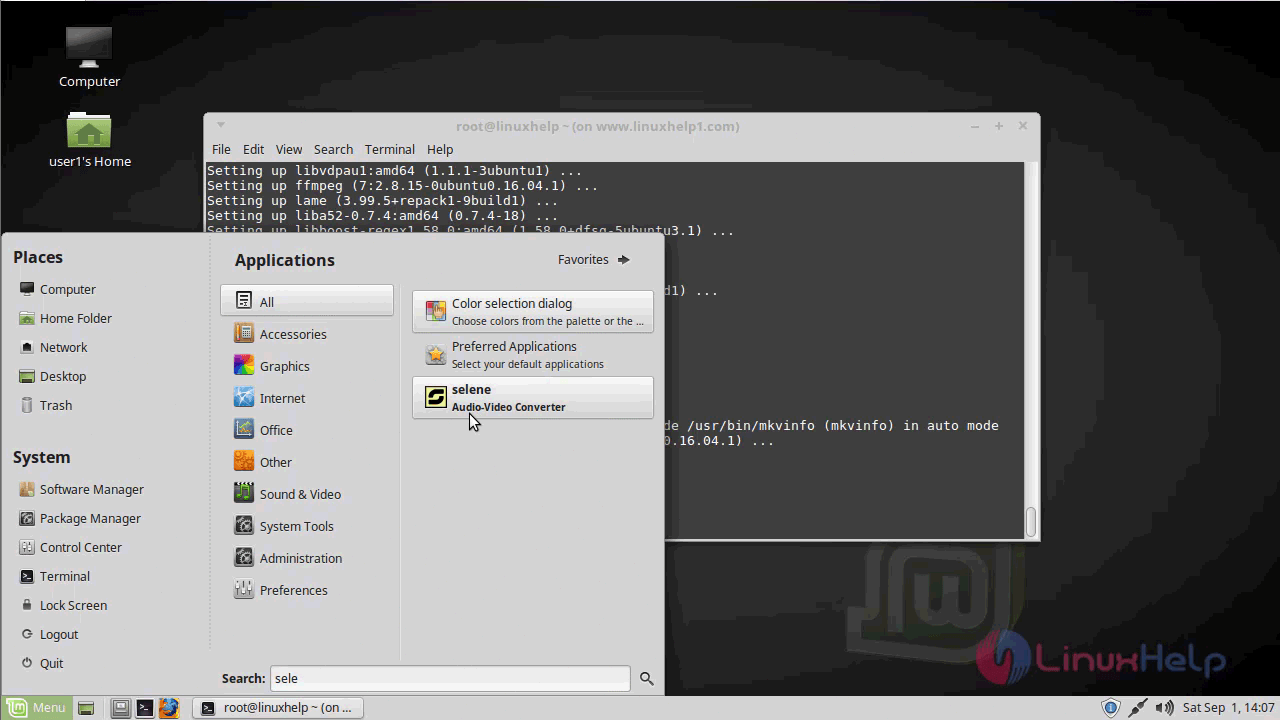
Once Installation is done you can access the Selene from the Menu as shown here
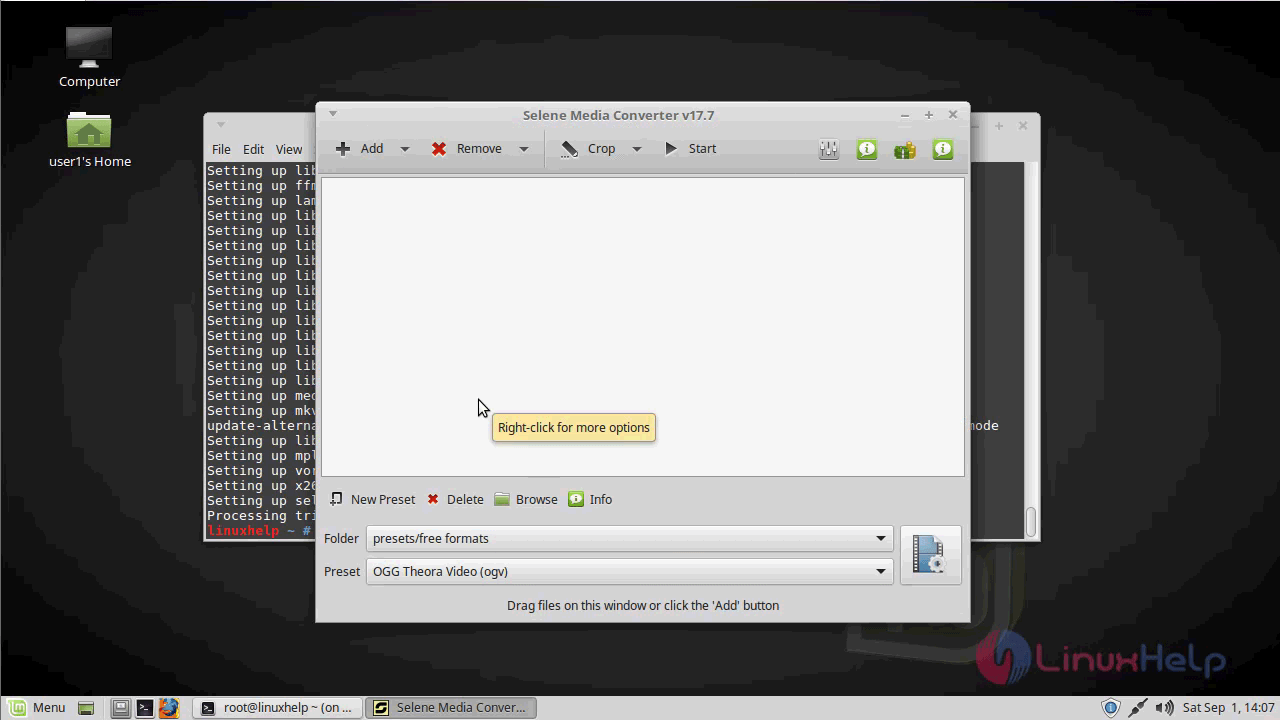
Now you can access the Selene application and also you will see the version of Selene application
With this, the method to install Selene on Linux mint 18.03 comes to an end.
Comments ( 0 )
No comments available