How to install Shiny server on CentOS 6
How to install Shiny server on CentOS 6
Shiny Server is a web server program specifically designed to host R-powered Shiny apps. With Shiny Server, the user can easily host various R-powered apps without getting HTML, CSS, JavaScript or other languages involved. This tutorial covers the installation procedure of Shiny Server on CentOS 6.
Installation procedure
Before starting the installation procedure, update the target system by executing the yum update command.
Then run the following command to install the R tools and press y to continue with the installation procedure.
[root@linuxhelp2 ~]# yum install R
Loaded plugins: fastestmirror, refresh-packagekit, replace, security
Setting up Install Process
Determining fastest mirrors
epel/metalink                                            | 5.4 kB     00:00
 * base: mirror.nbrc.ac.in
 * epel: epel.scopesky.iq
 * extras: mirror.nbrc.ac.in
 * updates: mirror.nbrc.ac.in
 * webtatic: sp.repo.webtatic.com
base                                                     | 3.7 kB     00:00
epel                                                     | 4.3 kB     00:00

Dependency Updated:
  cpp.x86_64 0:4.4.7-18.el6               freetype.x86_64 0:2.3.11-17.el6
  gcc.x86_64 0:4.4.7-18.el6               libX11.x86_64 0:1.6.4-3.el6
  libX11-common.noarch 0:1.6.4-3.el6      libXft.x86_64 0:2.3.2-1.el6
  libXrender.x86_64 0:0.9.10-1.el6        libgcc.x86_64 0:4.4.7-18.el6
  libgomp.x86_64 0:4.4.7-18.el6           libicu.x86_64 0:4.2.1-14.el6
  libstdc++.x86_64 0:4.4.7-18.el6         libxcb.x86_64 0:1.12-4.el6
  nspr.x86_64 0:4.13.1-1.el6              nss.x86_64 0:3.28.4-3.el6_9
  nss-sysinit.x86_64 0:3.28.4-3.el6_9     nss-tools.x86_64 0:3.28.4-3.el6_9
  nss-util.x86_64 0:3.28.4-1.el6_9
Complete!
The R tools have been installed successfully. Next, install a few commonly used R packages, including shiny by executing the following command.
[root@linuxhelp2 ~]#  su - -c " R -e " install.packages(c(' shiny' , ' rmarkdown' , ' devtools' , ' RJDBC' ), repos=' http://cran.rstudio.com/' )" "
R version 3.4.0 (2017-04-21) -- " You Stupid Darkness"
Copyright (C) 2017 The R Foundation for Statistical Computing
Platform: x86_64-redhat-linux-gnu (64-bit)

R is free software and comes with ABSOLUTELY NO WARRANTY.
You are welcome to redistribute it under certain conditions.
Type ' license()'  or ' licence()'  for distribution details.
  Natural language support but running in an English locale

 R is a collaborative project with many contributors.
.
.
.
.
.
1: In install.packages(c(" shiny" , " rmarkdown" , " devtools" , " RJDBC" ),  :
  installation of package ‘ curl’  had non-zero exit status
2: In install.packages(c(" shiny" , " rmarkdown" , " devtools" , " RJDBC" ),  :
  installation of package ‘ openssl’  had non-zero exit status
3: In install.packages(c(" shiny" , " rmarkdown" , " devtools" , " RJDBC" ),  :
  installation of package ‘ git2r’  had non-zero exit status
4: In install.packages(c(" shiny" , " rmarkdown" , " devtools" , " RJDBC" ),  :
  installation of package ‘ httr’  had non-zero exit status
5: In install.packages(c(" shiny" , " rmarkdown" , " devtools" , " RJDBC" ),  :
  installation of package ‘ devtools’  had non-zero exit status
>
>
The required packages are installed in the target system. Run the wget command to download and install Shiny Server.
 [root@linuxhelp2 ~]# wget https://download3.rstudio.org/centos5.9/x86_64/shiny-server-1.4.2.786-rh5-x86_64.rpm

--2017-07-10 02:48:42--  https://download3.rstudio.org/centos5.9/x86_64/shiny-server-1.4.2.786-rh5-x86_64.rpm
Resolving download3.rstudio.org... 52.222.177.110, 52.222.177.77, 52.222.177.75, ...
Connecting to download3.rstudio.org|52.222.177.110|:443... connected.
HTTP request sent, awaiting response... 200 OK
Length: 46800194 (45M) [application/octet-stream]
Saving to: “ shiny-server-1.4.2.786-rh5-x86_64.rpm”
100%[======================================> ] 46,800,194   517K/s   in 2m 46s
2017-07-10 02:51:29 (276 KB/s) - “ shiny-server-1.4.2.786-rh5-x86_64.rpm”  saved [46800194/46800194]
The Shiny server is downloaded in the target system. Install by executing the following command.
[root@linuxhelp2 ~]# yum install --nogpgcheck shiny-server-1.4.2.786-rh5-x86_64.rpm
Loaded plugins: fastestmirror, refresh-packagekit, replace, security
Setting up Install Process
Examining shiny-server-1.4.2.786-rh5-x86_64.rpm: shiny-server-1.4.2.786-1.x86_64
Marking shiny-server-1.4.2.786-rh5-x86_64.rpm to be installed
Loading mirror speeds from cached hostfile
 * base: centos.myfahim.com
 * epel: mirror01.idc.hinet.net
 * extras: centos.myfahim.com
 * updates: mirror.ehost.vn
 * webtatic: sp.repo.webtatic.com
Resolving Dependencies
-->  Running transaction check
--->  Package shiny-server.x86_64 0:1.4.2.786-1 will be installed
.
.
.
.
Downloading Packages:
Running rpm_check_debug
Running Transaction Test
Transaction Test Succeeded
Running Transaction
  Installing : shiny-server-1.4.2.786-1.x86_64                              1/1
Creating group shiny
Creating user shiny
shiny-server start/running, process 16460
  Verifying  : shiny-server-1.4.2.786-1.x86_64                              1/1
Installed:
  shiny-server.x86_64 0:1.4.2.786-1
Complete!
To start the shiny server, execute the following command via terminal.
[root@linuxhelp2 ~]# start shiny-server
start: Job is already running: shiny-server
Then switch over to the required browser and enter the system' s IP http://192.168.7.222:3838/ and run it.
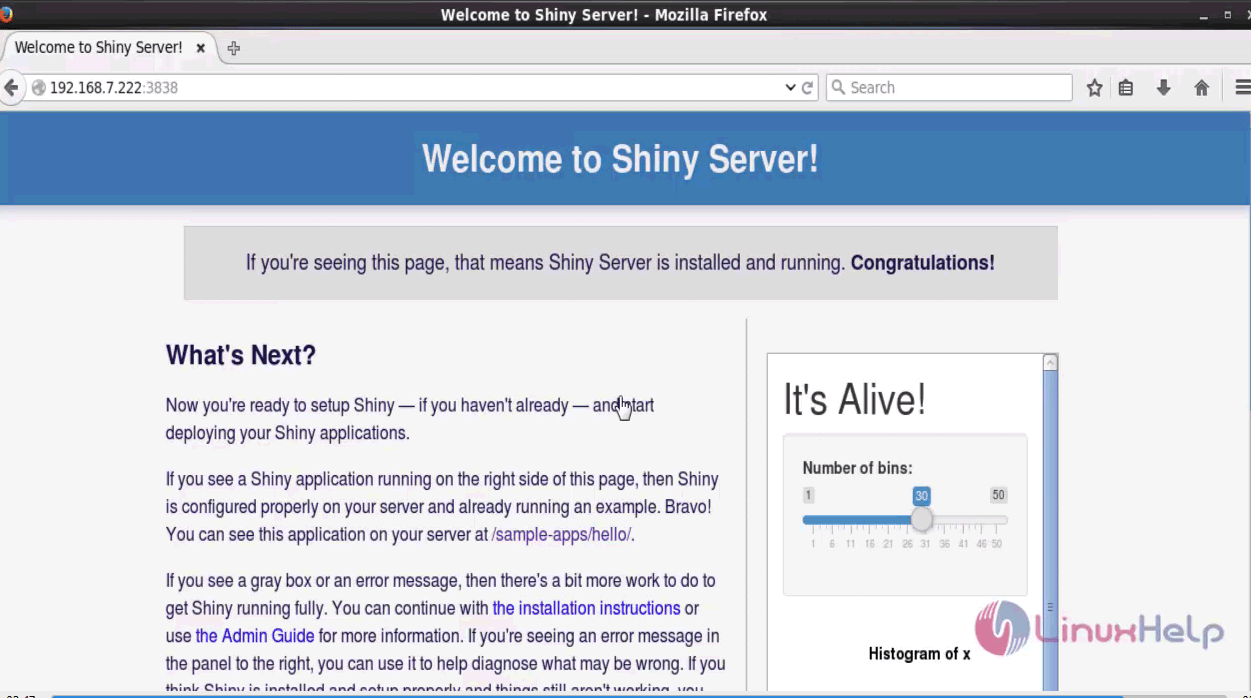
That was an easy installation procedure, Wasn' t it? Shiny server can host your apps in a controlled environment.
Comments ( 0 )
No comments available