How to install Simple Image Resizer in Ubuntu
To Install Simple Image Resizer in Ubuntu 16.04
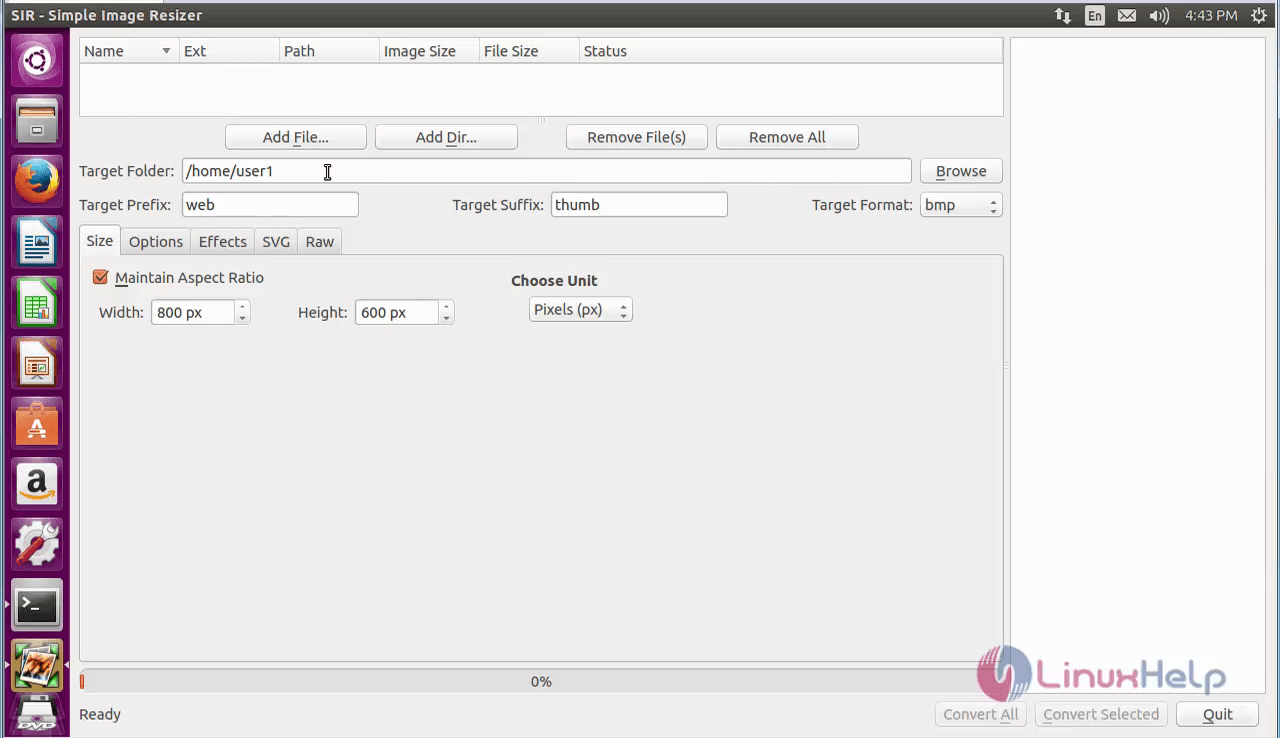
Simple Image Resizer (SIR) is a free tool programmed in C++ that is designed using Qt GUI toolkit. This is used mainly for batch resizing, rotating and converting images. It provides support for adding frames or text and apply color and gradient filters to the images. Installation of Simple Image resizer is explained in this manual.
Features
- Manipulate the histogram and works with multiple photos by splitting the tasks on the processors.
- Contains a Raw tab into main window.
- Basic view tab for user friendly Raw configuration is provided.
- Support almost all the popular file formats.
To install Simple Image Resizer
Add the repository before installing Simple Image Resizer.
root@linuxhelp1:~# apt-add-repository ppa:dhor/myway
 Every photographer needs some tools...

 More info: https://launchpad.net/~dhor/+archive/ubuntu/myway
Press [ENTER] to continue or ctrl-c to cancel adding it

gpg: keyring `/tmp/tmpgiv07sg4/secring.gpg'  created
gpg: keyring `/tmp/tmpgiv07sg4/pubring.gpg'  created
gpg: requesting key 93330B78 from hkp server keyserver.ubuntu.com
gpg: /tmp/tmpgiv07sg4/trustdb.gpg: trustdb created
gpg: key 93330B78: public key " Launchpad PPA for Dariusz Duma"  imported
gpg: Total number processed: 1
gpg:               imported: 1  (RSA: 1)
OK
Now update the newly added repository to the system by using the following command.
root@linuxhelp1:~# apt-get update -y
Get:1 http://ppa.launchpad.net/dhor/myway/ubuntu xenial InRelease [17.5 kB]
Hit:2 http://in.archive.ubuntu.com/ubuntu xenial InRelease
Hit:3 http://in.archive.ubuntu.com/ubuntu xenial-updates InRelease
Hit:4 http://in.archive.ubuntu.com/ubuntu xenial-backports InRelease
Get:5 http://ppa.launchpad.net/dhor/myway/ubuntu xenial/main amd64 Packages [8,824 B]
Get:6 http://ppa.launchpad.net/dhor/myway/ubuntu xenial/main i386 Packages [8,640 B]
Get:7 http://ppa.launchpad.net/dhor/myway/ubuntu xenial/main Translation-en [5,336 B]
Hit:8 http://security.ubuntu.com/ubuntu xenial-security InRelease
Fetched 40.3 kB in 1s (24.9 kB/s)
Reading package lists... Done
Next start installing the Simple Image Resizer package.
root@linuxhelp1:~# apt-get install sir -y
Reading package lists... Done
Building dependency tree
Reading state information... Done
The following packages were automatically installed and are no longer required:
  libpango1.0-0 libpangox-1.0-0 linux-headers-4.4.0-21 linux-headers-4.4.0-21-generic linux-image-4.4.0-21-generic
  linux-image-extra-4.4.0-21-generic
Use ' sudo apt autoremove'  to remove them.
The following additional packages will be installed:
  dcraw
Suggested packages:
  gphoto2
The following NEW packages will be installed:
  dcraw sir
0 upgraded, 2 newly installed, 0 to remove and 53 not upgraded.
Need to get 641 kB of archives.
.
.
.
Preparing to unpack .../sir_3.1-1dhor~xenial_amd64.deb ...
Unpacking sir (3.1-1dhor~xenial) ...
Processing triggers for man-db (2.7.5-1) ...
Processing triggers for bamfdaemon (0.5.3~bzr0+16.04.20160701-0ubuntu1) ...
Rebuilding /usr/share/applications/bamf-2.index...
Processing triggers for gnome-menus (3.13.3-6ubuntu3.1) ...
Processing triggers for desktop-file-utils (0.22-1ubuntu5) ...
Processing triggers for mime-support (3.59ubuntu1) ...
Setting up dcraw (9.21-0.2) ...
Setting up sir (3.1-1dhor~xenial) ...
To Launch Simple Image Resizer
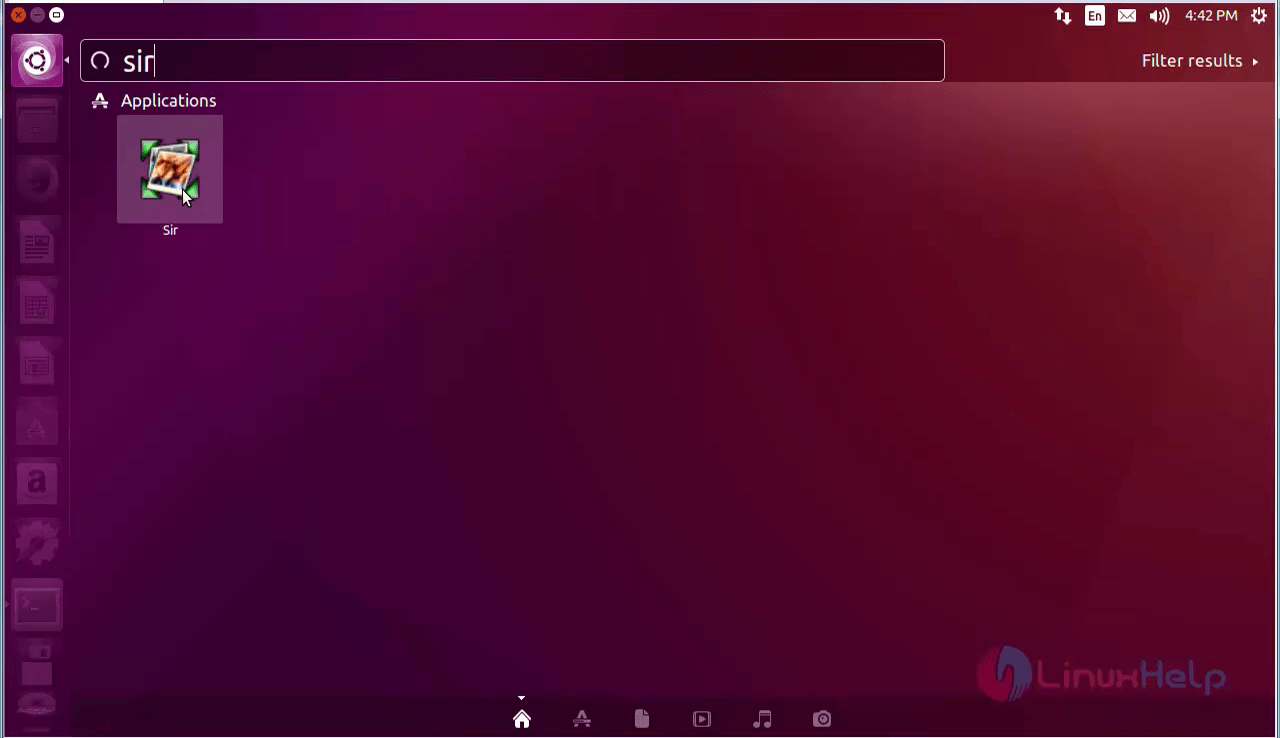
For opening the SIR package, click on search bar and type SIR and then finally click on the icon.
Now the Simple Image Resizer software appears as shown below.
To uninstall Simple Image Resizer
For removing the simple image resizer package, run the following command.
root@linuxhelp1:~# apt-get remove sir -y
Reading package lists... Done
Building dependency tree
Reading state information... Done
The following packages were automatically installed and are no longer required:
  dcraw libpango1.0-0 libpangox-1.0-0 linux-headers-4.4.0-21 linux-headers-4.4.0-21-generic linux-image-4.4.0-21-generic
  linux-image-extra-4.4.0-21-generic
Use ' sudo apt autoremove'  to remove them.
The following packages will be REMOVED:
  sir
.
.
.
Removing sir (3.1-1dhor~xenial) ...
Processing triggers for bamfdaemon (0.5.3~bzr0+16.04.20160701-0ubuntu1) ...
Rebuilding /usr/share/applications/bamf-2.index...
Processing triggers for gnome-menus (3.13.3-6ubuntu3.1) ...
Processing triggers for desktop-file-utils (0.22-1ubuntu5) ...
Processing triggers for mime-support (3.59ubuntu1) ...
Comments ( 0 )
No comments available